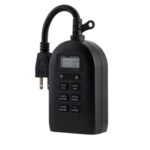
My Touch Smart timer Plug-in Timer ຄູ່ມືຜູ້ໃຊ້
my Touch Smart timer Plug-in Timer User Manual Mounting/Installation Mount the timer on a wall near a GFCI receptacle using a screw or nail. Timer must be mounted in a…


myTouchSmart provides intuitive, programmable digital timers for indoor and outdoor home automation, lighting, and efficient energy management.
myTouchSmart is a brand of easy-to-use home automation timers and lighting controls manufactured by Jasco Products Company. Designed to simplify daily routines, myTouchSmart devices feature user-friendly interfaces with one-touch preset options such as "morning", "evening", and "all night".
The product line encompasses indoor plug-in timers, in-wall switches, and durable outdoor timers ideal for landscape lighting and seasonal decorations. By automating electrical outlets, myTouchSmart solutions help homeowners conserve energy and enhance security.
ຄູ່ມືຫຼ້າສຸດຈາກ manuals+ curated ສໍາລັບຍີ່ຫໍ້ນີ້.


ຄໍາຖາມທົ່ວໄປກ່ຽວກັບຄູ່ມື, ການລົງທະບຽນ, ແລະການສະຫນັບສະຫນູນສໍາລັບຍີ່ຫໍ້ນີ້.
Plug the timer into an outlet and let it charge for 1 hour. Once charged, press the reset button in the lower right corner using a toothpick or pencil.
The timers typically include three presets: Evening (5pm-12am), Morning (5am-8am), and All Night (6pm-6am).
Press the 'countdown' button and use the up/down arrows to set a duration from 1 minute to 24 hours. The device will turn on immediately and turn off when the time expires.