
1. ບົດແນະນຳ
The myTouchSmart In-Wall Push-Button Countdown Timer Switch (Model 40953) is designed to simplify your routine by providing convenient automation for indoor or outdoor lighting and various appliances. This timer replaces any standard single-pole light switch and offers preset countdown times to automatically turn off connected devices. It is compatible with LED, CFL, incandescent, and halogen bulbs.

The product packaging displays the in-wall digital countdown timer switch, highlighting its key features such as preset countdown times and compatibility with various bulb types.
2. ຂໍ້ມູນຄວາມປອດໄພ
Before beginning installation, read all instructions carefully. Improper installation can result in electrical shock or fire. Always consult a qualified electrician if you are unsure about any part of the installation process.
- ປິດພະລັງງານ at the circuit breaker or fuse box before wiring.
- ອຸປະກອນນີ້ມີຈຸດປະສົງໃນການຕິດຕັ້ງຕາມລະຫັດໄຟຟ້າແຫ່ງຊາດແລະກົດລະບຽບທ້ອງຖິ່ນ.
- ໃຊ້ພຽງແຕ່ສາຍທອງແດງ.
- NEUTRAL WIRE REQUIRED ສໍາລັບການດໍາເນີນງານ.
3. ການຕິດຕັ້ງ
3.1 ເຄື່ອງມືທີ່ຕ້ອງການ
- Screwdriver (Phillips ແລະ Flathead)
- ເສັ້ນລວດ
- ເທບໄຟຟ້າ
- ສະບັບtage Tester (recommended)
3.2 ຄໍາແນະນໍາການສາຍ
- ປິດໄຟ to the switch location at the circuit breaker or fuse box. Verify power is off using a voltage ເຄື່ອງທົດສອບ.
- ເອົາແຜ່ນຕິດຝາທີ່ມີຢູ່ແລ້ວອອກແລະປ່ຽນຈາກກ່ອງໃສ່ຝາ.
- Carefully disconnect the wires from the old switch. Identify and label the LINE (hot), LOAD, NEUTRAL, and GROUND wires. The timer requires a neutral wire for proper operation.
- Connect the wires to the myTouchSmart timer using the screw terminals:
- ເຊື່ອມຕໍ່ ເສັ້ນ (hot) wire to the terminal labeled 'LINE'.
- ເຊື່ອມຕໍ່ ໂຫຼດ wire (to the light/appliance) to the terminal labeled 'LOAD'.
- ເຊື່ອມຕໍ່ ເປັນກາງ wire (typically white) to the terminal labeled 'NEUTRAL'.
- ເຊື່ອມຕໍ່ ພື້ນ wire (typically bare copper or green) to the terminal labeled 'GROUND'.
- ໃຫ້ແນ່ໃຈວ່າການເຊື່ອມຕໍ່ສາຍໄຟທັງຫມົດແມ່ນປອດໄພ.
- Carefully push the wired timer into the wall box.
- Mount the timer to the wall box using the provided screws.
- Attach the desired color faceplate (White or Light Almond included, wallplate not included).
- ຟື້ນຟູພະລັງງານຢູ່ທີ່ຕົວຕັດວົງຈອນ.

ດ້ານຫລັງ view of the timer, displaying the screw terminals for Line, Load, Neutral, and Ground connections, essential for proper installation.

ດ້ານຂ້າງfile of the timer, showing its depth and how it fits into a standard electrical wall box, with wiring connections visible.
4. ຄໍາແນະນໍາການດໍາເນີນງານ
The myTouchSmart timer features an ON/OFF door panel that conceals preset buttons and LEDs when closed. Opening the door provides access to all countdown options.
4.1 Activating a Countdown
- Open the front door panel to reveal the preset buttons.
- Press the desired countdown button: 5 Min, 10 Min, 30 Min, 60 Min, 2 Hour, or 4 ຊົ່ວໂມງ.
- A blue LED indicator light next to the selected button will illuminate, confirming the countdown is active. The connected device will turn on and remain on for the selected duration, then automatically turn off.
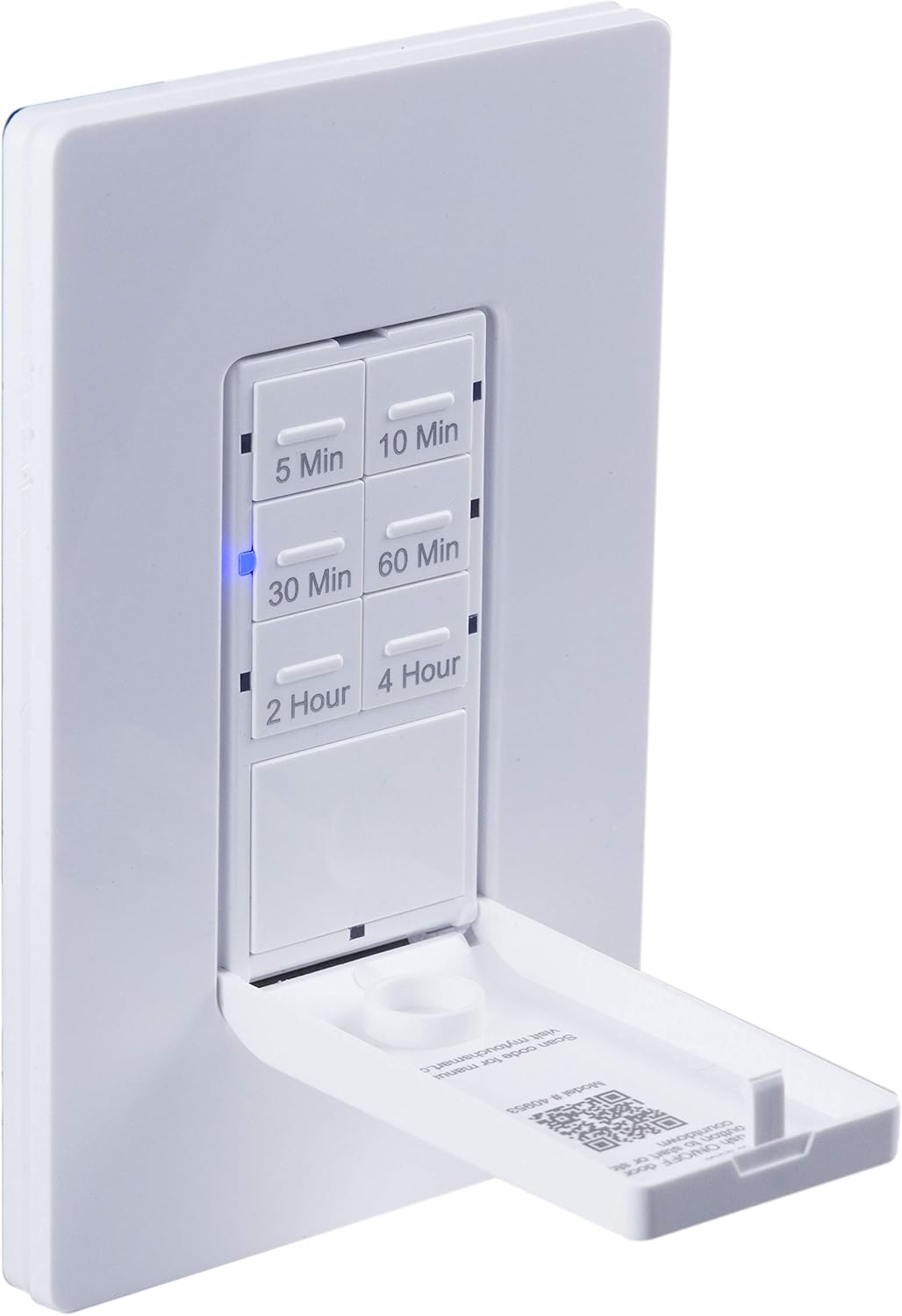
ໃກ້ຊິດ view of the timer with its front door panel open, exposing the six preset countdown buttons (5, 10, 30, 60 minutes, 2, and 4 hours) and the manual ON/OFF button.

The in-wall timer with its door open, showing the preset buttons and a blue LED illuminated next to the '30 Min' button, indicating an active countdown.

A hand pressing one of the preset countdown buttons on the timer, demonstrating user interaction.
4.2 Manual ON/OFF Override
- To manually turn the connected device ON or OFF at any time, press the large ON/OFF button located at the bottom of the timer (this button is also the door panel when closed).
- Pressing this button will override any active countdown. If no countdown is active, it functions as a standard ON/OFF switch.
4.3 ຄໍາຮ້ອງສະຫມັກ
This timer is suitable for a variety of applications, including:
- ແສງສະຫວ່າງພາຍໃນແລະນອກ
- ພັດລົມລະບາຍອາກາດ
- ເຄື່ອງເຮັດຄວາມຮ້ອນ
- Other compatible appliances

An image illustrating various applications for the timer, including controlling indoor/outdoor lights, ceiling fans, and exhaust fans.
5. ບໍາລຸງຮັກສາ
The myTouchSmart timer requires minimal maintenance. Follow these guidelines:
- ທໍາຄວາມສະອາດ: Disconnect power at the circuit breaker before cleaning. Wipe the surface with a soft, damp ຜ້າ. ຢ່າໃຊ້ສານເຄມີທີ່ຮຸນແຮງຫຼືເຄື່ອງເຮັດຄວາມສະອາດຂັດ.
- ການກວດກາ: Periodically check for any loose connections or damage to the switch. If any damage is observed, discontinue use and consult a qualified electrician.
6. ການແກ້ໄຂບັນຫາ
If you experience issues with your myTouchSmart timer, refer to the following common problems and solutions:
| ບັນຫາ | ສາເຫດທີ່ເປັນໄປໄດ້ | ການແກ້ໄຂ |
|---|---|---|
| ໂມງຈັບເວລາບໍ່ເປີດ/ປິດ. | No power to the switch; Incorrect wiring (Line/Load reversed); Loose connections. | Check circuit breaker. Verify wiring connections (Line to Line, Load to Load, Neutral, Ground). Ensure all wires are securely fastened. |
| Countdown does not activate. | Button not fully pressed; Faulty unit. | Ensure the desired countdown button is pressed firmly until the blue LED illuminates. If issue persists, contact customer support. |
| ຕົວຊີ້ວັດ LED ບໍ່ເຮັດວຽກ. | No power; Unit malfunction. | Check power supply. If the timer functions but LEDs do not, contact customer support. |
| ການດໍາເນີນງານແບບບໍ່ຢຸດຢັ້ງ. | Loose wiring; Overload. | Check all wiring connections for tightness. Ensure the connected load does not exceed the timer's electrical ratings. |
ຖ້າຂັ້ນຕອນການແກ້ໄຂບັນຫາບໍ່ສາມາດແກ້ໄຂບັນຫາໄດ້, ກະລຸນາຕິດຕໍ່ຝ່າຍຊ່ວຍເຫຼືອລູກຄ້າ.
7. ຂໍ້ມູນຈໍາເພາະ
| ຄຸນສົມບັດ | ຂໍ້ມູນຈໍາເພາະ |
|---|---|
| ໝາຍເລກຕົວແບບ | 40953 |
| ຮູບແບບການເຮັດວຽກ | Automatically, Off, Push Button |
| ການຈັດອັນດັບປັດຈຸບັນ | 15 Amps |
| ການດໍາເນີນງານ Voltage | 120 VAC, 60 Hz |
| ການໂຫຼດຕ້ານທານ | 15A |
| Tungsten Load | 1200W |
| ການຈັດອັນດັບມໍເຕີ້ | HP 1 / 2 |
| Bulbs ເຂົ້າກັນໄດ້ | ໄຟ LED, CFL, Incandescent, Halogen |
| ປະເພດການຕິດຕັ້ງ | ຕິດຝາ |
| ຂະໜາດ (L x W x H) | 2.75 x 4.85 x 6.85 ນິ້ວ |
| ນ້ໍາຫນັກລາຍການ | 5.9 ອອນ |
| ສາຍກາງ | ຕ້ອງການ |
| ອົງປະກອບລວມ | In-Wall Timer, White/Light Almond Door Panels |
8. ການຮັບປະກັນແລະການສະຫນັບສະຫນູນ
ສໍາລັບຂໍ້ມູນການຮັບປະກັນແລະການສະຫນັບສະຫນູນດ້ານວິຊາການ, ກະລຸນາອ້າງອີງເຖິງເຈົ້າຫນ້າທີ່ຂອງຜູ້ຜະລິດ webເວັບໄຊ ຫຼືຕິດຕໍ່ພະແນກບໍລິການລູກຄ້າຂອງເຂົາເຈົ້າ. ຮັກສາໃບຮັບເງິນການຊື້ຂອງທ່ານໄວ້ເປັນຫຼັກຖານການຊື້.
ຜູ້ຜະລິດ: myTouchSmart
UPC: 030878409537
Webເວັບໄຊ: www.mytouchsmart.com (ກະລຸນາກວດສອບເຈົ້າຫນ້າທີ່ webເວັບໄຊທ໌ສຳລັບຂໍ້ມູນສະໜັບສະໜູນລ່າສຸດ.)