1. ບົດແນະນຳ
Thank you for choosing the BALLU Apollo Portable Convection Panel Space Heater. This manual provides essential information for the safe and efficient operation of your new heater. Please read all instructions carefully before use and retain this manual for future reference.
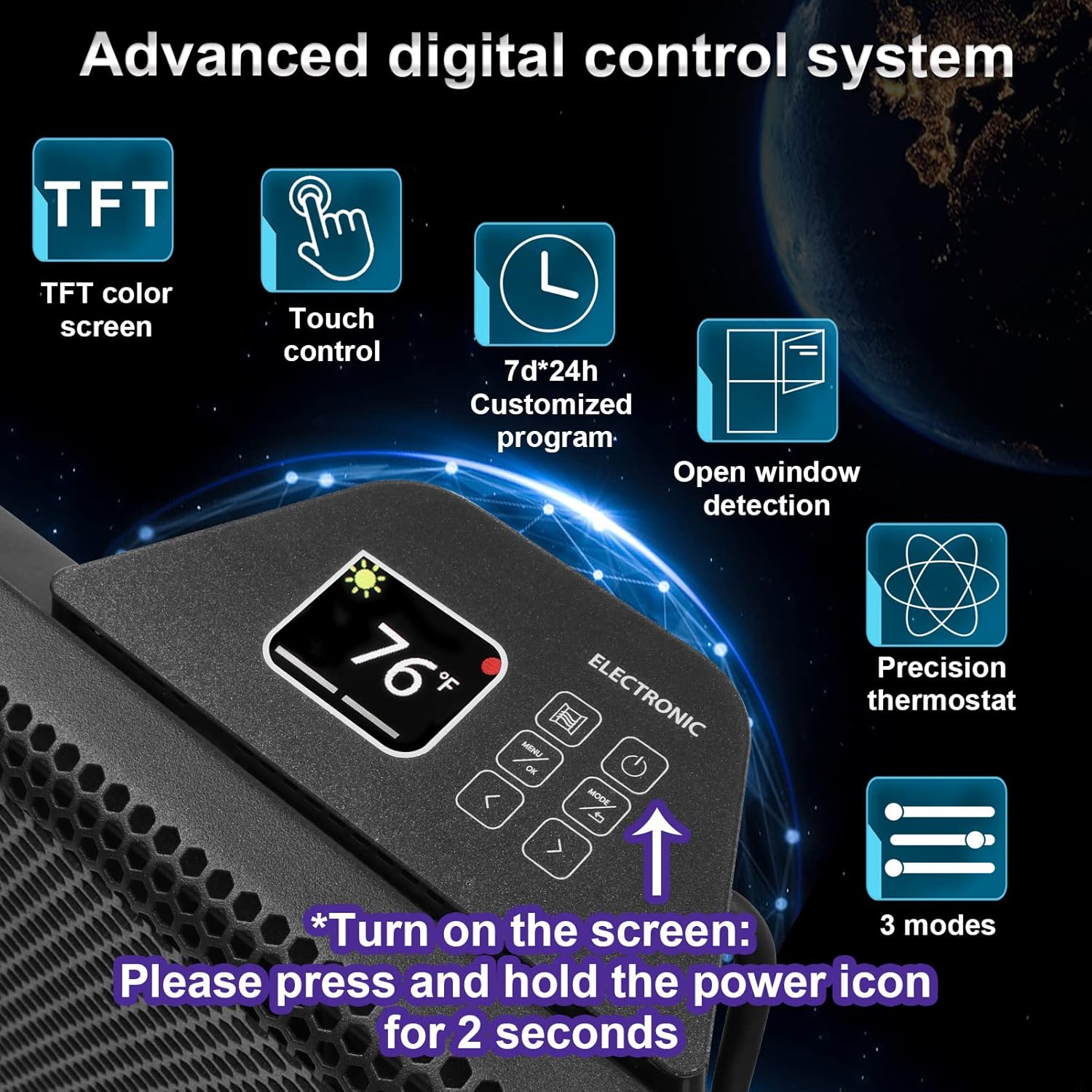
Image 1: The BALLU Apollo Portable Convection Panel Space Heater, shown in a room setting.
2. ຂໍ້ມູນຄວາມປອດໄພ
To prevent personal injury or property damage, always follow basic safety precautions when using electrical appliances. This heater is designed with several safety features:
- ການປົກປ້ອງເຄັດລັບ: ເຄື່ອງເຮັດຄວາມຮ້ອນຈະປິດໂດຍອັດຕະໂນມັດຖ້າມັນຖືກລົ້ມໂດຍບັງເອີນ.
- ການປ້ອງກັນຄວາມຮ້ອນເກີນ: The unit will power down if it detects an internal overheating condition.
- ລັອກເດັກ: This feature prevents unintended changes to settings by children.
- V0 ວັດສະດຸຕ້ານໄຟໄໝ້: Constructed with a metal case and V0 flame-retardant power cord and plug for enhanced safety.
- ເປີດການກວດສອບປ່ອງຢ້ຽມ: The heater can detect an open window and will temporarily pause heating to conserve energy.
ສຳຄັນ: Do not cover the heater. Ensure adequate clearance around the unit for proper airflow. Always plug the heater directly into a wall outlet; do not use extension cords.

Image 2: Visual representation of the heater's multiple safety protections, including tip-over, child lock, and overheat protection.
3. ເນື້ອໃນຊຸດ
ກວດສອບວ່າລາຍການທັງຫມົດແມ່ນມີຢູ່ໃນຊຸດ:
- BALLU Apollo Convection Panel Space Heater Unit
- Removable Casters (for freestanding use)
- Wall-Mounted Accessories (brackets and screws)
- ຄູ່ມືຜູ້ໃຊ້
4. ການຕິດຕັ້ງ & ການຕິດຕັ້ງ
The BALLU Apollo heater offers both freestanding and wall-mounted installation options.
4.1 ການຕິດຕັ້ງແບບຕັ້ງດ່ຽວ
For freestanding use, attach the provided casters to the bottom of the heater. No additional tools are required for this step. Simply align the casters with the designated slots and secure them firmly.
Image 3: The heater shown in its freestanding configuration with casters attached.
4.2 ການຕິດຕັ້ງ Wall Mount
To mount the heater on a wall, use the included wall-mounted accessories. Ensure the wall surface is suitable for supporting the heater's weight and heat output. Follow the detailed instructions in the full user manual for secure wall mounting. A drill may be required for this installation method.

Image 4: The back of the heater, illustrating the brackets for wall mounting.
5. ຄໍາແນະນໍາການດໍາເນີນງານ
The BALLU Apollo heater features a user-friendly TFT digital display and touch control panel for easy operation.
5.1 ການເປີດ/ປິດ
To turn the heater on or off, press and hold the power icon on the control panel for 2 seconds.
5.2 ຈໍສະແດງຜົນ ແລະ ການຄວບຄຸມດິຈິຕອນ
The TFT digital display shows the current temperature and selected settings. Use the touch controls to navigate through menus and adjust parameters.

ຮູບພາບ 5: A ລາຍລະອຽດ view of the advanced digital control system with TFT color screen, touch control, and various setting options.
5.3 ການຕັ້ງຄ່າອຸນຫະພູມ
Adjust the desired temperature between 41°F and 95°F using the up/down arrows on the control panel.
5.4 Heat Modes
Select from different heat modes to suit your needs:
- ໂໝດສະດວກສະບາຍ: Maintains a consistent, comfortable temperature.
- ໂໝດອັດສະລິຍະອັດສະລິຍະ: Optimizes energy consumption by automatically adjusting heat output.
- Anti-Freeze Mode: Prevents the room temperature from dropping below a certain point (e.g., 41°F) to protect against freezing.
5.5 ຟັງຊັນຈັບເວລາ
Program the heater to turn on or off at specific times using the 7*24h timer function. This allows for customized heating schedules throughout the week.
5.6 ລັອກເດັກ
Activate the child lock feature to prevent accidental changes to settings. Refer to the full manual for specific instructions on how to engage and disengage the child lock.
6. ຄຸນນະສົມບັດທີ່ສໍາຄັນ
- 100% Energy Conversion: Features a patented hedgehog heating element made of aerospace aluminum, ensuring 100% conversion of electrical energy to thermal energy for faster heating and lower consumption.
- ການໃຫ້ຄວາມຮ້ອນໄວ: Experience warmth within 30 seconds of activation. Heats a full room evenly within 1-2 hours, depending on room size and insulation.
- ປະສິດທິພາບພະລັງງານ: Direct air heating combined with an automatic thermostat system helps reduce energy bills.
- Quiet & Comfortable: Operates silently (below 25dB) without a fan, preventing dry air and maintaining natural humidity. No dazzling light for undisturbed sleep.
- ການຈັດວາງທີ່ຫຼາກຫຼາຍ: Can be used as a freestanding unit with removable casters or mounted on a wall.

Image 6: Illustration demonstrating how the convection heater effectively warms an entire room.

Image 7: Diagram highlighting the higher heating efficiency due to patented hedgehog fins, leading to faster heating and energy saving.

Image 8: A comparison chart illustrating the benefits of convection heaters, such as full room heat, silent operation, and energy efficiency.
7. ບໍາລຸງຮັກສາ
ການບໍາລຸງຮັກສາເປັນປົກກະຕິຮັບປະກັນປະສິດທິພາບທີ່ດີທີ່ສຸດແລະອາຍຸຍືນຂອງເຄື່ອງເຮັດຄວາມຮ້ອນຂອງທ່ານ.
- ທໍາຄວາມສະອາດ: ໃຫ້ແນ່ໃຈວ່າເຄື່ອງເຮັດຄວາມຮ້ອນໄດ້ຖືກຖອດປລັກອອກ ແລະ ເຢັນລົງໝົດກ່ອນການທຳຄວາມສະອາດ. ໃຊ້ຜ້າເຊັດທີ່ອ່ອນນຸ້ມ, ເຊັດອອກໃຫ້ສະອາດ.amp cloth to wipe the exterior. Do not use abrasive cleaners or allow water to drip into the interior.
- ການເກັບຮັກສາ: ເມື່ອບໍ່ໄດ້ໃຊ້, ໃຫ້ເກັບຮັກສາເຄື່ອງເຮັດຄວາມຮ້ອນໃນບ່ອນທີ່ເຢັນ, ແຫ້ງ, ດີກວ່າຢູ່ໃນການຫຸ້ມຫໍ່ຕົ້ນສະບັບຂອງມັນ.
- ການກວດກາ: ໃຫ້ກວດສອບສາຍໄຟ ແລະ ປລັກໄຟເປັນໄລຍະໆ ເພື່ອຫາຮ່ອງຮອຍຄວາມເສຍຫາຍ. ຖ້າພົບຄວາມເສຍຫາຍ, ໃຫ້ຢຸດໃຊ້ ແລະ ຕິດຕໍ່ຝ່າຍບໍລິການລູກຄ້າ.
8. ການແກ້ໄຂບັນຫາ
If you encounter issues with your heater, refer to the following common solutions. For more complex problems, consult the full user manual or contact customer support.
- ເຄື່ອງເຮັດຄວາມຮ້ອນບໍ່ເປີດ: Ensure the power cord is securely plugged into a functional outlet. Check if the power button is pressed and held for 2 seconds. Verify that the circuit breaker has not tripped.
- ບໍ່ມີຜົນຜະລິດຄວາມຮ້ອນ: Confirm the desired temperature setting is higher than the ambient room temperature. Check if any safety features (e.g., tip-over, overheat protection) have been activated.
- Unusual odors or sounds: A new heater may emit a slight odor during initial use; this is normal and should dissipate. If strong or persistent odors/sounds occur, unplug the unit and contact support.
9. ຂໍ້ມູນຈໍາເພາະ
| ຄຸນສົມບັດ | ລາຍລະອຽດ |
|---|---|
| ຍີ່ຫໍ້ | ບານລູ |
| ຕົວແບບ | Apollo |
| ຄຸນນະສົມບັດພິເສດ | Energy Efficient, Noiseless, Portable |
| ສີ | ດຳ |
| ປັດໄຈແບບຟອມ | ແທ່ນ |
| ການນຳໃຊ້ພາຍໃນ/ນອກ | ພາຍໃນ |
| ປະເພດການຕິດຕັ້ງ | ຕິດຝາ |
| ປະເພດຫ້ອງ | ຫ້ອງນອນ, ຫ້ອງການບ້ານ, ຫ້ອງການສຶກສາ |
| ການຄຸ້ມຄອງຄວາມຮ້ອນ | 300 ຕາແມັດ |
| ປະເພດເຕົາ | ຮຸ່ງເຮືອງ |
| ຜົນຜະລິດຄວາມຮ້ອນ | 1500 ວັດ |
| ຂະໜາດແພັກເກັດ | 30 x 19 x 6.8 ນິ້ວ |
| ນ້ໍາຫນັກລາຍການ | 14.57 ປອນ |
10. ການຮັບປະກັນແລະການສະ ໜັບ ສະ ໜູນ
For detailed warranty information and customer support, please refer to the warranty card included in your package or visit the official Ballu webເວັບໄຊ. ຮັກສາໃບຮັບເງິນການຊື້ຂອງທ່ານສໍາລັບການຮ້ອງຂໍການຮັບປະກັນ.


