1. ຂໍ້ມູນຄວາມປອດໄພທີ່ສໍາຄັນ
ກະລຸນາອ່ານຄໍາແນະນໍາທັງຫມົດຢ່າງລະອຽດກ່ອນທີ່ຈະໃຊ້ເຄື່ອງໃຊ້ນີ້. ການບໍ່ປະຕິບັດຕາມຄໍາແນະນໍາເຫຼົ່ານີ້ອາດຈະເຮັດໃຫ້ໄຟຟ້າຊ໊ອກ, ໄຟໄຫມ້, ຫຼືບາດເຈັບສາຫັດ.
- ສຽບເຄື່ອງເຮັດຄວາມຮ້ອນໂດຍກົງໃສ່ປລັກສຽບໃສ່ຝາທຸກຄັ້ງ. ຢ່າໃຊ້ກັບສາຍໄຟຂະຫຍາຍ ຫຼື ແຕະໄຟທີ່ສາມາດຍ້າຍໄດ້.
- Do not use the heater in bathrooms, laundry areas, or similar indoor locations where water is present.
- ຮັກສາວັດສະດຸທີ່ຕິດໄຟໄດ້, ເຊັ່ນເຟີນິເຈີ, ໝອນ, ຜ້າປູບ່ອນ, ເອກະສານ, ເຄື່ອງນຸ່ງ, ແລະຜ້າມ່ານຢ່າງໜ້ອຍ 3 ຟຸດ (0.9 ມ) ຈາກດ້ານໜ້າຂອງເຄື່ອງເຮັດຄວາມຮ້ອນ ແລະ ຮັກສາໃຫ້ຫ່າງຈາກດ້ານຂ້າງ ແລະ ດ້ານຫຼັງ.
- ຄວາມລະມັດລະວັງທີ່ສຸດແມ່ນມີຄວາມຈໍາເປັນໃນເວລາທີ່ເຄື່ອງເຮັດຄວາມຮ້ອນໃດໆຖືກນໍາໃຊ້ໂດຍຫຼືຢູ່ໃກ້ກັບເດັກນ້ອຍຫຼືເດັກນ້ອຍທີ່ບໍ່ຖືກຕ້ອງແລະທຸກຄັ້ງທີ່ເຄື່ອງເຮັດຄວາມຮ້ອນຖືກປະໄວ້ແລະບໍ່ມີການເບິ່ງແຍງ.
- ຫ້າມສຽບ ຫຼື ອະນຸຍາດໃຫ້ສິ່ງຂອງຕ່າງປະເທດເຂົ້າໄປໃນທໍ່ລະບາຍອາກາດ ຫຼື ທໍ່ລະບາຍອາກາດ ເພາະອາດເຮັດໃຫ້ເກີດໄຟຊັອດ ຫຼື ໄຟໄໝ້ ຫຼື ເຮັດໃຫ້ເຄື່ອງເຮັດຄວາມຮ້ອນເສຍຫາຍໄດ້.
- ເພື່ອປ້ອງກັນໄຟທີ່ອາດຈະເກີດຂຶ້ນ, ຢ່າປິດກັ້ນການຮັບອາກາດຫຼືລະບາຍອາກາດໃນທາງໃດກໍ່ຕາມ. ຢ່າໃຊ້ພື້ນຜິວທີ່ອ່ອນນຸ້ມ, ຄືກັບຕຽງນອນ, ບ່ອນທີ່ຊ່ອງເປີດອາດຈະຖືກປິດກັ້ນ.
2. ຜະລິດຕະພັນເກີນview
The Ballu NCA2-15-EF3.0 is a micathermic infrared space heater designed for efficient and comfortable indoor heating. It utilizes far infrared technology to warm objects directly, providing a gentle and consistent heat without drying the air or consuming oxygen.

Figure 1: Ballu NCA2-15-EF3.0 Space Heater (Front View)
3. ການຕິດຕັ້ງແລະການຕິດຕັ້ງ
3.1 Floor Standing Setup
- ເອົາເຄື່ອງເຮັດຄວາມຮ້ອນ ແລະ ອຸປະກອນເສີມທັງໝົດອອກຈາກການຫຸ້ມຫໍ່ຢ່າງລະມັດລະວັງ.
- Attach the two provided pedestal feet to the base of the heater using the included screws. Ensure they are securely fastened.
- Place the heater on a stable, level surface, away from any obstructions or combustible materials.
3.2 ການຕິດຕັ້ງ Wall Mount
The heater can also be mounted on a wall. Mounting accessories are included for this purpose.
- Identify a suitable wall location, ensuring it is clear of electrical wiring, plumbing, and combustible materials.
- Use the provided wall brackets and hardware to securely mount the heater to the wall. Refer to the detailed diagrams in the separate installation guide for precise measurements and steps.
- Ensure the heater is level and securely attached before plugging it in.

ຮູບ 2: ດ້ານຫລັງ view of the heater showing wall mount brackets and handle.
For a visual guide on unboxing and assembly, please refer to the video below:
Video 1: Unboxing and Assembly of the Ballu Space Heater.
4. ຄໍາແນະນໍາການດໍາເນີນງານ
4.1 ກະດານຄວບຄຸມຫຼາຍກວ່າview
The heater features an advanced digital control system with a TFT color screen and touch controls for easy operation.
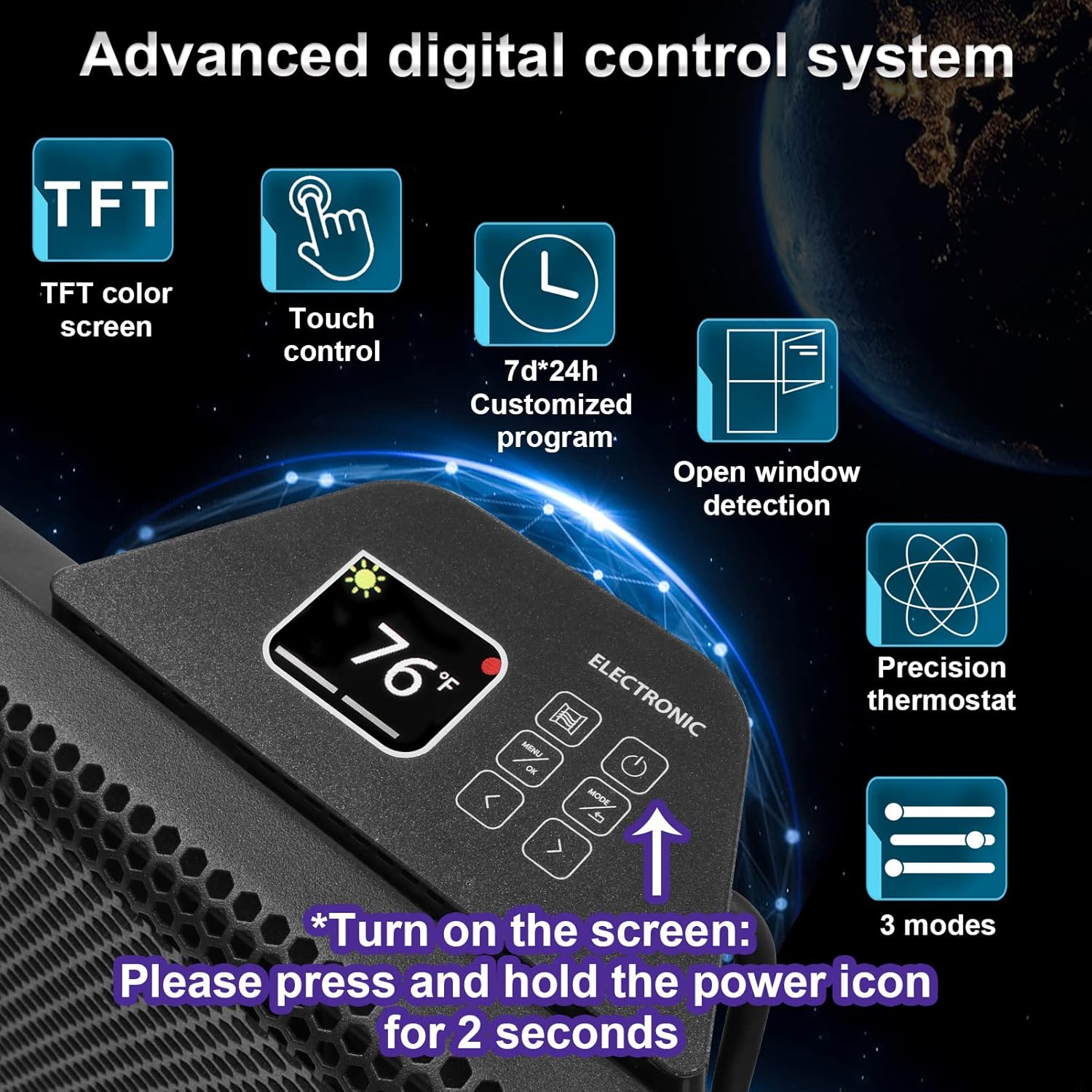
Figure 3: Digital control panel with touch buttons and TFT display.
4.2 ເປີດ/ປິດ
- Ensure the heater is plugged into a suitable power outlet.
- Press and hold the power icon on the touch screen for 2 seconds to turn the display on.
- Press the power icon again to turn the heater on or off.
4.3 ການປັບອຸນຫະພູມ
The precision thermostat allows temperature adjustment from 41°F to 96°F (5°C to 35°C).
- Use the up (^) and down (v) arrow buttons on the control panel to increase or decrease the desired temperature.
- The current and set temperatures will be displayed on the TFT screen.
4.4 ຮູບແບບຄວາມຮ້ອນ
The heater offers three distinct heating modes:
- ໂໝດສະດວກສະບາຍ: Maintains a consistent, comfortable temperature.
- ໂໝດອັດສະລິຍະອັດສະລິຍະ: Automatically adjusts energy consumption to maintain the set temperature, optimizing for energy savings.
- ໂໝດຕ້ານການແຊ່ແຂງ: Prevents the room temperature from dropping below a certain point (e.g., 37°F/3°C) to protect against freezing.
Press the 'Mode' button on the control panel to cycle through the available heating modes.
4.5 ຟັງຊັນຈັບເວລາ
The 24-hour timer allows you to program the heater to turn on or off at specific times.
- Press the 'Timer' button on the control panel.
- Use the up (^) and down (v) arrow buttons to set the desired on/off time.
- Confirm your selection to activate the timer.
4.6 ເປີດ Window Detection
This feature automatically stops the heater from operating if it detects a sudden drop in room temperature, indicating an open window or door. This helps to conserve energy.
- When an open window is detected, the heater will pause operation.
- Close the window/door, and the heater will resume normal operation or can be manually restarted.
5. ຄຸນສົມບັດ ແລະ ປະໂຫຍດ
- Higher Heating Efficiency: Micathermic with far infrared warms objects directly rather than the surrounding air, ensuring 100% electrical input to heat with no visible light.
- Quick Room Heating: Effectively heats rooms up to 300 square feet. For first use, it is recommended to set the maximum temperature (96°F) and power (1500W) for at least 1 hour.
- Silent and Comfortable Operation: Operates quietly (≤25db) without a fan, preventing dry skin and providing heat without dazzling light.
- ການປົກປ້ອງຄວາມປອດໄພຫຼາຍອັນ: Includes tip-over protection, a child lock feature, and overheat protection for safe operation.

Figure 4: Illustration of micathermic infrared heating.

Figure 5: Visual representation of room heating coverage.

Figure 6: Benefits of silent and comfortable heating.
6. ບໍາລຸງຮັກສາ
Regular maintenance ensures optimal performance and longevity of your Ballu space heater.
- ທໍາຄວາມສະອາດ: ໃຫ້ແນ່ໃຈວ່າເຄື່ອງເຮັດຄວາມຮ້ອນໄດ້ຖືກຖອດປລັກອອກ ແລະ ເຢັນລົງໝົດກ່ອນການທຳຄວາມສະອາດ. ໃຊ້ຜ້າເຊັດທີ່ອ່ອນນຸ້ມ, ເຊັດອອກໃຫ້ສະອາດ.amp ຜ້າເຊັດພື້ນຜິວພາຍນອກ. ຢ່າໃຊ້ເຄື່ອງເຮັດຄວາມສະອາດຂັດຫຼືສານລະລາຍ.
- ການເກັບຮັກສາ: If storing the heater for an extended period, unplug it, clean it, and store it in a cool, dry place.
- ການກວດກາ: Periodically check the power cord and plug for any signs of damage. If any damage is found, discontinue use and contact customer support.
7. ການແກ້ໄຂບັນຫາ
If you encounter issues with your Ballu space heater, refer to the following common troubleshooting steps:
| ບັນຫາ | ສາເຫດທີ່ເປັນໄປໄດ້ | ການແກ້ໄຂ |
|---|---|---|
| ເຄື່ອງເຮັດຄວາມຮ້ອນບໍ່ເປີດ. | ບໍ່ມີພະລັງງານ, ສະຫຼັບປາຍເປີດເປີດ, ເປີດໃຊ້ການປ້ອງກັນຄວາມຮ້ອນເກີນ. | Check power connection. Ensure heater is on a flat surface. Allow heater to cool down if overheated. |
| ຜົນຜະລິດຄວາມຮ້ອນຫຼຸດລົງ. | Incorrect mode selected, room size exceeds capacity, open window detected. | Select a higher heating mode. Ensure room size is within 300 sq ft. Close windows/doors. |
| Unusual odor or smoke on first use. | ການຜະລິດທີ່ຕົກຄ້າງການເຜົາໄຫມ້ອອກ. | This is normal for the first few uses. Operate in a well-ventilated area for an hour or two until odor dissipates. If odor persists or is strong, discontinue use. |
| ຈໍສະແດງຜົນບໍ່ເຮັດວຽກ. | ບັນຫາພະລັງງານ, ຄວາມຜິດປົກກະຕິພາຍໃນ. | Ensure power is connected. Try pressing and holding the power button for 2 seconds. If issue persists, contact customer support. |
8. ຂໍ້ມູນຈໍາເພາະ
| ຄຸນລັກສະນະ | ມູນຄ່າ |
|---|---|
| ຍີ່ຫໍ້ | ບານລູ |
| ຕົວແບບ | NCA2-15-EF3.0 |
| ສີ | ດຳ |
| ປັດໄຈແບບຟອມ | ແທ່ນ |
| ການນຳໃຊ້ພາຍໃນ/ນອກ | ພາຍໃນ |
| ຂະໜາດສິນຄ້າ | 25.2"D x 3.2"W x 17.3"H |
| ການນໍາໃຊ້ທີ່ແນະນໍາ | Office, Bedroom, Home Office, Study Room |
| ປະເພດການຕິດຕັ້ງ | ຕິດຝາ |
| ການຄຸ້ມຄອງຄວາມຮ້ອນ | 300 ຕາແມັດ |
| ປະເພດເຕົາ | ຮຸ່ງເຮືອງ |
| ນ້ໍາຫນັກລາຍການ | 12.62 ປອນ |
9. ການຮັບປະກັນແລະການສະຫນັບສະຫນູນ
For warranty information, technical support, or service inquiries, please refer to the warranty card included with your product or visit the official Ballu webເວັບໄຊ. ຮັກສາໃບຮັບເງິນການຊື້ຂອງທ່ານໄວ້ເປັນຫຼັກຖານການຊື້.


