1. ບົດແນະນຳ
The Hikvision DS-7316HQHI-SH is a 16-channel Tribrid Digital Video Recorder (DVR) designed for advanced surveillance systems. This DVR supports Turbo HD, analog, and 1080P IP cameras, offering versatile compatibility for various security setups. It features H.264 video compression for efficient storage and supports auto-detection of camera types. This manual provides essential information for the proper installation, operation, and maintenance of your DVR system.
2. ຄໍາແນະນໍາຄວາມປອດໄພ
ກະລຸນາອ່ານຄໍາແນະນໍາດ້ານຄວາມປອດໄພເຫຼົ່ານີ້ຢ່າງລະມັດລະວັງກ່ອນທີ່ຈະດໍາເນີນການອຸປະກອນເພື່ອປ້ອງກັນການບາດເຈັບຫຼືຄວາມເສຍຫາຍ.
- ຮັບປະກັນການສະຫນອງພະລັງງານ voltage ມີຄວາມໝັ້ນຄົງ ແລະ ຕອບສະໜອງຄວາມຕ້ອງການຂອງອຸປະກອນ.
- Do not place the device in direct sunlight, near heat sources, or in environments with high humidity or dust.
- Avoid placing heavy objects on top of the DVR.
- ໃຊ້ອຸປະກອນເສີມ ແລະ ອະແດບເຕີໄຟຟ້າທີ່ໄດ້ຮັບການຮັບຮອງຈາກ Hikvision ເທົ່ານັ້ນ.
- ຕັດການເຊື່ອມຕໍ່ໄຟຟ້າກ່ອນທີ່ຈະດໍາເນີນການບໍາລຸງຮັກສາຫຼືການຕິດຕັ້ງຂັ້ນຕອນ.
- Properly ground the device to prevent electrical shock.
3. ເນື້ອໃນຊຸດ
ກວດສອບວ່າລາຍການທັງຫມົດແມ່ນມີຢູ່ໃນຊຸດ. ຖ້າລາຍການໃດຂາດຫາຍໄປຫຼືເສຍຫາຍ, ຕິດຕໍ່ຜູ້ສະຫນອງຂອງທ່ານ.
- Hikvision DS-7316HQHI-SH DVR Unit
- Power Adapter
- ເມົາສ໌ USB
- ສາຍ SATA (ສໍາລັບການເຊື່ອມຕໍ່ HDD)
- ສະກູ (ສຳລັບຕິດຕັ້ງ HDD)
- ຄູ່ມືເລີ່ມຕົ້ນດ່ວນ
4. ຜະລິດຕະພັນເກີນview
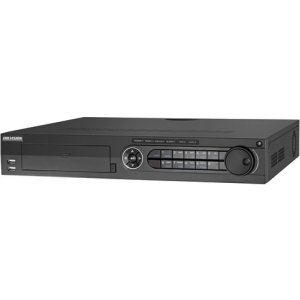
4.1 ກະດານດ້ານ ໜ້າ

The front panel of the DVR provides access to essential controls and indicators. It typically includes:
- ພອດ USB: For connecting a mouse, USB flash drive, or external storage.
- ຕົວຊີ້ບອກສະຖານະ: LEDs for power, HDD activity, and network status.
- ປຸ່ມຄວບຄຸມ: Navigation and selection buttons for menu operation.
- ຕົວຮັບ IR: For remote control (if applicable).
4.2 ການເຊື່ອມຕໍ່ແຜງດ້ານຫລັງ
The rear panel houses all the necessary ports for connecting cameras, monitors, network, and power. Key connections include:
- Video Input: BNC connectors for 16 Turbo HD/Analog cameras.
- ຜົນຜະລິດວິດີໂອ: ພອດ HDMI ແລະ VGA ສຳລັບເຊື່ອມຕໍ່ຈໍພາບ.
- ສຽງເຂົ້າ/ອອກ: RCA connectors for audio devices.
- LAN Port: RJ45 Ethernet port for network connection.
- ພອດ USB: ພອດ USB ເພີ່ມເຕີມສໍາລັບອຸປະກອນຕໍ່ພອດ.
- I/O ໂມງປຸກ: Terminal blocks for alarm input and output devices.
- ການປ້ອນຂໍ້ມູນພະລັງງານ: ຮູສຽບໄຟຟ້າ DC 12V.
5. ຕັ້ງຄ່າ
5.1 ການຕິດຕັ້ງຮາດແວ
- ການຕິດຕັ້ງ Hard Disk Drive (HDD):
- ຖອດອອກ ແລະຖອດຝາປິດດ້ານເທິງຂອງ DVR ອອກ.
- ເຊື່ອມຕໍ່ສາຍຂໍ້ມູນ SATA ແລະສາຍໄຟກັບ HDD.
- Align the HDD with the screw holes at the bottom of the DVR chassis and secure it with the provided screws.
- ປ່ຽນຝາເທິງແລະຍຶດມັນດ້ວຍສະກູ.
- ການເຊື່ອມຕໍ່ກ້ອງຖ່າຍຮູບ: Connect your Turbo HD, analog, or IP cameras to the corresponding video input ports on the rear panel using BNC connectors. For IP cameras, ensure they are connected to the same network as the DVR.
- ຕິດຕາມກວດກາການເຊື່ອມຕໍ່: Connect a monitor to the HDMI or VGA output port on the rear panel.
- ການເຊື່ອມຕໍ່ຫນູ: Connect the USB mouse to a USB port on the front or rear panel.
- ການເຊື່ອມຕໍ່ເຄືອຂ່າຍ: Connect an Ethernet cable from your router/switch to the LAN port on the DVR.
- ການເຊື່ອມຕໍ່ພະລັງງານ: Connect the power adapter to the DVR's power input and then plug it into a power outlet.
5.2 ການເປີດເຄື່ອງເບື້ອງຕົ້ນ ແລະການຕັ້ງຄ່າ
After connecting all hardware, power on the DVR. The system will boot up, and you will be prompted to set up basic configurations.
- Create Admin Password: Follow the on-screen prompts to create a strong administrator password.
- Activate HDD: The newly installed HDD will need to be initialized or formatted by the DVR. Navigate to Menu > HDD > HDD Management ເພື່ອຟໍແມັດໄດ.
- ການຕັ້ງຄ່າເຄືອຂ່າຍ: Configure network parameters (IP address, subnet mask, gateway, DNS) to enable remote access and IP camera integration. You can use DHCP or static IP.
- ວັນທີ ແລະເວລາ: ກໍານົດວັນທີ, ເວລາ, ແລະເຂດເວລາທີ່ຖືກຕ້ອງ.
- ການກວດຫາກ້ອງຖ່າຍຮູບ: The DVR will automatically detect connected Turbo HD and analog cameras. For IP cameras, you may need to add them manually via Menu > Camera > IP Camera.
6. ຄໍາແນະນໍາການດໍາເນີນງານ
6.1 ການນໍາທາງສ່ວນຕິດຕໍ່ຜູ້ໃຊ້
ໃຊ້ເມົ້າ USB ທີ່ເຊື່ອມຕໍ່ເພື່ອນຳທາງໃນສ່ວນຕິດຕໍ່ຜູ້ໃຊ້ແບບກຣາຟິກ (GUI). ຄລິກຂວາເພື່ອເຂົ້າຫາເມນູຫຼັກ, ແລະຄລິກຊ້າຍເພື່ອເລືອກຕົວເລືອກ.
- ດໍາລົງຊີວິດ View: Displays real-time video feeds from all connected cameras.
- ເມນູຫຼັກ: Provides access to all system settings, recording, playback, and advanced features.
- ຫຼິ້ນຄືນ: ອະນຸຍາດໃຫ້ reviewໃນບັນທຶກ footage.
- ສຳ ຮອງ: For exporting recorded video to a USB device.
6.2 ການຕັ້ງຄ່າການບັນທຶກ
ເພື່ອກໍານົດການຕັ້ງຄ່າການບັນທຶກ:
- ໄປທີ່ Main Menu > Record > Parameters.
- Select the desired camera and configure settings such as resolution, frame rate, and bit rate.
- ທ່ອງໄປຫາ Main Menu > Record > Schedule to set up continuous, motion-detection, or alarm-triggered recording schedules for each camera.
6.3 ການຫຼິ້ນຄືນ
ເພື່ອຫຼິ້ນຄືນ foo ທີ່ບັນທຶກໄວ້tage:
- ຈາກການຖ່າຍທອດສົດ view, ຄລິກຂວາແລະເລືອກ ຫຼິ້ນຄືນ, ຫຼືໄປທີ່ Main Menu > Playback.
- Select the camera(s) and the date/time range you wish to review.
- Use the timeline and control buttons (play, pause, fast forward, rewind) to navigate through the footage.
6.4 ການເຂົ້າເຖິງໄລຍະໄກ
To access your DVR remotely:
- Ensure the DVR is connected to the internet and network settings are correctly configured.
- Download and install the Hik-Connect app on your mobile device or the iVMS-4200 client software on your computer.
- Register an account and add your DVR using its serial number or QR code.
- Follow the app/software instructions to view live feeds, play back recordings, and manage settings remotely.
7. ບໍາລຸງຮັກສາ
7.1 ການຈັດການຮາດດິດ
Regularly check the status of your hard drive to ensure optimal recording performance. Go to Main Menu > HDD > HDD Management ກັບ view disk status, remaining capacity, and perform formatting if necessary. It is recommended to format the HDD periodically (e.g., every 6-12 months) to maintain performance, after backing up any critical data.
7.2 ການອັບເດດເຟີມແວ
Keep your DVR's firmware updated to benefit from new features, security enhancements, and bug fixes. Download the latest firmware from the official Hikvision website. Update the firmware via USB or network through Main Menu > Maintenance > Upgrade.
7.3 ການທໍາຄວາມສະອາດ
Periodically clean the exterior of the DVR with a soft, dry cloth. Ensure ventilation openings are free from dust to prevent overheating. Do not use liquid cleaners or aerosols directly on the device.
8. ການແກ້ໄຂບັນຫາ
| ບັນຫາ | ສາເຫດທີ່ເປັນໄປໄດ້ | ການແກ້ໄຂ |
|---|---|---|
| ບໍ່ມີຜົນຜະລິດວິດີໂອໃນຈໍພາບ | Loose HDMI/VGA cable; Incorrect monitor input; DVR not powered on. | Check cable connections; Select correct input on monitor; Verify DVR power. |
| ບໍ່ມີຮູບກ້ອງຖ່າຍຮູບ | Camera not powered; Loose BNC cable; Incorrect camera type selected; IP camera not configured. | Check camera power and connections; Verify camera type in DVR settings; Add/configure IP camera. |
| ບໍ່ມີການບັນທຶກ | HDD not initialized/formatted; Recording schedule not set; HDD full. | ເລີ່ມຕົ້ນ / ຮູບແບບ HDD; ຕັ້ງຄ່າຕາຕະລາງການບັນທຶກ; ກວດເບິ່ງຄວາມອາດສາມາດ HDD. |
| ບໍ່ສາມາດເຂົ້າເຖິງ DVR ຈາກໄລຍະໄກໄດ້ | Network cable disconnected; Incorrect network settings; Router firewall blocking ports. | Check network cable; Verify DVR network settings (IP, DNS); Configure port forwarding on router or enable UPnP. |
9. ຂໍ້ມູນຈໍາເພາະ
| ຄຸນສົມບັດ | ລາຍລະອຽດ |
|---|---|
| ໝາຍເລກຕົວແບບ | DS-7316HQHI-SH-2TB |
| ວິດີໂອປ້ອນຂໍ້ມູນ | 16 Channels (Turbo HD/Analog) + 2 IP Cameras (1080P) |
| ການບີບອັດວິດີໂອ | H.264 |
| ຜົນຜະລິດວິດີໂອ | hdmi, vga |
| ສຽງເຂົ້າ/ອອກ | ແມ່ນແລ້ວ |
| I/O ໂມງປຸກ | ແມ່ນແລ້ວ |
| ການເຊື່ອມໂຍງເຄືອຂ່າຍ | 1 RJ45 10M/100M/1000M Ethernet interface |
| ການໂຕ້ຕອບ USB | 2 x USB 2.0 (ທາງຫນ້າ), 1 x USB 3.0 (ດ້ານຫລັງ) |
| ຮາດດິດໄດ | 2TB pre-installed (supports up to 2 SATA HDDs) |
| ການສະຫນອງພະລັງງານ | 12V DC |
| ຂະໜາດສິນຄ້າ | 390 x 445 x 70 inches (Note: This dimension appears unusually large and may be a unit conversion error in the source data. Please refer to official product documentation for accurate dimensions.) |
| ນ້ໍາຫນັກລາຍການ | 1 ປອນ |
10. ການຮັບປະກັນແລະການສະຫນັບສະຫນູນ
Hikvision products typically come with a limited warranty. For detailed warranty information, please refer to the warranty card included with your product or visit the official Hikvision website. For technical support, product registration, or service inquiries, please contact Hikvision customer support or your authorized dealer.
ທາງການ Webເວັບໄຊ: www.hikvision.com


