
ແນະນຳ
Thank you for choosing the Urageuxy 7-in-1 WiFi Weather Station. This device provides comprehensive real-time weather data directly from your local environment. This manual will guide you through the setup, operation, and maintenance of your new weather station to ensure accurate and reliable performance.
The system includes an indoor display console and an integrated outdoor sensor array, offering measurements for indoor/outdoor temperature and humidity, wind speed and direction, barometric pressure, rainfall, UV index, light levels, moon phase, date, and time. It also features an alarm clock and supports manual calibration for various parameters.
ເນື້ອໃນຊຸດ
ກ່ອນທີ່ຈະເລີ່ມການຕິດຕັ້ງ, ກະລຸນາກວດສອບວ່າມີອົງປະກອບທັງໝົດຢູ່ແລ້ວ:
- 1x Display Console
- 1x Integrated Outdoor Transmitter (Sensor Array)
- 1x ເຊັນເຊີໄລຍະໄກ
- 1x ຄູ່ມື
- 1x ຕົວແປງໄຟ
- Mounting Hardware: 4x Washer (Metal gasket), 4x Pole Mounting U-bolt Nuts (M5), 2x U-bolt (M5), 1x L-shaped Stainless Steel base, 1x Wrench (M5), 1x Screwdriver (M3), 3x Wind Vane and Wind Cup mounting screws (Ø3), 2x Wind Vane and Wind Cup Waterproof rubber plug, 1x Foot Mounting (with pole insert), 1x Mounting Bracket Back Plate (pole mount), 1x Mounting Pole, 1x Pole mounting nuts (M3), 4x Pole mounting nuts (M5), 4x Tapping screws

Image: All components included in the Urageuxy 7-in-1 WiFi Weather Station package, laid out for inspection.
ການຕິດຕັ້ງແລະການຕິດຕັ້ງ
1. ການສະໜອງພະລັງງານໃຫ້ກັບຄອນໂຊນຈໍສະແດງຜົນ
- Connect the provided power adapter to the display console and a power outlet.
- ໃສ່ແບັດເຕີຣີ AAA 3 ກ້ອນ (ບໍ່ລວມ) ເຂົ້າໄປໃນຊ່ອງແບັດເຕີຣີເພື່ອໃຊ້ພະລັງງານສຳຮອງ.
2. Installing the Outdoor Sensor Array
The outdoor sensor array measures wind speed/direction, temperature, humidity, solar radiation, and rainfall. Proper placement is crucial for accurate readings.
- ສະຖານທີ່: Choose an open area free from obstructions (trees, buildings) that could interfere with wind or rain measurements. A garden, lawn, patio, or roof/fence location is suitable.
- ປະຖົມນິເທດ: Ensure the wind vane (the part with the propeller) is pointing south for accurate wind direction readings.
- ການຕິດຕັ້ງ: Use the provided mounting pole and hardware to securely attach the sensor array. The system supports various mounting options, including fence or pole mounting.
- ແບັດເຕີຣີ: The outdoor sensor array requires 3 AAA batteries (not included). These batteries provide power when the integrated solar panel is not receiving sufficient sunlight.

ຮູບພາບ: ລາຍລະອຽດ view of the 8-in-1 outdoor sensor array, highlighting components like the rain collector, solar panel, wind cups, and wind vane.

ຮູບພາບ: Examples of suitable installation locations for the outdoor sensor, including farm, garden, and roof setups.
3. Connecting the Remote Sensor (Optional)
The remote sensor provides additional temperature and humidity readings. Place it in a desired location within 328ft/100m of the main display console.
4. ການເຊື່ອມຕໍ່ Wi-Fi
The weather station supports 2.4G Wi-Fi for data upload to online weather services.
- Ensure your display console is powered on.
- Follow the instructions in the manual to connect the console to your home 2.4G Wi-Fi network.
- Once connected, you can upload data to platforms like Weather Underground, PWSWeather, and Weathercloud to view, analyze, and share your local weather data on your PC or smart device.

Image: Diagram illustrating the Wi-Fi synchronization process, showing data flow from the outdoor sensor to the console, router, and online weather services.
ຄໍາແນະນໍາການດໍາເນີນງານ
Display Console Overview
The color display console provides a comprehensive overview of current and historical weather data.

Image: Labeled diagram of the display console, indicating various data points such as indoor/outdoor temperature, humidity, wind speed/direction, rainfall, pressure, UV, moon phase, and time/date.
- ຂໍ້ມູນພາຍນອກ: Temperature, humidity, dew point, wind speed (gust/average), wind direction, pressure, rainfall (1 hour, 24 hours, week, month, total), moon phase, UV index, light.
- ຂໍ້ມູນພາຍໃນ: ອຸນຫະພູມ, ຄວາມຊຸ່ມຊື່ນ.
- ເວລາແລະວັນທີ: ເວລາປັດຈຸບັນ, ວັນທີ ແລະ ມື້ຂອງອາທິດ.
- ພະຍາກອນອາກາດ: Graphical representation of upcoming weather trends.
ການປັບຄວາມສະຫວ່າງຂອງ Backlight
The display console features 3 levels of brightness adjustment for optimal viewຢູ່ໃນສະພາບແສງສະຫວ່າງຕ່າງໆ.
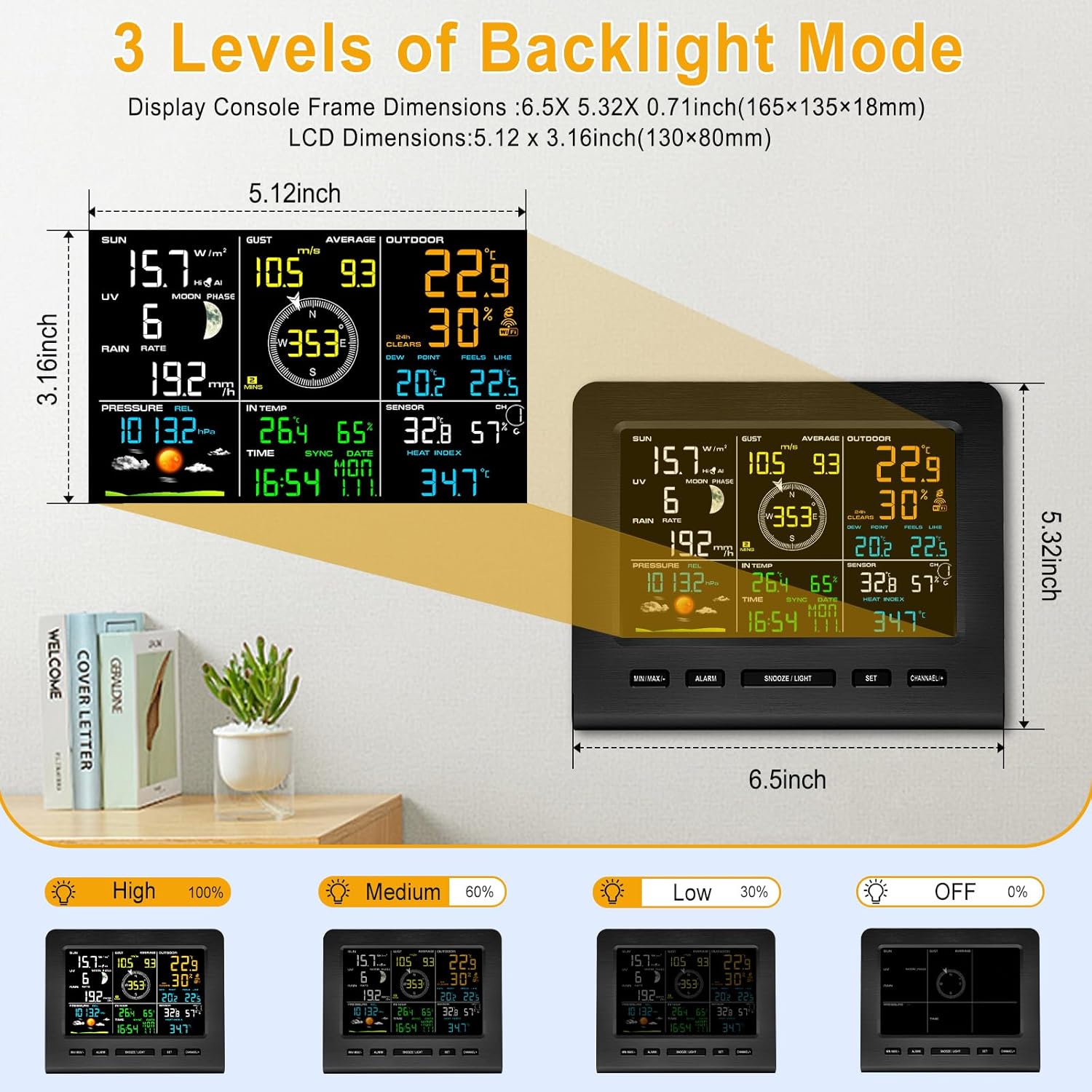
Image: Visual representation of the display console with different backlight brightness levels (High, Medium, Low, Off).
ຟັງຊັນປຸກ
Set various alarms including time alarm, indoor/outdoor temperature & humidity, gust/average wind speed, barometric pressure, and rainfall alerts.
Calibration ຄູ່ມື
The weather station supports manual calibration of temperature, humidity, wind speed, barometric pressure, and rainfall to fine-tune accuracy based on your specific environment.
ບໍາລຸງຮັກສາ
- ການປ່ຽນແບັດເຕີຣີ: Replace batteries in the display console (3x AAA) and outdoor sensor array (3x AAA) as needed. Batteries are not included.
- ການອະນາໄມເຊັນເຊີ: Periodically clean the rain collector and other exposed parts of the outdoor sensor to ensure accurate readings. Remove any debris that may obstruct the wind cups or rain gauge.
- ເຊັນເຊີອຸນຫະພູມ/ຄວາມຊຸ່ມຊື່ນ: The outdoor sensor features a Swiss-made replaceable temperature/humidity sensor for long-term accuracy.
ການແກ້ໄຂບັນຫາ
- No Data on Display: Ensure both the display console and outdoor sensor array have fresh batteries and are powered on. Verify they are within the wireless transmission range (up to 328ft/100m in open areas).
- ການອ່ານທີ່ບໍ່ຖືກຕ້ອງ: Check the outdoor sensor's placement for obstructions. Ensure the wind vane is correctly oriented to the south. Perform manual calibration if necessary.
- ບັນຫາການເຊື່ອມຕໍ່ Wi-Fi: Confirm your router is operating on a 2.4G frequency. Re-attempt the Wi-Fi setup process as outlined in the manual. Ensure the console is within range of your Wi-Fi router.
ຂໍ້ມູນຈໍາເພາະ
| ຄຸນສົມບັດ | ລາຍລະອຽດ |
|---|---|
| ຍີ່ຫໍ້ | Urageuxy |
| ໝາຍເລກຕົວແບບ | BDFCWS0361DB |
| ປະເພດການສະແດງ | ຈໍ LCD |
| ເຕັກໂນໂລຊີການເຊື່ອມຕໍ່ | Wi-Fi (2.4G router support) |
| ແຫຼ່ງພະລັງງານ (ຄອນໂຊນ) | Power Adapter, 3x AAA Batteries (backup, not included) |
| ແຫຼ່ງພະລັງງານ (ເຊັນເຊີກາງແຈ້ງ) | Solar Panel, 3x AAA Batteries (not included) |
| ໄລຍະການສົ່ງຜ່ານໄຮ້ສາຍ | ສູງສຸດ 328 ຟຸດ / 100 ແມັດ (ພື້ນທີ່ເປີດ) |
| ຂະໜາດຜະລິດຕະພັນ (ຄອນໂຊນ) | 0.78"D x 6.35"W x 5.32"H |
| ນ້ໍາຫນັກລາຍການ | 5.06 ປອນ (2.3 ກິໂລກຣາມ) |
| ວັດສະດຸ | Acrylonitrile Butadiene Styrene (ABS) |
| ຊ່ວງອຸນຫະພູມພາຍໃນ | 0 to 60 °C (32 to 140 °F), Accuracy: ± 1 °C (± 2 °F), Resolution: 0.1 °C (°F) |
| ຊ່ວງອຸນຫະພູມກາງແຈ້ງ | -40 to 60 °C (-40 to 140 °F), Accuracy: ± 1 °C (± 2 °F), Resolution: 0.1 °C (°F) |
| ຊ່ວງຄວາມຊຸ່ມຊື່ນພາຍໃນ | 10 to 99 %, Accuracy: ± 5 % (only guaranteed between 20 to 90 %), Resolution: 1 % |
| ຊ່ວງຄວາມຊຸ່ມຊື່ນກາງແຈ້ງ | 10 to 99 %, Accuracy: ± 5 % (only guaranteed between 20 to 90 %), Resolution: 1 % |
| Rain Range | 0 to 9999mm, Accuracy: <15mm: ± 1mm; 15mm to 9999mm: ± 7%, Resolution: <1000mm (0.3mm); >1000mm (1mm) |
| Wind Direction Range | 0 - 360°, Accuracy: ± 10° (8 point compass), Resolution: ± 1° (8 point compass) |
| ຊ່ວງຄວາມໄວຂອງລົມ | 0 to 50 m/s, Accuracy: 2 m/s ~ 10 m/s: ± 0.3m/s; 10m/s ~ 50 m/s: ± 10% (whichever is greater), Resolution: 0.1 m/s |
| ຊ່ວງຄວາມກົດດັນ Barometric | 300 to 1100 hpa, Accuracy: ± 3 hpa, Resolution: 0.1 hpa |
| UV Index Range | 1 to 15+, Accuracy: ± 1, Resolution: ± 1 |
| Sunlight Range | 0 to 200klux, Accuracy: ± 15%, Resolution: ± 15% |
Image: A table summarizing the measurement specifications for various parameters of the weather station.
ການຮັບປະກັນແລະການສະຫນັບສະຫນູນ
Specific warranty details are not provided in the product information. For warranty claims or technical support, please refer to the contact information provided in your product packaging or visit the official Urageuxy webເວັບໄຊ.
The product is sold by Urageuxy and fulfilled by Amazon. Standard return policy is 30 days for refund/replacement.


