ແນະນຳ
This manual provides detailed instructions for the AGPTEK A55PL USB C MP3 Player. It covers setup, operation, maintenance, and troubleshooting to ensure optimal use of your device. The A55PL is a versatile music player featuring USB-C connectivity, 64GB storage, FM radio, and voice recording capabilities, powered by a replaceable AAA battery.
ເນື້ອໃນຊຸດ
ກວດສອບວ່າລາຍການທັງຫມົດທີ່ລະບຸໄວ້ຂ້າງລຸ່ມນີ້ແມ່ນລວມຢູ່ໃນຊຸດຂອງທ່ານ:
- AGPTEK A55PL MP3 Player
- 64GB TF Card (pre-installed)
- Type-C ກັບສາຍສາກ USB
- ຄູ່ມືຜູ້ໃຊ້

Image: Contents of the AGPTEK A55PL MP3 Player package, showing the player, USB-C cable, 64GB TF card, and user manual.
ສິນຄ້າເກີນview ແລະຄຸນສົມບັດ
The AGPTEK A55PL MP3 Player is designed for portability and ease of use, offering multiple functionalities in a compact form factor.
ຄຸນນະສົມບັດທີ່ສໍາຄັນ:
- Direct Type-C & Universal USB Connectivity: Connects directly to Type-C phones for file transfer or to laptops/PCs using the included adapter/cable.
- Swappable AAA Batteries: Operates on a single AAA battery (not included), allowing for instant power replacement without needing charging outlets.
- Massive 64GB Storage: Comes with a pre-loaded 64GB TF card, supporting over 13,000 songs and high-fidelity formats like FLAC, APE, and WAV. Functions as a U disk for data transfer.
- Crisp LED Display: Features an energy-efficient LED screen for clear navigation and song title display.
- Voice Recorder & FM Radio: Built-in voice recorder for capturing audio and an FM radio (requires wired headset as antenna) for broadcasts.

ຮູບພາບ: ຫຼາຍກວ່າview of the AGPTEK A55PL MP3 Player's capabilities, including its Type-C port, music playback, recording, FM radio, and 64GB TF card storage.
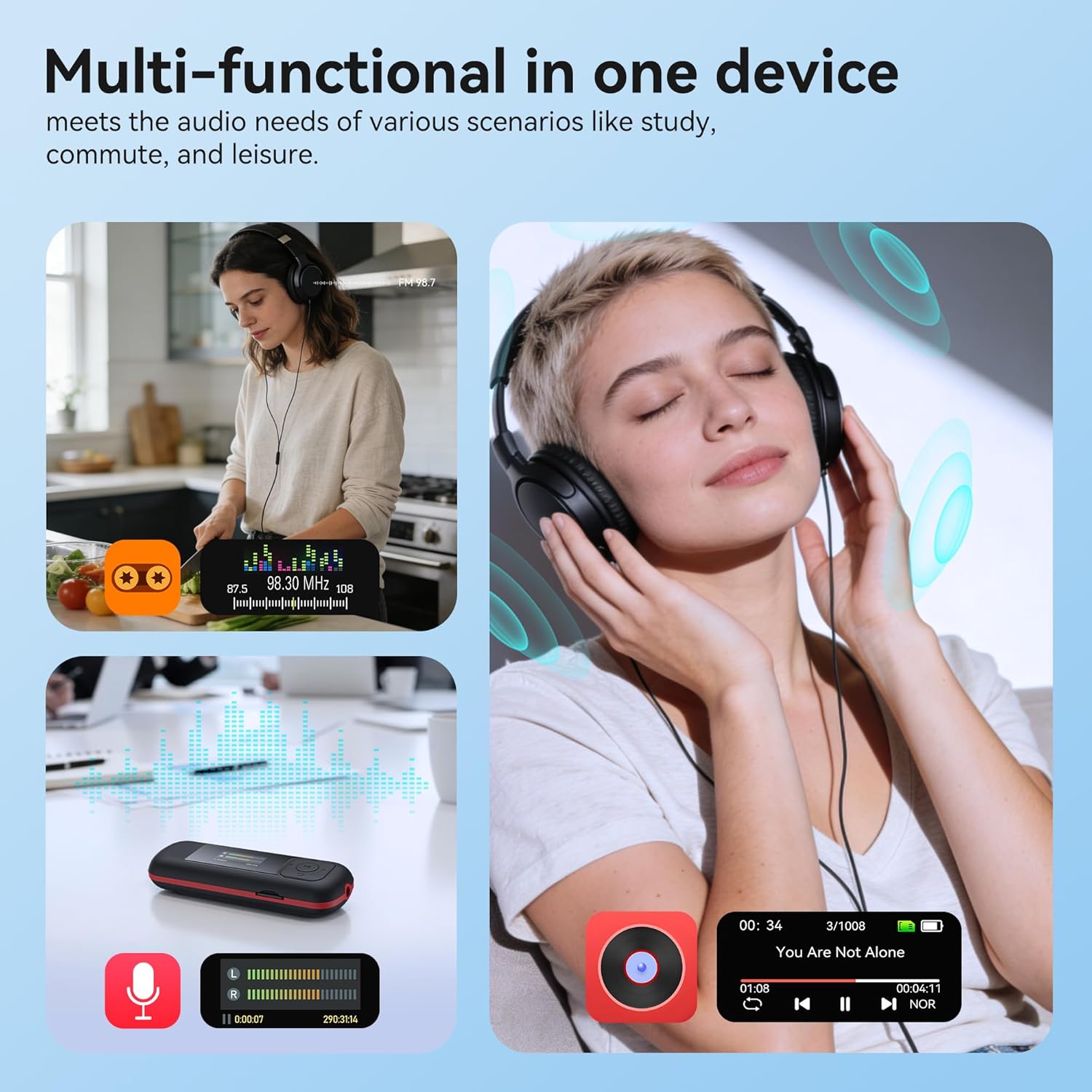
Image: The AGPTEK A55PL MP3 Player showcasing its multi-functional capabilities, including FM radio, voice recording, and music playback, suitable for various scenarios.
ຕັ້ງຄ່າ
1. ການຕິດຕັ້ງຫມໍ້ໄຟ
The AGPTEK A55PL uses one AAA battery (not included). Ensure correct polarity when inserting the battery.
- ຊອກຫາຝາປິດຊ່ອງໃສ່ຫມໍ້ໄຟຢູ່ດ້ານຫຼັງຂອງອຸປະກອນ.
- Press the center of the cover and slide it forward to unlock and remove.
- ໃສ່ແບັດ AAA ອັນໜຶ່ງ, ຈັບຄູ່ກັບຈຸດບວກ (+) ແລະ ລົບ (-) ທີ່ມີຕົວຊີ້ບອກພາຍໃນຊ່ອງ.
- ເລື່ອນຝາປິດໃສ່ບ່ອນອື່ນຈົນກວ່າມັນຈະກົດຢ່າງປອດໄພ.

Image: Step-by-step guide for removing the USB cap and installing the AAA battery into the AGPTEK A55PL MP3 Player.
ໝາຍເຫດ: USB charging is not supported. The device relies solely on AAA battery power. The battery display on the screen is based on voltage changes at the battery terminal.
2. Initial Connection and File ໂອນ
You can transfer music and other files to your MP3 player from a computer or a Type-C smartphone.
- ສໍາລັບຄອມພິວເຕີ: Use the included Type-C to USB cable. Connect the Type-C end to the player and the USB-A end to your computer's USB port. The player will appear as a removable disk.
- For Type-C Phones: Plug the player's Type-C connector directly into your phone's Type-C port. The player will be recognized as external storage. (For iPhones, a Lightning-to-Type-C OTG adapter is needed, not included).

Image: Demonstrates connecting the AGPTEK A55PL MP3 Player to a computer via USB cable and directly to a Type-C smartphone for file ການໂອນຍ້າຍ.
ຄໍາແນະນໍາການດໍາເນີນງານ
ການຄວບຄຸມພື້ນຖານ
The player features a simple interface with dedicated buttons for easy navigation.
- ປຸ່ມເປີດປິດ: ກົດຄ້າງໄວ້ເພື່ອເປີດ/ປິດ.
- ປຸ່ມຫຼິ້ນ/ຢຸດຊົ່ວຄາວ: ກົດເພື່ອຫຼິ້ນ ຫຼືຢຸດເພງ.
- ປຸ່ມນຳທາງ (ຂຶ້ນ/ລົງ/ຊ້າຍ/ຂວາ): ໃຊ້ເພື່ອນຳທາງເມນູ ແລະປັບການຕັ້ງຄ່າ.
- ປຸ່ມລະດັບສຽງ (+/-): Dedicated buttons on the side to adjust playback volume.
- ປຸ່ມເມນູ (M): Accesses context-sensitive menus.
- ປຸ່ມກັບຄືນ/ກັບຄືນ: ກັບຄືນໄປຫາໜ້າຈໍ ຫຼືເມນູກ່ອນໜ້າ.
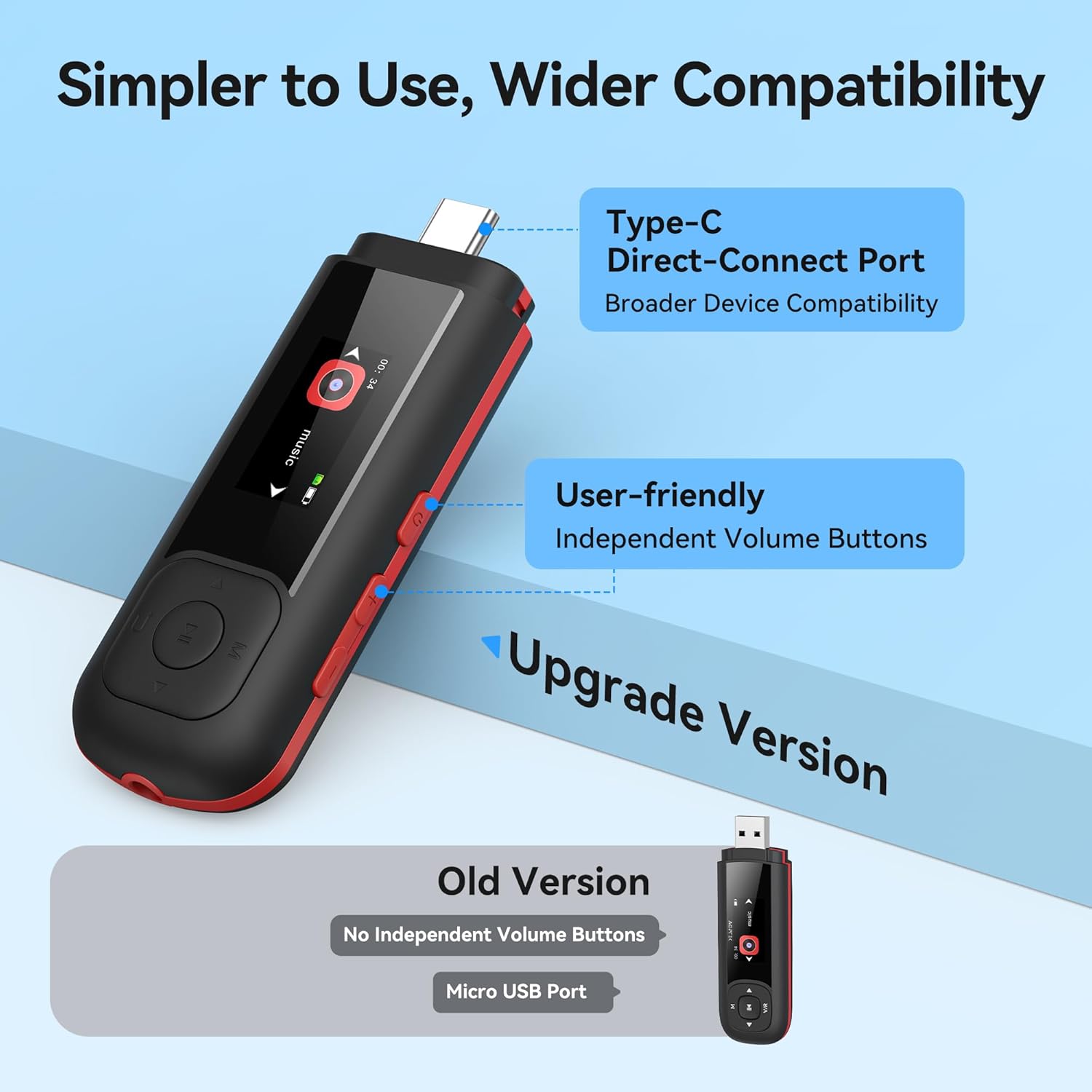
Image: Close-up of the AGPTEK A55PL MP3 Player, showing the Type-C direct-connect port and the independent volume buttons for user-friendly operation.
ເພັງ Playback
The player supports various audio formats including MP3, WMA, APE, FLAC, and WAV.
- Connect wired headphones to the 3.5mm audio jack.
- Navigate to the "Music" option on the main menu.
- Browse through your music library by artist, album, or folder.
- ເລືອກເພງເພື່ອເລີ່ມຫຼິ້ນຄືນ.
- Use the Play/Pause button to control playback and the volume buttons to adjust sound levels.

Image: A person enjoying music through headphones, highlighting the AGPTEK A55PL MP3 Player's support for multi-format lossless audio quality.

Image: Illustrates the different playback modes available on the AGPTEK A55PL MP3 Player, including Folder Mode and Music Mode with options like repeat, shuffle, and play in order.
ວິທະຍຸ FM
To use the FM radio function, a wired headset must be connected as it acts as the antenna.
- ເຊື່ອມຕໍ່ຫູຟັງແບບມີສາຍຂອງທ່ານ.
- Navigate to the "FM Radio" option from the main menu.
- ໃຊ້ປຸ່ມນຳທາງເພື່ອສະແກນຫາສະຖານີ ຫຼື ປັບຄວາມຖີ່ດ້ວຍຕົນເອງ.

Image: A user enjoying FM radio on the AGPTEK A55PL MP3 Player, emphasizing that wired headphones are required to function as an antenna.
ເຄື່ອງບັນທຶກສຽງ
The built-in voice recorder allows you to capture audio on the go.
- Navigate to the "Recorder" option from the main menu.
- ເລືອກ "ເລີ່ມຕົ້ນການບັນທຶກ" ເພື່ອເລີ່ມຕົ້ນ.
- ກົດປຸ່ມ Play/Pause ເພື່ອຢຸດ ແລະບັນທຶກການບັນທຶກ.
- Recordings can be accessed and played back from the "Recordings" list.

Image: The AGPTEK A55PL MP3 Player showing its portable recorder function, ready for effortless on-the-go audio capture.
Custom Playlists
You can create and manage custom playlists by connecting the player to a computer.
- Connect the MP3 player to your computer using the Type-C to USB cable.
- Access the player's storage as a removable disk.
- ຈັດລະບຽບດົນຕີຂອງທ່ານ files into folders or create M3U playlist files ໂດຍກົງໃນອຸປະກອນ.
- The player supports up to 3 built-in customizable playlists.

Image: Demonstrates how to create and edit custom playlists by connecting the AGPTEK A55PL MP3 Player to a computer via USB.
ບໍາລຸງຮັກສາ
- ທໍາຄວາມສະອາດ: ໃຊ້ຜ້າອ່ອນໆ, ແຫ້ງເພື່ອເຮັດຄວາມສະອາດອຸປະກອນ. ຫຼີກເວັ້ນການເຮັດຄວາມສະອາດຂອງແຫຼວຫຼືສານລະລາຍ.
- ການເກັບຮັກສາ: ເກັບຮັກສາເຄື່ອງຫຼີ້ນໄວ້ໃນບ່ອນທີ່ເຢັນ, ແຫ້ງ, ຫ່າງຈາກແສງແດດໂດຍກົງແລະອຸນຫະພູມທີ່ສຸດ.
- ການດູແລຫມໍ້ໄຟ: Remove the AAA battery if the device will not be used for an extended period to prevent leakage.
- ການສໍາຮອງຂໍ້ມູນ: ເປັນປົກກະຕິສໍາຮອງຂໍ້ມູນທີ່ສໍາຄັນ files from the player to a computer to prevent data loss.
ການແກ້ໄຂບັນຫາ
ອຸປະກອນບໍ່ເປີດ
- Ensure the AAA battery is inserted correctly with the correct polarity.
- ປ່ຽນແບັດ AAA ໃໝ່.
- ກົດປຸ່ມເປີດປິດຄ້າງໄວ້ສອງສາມວິນາທີ.
ບໍ່ສາມາດໂອນຍ້າຍໄດ້ Files
- Verify the Type-C to USB cable is securely connected to both the player and the computer/phone.
- ລອງໃຊ້ພອດ USB ອື່ນໃນຄອມພິວເຕີຂອງທ່ານ.
- Ensure your computer's operating system recognizes external storage devices.
- For phones, ensure the phone supports OTG (On-The-Go) functionality for external storage.
ບໍ່ມີສຽງໃນລະຫວ່າງການຫຼິ້ນ
- Check if wired headphones are properly plugged into the 3.5mm audio jack.
- ໃຫ້ແນ່ໃຈວ່າລະດັບສຽງບໍ່ໄດ້ຖືກຕັ້ງໄວ້ທີ່ລະດັບສຽງຕໍ່າສຸດ ຫຼື ປິດສຽງໄວ້.
- Test with a different pair of headphones to rule out headphone issues.
- ກວດສອບສຽງ files are not corrupted and are in a supported format (MP3, WMA, APE, FLAC, WAV).
ວິທະຍຸ FM ບໍ່ເຮັດວຽກ
- Confirm that wired headphones are connected, as they serve as the antenna.
- Try scanning for stations again in an open area.
ຂໍ້ມູນຈໍາເພາະ
| ຄຸນສົມບັດ | ລາຍລະອຽດ |
|---|---|
| ຊື່ຕົວແບບ | A55PL |
| ຍີ່ຫໍ້ | AGPTEK |
| ຄວາມອາດສາມາດເກັບຮັກສາຫນ່ວຍຄວາມຈໍາ | 64 GB (via TF Card) |
| ເຕັກໂນໂລຊີການເຊື່ອມຕໍ່ | USB Type-C, Aux (3.5mm) |
| ຄຸນນະສົມບັດພິເສດ | FM Radio, Voice Recorder, Replaceable AAA Battery |
| ສີ | ດຳ |
| ຂະໜາດໜ້າຈໍ | 0.96 Inches (LED) |
| ອຸປະກອນທີ່ເຂົ້າກັນໄດ້ | Headphones, Computers, Type-C Smartphones |
| ປະເພດສື່ | Micro SD |
| ນ້ໍາຫນັກລາຍການ | 3.87 ອອນ |
| ຂະໜາດແພັກເກັດ | 6.57 x 5.12 x 0.94 ນິ້ວ |
ການຮັບປະກັນແລະການສະຫນັບສະຫນູນ
For warranty information and technical support, please refer to the official AGPTEK webເວັບໄຊ ຫຼືຕິດຕໍ່ບໍລິການລູກຄ້າຂອງເຂົາເຈົ້າ. ຮັກສາໃບຮັບເງິນການຊື້ຂອງທ່ານໄວ້ເປັນຫຼັກຖານການຊື້ສໍາລັບການຮຽກຮ້ອງການຮັບປະກັນໃດໆ.
ສະຫນັບສະຫນູນອອນໄລນ໌: ຢ້ຽມຢາມ AGPTEK Store on Amazon ສໍາລັບຂໍ້ມູນຜະລິດຕະພັນແລະຊັບພະຍາກອນສະຫນັບສະຫນູນ.


