1. ບົດແນະນຳ
ຂອບໃຈສໍາລັບການຊື້asing the ELEPHAS BL128MINI Mini Projector. This manual provides essential information for setting up, operating, and maintaining your projector. Please read it thoroughly before use to ensure optimal performance and longevity of the device.
2. ເນື້ອໃນຊຸດ
ກວດສອບວ່າລາຍການທັງຫມົດທີ່ລະບຸໄວ້ຂ້າງລຸ່ມນີ້ແມ່ນລວມຢູ່ໃນຊຸດຂອງທ່ານ:
- 1 x ELEPHAS BL128MINI Projector
- 1 x ການຄວບຄຸມໄລຍະໄກ
- 1 x ຄູ່ມືຜູ້ໃຊ້ (ເອກະສານນີ້)
- 1 x ສາຍ HDMI
- 1 x Detachable Tripod
3. ຜະລິດຕະພັນເກີນview
3.1 ລັກສະນະທີ່ສໍາຄັນ
- 1080P ຄວາມລະອຽດ Full HD: Supports 1920 x 1080 resolution for clear images.
- 24-bit True Color: ໃຫ້ສີສັນທີ່ສົດໃສ ແລະ ຖືກຕ້ອງ.
- ການຄາດຄະເນຫນ້າຈໍຂະຫນາດໃຫຍ່: Capable of projecting up to a 200-inch screen.
- Detachable Tripod: Provides stable placement and flexible positioning.
- Built-in HIFI Speaker: ສະເໜີຜົນຜະລິດສຽງປະສົມປະສານ.
- ຕົວເລືອກການເຊື່ອມຕໍ່ຫຼາຍອັນ: Includes USB, HDMI, AV, and Audio ports.

Image 3.1: The ELEPHAS BL128MINI Projector offers 1080P Full HD resolution with 24-bit true color, an 8000:1 contrast ratio, and enhanced brightness for a vivid viewປະສົບການ.
3.2 Projector Ports and Controls
Familiarize yourself with the various ports and controls on your projector for proper connection and operation.

Image 3.2: Rear panel of the ELEPHAS BL128MINI Projector, highlighting DC power input, USB ports, HDMI port, AV port, and audio output. Compatible devices include Xbox, TV Stick, PC, Smartphone, USB drives, speakers, and headphones.
4. ຕັ້ງຄ່າ
4.1 ການເຊື່ອມຕໍ່ພະລັງງານ
- ເຊື່ອມຕໍ່ອະແດບເຕີໄຟກັບຜອດ DC IN ໃນໂປເຈັກເຕີ.
- ສຽບອະແດບເຕີໄຟໃສ່ກັບປລັກສຽບໃສ່ຝາ.
4.2 Tripod Installation
The included detachable tripod allows for stable placement on various surfaces.
- Locate the tripod mounting screw hole on the bottom of the projector.
- Screw the tripod securely into the mounting hole.
- Adjust the tripod legs to achieve the desired height and angle for projection.

Image 4.2: The detachable tripod provides stability for the projector, whether placed on a desktop or uneven outdoor surfaces.
4.3 ການວາງ ແລະ ໄລຍະການສາຍພາບ
Position the projector on a flat, stable surface. The optimal projection distance ranges from 3.3 to 9.8 feet for screen sizes between 50 and 200 inches.

Image 4.3: Recommended projection distances for achieving various screen sizes, from 50 to 200 inches.
5. ຄໍາແນະນໍາການດໍາເນີນງານ
5.1 ເປີດ/ປິດ
- ເປີດ: ກົດປຸ່ມເປີດປິດໃນໂປເຈັກເຕີຫຼືການຄວບຄຸມໄລຍະໄກ.
- ປິດພະລັງງານ: ກົດປຸ່ມເປີດປິດອີກຄັ້ງ. ໂປເຈັກເຕີຈະເຂົ້າສູ່ໂໝດສະແຕນບາຍ.
5.2 ການປັບໂຟກັດ
ໝຸນວົງແຫວນໂຟກັສໃສ່ເລນໂປເຈັກເຕີຈົນກວ່າຮູບພາບທີ່ສະແດງຈະຊັດເຈນ ແລະ ຄົມຊັດ.
5.3 ການເລືອກແຫຼ່ງປ້ອນຂໍ້ມູນ
Use the 'Source' button on the remote control or the projector to select the desired input source (HDMI, USB, AV).
5.4 ການເຊື່ອມຕໍ່ອຸປະກອນພາຍນອກ
ໂປເຈັກເຕີຮອງຮັບອຸປະກອນພາຍນອກຕ່າງໆ:
- HDMI: Connect laptops, PCs, TV boxes, TV sticks, gaming consoles (e.g., Xbox), or other HDMI-enabled devices using the provided HDMI cable.
- USB: ສຽບ USB flash drive ເຂົ້າໄປໃນພອດ USB ເພື່ອຫຼິ້ນສື່ files ໂດຍກົງ.
- ຂອງ: Use the AV port for older devices with composite video output.
- ໂທລະສັບສະຫຼາດ / ແທັບເລັດ: For iOS and Android devices, an additional HDMI adapter (not included) is required for connection.
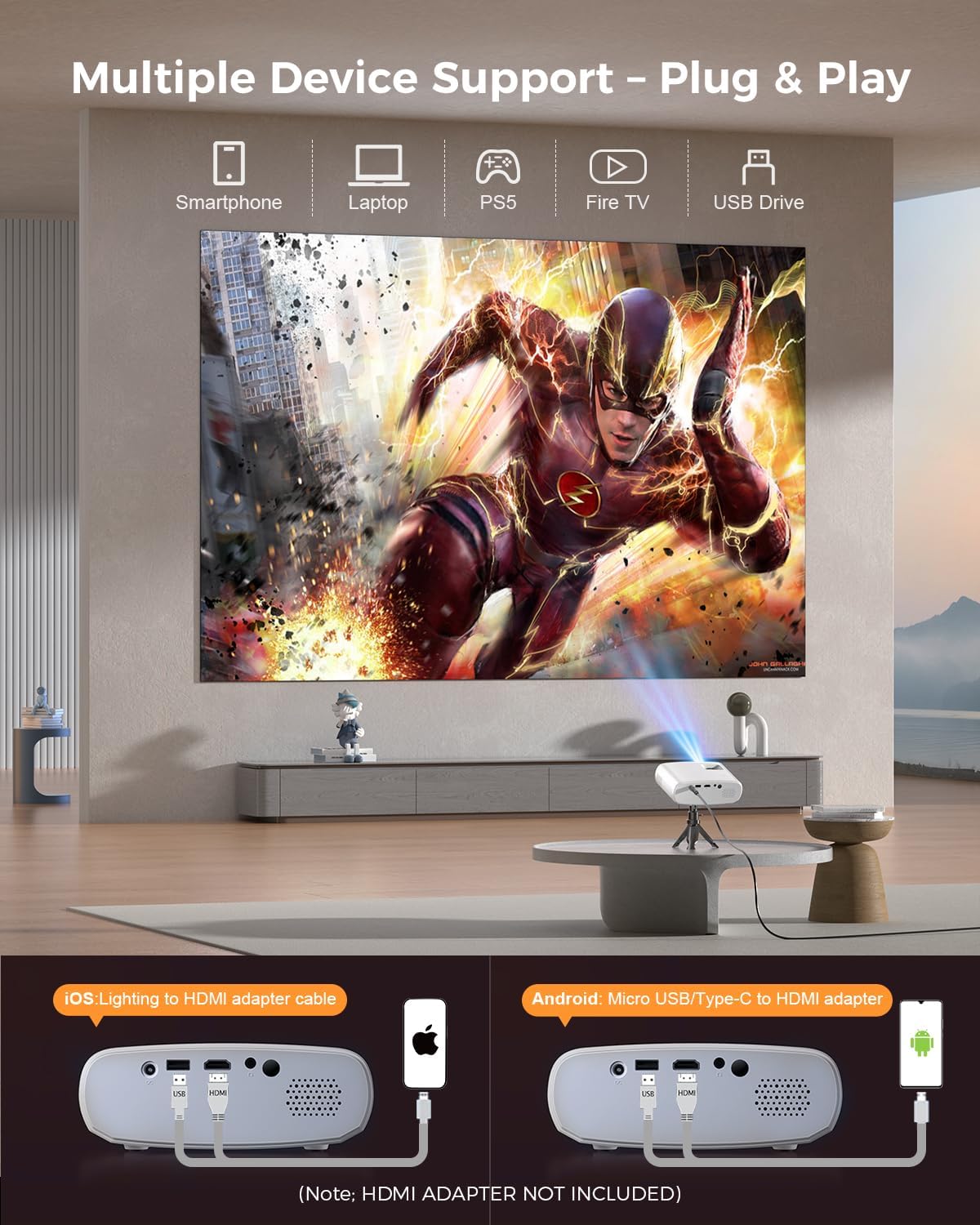
Image 5.4: The projector supports multiple devices via HDMI and USB. Note that an HDMI adapter is required for direct smartphone connection (not included).
5.5 ສຽງອອກ
The projector has a built-in HIFI speaker. For external audio, connect headphones or external speakers to the Audio Out port.
6. ບໍາລຸງຮັກສາ
6.1 ການທໍາຄວາມສະອາດ
- ເລນ: Use a soft, lint-free cloth or lens cleaning paper. Avoid abrasive materials.
- Casing: ເຊັດໂປເຈັກເຕີ ຄasing with a soft, dry cloth. Do not use liquid cleaners or solvents.
- ການລະບາຍອາກາດ: ໃຫ້ແນ່ໃຈວ່າຊ່ອງລະບາຍອາກາດມີຄວາມຊັດເຈນຂອງຝຸ່ນແລະສິ່ງກີດຂວາງເພື່ອປ້ອງກັນຄວາມຮ້ອນເກີນ.
6.2 ການເກັບຮັກສາ
When not in use, store the projector in a cool, dry place, away from direct sunlight and extreme temperatures. Use the original packaging or a protective bag to prevent dust accumulation.
7. ການແກ້ໄຂບັນຫາ
| ບັນຫາ | ສາເຫດທີ່ເປັນໄປໄດ້ | ການແກ້ໄຂ |
|---|---|---|
| ບໍ່ມີຮູບທີ່ຄາດໄວ້ | Power cable loose; Incorrect input source; Device not connected properly. | Check power connection; Select correct input source; Reconnect HDMI/USB cable. |
| ຮູບພາບມົວ | ຈຸດສຸມບໍ່ໄດ້ປັບ; ໂປເຈັກເຕີໃກ້/ໄກຈາກໜ້າຈໍເກີນໄປ. | ປັບວົງແຫວນໂຟກັສ; ປັບໄລຍະຫ່າງການສາຍພາບ. |
| ບໍ່ມີສຽງ | ລະດັບສຽງຕໍ່າເກີນໄປ; ປິດສຽງແລ້ວ; ບໍ່ໄດ້ເຊື່ອມຕໍ່ອຸປະກອນສຽງພາຍນອກ. | ເພີ່ມປະລິມານ; ເປີດສຽງ; ກວດເບິ່ງການເຊື່ອມຕໍ່ສຽງພາຍນອກ. |
| ການຄວບຄຸມໄລຍະໄກບໍ່ເຮັດວຽກ | ແບັດເຕີຣີຕໍ່າ/ໝົດ; ມີສິ່ງກີດຂວາງລະຫວ່າງຣີໂໝດ ແລະ ໂປເຈັກເຕີ. | ປ່ຽນແບັດເຕີຣີ; ໃຫ້ແນ່ໃຈວ່າສາຍຕາຂອງເຄື່ອງຮັບ IR ຢູ່ໃນແນວຕັ້ງຢ່າງຊັດເຈນ. |
| Cannot play Netflix/Hulu/Prime Video | HDCP copyright protection. | Use an external streaming device like Amazon Fire Stick or Roku Stick (not included). |
8. ຂໍ້ມູນຈໍາເພາະ
| ຄຸນສົມບັດ | ລາຍລະອຽດ |
|---|---|
| ຕົວແບບ | BL128MINI |
| ຍີ່ຫໍ້ | ELEPHAS |
| ຄວາມລະອຽດການສະແດງ | 1920 x 1080 (1080P Full HD) |
| ເຕັກໂນໂລຊີການເຊື່ອມຕໍ່ | HDMI, USB, AV, Audio Out |
| ຄຸນນະສົມບັດພິເສດ | HDMI Connectivity, Portable, Built-in Speakers, Detachable Tripod |
| ການນໍາໃຊ້ທີ່ແນະນໍາ | ພາຍໃນ/ນອກ |
| ນ້ໍາຫນັກລາຍການ | 1.96 ປອນ (ປະມານ 0.89 ກິໂລ) |
| ຂະໜາດສິນຄ້າ | 6 x 4.4 x 2.4 ນິ້ວ (ປະມານ 15.2 x 11.2 x 6.1 ຊມ) |
9. ການຮັບປະກັນແລະການສະຫນັບສະຫນູນ
ELEPHAS projectors are certified with CE, FCC, and RoHS standards.
- Factory Support: We provide 3-years factory support for this product.
- ສະຫນັບສະຫນູນດ້ານວິຊາການ: ການຊ່ວຍເຫຼືອດ້ານວິຊາການຕະຫຼອດຊີວິດແມ່ນມີຢູ່.
- ບໍລິການລູກຄ້າ: 24/7 professional service is provided.
- ຜົນຕອບແທນ: A 30-day return or exchange policy is in place.
For further assistance, please refer to the contact information provided on the product packaging or the official ELEPHAS webເວັບໄຊ.

Image 9.1: ELEPHAS offers comprehensive customer support, including 24/7 professional service, a 30-day return policy, and lifetime technical support.


