1. ບົດແນະນຳ
The Honeywell Xenon 1902GSR is a high-performance wireless handheld barcode scanner designed for efficient and reliable data capture. This device utilizes advanced area-imaging technology to read both 1D and 2D barcodes, including those that are damaged, smudged, or displayed on digital screens. With Bluetooth connectivity, it offers cordless operation, enhancing mobility and reducing workspace clutter. This manual provides essential information for the proper setup, operation, and maintenance of your barcode reader.
2. ຂໍ້ມູນຄວາມປອດໄພ
- Do not expose the device to extreme temperatures, moisture, or corrosive substances.
- Avoid direct eye exposure to the scanner's light source.
- Use only manufacturer-approved accessories and power adapters.
- ຢ່າພະຍາຍາມຖອດປະກອບ ຫຼືສ້ອມແປງອຸປະກອນດ້ວຍຕົນເອງ. ອ້າງອີງເຖິງພະນັກງານບໍລິການທີ່ມີຄຸນວຸດທິ.
- ຖິ້ມແບດເຕີລີ່ຕາມກົດລະບຽບທ້ອງຖິ່ນ.
3. ເນື້ອໃນຊຸດ
ກວດສອບວ່າລາຍການທັງຫມົດແມ່ນມີຢູ່ໃນຊຸດຂອງທ່ານ:
- Honeywell Xenon 1902GSR Barcode Reader
- Communication/Charging Cradle (CCB01-010BT)
- ສາຍ USB
- ຄູ່ມືເລີ່ມຕົ້ນດ່ວນ (ຄູ່ມືນີ້)
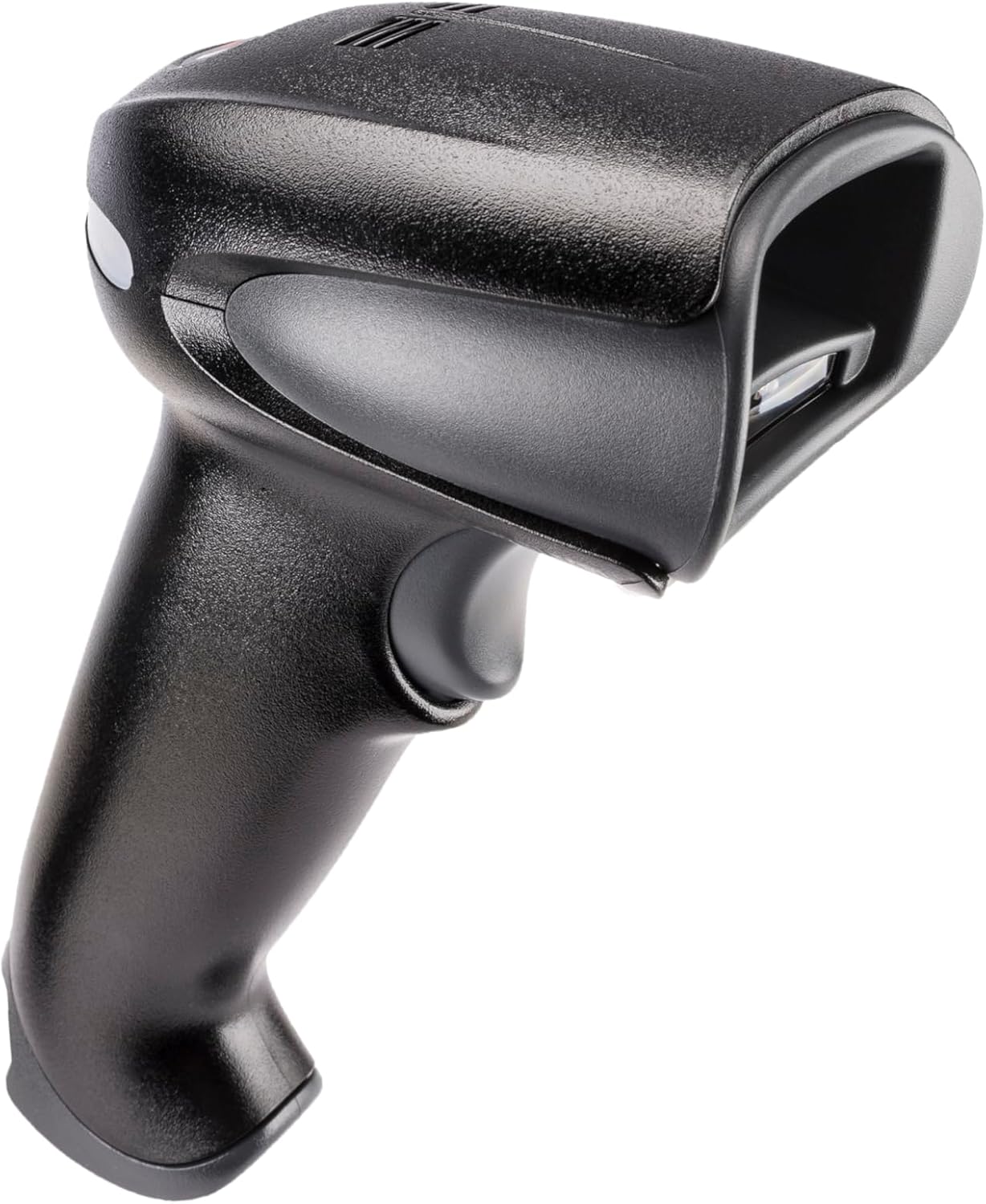
Figure 1: Honeywell Xenon 1902GSR Barcode Reader (Handheld Unit)

Figure 2: Honeywell Xenon 1902GSR Barcode Reader with its Communication/Charging Cradle
4. ການຕິດຕັ້ງແລະການຕິດຕັ້ງ
4.1 ການສາກແບັດເຕີຣີ
- Connect the USB cable to the communication/charging cradle.
- ສຽບປາຍອີກດ້ານໜຶ່ງຂອງສາຍ USB ເຂົ້າກັບພອດ USB ທີ່ມີພະລັງງານຢູ່ໃນຄອມພິວເຕີຂອງທ່ານ ຫຼື ອະແດບເຕີຕິດຝາ USB.
- Place the barcode reader into the cradle. Ensure it is seated correctly.
- The scanner's indicator light will show charging status. Allow several hours for a full charge before first use.
4.2 Connecting the Cradle to a Host System
The cradle connects to your host system (e.g., computer, POS terminal) via the supplied USB cable.
- Ensure the host system is powered on.
- Connect the USB cable from the cradle to an available USB port on your host system.
- The system should automatically detect and install the necessary drivers. If not, refer to the Honeywell support webເວັບໄຊທ໌ສໍາລັບການດາວໂຫຼດໄດເວີ.
4.3 Pairing the Scanner with the Cradle
The scanner and cradle are typically pre-paired at the factory. If re-pairing is necessary:
- ໃຫ້ແນ່ໃຈວ່າເຄື່ອງສະແກນໄດ້ສາກໄຟ ແລະ ເປີດຢູ່.
- Scan the "Link" barcode found on the bottom of the communication/charging cradle.
- The scanner will emit a series of beeps to indicate successful pairing.
5. ຄໍາແນະນໍາການດໍາເນີນງານ
5.1 ການສະແກນພື້ນຖານ
- Hold the scanner with the scan window facing the barcode.
- ກົດປຸ່ມ trigger ຄ້າງໄວ້. ຈະມີລໍາຕັ້ງເປົ້າຫມາຍຈະປາກົດຂຶ້ນ.
- ວາງລຳແນມໃສ່ທາງກາງຂອງບາໂຄດ.
- Once the barcode is successfully read, the scanner will emit a beep and the indicator light will flash green.
- ປ່ອຍຕົວກະຕຸ້ນ.
5.2 Reading 1D and 2D Barcodes
The Xenon 1902GSR is capable of reading a wide variety of 1D (e.g., UPC/EAN, Code 39) and 2D (e.g., QR Code, Data Matrix, PDF417) barcodes. For optimal performance, ensure the barcode is well-lit and the scanner is held at an appropriate distance.
5.3 ລະດັບ Bluetooth
The scanner operates wirelessly up to 33 feet (10 meters) from its communication cradle. Performance may vary depending on environmental factors and obstacles.
6. ບໍາລຸງຮັກສາ
6.1 ການທໍາຄວາມສະອາດອຸປະກອນ
- ໃຊ້ຜ້າສະອາດ ງampened with water or a mild cleaning solution to wipe the exterior of the scanner and cradle.
- ຢ່າໃຊ້ເຄື່ອງເຮັດຄວາມສະອາດຂັດ, ສານລະລາຍ, ຫຼືສານເຄມີທີ່ຮຸນແຮງ.
- Keep the scan window clean and free of dust and smudges for optimal reading performance.
6.2 ການດູແລຫມໍ້ໄຟ
- For best battery life, avoid fully discharging the battery frequently.
- ເກັບຮັກສາອຸປະກອນໄວ້ໃນບ່ອນທີ່ເຢັນ, ແຫ້ງ, ເມື່ອບໍ່ໄດ້ໃຊ້ເປັນເວລາດົນນານ.
- If the battery performance significantly degrades, it may need replacement. Contact Honeywell support for authorized battery replacement options.
7. ການແກ້ໄຂບັນຫາ
| ບັນຫາ | ສາເຫດທີ່ເປັນໄປໄດ້ | ການແກ້ໄຂ |
|---|---|---|
| ເຄື່ອງສະແກນບໍ່ໄດ້ເປີດ | ແບັດເຕີຣີເຫຼືອໜ້ອຍ ຫຼືໝົດແລ້ວ | Place scanner in cradle to charge. Ensure cradle is powered. |
| ເຄື່ອງສະແກນບໍ່ອ່ານບາໂຄດ | Barcode damaged/poor quality; improper scanning technique; dirty scan window | Try scanning a different barcode. Adjust distance/angle. Clean scan window. |
| No data transmitted to host | Scanner not paired; USB cable disconnected; incorrect host interface settings | Re-pair scanner with cradle. Check USB cable connection. Verify host system settings. |
| ການເຊື່ອມຕໍ່ແບບບໍ່ຢຸດຢັ້ງ | Out of range; interference | Move scanner closer to cradle. Reduce sources of interference (e.g., other Bluetooth devices, Wi-Fi routers). |
8. ຂໍ້ມູນຈໍາເພາະ
| ຄຸນສົມບັດ | ລາຍລະອຽດ |
|---|---|
| ຕົວແບບ | 1902GSR |
| ການເຊື່ອມຕໍ່ | Bluetooth Class 2, v2.1 EDR; USB (via cradle) |
| ສະແກນຮູບແບບ | ຮູບພາບພື້ນທີ່ (ອາເຣ 838 x 640 ພິກເຊວ) |
| ຖອດລະຫັດຄວາມສາມາດ | 1D, 2D, PDF417 |
| Range ໄຮ້ສາຍ | ສາຍຕາຍາວເຖິງ 33 ຟຸດ (10 ແມັດ). |
| ແບັດເຕີຣີ | Lithium-Ion, 1800 mAh (minimum) |
| ຂະໜາດ (ເຄື່ອງສະແກນ) | 4 x 6 x 3 ນິ້ວ (ໂດຍປະມານ) |
| Weight (Scanner) | 1 ປອນ (ປະມານ) |
| ອຸນຫະພູມປະຕິບັດການ | 0°C ຫາ 50°C (32°F ຫາ 122°F) |
9. ການຮັບປະກັນແລະການສະຫນັບສະຫນູນ
Honeywell products are designed for reliability and performance. For specific warranty details, please refer to the warranty card included with your product or visit the official Honeywell website. For technical support, driver downloads, or service inquiries, please visit www.honeywell.com/us/en/support or contact your local Honeywell representative.
ASIN: B0G1PTY418
ວັນທີທໍາອິດທີ່ມີ: ວັນທີ 10 ພະຈິກ 2025