1. ບົດແນະນຳ
The Havit MS966SE is a high-performance tri-mode gaming mouse designed for versatility, precision, and comfort. It features a PixArt PMW3325 optical sensor, offering exceptional tracking accuracy and adjustable DPI settings up to 10,000. With its tri-mode connectivity, you can seamlessly switch between 2.4GHz wireless, Bluetooth 5.3, and USB-C wired modes to suit your gaming or work environment. The lightweight and ergonomic design ensures comfortable use during extended sessions, complemented by dynamic RGB lighting for a personalized aesthetic.

Figure 1: Havit MS966SE Gaming Mouse with USB-C cable.
2. ຕັ້ງຄ່າ
2.1 ການຫຸ້ມຫໍ່
Carefully remove the mouse and all accessories from the packaging. Ensure all components are present:
- Havit MS966SE Gaming Mouse
- ສາຍ USB-C ຫາ USB-A
- ເຄື່ອງຮັບ USB 2.4GHz
- ຄູ່ມືຜູ້ໃຊ້ (ເອກະສານນີ້)
2.2 ການເຊື່ອມຕໍ່ຫນູ
The MS966SE offers three connectivity options:
2.2.1 2.4GHz ໂໝດໄຮ້ສາຍ
- Insert the 2.4GHz USB receiver into an available USB-A port on your computer.
- Locate the mode switch on the bottom of the mouse and slide it to the 2.4ກ ຕໍາແຫນ່ງ.
- ເມົ້າຈະເຊື່ອມຕໍ່ກັບຄອມພິວເຕີຂອງທ່ານໂດຍອັດຕະໂນມັດ.
ໂໝດ Bluetooth 2.2.2
- Locate the mode switch on the bottom of the mouse and slide it to the BT ຕໍາແຫນ່ງ.
- On your computer or mobile device, open Bluetooth settings and search for new devices.
- Select "Havit MS966SE" from the list of available devices to pair.
2.2.3 ໂໝດສາຍ USB-C
- Connect one end of the provided USB-C cable to the mouse and the other end to an available USB-A port on your computer.
- ເມົ້າຈະປ່ຽນເປັນໂໝດໃຊ້ສາຍໂດຍອັດຕະໂນມັດ ແລະ ເລີ່ມສາກໄຟ.
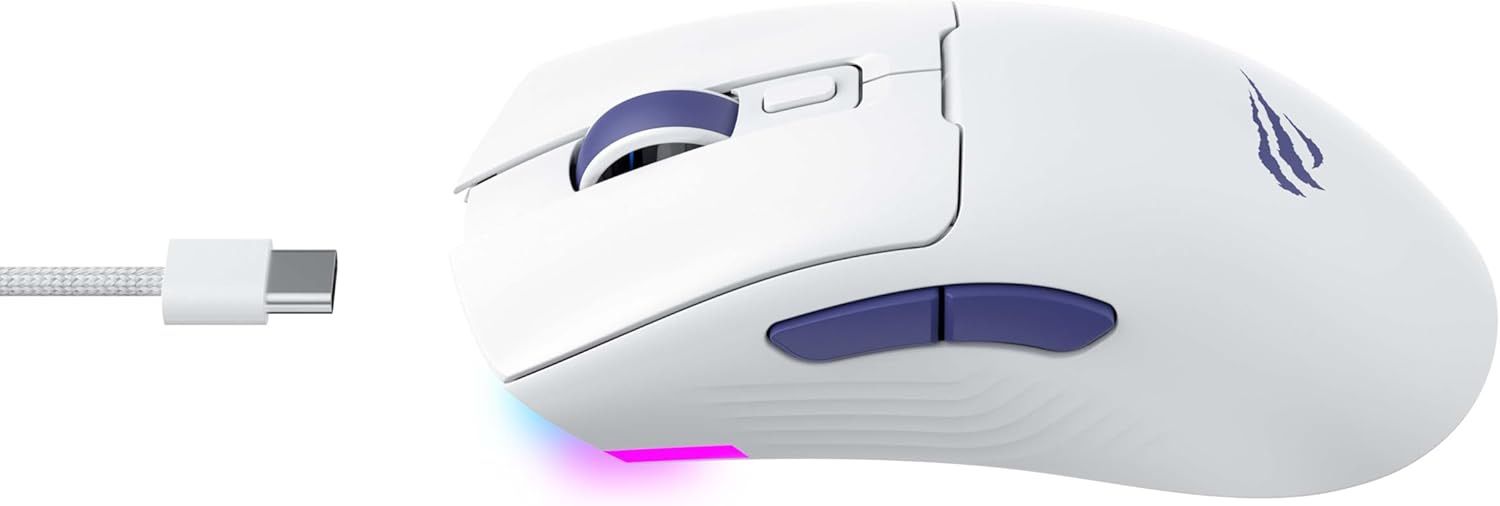
ຮູບ 2: ຂ້າງ view of the mouse, highlighting the USB-C port.
2.3 ການສາກໄຟຂອງຫນູ
To charge the mouse, connect it to your computer using the USB-C cable. The mouse can be used in wired mode while charging. An indicator light on the mouse will show the charging status (refer to the manufacturer's website or product packaging for specific light behaviors).
3. ຄໍາແນະນໍາການດໍາເນີນງານ
3.1 ການທໍາງານຂອງປຸ່ມ
The Havit MS966SE features several programmable buttons for enhanced control:
- ປຸ່ມກົດຊ້າຍ: ຟັງຊັນການຄລິກຫຼັກມາດຕະຖານ.
- ປຸ່ມກົດຂວາ: ຟັງຊັນການຄລິກຂັ້ນສອງມາດຕະຖານ.
- ລໍ້ເລື່ອນ: ເລື່ອນຂຶ້ນ/ລົງ, ແລະເຮັດໜ້າທີ່ເປັນປຸ່ມຄລິກກາງ.
- ປຸ່ມວົງຈອນ DPI: Located behind the scroll wheel, this button cycles through preset DPI sensitivity levels.
- ປຸ່ມດ້ານຂ້າງ (ໄປໜ້າ/ຖອຍຫຼັງ): ປົກກະຕິແລ້ວໃຊ້ສໍາລັບການນໍາທາງໃນ web browsers or can be programmed for in-game actions.

Figure 3: Side buttons and ergonomic design.
3.2 ການປັບ DPI
The PixArt PMW3325 sensor allows for adjustable DPI settings up to 10,000. Press the DPI cycle button (located behind the scroll wheel) to switch between different sensitivity levels. Each press will cycle to the next preset DPI, allowing you to quickly adapt to various tasks or game scenarios.
3.3 Connectivity Mode Switching
To switch between 2.4GHz wireless, Bluetooth, and wired modes, use the physical switch located on the bottom of the mouse. Ensure the correct mode is selected based on your connection preference.
3.4 ແສງ RGB
The mouse features dynamic RGB lighting. Specific controls for RGB lighting effects, colors, and brightness may be available through dedicated software provided by Havit. Please visit the official Havit website for software downloads and further customization options.
4. ບໍາລຸງຮັກສາ
4.1 ການທໍາຄວາມສະອາດ
- ຕັດການເຊື່ອມຕໍ່ຫນູຈາກຄອມພິວເຕີຂອງທ່ານກ່ອນທີ່ຈະທໍາຄວາມສະອາດ.
- ໃຊ້ຜ້າອ່ອນ, ແຫ້ງ, ແລະ ບໍ່ມີຂົນເພື່ອເຊັດໜ້າຜິວຂອງໜູ.
- ສໍາລັບຝຸ່ນ stubborn, ເລັກນ້ອຍ dampen ຜ້າດ້ວຍນ້ໍາຫຼືການແກ້ໄຂການທໍາຄວາມສະອາດອ່ອນໆ. ຫຼີກເວັ້ນການສານເຄມີທີ່ຮຸນແຮງ.
- Use a cotton swab or compressed air to clean around buttons and the scroll wheel.
- Do not immerse the mouse in water or any liquid.
4.2 ການເກັບຮັກສາ
When not in use for extended periods, store the mouse in a cool, dry place away from direct sunlight and extreme temperatures. If storing for a long time, ensure the mouse is fully charged to maintain battery health.
5. ການແກ້ໄຂບັນຫາ
5.1 ເມົາສ໌ບໍ່ຕອບສະໜອງ
- ກວດສອບພະລັງງານ: Ensure the mouse is turned on and has sufficient battery charge.
- ກວດສອບການເຊື່ອມຕໍ່:
- ແບບມີສາຍ: Ensure the USB-C cable is securely connected to both the mouse and the computer. Try a different USB port.
- 2.4GHz Wireless: Ensure the USB receiver is properly inserted and the mouse is set to 2.4G mode. Try a different USB port for the receiver.
- ແບບບູທູດ: Ensure Bluetooth is enabled on your device and the mouse is paired. Try unpairing and re-pairing the mouse.
- ຣີສະຕາດ: ເປີດຄອມພິວເຕີ ແລະ ເມົ້າຂອງທ່ານຄືນໃໝ່.
5.2 DPI ບໍ່ປ່ຽນແປງ
- Ensure you are pressing the correct DPI cycle button.
- If using custom software, check the DPI settings within the software.
5.3 Lag or Disconnections in Wireless Mode
- ແຊກແຊງ: Move the mouse closer to the receiver/device. Avoid obstacles between the mouse and receiver.
- ລະດັບຫມໍ້ໄຟ: ແບັດເຕີຣີຕໍ່າສາມາດສົ່ງຜົນກະທົບຕໍ່ປະສິດທິພາບໄຮ້ສາຍ. ສາກເມົ້າສ໌.
- ພອດ USB: Try connecting the 2.4GHz receiver to a different USB port, preferably a USB 2.0 port if available, as some USB 3.0 ports can cause interference.
6. ຂໍ້ມູນຈໍາເພາະ
| ຍີ່ຫໍ້ | ຮາວິດ |
| ຕົວແບບ | MS966SE |
| ເຕັກໂນໂລຊີການເຊື່ອມຕໍ່ | Tri-Mode: 2.4GHz Wireless, Bluetooth 5.3, USB-C Wired |
| ເຕັກໂນໂລຢີເຊັນເຊີ | ອອບຕິກ (PixArt PMW3325) |
| ລະດັບ DPI | Up to 10,000 adjustable DPI |
| ຄຸນນະສົມບັດພິເສດ | Ergonomic Design, Dynamic RGB Lighting |
| ລະບົບປະຕິບັດການທີ່ເຂົ້າກັນໄດ້ | Windows, macOS, Linux |
| ອຸປະກອນທີ່ເຂົ້າກັນໄດ້ | Notebook, Personal Computer, Tablet, Smartphone |
| ນ້ຳໜັກຫນູ | ປະມານ 68 ກຣາມ |
| ປະເພດຫມໍ້ໄຟ | ລິດທຽມ-ໄອອອນ |
7. ການຮັບປະກັນແລະການສະຫນັບສະຫນູນ
7.1 ຂໍ້ມູນການຮັບປະກັນ
This Havit MS966SE Gaming Mouse comes with a 1 ປີຮັບປະກັນຜູ້ຜະລິດ. ກະລຸນາຮັກສາຫຼັກຖານການຊື້ຂອງທ່ານສໍາລັບການຮຽກຮ້ອງການຮັບປະກັນ. ການຮັບປະກັນກວມເອົາຂໍ້ບົກພ່ອງຂອງວັດສະດຸແລະການເຮັດວຽກພາຍໃຕ້ການນໍາໃຊ້ປົກກະຕິ.
7.2 ສະຫນັບສະຫນູນລູກຄ້າ
For technical assistance, troubleshooting beyond this manual, or warranty inquiries, please contact Havit customer service directly. You can find the most up-to-date contact information and support resources on the official Havit webເວັບໄຊ (www.havit.com).