1. ບົດແນະນຳ
ຂອບໃຈສໍາລັບການຊື້asing the ThermoPro TP210B Wireless Refrigerator/Freezer Thermometer. This device is designed to help you monitor the temperature of your refrigerator and freezer wirelessly, ensuring your food is stored at optimal temperatures. With a strong 500ft/150m wireless range and customizable alarms, you can easily keep track of temperature fluctuations.
2. ເນື້ອໃນຊຸດ
- 1 x ຫນ່ວຍຮັບ
- 1 x ຫນ່ວຍສົ່ງສັນຍານ
- ແບັດເຕີຣີ AAA 2 ກ້ອນ (ສຳລັບຕົວຮັບ)
- 1 x USB Charging Cable (for Transmitter)
- 1 x ຄູ່ມືຜູ້ໃຊ້
3. ຄຸນນະສົມບັດທີ່ສໍາຄັນ
- ຂະຫຍາຍໄລຍະໄຮ້ສາຍ: Up to 500ft/150m using advanced RF technology for stable connection.
- ຈັບຄູ່ລ່ວງໜ້າສຳລັບການນຳໃຊ້ທັນທີ: No complex setup required; units are pre-paired from the factory.
- ຂອບເຂດການວັດແທກກວ້າງ: Accurate readings within ±0.9°F across -40°F to 158°F (-40°C to 70°C).
- ການແຈ້ງເຕືອນອຸນຫະພູມອັດສະລິຍະ: Customizable high/low temperature limits with audio-visual alarms.
- Easy-to-Read Backlit Display: Shows fridge and freezer readings, Max/Min records, and low-battery status.
- Considerate Power Design: Receiver uses AAA batteries, transmitter features a rechargeable lithium battery.
- ຕົວເລືອກການຈັດວາງແບບຍືດຫຍຸ່ນ: Receiver has hook, stand, or magnet; transmitter has clip or stand.
4. ຕັ້ງຄ່າ
4.1. Receiver Battery Installation
- ເປີດຊ່ອງໃສ່ຫມໍ້ໄຟຢູ່ດ້ານຫຼັງຂອງຫນ່ວຍຮັບ.
- ໃສ່ໝໍ້ໄຟ AAA 2 ອັນ, ຮັບປະກັນການຂົ້ວທີ່ຖືກຕ້ອງ (+/-).
- ປິດຊ່ອງໃສ່ຫມໍ້ໄຟຢ່າງປອດໄພ.
Note: The receiver requires 2 AAA batteries, which are included in the package.
4.2. Transmitter Charging
- Locate the charging port on the transmitter unit.
- Connect the provided USB charging cable to the transmitter and a standard USB power source (e.g., wall adapter, computer USB port).
- Allow the transmitter to charge fully before first use. The charging indicator will change when fully charged.
Note: The transmitter uses a rechargeable lithium battery designed for low-temperature environments.
4.3. Initial Pairing (Pre-Paired)
The ThermoPro TP210B units are pre-paired at the factory. Simply power on both the receiver and transmitter, and they should automatically connect. If connection issues occur, refer to the Troubleshooting section.
4.4. ບັນຈຸເຂົ້າຮຽນ
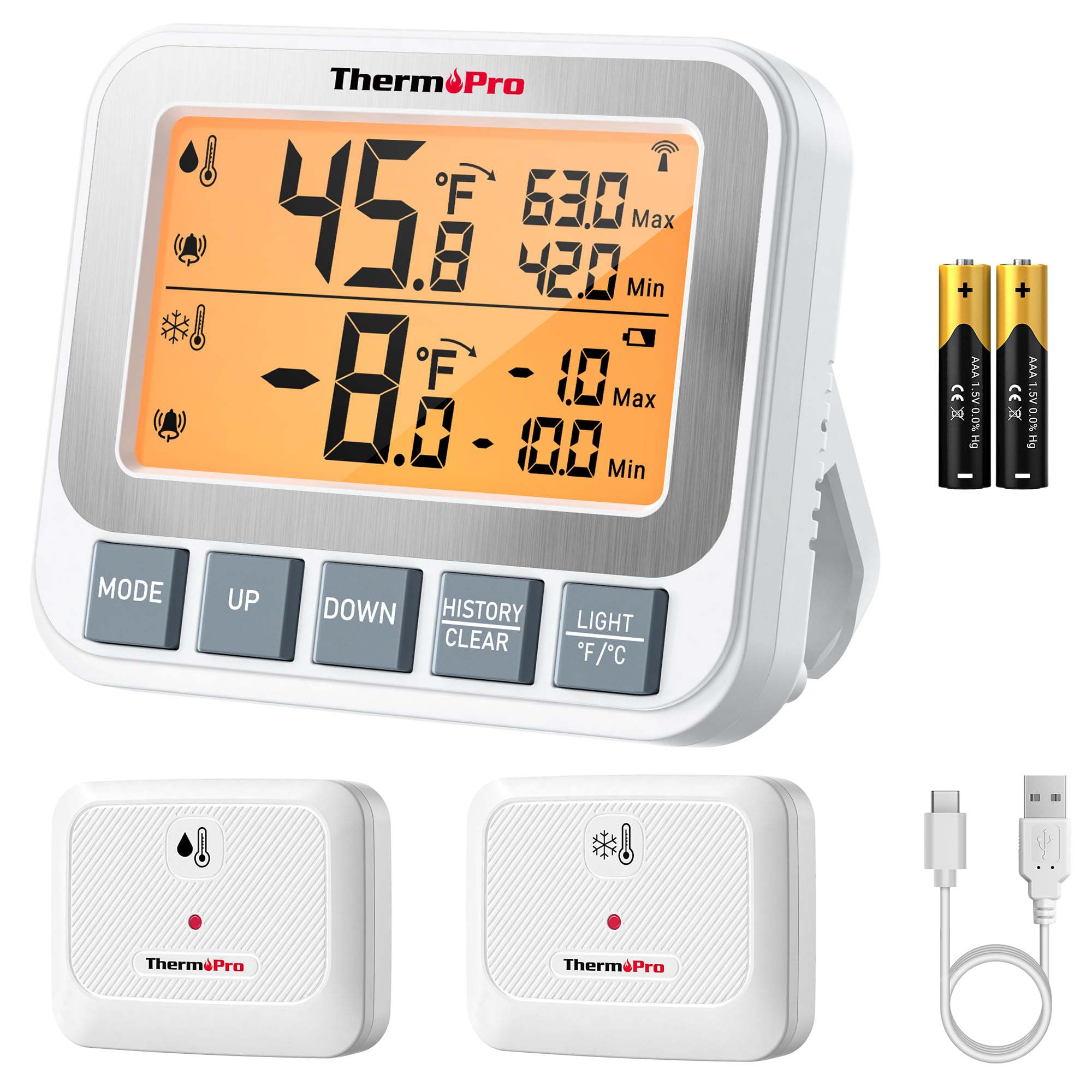
Image: ThermoPro TP210B Receiver and Transmitter. The receiver displays temperatures, while the transmitter sends data from inside the appliance.
ຕຳແໜ່ງຜູ້ຮັບ:
- Use the integrated stand to place it on a countertop.
- Utilize the magnetic back to attach it to a metallic surface.
- Hang it using the hook on the back.
- Place the receiver in a location where you can easily view the display and hear alarms, within the 500ft/150m range of the transmitter.
ການຈັດວາງເຄື່ອງສົ່ງ:
- Place the transmitter inside your refrigerator or freezer.
- Use the integrated clip to attach it to a shelf or rack.
- Ensure the transmitter is not obstructed by large items that could block the wireless signal.
5. ຄໍາແນະນໍາການດໍາເນີນງານ
5.1. ເປີດ/ປິດ
- ກົດ ພະລັງງານ button on both the receiver and transmitter to turn them on or off.
5.2. Reading Temperatures
- The receiver's backlit LCD display will show the current temperature from the transmitter.
- The display typically shows both the current temperature and the all-time Max/Min records.
5.3. Setting Temperature Alarms
The TP210B allows you to set custom high and low temperature limits for alerts.
- ກົດ ແຈ້ງເຕືອນ button on the receiver. The high limit will flash.
- ໃຊ້ UP or ລົງ buttons to adjust the high temperature limit.
- ກົດ ແຈ້ງເຕືອນ again to confirm the high limit and move to the low limit setting.
- ໃຊ້ UP or ລົງ buttons to adjust the low temperature limit.
- ກົດ ແຈ້ງເຕືອນ a third time to confirm the low limit and exit alarm setting mode.
When the temperature exceeds the set range, the receiver will emit an audio-visual alarm.
5.4. Max/Min Temperature Records
- The receiver automatically records the maximum and minimum temperatures detected since the last reset.
- ກົດ MAX/MIN button to cycle through current, maximum, and minimum temperature readings.
- To reset the Max/Min records, press and hold the MAX/MIN ປຸ່ມເປັນເວລາ 3 ວິນາທີ viewing the Max/Min display.
5.5. ແສງຫຼັງ
- The receiver features a bright backlit display for easy reading in low-light conditions.
- The backlight will activate automatically when a button is pressed and will turn off after a short period of inactivity to conserve battery.
6. ບໍາລຸງຮັກສາ
6.1. ທໍາຄວາມສະອາດ
- ເຊັດໜ່ວຍດ້ວຍໂຄສະນາamp ຜ້າ. ຢ່າ immerse ໃນນ້ໍາ.
- ຢ່າໃຊ້ເຄື່ອງເຮັດຄວາມສະອາດຂັດຫຼືສານລະລາຍ.
6.2. ການປ່ຽນແບັດເຕີຣີ (ຕົວຮັບສັນຍານ)
- When the low battery indicator appears on the receiver display, replace the 2 AAA batteries.
- Ensure proper polarity when inserting new batteries.
6.3. Transmitter Charging
- Recharge the transmitter's lithium battery when the low battery indicator appears.
- ໃຊ້ສາຍສາກ USB ທີ່ໃຫ້ມາ.
6.4. ການເກັບຮັກສາ
- If storing the device for an extended period, remove the AAA batteries from the receiver.
- ເກັບຮັກສາໄວ້ໃນບ່ອນແຫ້ງແລ້ງຫ່າງຈາກອຸນຫະພູມສູງສຸດ.
7. ການແກ້ໄຂບັນຫາ
| ບັນຫາ | ສາເຫດທີ່ເປັນໄປໄດ້ | ການແກ້ໄຂ |
|---|---|---|
| No temperature reading / "--" displayed | ເຄື່ອງສົ່ງສັນຍານບໍ່ໄດ້ເປີດ, ຢູ່ນອກໄລຍະ, ຫຼືແບັດເຕີຣີຕໍ່າ. |
|
| ການອ່ານອຸນຫະພູມບໍ່ຖືກຕ້ອງ | Sensor obstruction, extreme environmental conditions, or sensor malfunction. |
|
| ໂມງປຸກບໍ່ດັງ | Alarm limits not set correctly or alarm function disabled. |
|
| Transmitter battery drains quickly | Operating in extremely low temperatures or frequent signal transmission. |
|
8. ຂໍ້ມູນຈໍາເພາະ
- ຊ່ວງອຸນຫະພູມ: -40°F ຫາ 158°F (-40°C ຫາ 70°C)
- ຄວາມຖືກຕ້ອງຂອງອຸນຫະພູມ: ± 0.9 ° F (± 0.5 ° C)
- ຊ່ວງໄຮ້ສາຍ: ສູງເຖິງ 500 ຟຸດ (150 ແມັດ) ໃນອາກາດເປີດ
- ຄວາມຖີ່ຂອງການສົ່ງ: 433 MHz
- ພະລັງງານຜູ້ຮັບ: 2 x ຫມໍ້ໄຟ AAA (ລວມ)
- ພະລັງງານເຄື່ອງສົ່ງ: Rechargeable Lithium battery (included, with USB charging cable)
- ຈໍສະແດງຜົນ: LCD backlit
- ຂະໜາດ (ຕົວຮັບ): ປະມານ 4.33 ນີ້ວ (ຄວາມຍາວ)
- ນ້ຳໜັກ (ລາຍການ): ປະມານ 11.2 ອອນສ໌
9. ການຮັບປະກັນແລະການສະ ໜັບ ສະ ໜູນ
ThermoPro ໃຫ້ການຮັບປະກັນສຳລັບຜະລິດຕະພັນນີ້ຕໍ່ກັບຂໍ້ບົກຜ່ອງດ້ານວັດສະດຸ ແລະ ຝີມືແຮງງານ. ສຳລັບຂໍ້ມູນການຮັບປະກັນລະອຽດ, ການລົງທະບຽນຜະລິດຕະພັນ, ຫຼື ການຊ່ວຍເຫຼືອດ້ານເຕັກນິກ, ກະລຸນາເຂົ້າເບິ່ງ ThermoPro ຢ່າງເປັນທາງການ webເວັບໄຊ ຫຼືຕິດຕໍ່ບໍລິການລູກຄ້າຂອງເຂົາເຈົ້າໂດຍກົງ.
ທາງການ Webເວັບໄຊ: www.thermopro.com
ການຊ່ວຍເຫຼືອລູກຄ້າ: Refer to the contact information provided on the ThermoPro webສະຖານທີ່ຫຼືການຫຸ້ມຫໍ່ຜະລິດຕະພັນ.