1. ບົດແນະນຳ
The GMKtec M7 Ultra Mini PC is a versatile and compact computing device designed for high performance in a small form factor. Equipped with an AMD Ryzen 7 PRO 6850U processor, ample DDR5 RAM, and fast PCIe SSD storage, it is capable of handling demanding tasks such as photo/video editing, gaming, and streaming. Its sleek design allows it to integrate seamlessly into various environments, from home offices to entertainment setups. This manual provides essential information for setting up, operating, and maintaining your M7 Ultra Mini PC.
2. ສິ່ງທີ່ຢູ່ໃນກ່ອງ
Upon unboxing your GMKtec M7 Ultra Mini PC, please ensure all the following items are present:
- GMKtec Nucbox M7 Ultra AMD Ryzen 7 PRO 6850U Mini PC Computer
- Power Supply & Cable
- ສາຍ HDMI
- VESA Mount and Screws
- ຄູ່ມືຜູ້ໃຊ້

3. ຜະລິດຕະພັນເກີນview
The GMKtec M7 Ultra Mini PC is engineered for high performance in a compact design. It features an AMD Ryzen 7 PRO 6850U processor with 8 cores and 16 threads, capable of boosting up to 4.7 GHz. Integrated AMD Radeon 680M graphics provide robust visual performance, suitable for demanding applications and gaming with FSR 3.0+ technology support.


4. ພອດແລະການເຊື່ອມຕໍ່
The M7 Ultra offers extensive connectivity options for various peripherals and displays.
4.1 ພອດດ້ານໜ້າ
- Oculink Port: For high-bandwidth external GPU connections (PCIe 4.0 x4).
- USB4 ພອດ: Supports USB-C video output, power delivery, and data transfer.
- USB 3.2 (Gen2) Ports (x2): For high-speed peripheral connections.
- 3.5mm Audio Jack (CTIA): For headphones or microphones.
- ປຸ່ມເປີດປິດ: ເພື່ອເປີດ / ປິດອຸປະກອນ.
4.2 ພອດຫລັງ
- USB2.0 Ports (x2): ສໍາລັບການເຊື່ອມຕໍ່ອຸປະກອນ USB ມາດຕະຖານ.
- ຜອດ HDMI 2.1: Supports up to 8K@60Hz display output.
- DisplayPort 2.0: Supports up to 8K@60Hz display output.
- ພອດ LAN 2.5G (x2): Dual Intel i226V 2.5Gbps Ethernet for high-speed wired network connections.
- USB4 ພອດ: Supports USB-C video output, power delivery, and data transfer.
- Kensington Lock Slot: ສໍາລັບຄວາມປອດໄພທາງດ້ານຮ່າງກາຍ.
- DC IN (19V 6.32A): ການປ້ອນຂໍ້ມູນພະລັງງານ.

4.3 ການເຊື່ອມຕໍ່ໄຮ້ສາຍ
- WiFi 6: For fast and reliable wireless internet access.
- Bluetooth 5.2: For connecting wireless peripherals like keyboards, mice, and audio devices.
5. Display Capabilities
The M7 Ultra supports simultaneous quad-screen display, offering extensive options for multitasking and immersive experiences.
- Dual USB4 USB-C Video output (supports 4K@144Hz).
- HDMI 2.1 port (supports up to 8K@60Hz).
- DisplayPort 2.0 (supports up to 8K@60Hz).

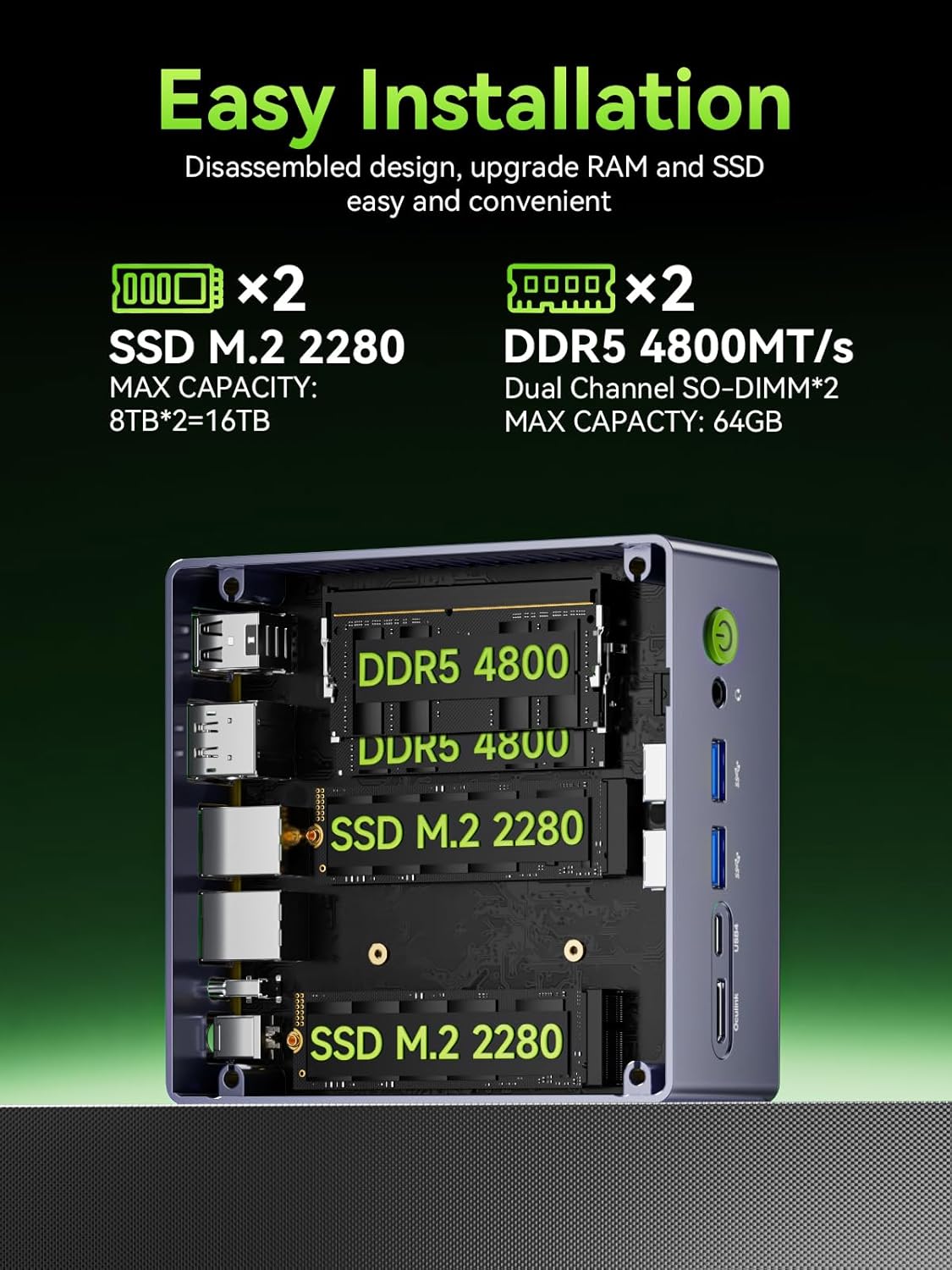
6. ການຂະຫຍາຍພື້ນທີ່ເກັບຂໍ້ມູນ ແລະ RAM
The M7 Ultra is designed for easy upgrades to meet your evolving needs.
- RAM: Comes with 16GB DDR5 4800MHz (Dual Channel 2x8GB) and supports expansion up to 96GB RAM.
- SSD: Features a 1TB M.2 2280 PCIe 3.0 SSD and supports dual slot expansion to 2*PCIe 4.0 2TB SSD, totaling up to 4TB.
7. Oculink Port Usage
The M7 Ultra features an Oculink port, which provides a direct PCIe x4 connection for external GPUs, offering higher bandwidth and lower latency compared to Thunderbolt connections.
- ຜົນປະໂຫຍດ: Enables higher bandwidth capabilities, better frame rates, and lower lag for eGPU setups, beneficial for gamers and content creators.
- ໝາຍເຫດ: Oculink does NOT support hot-plugging. Always power off the PC before connecting/disconnecting devices.

8. ລະບົບເຮັດຄວາມເຢັນ
The M7 Ultra incorporates an upgraded dual cooling fan system, the Hyper Ice Chamber 2.0, designed for efficient heat dissipation and quiet operation.
- Features larger top and bottom cooling fans with 360-degree airflow.
- Copper base helps maintain optimal temperatures.
- Fan noise is reduced to 35dB in Quiet mode.

9. ຄໍາແນະນໍາການດໍາເນີນງານ
9.1 ຮູບແບບການປະຕິບັດ
The M7 Ultra offers three distinct performance modes, configurable via the updated BIOS, to suit different usage scenarios:
- ໂໝດງຽບ: 35W TDP, optimized for silent operation.
- ຮູບແບບການດຸ່ນດ່ຽງ: 50W TDP, offering a balance between performance and noise.
- ໂໝດປະສິດທິພາບ: 65W-70W TDP, for maximum computing power.
9.2 ການຕັ້ງຄ່າ BIOS
The updated BIOS allows for advanced configurations, including VRAM allocation, Auto Power On, and Wake-on-LAN options.
10. ຂໍ້ມູນຈໍາເພາະ
| ຄຸນສົມບັດ | ລາຍລະອຽດ |
|---|---|
| ຍີ່ຫໍ້ | GMKtec |
| ຊຸດ | M7 Ultra |
| ໝາຍເລກຕົວແບບ | M7 Ultra |
| ລະບົບປະຕິບັດການ | 11 Pro |
| ຕົວແບບ CPU | AMD Ryzen 7 |
| ໂຮງງານຜະລິດ | 4.7 GHz amd_ryzen_7 |
| ຈໍານວນຜູ້ປະມວນຜົນ | 8 |
| RAM | DDR5 |
| ຄວາມໄວຄວາມຈໍາ | 4800 MHz |
| ຄວາມອາດສາມາດເກັບຮັກສາຫນ່ວຍຄວາມຈໍາ | 16 GB |
| ຮາດດິດ | 2 TB M.2 2280 PCIE 4.0 NVME SSD DUAL SLOTS |
| ການໂຕ້ຕອບຮາດດິດ | PCIE x 16 |
| ຄວາມໄວການຫມຸນຂອງຮາດດິດ | 7200 RPM |
| Graphics Coprocessor | AMD Radeon 680M |
| ລາຍລະອຽດບັດກາຟິກ | ປະສົມປະສານ |
| ຂະໜາດຂອງບັດກາຟິກ | 16 GB |
| ຄວາມລະອຽດໜ້າຈໍສູງສຸດ | 4096x2160 ພິກເຊລ |
| ປະເພດໄຮ້ສາຍ | 2.4 GHz Radio Frequency, 5 GHz Radio Frequency, 802.11ax, Bluetooth |
| ຈຳນວນຂອງ USB 2.0 Ports | 2 |
| ຈຳນວນຂອງ USB 3.0 Ports | 2 |
| ນ້ໍາຫນັກລາຍການ | 1.39 ປອນ |
| ຂະໜາດແພັກເກັດ | 5.19 x 4.9 x 2.28 ນິ້ວ |
| ສີ | ໂລຫະສີດໍາ |
11. ການຮັບປະກັນແລະການສະຫນັບສະຫນູນ
GMKtec is committed to providing reliable products and customer satisfaction.
- ການຮັບປະກັນ: GMKtec offers a 1-year limited warranty for each mini PC, starting from the date of purchase. This covers all defects due to design and workmanship.
- ສະຫນັບສະຫນູນ: A professional after-sales team is available to assist with any needs or issues you may encounter with your mini PC.


