1. ບົດແນະນຳ
Welcome to the LIGE DM6 Smartwatch user manual. This document provides essential information for the proper setup, operation, and maintenance of your new smartwatch. The LIGE DM6 is designed to enhance your daily life with features such as integrated GPS, a vibrant AMOLED display, Bluetooth calling, extensive sports tracking, and comprehensive health monitoring.
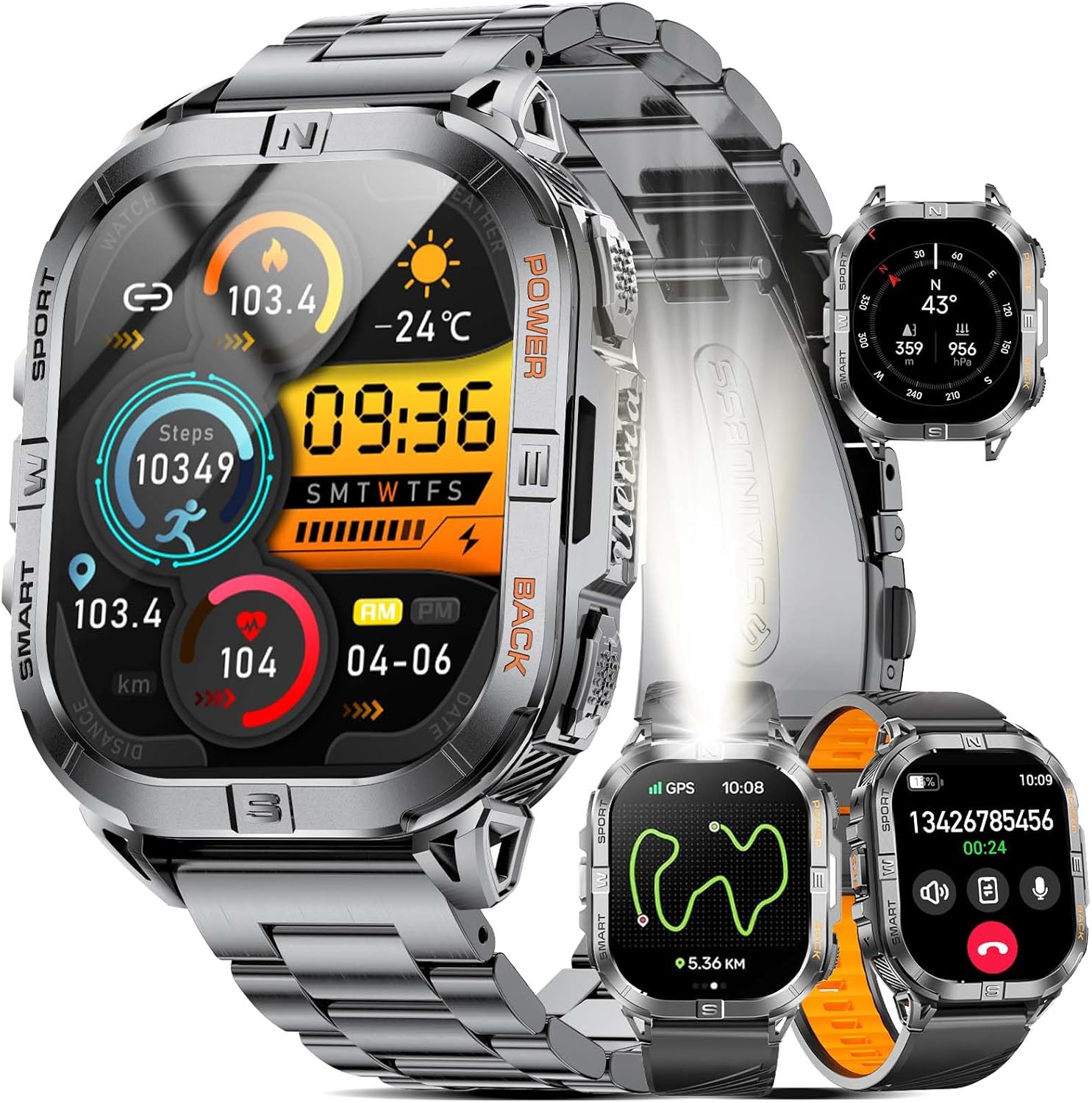
Image 1.1: LIGE DM6 Smartwatch showcasing its design and display capabilities.
2. ຕັ້ງຄ່າ
2.1. Unboxing ແລະອົງປະກອບ
ເມື່ອເປີດຊຸດ, ໃຫ້ແນ່ໃຈວ່າອົງປະກອບຕໍ່ໄປນີ້ມີຢູ່:
- LIGE DM6 Smartwatch
- ສາຍສະແຕນເລດ
- ສາຍຊິລິໂຄນ
- ສາຍສາກ USB
- ສາຍໄຟແບບ Type-C
- Accessory Tools (for strap adjustment)
- ຄູ່ມືຜູ້ໃຊ້
2.2. ການສາກ Smartwatch
Before initial use, fully charge your LIGE DM6 smartwatch. Connect either the USB or Type-C charging cable to the charging port on the back of the watch and to a compatible power source (e.g., computer USB port, wall adapter). A full charge typically takes approximately 2.5 hours.

Image 2.1: Charging the LIGE DM6 Smartwatch using the provided USB and Type-C cables.
2.3. ການຕິດຕັ້ງແອັບ ແລະ ການຈັບຄູ່
To unlock the full potential of your LIGE DM6, download and install the companion application on your smartphone. The app is compatible with iOS 11.0 and above (iOS 13+ for calls) and Android 5.0 and above.
- Scan the QR code in the included manual or search for the app name (usually specified in the manual) in your phone's app store.
- ຕິດຕັ້ງແອັບພລິເຄຊັນ ແລະ ສ້າງບັນຊີຖ້າມີການຖາມ.
- ເປີດໃຊ້ Bluetooth ໃນໂທລະສັບສະຫຼາດຂອງທ່ານ.
- Open the app, navigate to the device pairing section, and follow the on-screen instructions to connect your LIGE DM6 smartwatch.
- Grant all necessary permissions to the app for optimal functionality, including notifications and location services.
3. ຄໍາແນະນໍາການດໍາເນີນງານ
3.1. ການນໍາທາງພື້ນຖານ
The LIGE DM6 features a 2.13-inch AMOLED touchscreen and physical buttons for navigation:
- ໜ້າຈໍສຳຜັດ: ປັດຂຶ້ນ, ລົງ, ຊ້າຍ ຫຼື ຂວາ ເພື່ອເຂົ້າເຖິງເມນູ, ການແຈ້ງເຕືອນ ແລະ ການຕັ້ງຄ່າດ່ວນຕ່າງໆ. ແຕະເພື່ອເລືອກລາຍການ.
- ປຸ່ມທາງດ້ານຮ່າງກາຍ: Typically, one button serves as a power/back button, while others may provide quick access to sports modes or other functions. Refer to the specific button layout in your manual for exact functions.
3.2. Display Features and Watch Faces
The 2.13-inch AMOLED HD display offers a resolution of 410x502 pixels. You can customize your watch face through the companion app or directly on the watch to suit your style and display preferred information.

Image 3.1: Customizable watch faces and app interface on the LIGE DM6 AMOLED display.
3.3. ການໂທ ແລະ ການແຈ້ງເຕືອນຜ່ານ Bluetooth
With Bluetooth 5.3, the LIGE DM6 allows for stable and fast connections, enabling you to make and receive calls directly from your wrist. It also displays smart notifications from your connected smartphone.
- ໂທອອກ: ເຂົ້າເຖິງລາຍຊື່ຜູ້ຕິດຕໍ່ ຫຼື ລາຍຊື່ຜູ້ຕິດຕໍ່ໃນໂມງຂອງທ່ານເພື່ອເລີ່ມການໂທ.
- ຮັບສາຍ: ເມື່ອມີສາຍໂທເຂົ້າ, ທ່ານສາມາດຮັບສາຍ ຫຼື ປະຕິເສດສາຍໄດ້ໂດຍກົງຈາກໜ້າຈໍໂມງ.
- ການແຈ້ງເຕືອນ: Incoming messages and alerts from various applications will be displayed on your watch. Swipe down from the top of the screen to view ປະຫວັດການແຈ້ງເຕືອນຂອງທ່ານ.
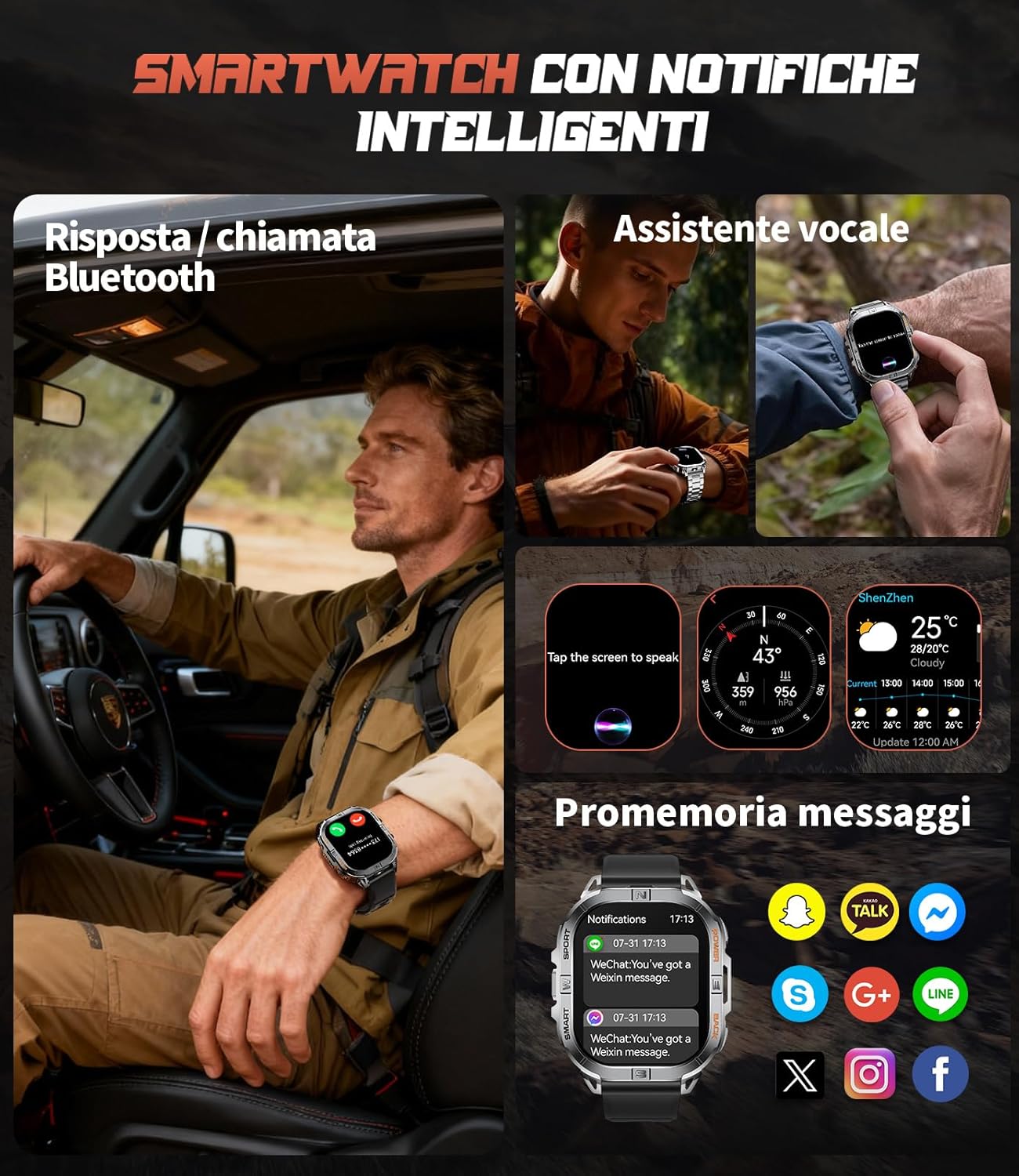
Image 3.2: Bluetooth calling and smart notification features in use.
3.4. GPS and Electronic Compass
The integrated GPS provides accurate positioning for outdoor activities, while the electronic compass helps you maintain direction. These features are particularly useful for trail running, hiking, and other adventures.
- GPS ຕິດຕາມ: When starting an outdoor sport mode, the watch will automatically activate GPS to record your route, distance, and pace.
- ເຂັມທິດ: Access the compass function from the main menu to view your current heading.
- Barometer & Altimeter: The watch also includes a barometer to track atmospheric pressure changes and an altimeter to measure current altitude, providing comprehensive outdoor data.

Image 3.3: GPS tracking and compass functionality for outdoor activities.

Image 3.4: Outdoor assistant features including compass, altimeter, and barometer.
3.5. ໄຟສາຍໄຟ LED
The LIGE DM6 includes a built-in LED flashlight for convenience in low-light conditions. To activate, press and hold the designated button (refer to your specific manual for button assignment) for approximately 3 seconds. This feature is useful during night runs, camping, ຫຼືພະລັງງານ outages.
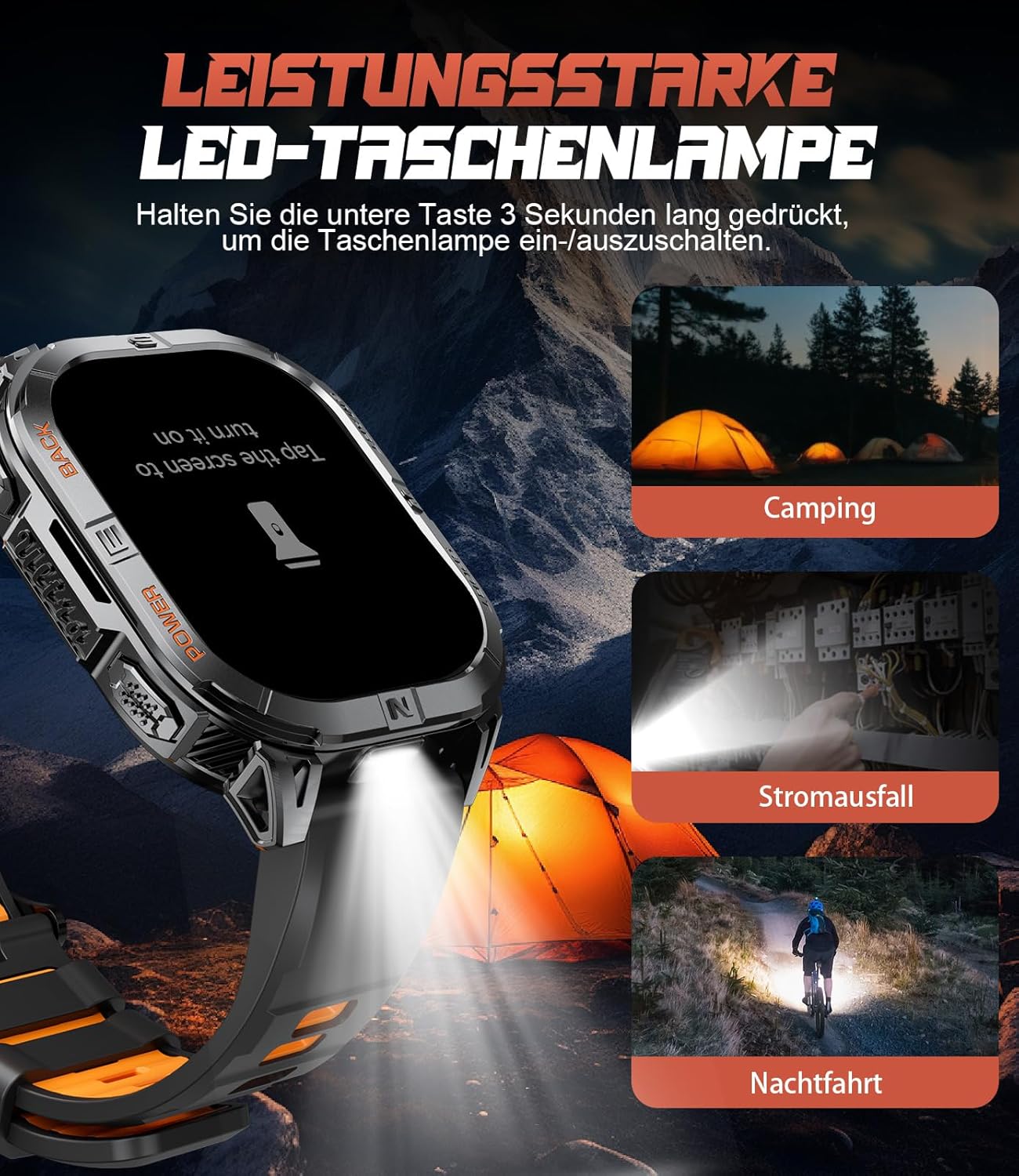
Image 3.5: The integrated LED flashlight in action.
3.6. ຮູບແບບກິລາ
The smartwatch supports over 170 sports modes, allowing you to accurately track various activities. Data such as steps, distance, calories burned, and heart rate are recorded and can be reviewed ໃນແອັບ companion.
- Activating a Sport Mode: Navigate to the sports menu on your watch, select your desired activity, and tap to start.
- ຂໍ້ມູນ Review: After completing an activity, save the data. You can view detailed statistics on the watch or in the companion app.

Image 3.6: Tracking multiple sports activities with the LIGE DM6.
3.7. ການຕິດຕາມສຸຂະພາບ
The LIGE DM6 provides continuous health monitoring features to help you stay informed about your well-being:
- ການກວດສອບອັດຕາການເຕັ້ນຫົວໃຈ: Tracks your heart rate throughout the day and during workouts.
- ການຕິດຕາມການນອນ: ຕິດຕາມກວດກາຮູບແບບການນອນຂອງທ່ານ, ລວມທັງການນອນຫຼັບສະໜິດ, ການນອນຫຼັບເບົາບາງ, ແລະ ເວລາຕື່ນນອນ.
- ການຕິດຕາມຄວາມຄຽດ: ໃຫ້ຄວາມເຂົ້າໃຈກ່ຽວກັບລະດັບຄວາມກົດດັນຂອງທ່ານ.
- ອົກຊີໃນເລືອດ (SpO2): ວັດແທກລະດັບຄວາມອີ່ມຕົວຂອງອົກຊີໃນເລືອດຂອງທ່ານ.
- ເຕືອນປະຈຳຕົວ: ແຈ້ງເຕືອນທ່ານໃຫ້ຍ້າຍຖ້າທ່ານບໍ່ໄດ້ເຄື່ອນໄຫວເປັນເວລາດົນເກີນໄປ.
- Drink Water Reminders: ກະຕຸ້ນໃຫ້ທ່ານດື່ມນໍ້າຢ່າງພຽງພໍ.

Image 3.7: Health and fitness management features of the smartwatch.
4. ບໍາລຸງຮັກສາ
4.1. ກັນນ້ຳ (IP68)
The LIGE DM6 smartwatch is IP68 waterproof, meaning it is resistant to dust and can withstand immersion in water up to 1.5 meters for up to 30 minutes. It is suitable for daily use, hand washing, and light rain. However, it is not recommended for hot showers, saunas, or diving, as steam and high water pressure can compromise the seals.
4.2. ທໍາຄວາມສະອາດ
To keep your smartwatch clean and functioning optimally:
- ເຊັດໜ້າຈໍ ແລະ ຕົວເຄື່ອງດ້ວຍຜ້າອ່ອນໆ.amp, ຜ້າບໍ່ມີ lint.
- Avoid using harsh chemicals, abrasive materials, or strong detergents.
- ເຮັດຄວາມສະອາດການສາກໄຟຢ່າງເປັນປົກກະຕິເພື່ອຮັບປະກັນການສາກໄຟຢ່າງຖືກຕ້ອງ.
4.3. ການດູແລຫມໍ້ໄຟ
ເພື່ອຍືດອາຍຸຂອງຫມໍ້ໄຟ 600mAh ຂອງທ່ານ:
- ຫຼີກເວັ້ນອຸນຫະພູມທີ່ຮຸນແຮງ.
- Do not let the battery completely drain for extended periods.
- ໃຫ້ສາກໄຟໂມງເປັນປະຈຳ, ເຖິງແມ່ນວ່າຈະບໍ່ໄດ້ໃຊ້ຢູ່ຕະຫຼອດເວລາກໍຕາມ.
5. ການແກ້ໄຂບັນຫາ
If you encounter issues with your LIGE DM6 smartwatch, refer to the following common solutions:
| ບັນຫາ | ການແກ້ໄຂທີ່ເປັນໄປໄດ້ |
|---|---|
| ເບິ່ງບໍ່ໄດ້ເປີດ | ໃຫ້ແນ່ໃຈວ່າໂມງສາກໄຟເຕັມແລ້ວ. ກົດປຸ່ມເປີດປິດຄ້າງໄວ້ສອງສາມວິນາທີ. |
| ບໍ່ສາມາດຈັບຄູ່ກັບໂທລະສັບໄດ້ | Ensure Bluetooth is enabled on your phone. Restart both the watch and phone. Check app permissions. |
| ການແຈ້ງເຕືອນບໍ່ປາກົດ | Verify notification permissions in the app and your phone's settings. Ensure the watch is connected via Bluetooth. |
| ຂໍ້ມູນ GPS ບໍ່ຖືກຕ້ອງ | ໃຫ້ແນ່ໃຈວ່າທ່ານຢູ່ໃນພື້ນທີ່ເປີດທີ່ມີຄວາມຊັດເຈນ view of the sky. Allow the watch to acquire a GPS signal before starting an activity. |
| ອາຍຸແບັດເຕີຣີສັ້ນ | Reduce screen brightness, disable unnecessary features (e.g., always-on display), and limit frequent GPS use. |
ຖ້າບັນຫາຍັງຄົງຢູ່, ກະລຸນາຕິດຕໍ່ຝ່າຍຊ່ວຍເຫຼືອລູກຄ້າ.
6. ຂໍ້ມູນຈໍາເພາະ
Key technical specifications for the LIGE DM6 Smartwatch:
| ຄຸນສົມບັດ | ລາຍລະອຽດ |
|---|---|
| ຕົວແບບ | DM6-A-FR |
| ຈໍສະແດງຜົນ | 2.13-inch AMOLED Touch Screen (410x502 resolution) |
| ການເຊື່ອມຕໍ່ | Bluetooth 5.3 |
| GPS | GPS ປະສົມປະສານ |
| ຄວາມອາດສາມາດຫມໍ້ໄຟ | 600 mAh Lithium Polymer |
| ອາຍຸຫມໍ້ໄຟປົກກະຕິ | ສູງສຸດ 5 ມື້ |
| ເວລາສາກໄຟ | ປະມານ. 2.5 ຊົ່ວໂມງ |
| ການຕໍ່ຕ້ານນ້ໍາ | IP68 |
| ຄວາມຊົງຈໍາ | 512 MB |
| ຄວາມເຂົ້າກັນໄດ້ | iOS 11.0+ (iOS 13+ for calls), Android 5.0+ |
| ນ້ຳໜັກ | 90 g |
| ຄຸນນະສົມບັດພິເສດ | LED Flashlight, Electronic Compass, Barometer, Altimeter, 170+ Sports Modes, Heart Rate, Sleep, Stress, SpO2 Monitoring, Bluetooth Calls, Smart Notifications, Find Phone, Alarm Clock, Camera Control, Calculator, Sedentary/Drink Reminders, Do Not Disturb Mode, Weather Forecast, Stopwatch, Pedometer, Timer, Music Control, Voice Assistant. |
7. ການຮັບປະກັນແລະການສະຫນັບສະຫນູນ
The LIGE DM6 smartwatch comes with a ຮັບປະກັນ 24 ເດືອນ ຈາກວັນທີ່ຊື້. ການຮັບປະກັນນີ້ກວມເອົາຄວາມບົກຜ່ອງດ້ານການຜະລິດແລະບັນຫາທີ່ເກີດຂື້ນຈາກການນໍາໃຊ້ປົກກະຕິ.
For any questions regarding accessories, quality issues, operational problems, or charging concerns, please contact our customer support. We offer 24-hour online support and aim to provide a solution within 24 hours of your inquiry.
Please refer to the contact information provided in your product packaging or on the official LIGE webເວັບໄຊສໍາລັບການສະຫນັບສະຫນູນ.


