ແນະນຳ
Thank you for choosing the vretti PB821 Portable Thermal Printer. This compact and versatile device is designed for convenient, inkless printing from various devices, including smartphones, tablets, and laptops. Its portability makes it ideal for business, office, home, and travel use. This manual provides essential information on setting up, operating, maintaining, and troubleshooting your printer to ensure optimal performance.
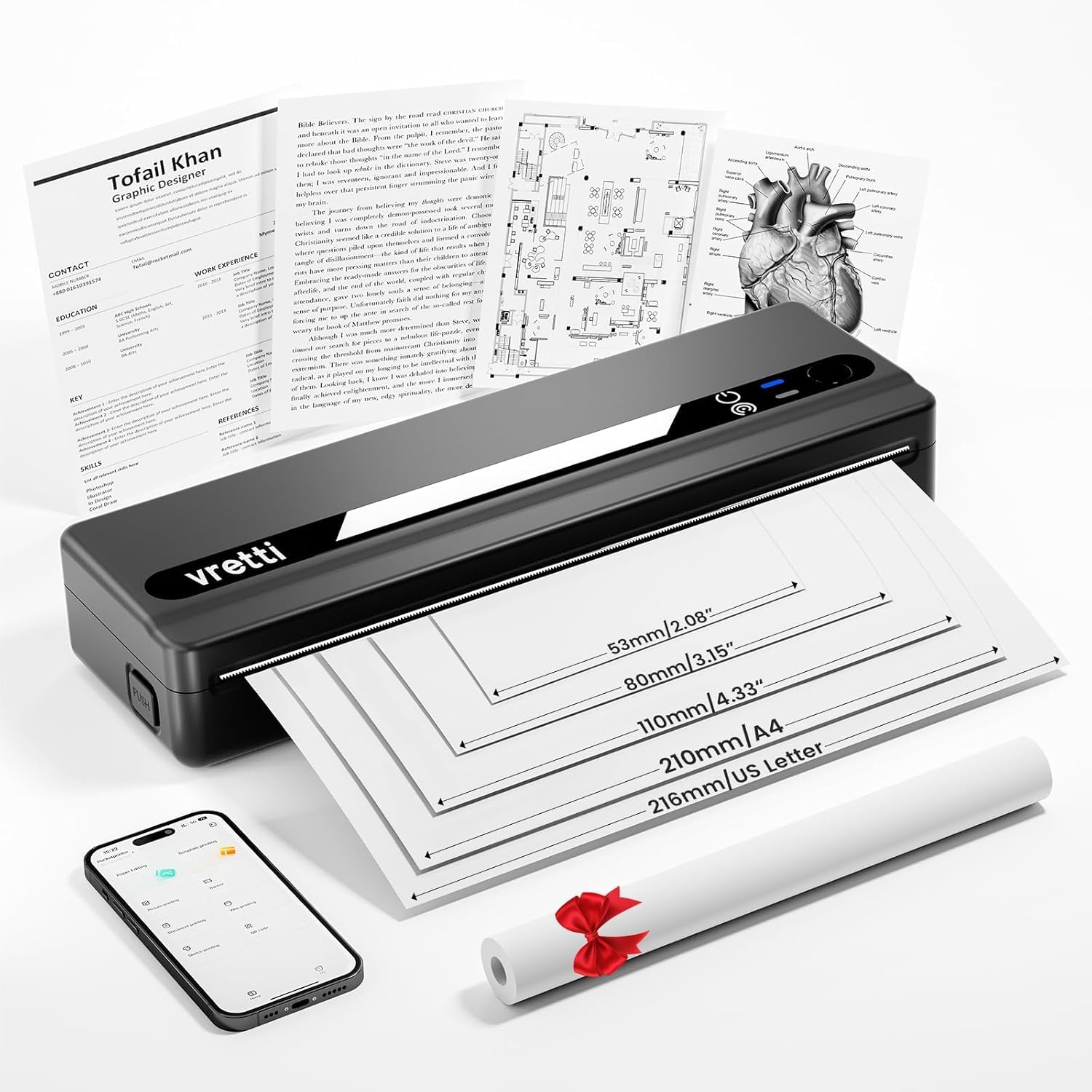
Image: The vretti PB821 Portable Thermal Printer, a sleek black device, ready for use.
ເນື້ອໃນຊຸດ
ກະລຸນາກວດເບິ່ງເນື້ອໃນຂອງແພັກເກັດໃນເວລາທີ່ unboxing ເພື່ອຮັບປະກັນວ່າລາຍການທັງຫມົດແມ່ນມີຢູ່:
- vretti PB821 Portable Thermal Printer
- 1 Roll of Thermal Paper
- ສາຍສາກ USB-C
- ຄູ່ມືຜູ້ໃຊ້
ສິນຄ້າເກີນview
ຄຸນນະສົມບັດທີ່ສໍາຄັນ
- ການພິມ Bluetooth ແບບໄຮ້ສາຍ: Connects wirelessly to phones and tablets via the "XLifePro" app.
- Portable ແລະກະທັດຮັດ: Small and lightweight design for easy transport.
- Cost-effective Inkless Printing: Utilizes advanced thermal printing technology, eliminating the need for ink, toner, or ribbons.
- High-quality Printing: Delivers clear prints with a 203 DPI resolution.
- ແບດເຕີຣີທີ່ຍາວນານ: Built-in 1500mAh rechargeable battery supports printing up to 223 A4 sheets on a full charge.
- ຮອງຮັບເຈ້ຍຫຼາຍຂະໜາດ: Compatible with A5, A4, Letter, and 2-4 inch labels.
ຕົວເລືອກການເຊື່ອມຕໍ່

Image: The vretti PB821 printer supports both Bluetooth and USB connections for versatile use with Android, iOS, iPad, Windows, Mac OS, Linux, and Chromebook devices.
The vretti PB821 printer offers flexible connectivity, allowing you to print wirelessly via Bluetooth from mobile devices or directly via USB from computers. This ensures compatibility across various operating systems and devices.
ການອອກແບບແບບພົກພາ

Image: A visual comparison highlighting the compact and portable design of the vretti PB821 printer against a larger, traditional printer, emphasizing its convenience.
The PB821 is designed for maximum portability, making it easy to carry in a backpack or bag. Its compact form factor does not compromise on functionality, offering easy setup and smooth, inkless printing.
ຕັ້ງຄ່າ
1. ການສາກໄຟເບື້ອງຕົ້ນ
Before first use, fully charge the printer using the provided USB-C cable. Connect the cable to the printer's USB-C port and a compatible power adapter (not included) or computer USB port. The charging indicator light will show the charging status.

Image: Visual representation of the printer's 1500mAh battery capacity, USB-C charging, and its ability to print up to 223 A4 sheets on a single charge.
2. ການໂຫຼດເຈ້ຍຄວາມຮ້ອນ
The vretti PB821 supports various thermal paper types. To load paper:
- ເປີດຝາປິດເຈ້ຍຂອງເຄື່ອງພິມ.
- ໃສ່ເຈ້ຍຄວາມຮ້ອນໂດຍໃຫ້ດ້ານທີ່ສາມາດພິມໄດ້ຫັນຂຶ້ນເທິງ. ໃຫ້ແນ່ໃຈວ່າເຈ້ຍຖືກຈັດວາງຢ່າງຖືກຕ້ອງພາຍໃນແຖບຄູ່ມື.
- ປິດຝາເຈ້ຍຢ່າງປອດໄພ.

Image: The vretti PB821 printer showcasing its compatibility with different thermal paper types, including folding thermal paper and roll paper, along with various paper sizes.
3. Connecting via Bluetooth (Mobile Devices)
To print wirelessly from your smartphone or tablet:
- Download the "XLifePro" app from the App Store (iOS) or Google Play Store (Android).
- Turn on the vretti PB821 printer. The Bluetooth indicator light will blink.
- Open the XLifePro app, navigate to the device connection settings, and select the PB821 printer from the list of available Bluetooth devices.
- ເມື່ອເຊື່ອມຕໍ່ແລ້ວ, ໄຟຕົວຊີ້ວັດ Bluetooth ຈະກາຍເປັນແຂງ.

Image: Step-by-step guide on connecting the vretti PB821 printer via Bluetooth, including downloading the XLifePro app and pairing the device.
4. Connecting via USB (Computers)
To print from your Windows, Mac OS, or Linux computer:
- Download the appropriate printer driver from the official vretti webເວັບໄຊ: vrettitech.com/pages/p83-support.
- Install the driver on your computer following the on-screen instructions.
- Connect the vretti PB821 printer to your computer using the provided USB-C cable.
- The computer should recognize the printer, and you can now select it as your printing device.

Image: Instructions for USB connection, detailing driver download from the vretti website and connecting the PB821 printer to a laptop.
ຄໍາແນະນໍາການດໍາເນີນງານ
Printing from Mobile Devices
ເມື່ອເຊື່ອມຕໍ່ຜ່ານ Bluetooth:
- Open the document, image, or file you wish to print within the XLifePro app. The app supports various formats including TXT, PDF, Excel, and Word documents.
- ເລືອກຕົວເລືອກການພິມພາຍໃນແອັບຯ.
- Confirm print settings such as paper size and quantity.
- Initiate printing.
Printing from Computers
Once connected via USB and drivers are installed:
- ເປີດເອກະສານຫຼື file ທ່ານຕ້ອງການພິມຢູ່ໃນຄອມພິວເຕີຂອງທ່ານ.
- ເລືອກຕົວເລືອກການພິມຈາກແອັບພລິເຄຊັນຂອງທ່ານ (ຕົວຢ່າງ, File > ພິມ).
- Choose "vretti PB821" from the list of available printers.
- Adjust print settings as needed (e.g., paper size, orientation).
- ກົດ "ພິມ".
ປະເພດ ແລະ ຂະໜາດເຈ້ຍທີ່ຮອງຮັບ
The PB821 printer is compatible with various thermal paper types and sizes, including:
- A4 (210 ມມ)
- Letter (8.5" x 11" / 216mm)
- A5 (148 ມມ)
- B5 (175mm)
- 2-inch (53mm) labels
- 3-inch (80mm) labels
- 4-inch (110mm) labels

Image: The vretti PB821 printer demonstrating its support for multiple paper sizes, including standard document sizes and various label sizes.
Using the XLifePro App
The XLifePro app provides additional functionalities beyond basic printing, including:
- Access to multiple templates for creative printing.
- Options for document printing, picture printing, and more.
- Customization features for various printing needs.

Image: Screenshots of the XLifePro app interface, illustrating its diverse range of templates and printing options.
ບໍາລຸງຮັກສາ
ການເຮັດຄວາມສະອາດເຄື່ອງພິມ
To maintain print quality and prolong the printer's lifespan:
- Ensure the printer is turned off and disconnected from power before cleaning.
- ໃຊ້ຜ້າແພທີ່ອ່ອນໆ ທີ່ບໍ່ມີເສັ້ນດ່າງ dampened with water or isopropyl alcohol to gently wipe the print head and paper path.
- ຢ່າໃຊ້ເຄື່ອງເຮັດຄວາມສະອາດຂັດຫຼືສານລະລາຍ.
- Allow the printer to dry completely before turning it on.
ການດູແລຫມໍ້ໄຟ
ເພື່ອເພີ່ມປະສິດທິພາບອາຍຸຫມໍ້ໄຟ:
- ຫຼີກລ້ຽງການປະຈຸຫມໍ້ໄຟຢ່າງເຕັມທີ່ເລື້ອຍໆ.
- ເກັບຮັກສາເຄື່ອງພິມໄວ້ໃນບ່ອນທີ່ເຢັນ ແລະ ແຫ້ງ ເມື່ອບໍ່ໄດ້ໃຊ້ງານເປັນເວລາດົນ.
- Charge the printer regularly, even if not in frequent use, to prevent deep discharge.
ການແກ້ໄຂບັນຫາ
| ສະບັບ | ສາເຫດທີ່ເປັນໄປໄດ້ | ການແກ້ໄຂ |
|---|---|---|
| ເຄື່ອງພິມບໍ່ເປີດ | ຫມໍ້ໄຟຕ່ໍາ; ກົດປຸ່ມເປີດປິດບໍ່ຖືກຕ້ອງ | ສາກເຄື່ອງພິມ; ກົດປຸ່ມເປີດປິດຄ້າງໄວ້ສອງສາມວິນາທີ |
| ບໍ່ສາມາດເຊື່ອມຕໍ່ຜ່ານ Bluetooth ໄດ້ | Bluetooth ປິດໃນອຸປະກອນ; ເຄື່ອງພິມບໍ່ຢູ່ໃນຮູບແບບການຈັບຄູ່; ບັນຫາແອັບ | Ensure Bluetooth is enabled; Restart printer; Reinstall XLifePro app |
| ຄຸນນະພາບການພິມບໍ່ດີ | Low battery; Dirty print head; Incorrect paper type | Charge printer; Clean print head; Use recommended thermal paper |
| ເຈ້ຍຕິດ | ການໃສ່ເຈ້ຍບໍ່ຖືກຕ້ອງ; ເຈ້ຍເສຍຫາຍ | Turn off printer, carefully remove jammed paper, reload correctly; Use undamaged paper |
| ເຄື່ອງພິມບໍ່ຖືກຮັບຮູ້ໂດຍຄອມພິວເຕີ | Missing/incorrect drivers; Faulty USB cable/port | Install/reinstall drivers from vretti website; Try a different USB cable/port |
ຂໍ້ມູນຈໍາເພາະ
| ຄຸນສົມບັດ | ລາຍລະອຽດ |
|---|---|
| ຕົວແບບ | PB821 |
| ຍີ່ຫໍ້ | vretti |
| ເຕັກໂນໂລຊີການພິມ | ຄວາມຮ້ອນ |
| ເຕັກໂນໂລຊີການເຊື່ອມຕໍ່ | Bluetooth, USB |
| ຄວາມລະອຽດການພິມສູງສຸດ | 203 DPI (Black and White) |
| ສື່ສິ່ງພິມ | Thermal Paper (plain) |
| ຂະໜາດແຜ່ນທີ່ຮອງຮັບ | 2'', 3'', 4'', A4, 8.5''x 11'' US Letter |
| ຄວາມອາດສາມາດຂອງແຜ່ນປ້ອນຂໍ້ມູນສູງສຸດ | 30 ແຜ່ນ |
| ຄວາມອາດສາມາດຫມໍ້ໄຟ | 1500mAh (Lithium Ion) |
| ຂະໜາດສິນຄ້າ | 25.7 x 7 x 4.7 cm |
| ນ້ໍາຫນັກລາຍການ | 900 g |
| ການພິມສອງດ້ານ | ບໍ່ |
| ສີຫມຶກ | ດຳ |
ການຮັບປະກັນແລະການສະຫນັບສະຫນູນ
The vretti PB821 Portable Thermal Printer comes with a standard manufacturer's warranty. For specific warranty details, technical support, or service inquiries, please refer to the warranty card included in your package or visit the official vretti webເວັບໄຊ. ຮັກສາໃບຮັບເງິນການຊື້ຂອງທ່ານໄວ້ເປັນຫຼັກຖານການຊື້ສໍາລັບການຮ້ອງຂໍການຮັບປະກັນ.
ວິດີໂອຜະລິດຕະພັນ
Video: An official product video demonstrating the features and usage of the vretti PB821 Portable Thermal Printer, including its compact design, wireless connectivity, and printing capabilities.


