1. ບົດແນະນຳ
The House of Marley Get Together Go is a portable Bluetooth speaker designed for high-quality audio and outdoor durability. It features sustainable materials, multiple sound modes, and a robust, adventure-ready design.

Figure 1: Get Together Go Speaker in an outdoor environment.
Key features include IP67 waterproof and dustproof rating, up to 20 hours of playtime, customizable EQ modes, and Auracast multi-speaker pairing. The speaker is crafted from renewable bamboo and REGRIND silicone, reflecting a commitment to sustainable design.

ຮູບ 2: ເກີນview of main features including EQ settings, playtime, IP67 protection, and ambient lighting.
2. ເນື້ອໃນຊຸດ
ໃຫ້ແນ່ໃຈວ່າທຸກລາຍການຢູ່ໃນຊຸດ:
- House of Marley Get Together Go Portable Bluetooth Speaker
- ສາຍສາກ USB-C
- ຄູ່ມືເລີ່ມຕົ້ນດ່ວນ (ບໍ່ລວມຢູ່ໃນຄູ່ມືນີ້)
3. ຕັ້ງຄ່າ
3.1 ກຳລັງສາກລຳໂພງ
- ເຊື່ອມຕໍ່ສາຍສາກ USB-C ທີ່ໃຫ້ມາກັບຊ່ອງສາກໄຟຂອງລຳໂພງ.
- ເຊື່ອມຕໍ່ອີກສົ້ນຂອງສາຍກັບອະແດັບເຕີໄຟ USB ທີ່ເຂົ້າກັນໄດ້ (ບໍ່ລວມ).
- ໄຟສະແດງການສາກຈະສະຫວ່າງຂຶ້ນໃນລະຫວ່າງການສາກ ແລະ ຈະດັບລົງເມື່ອສາກເຕັມ.
3.2 ການເປີດ/ປິດ
- To power on, press and hold the Power button until the indicator lights activate.
- ເພື່ອປິດເຄື່ອງ, ໃຫ້ກົດປຸ່ມເປີດປິດຄ້າງໄວ້ອີກຄັ້ງຈົນກ່ວາໄຟຕົວຊີ້ວັດຈະປິດ.

ຮູບ 3: ດ້ານຫນ້າ view of the speaker, illustrating general layout and control area.
3.3 ການຈັບຄູ່ Bluetooth
- ກວດໃຫ້ແນ່ໃຈວ່າໄດ້ເປີດລຳໂພງແລ້ວ.
- Press and hold the Bluetooth button on the speaker until the Bluetooth indicator light begins to flash, indicating pairing mode.
- ໃນອຸປະກອນຂອງທ່ານ (ໂທລະສັບສະຫຼາດ, ແທັບເລັດ, ແລະອື່ນໆ), ເປີດໃຊ້ Bluetooth ແລະຊອກຫາອຸປະກອນທີ່ມີຢູ່.
- Select "Get Together Go" from the list of devices.
- ເມື່ອເຊື່ອມຕໍ່ແລ້ວ, ໄຟຕົວຊີ້ວັດ Bluetooth ຈະກາຍເປັນແຂງ.
3.4 Auracast Multi-Speaker Pairing
The Get Together Go supports Auracast for connecting multiple compatible speakers for a larger sound experience. Refer to the official House of Marley website for detailed instructions on Auracast setup.
4. ຄໍາແນະນໍາການດໍາເນີນງານ
4.1 ການຫຼິ້ນສຽງ
- Once paired via Bluetooth, play audio from your connected device.
- ໃຊ້ປຸ່ມເພີ່ມສຽງ (+) ແລະ ຫຼຸດສຽງ (-) ໃນລຳໂພງເພື່ອປັບລະດັບສຽງ.
- ກົດປຸ່ມຫຼິ້ນ/ຢຸດຊົ່ວຄາວເພື່ອຄວບຄຸມການຫຼິ້ນຄືນ.

Figure 4: Speaker control panel for power, Bluetooth, volume, and playback.
4.2 Custom EQ Modes
The speaker features three customizable EQ modes to optimize sound for different environments:
- Marley Signature Sound: ມືອາຊີບສຽງທີ່ສົມດຸນfile.
- Boass Boost: ການຕອບສະໜອງຄວາມຖີ່ຕ່ຳທີ່ດີຂຶ້ນ.
- ໂໝດກາງແຈ້ງ: Optimized for open-air listening.
To switch between EQ modes, briefly press the Power button while the speaker is on. The ambient lighting may change to indicate the active mode.

Figure 5: Speaker in an outdoor setting, demonstrating its durability and suitability for various environments, where EQ modes can be adjusted.
4.3 ແສງແວດລ້ອມອ້ອມຂ້າງ
The speaker includes ambient lighting at its base. This lighting can be toggled or adjusted by pressing a dedicated button (refer to the speaker's physical controls for exact button location, often integrated with power or EQ controls).
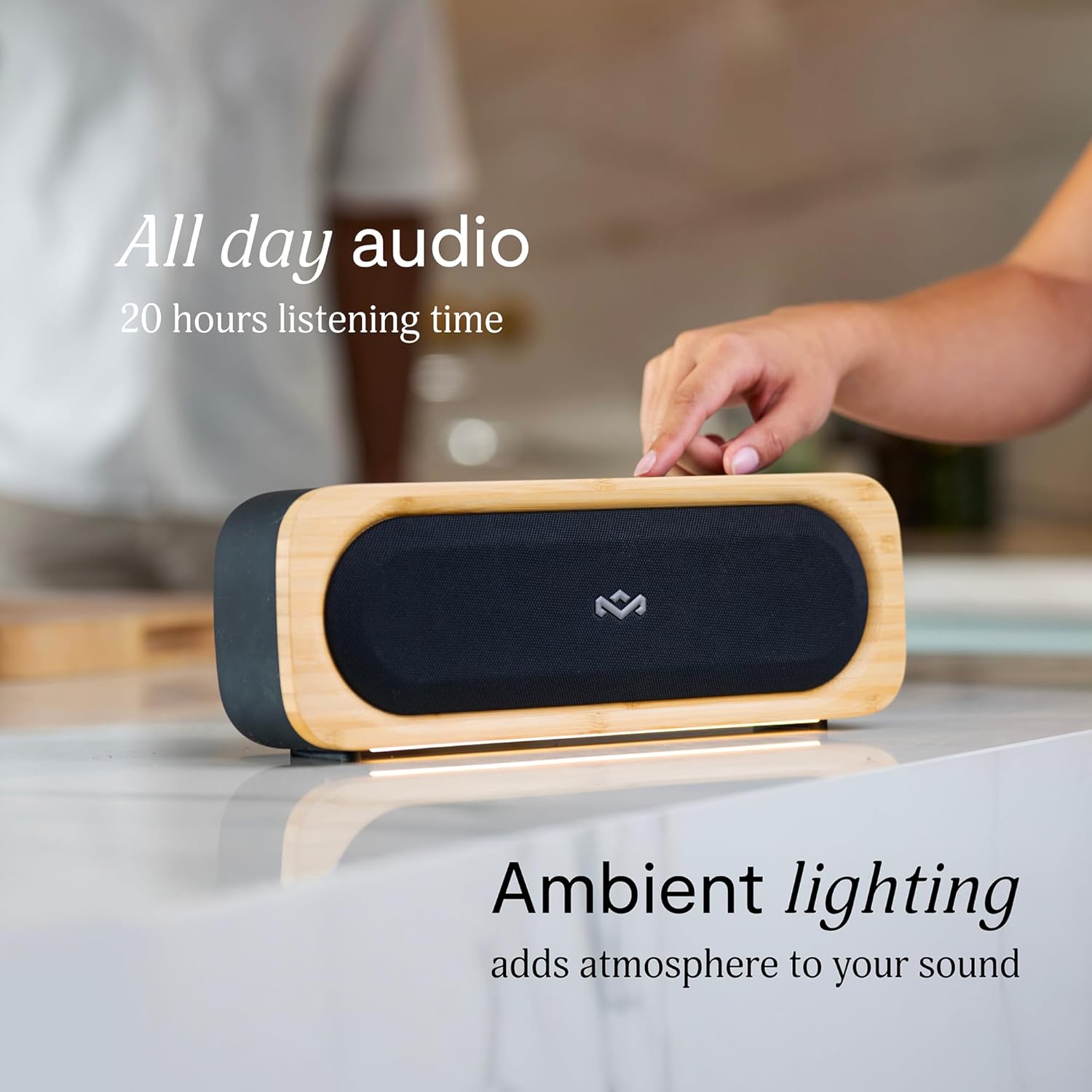
Figure 6: Speaker with ambient lighting active.
4.4 Built-in Bottle Opener
A bottle opener is integrated into the speaker's design for convenience. Locate the bottle opener on the rear or side of the speaker and use it as you would a standard bottle opener.

Figure 7: Demonstrating the use of the built-in bottle opener.
5. ບໍາລຸງຮັກສາ
5.1 ການທໍາຄວາມສະອາດ
- The speaker features a removable grill for easy cleaning. Gently detach the grill to clean any dust or debris from the speaker drivers.
- ເຊັດດ້ານນອກຂອງລໍາໂພງໃຫ້ອ່ອນໆ, ງamp ຜ້າ. ຫຼີກເວັ້ນການນໍາໃຊ້ສານເຄມີທີ່ຮຸນແຮງຫຼືເຄື່ອງເຮັດຄວາມສະອາດຂັດ.
- Ensure the speaker is completely dry before reattaching the grill or using it near water.

Figure 8: Speaker with removable grill detached for cleaning.
5.2 Water and Dust Protection (IP67)
- The IP67 rating means the speaker is protected from dust ingress and can withstand immersion in water up to 1 meter for 30 minutes.
- Always ensure the charging port cover is securely closed before exposing the speaker to water or dust.
- ຫຼັງຈາກການສໍາຜັດກັບນ້ໍາ, ເຊັດລໍາໂພງຢ່າງລະອຽດກ່ອນທີ່ຈະສາກໄຟ.
5.3 ການດູແລຫມໍ້ໄຟ
- ສໍາລັບອາຍຸຂອງຫມໍ້ໄຟທີ່ດີທີ່ສຸດ, ຫຼີກເວັ້ນການປະຖິ້ມລໍາໂພງຢ່າງເຕັມທີ່ເລື້ອຍໆ.
- ເກັບຮັກສາລຳໂພງໄວ້ໃນບ່ອນເຢັນ ແລະແຫ້ງເມື່ອບໍ່ໄດ້ໃຊ້ເປັນເວລາດົນ.
6. ການແກ້ໄຂບັນຫາ
ລຳໂພງ 6.1 ບໍ່ເປີດ
- ໃຫ້ແນ່ໃຈວ່າໄດ້ສາກໄຟແລ້ວ. ເຊື່ອມຕໍ່ລຳໂພງກັບແຫຼ່ງພະລັງງານ ແລະປ່ອຍໃຫ້ມັນສາກຢ່າງໜ້ອຍ 30 ນາທີກ່ອນທີ່ຈະພະຍາຍາມເປີດເຄື່ອງອີກຄັ້ງ.
- Press and hold the Power button for a few seconds to ensure it's not a brief press.
6.2 ບັນຫາການຈັບຄູ່ Bluetooth
- ໃຫ້ແນ່ໃຈວ່າລຳໂພງຢູ່ໃນໂໝດຈັບຄູ່ (ໄຟສະແດງ Bluetooth ກະພິບ).
- Ensure your device's Bluetooth is enabled and within range (typically 10 meters or 33 feet).
- Try forgetting the speaker from your device's Bluetooth settings and re-pairing.
- ຣີສະຕາດທັງລຳໂພງ ແລະອຸປະກອນ Bluetooth ຂອງທ່ານ.
6.3 ບໍ່ມີສຽງຫຼືສຽງຕ່ໍາ
- ກວດເບິ່ງລະດັບສຽງໃນທັງລຳໂພງ ແລະອຸປະກອນທີ່ເຊື່ອມຕໍ່ຂອງທ່ານ.
- ກວດໃຫ້ແນ່ໃຈວ່າລຳໂພງຖືກຈັບຄູ່ຢ່າງຖືກຕ້ອງ ແລະເຊື່ອມຕໍ່ກັບອຸປະກອນຂອງທ່ານ.
- ລອງຫຼິ້ນສຽງຈາກແອັບພລິເຄຊັນ ຫຼືແຫຼ່ງອື່ນໃນອຸປະກອນຂອງທ່ານ.
7. ຂໍ້ມູນຈໍາເພາະ
| ຄຸນສົມບັດ | ລາຍລະອຽດ |
|---|---|
| ຊື່ຕົວແບບ | ໄປນຳກັນ |
| ໝາຍເລກຕົວແບບ | EM-JA036-SB |
| ເຕັກໂນໂລຊີການເຊື່ອມຕໍ່ | Bluetooth |
| ລຳໂພງກຳລັງຜົນຜະລິດສູງສຸດ | 20 ວັດ |
| ການຈັດອັນດັບ IP | IP67 (ກັນນ້ຳ ແລະກັນຝຸ່ນ) |
| ເວລາຫຼິ້ນ | ສູງສຸດ 20 ຊົ່ວໂມງ |
| ຂະໜາດສິນຄ້າ | 5.75"D x 16.13"W x 4.75"H |
| ນ້ໍາຫນັກລາຍການ | 4.05 ປອນ |
| ວັດສະດຸ | Renewable Bamboo, REGRIND Silicone, REWIND Fabric |
| UPC | 846885011706 |
8. ການຮັບປະກັນແລະການສະຫນັບສະຫນູນ
For warranty information and technical support, please refer to the official House of Marley webເວັບໄຊ ຫຼືຕິດຕໍ່ບໍລິການລູກຄ້າຂອງເຂົາເຈົ້າໂດຍກົງ. ຮັກສາຫຼັກຖານການຊື້ຂອງທ່ານສໍາລັບການຮ້ອງຂໍການຮັບປະກັນ.
9. ຄຳໝັ້ນສັນຍາດ້ານຄວາມຍືນຍົງ
The House of Marley Get Together Go speaker is designed with sustainability in mind, utilizing:
- Renewable Bamboo: Crafted from one of the world's fastest-growing plants.
- REWIND Fabric: Made from recycled plastic bottles for a durable finish.
- REGRIND Silicone: Produced using reclaimed and upcycled post-process and post-consumer waste.

Figure 9: Details on the sustainable materials used in the speaker's construction.


