ແນະນຳ
This manual provides comprehensive instructions for the safe and efficient operation of your Crosley CR3505A-LN Cruiser Portable CD Player. Please read this manual thoroughly before using the device and retain it for future reference. This portable audio player combines classic design with modern functionality, offering CD playback, Bluetooth connectivity, FM radio, and auxiliary input.
ແມ່ນຫຍັງຢູ່ໃນກ່ອງ
ກວດສອບວ່າລາຍການທັງຫມົດແມ່ນມີຢູ່ໃນການຍົກເລີກການຫຸ້ມຫໍ່:
- Crosley CR3505A-LN Portable CD Player
- ສາຍ USB-C
ຄຸນສົມບັດຜະລິດຕະພັນ
- Portable Music Player: Equipped with a rechargeable lithium battery, providing up to 4 hours of playback at 50% volume after a 3.5-hour charge.
- Versatile Audio Options: Features built-in stereo speakers and a headphone jack. Supports CD playback, Bluetooth streaming to wireless headphones/speakers, and auxiliary input for other devices.
- Retro Style, Modern Function: Blends nostalgic aesthetics with contemporary features, including a tonearm-inspired power switch and a built-in FM radio.
- Designed for Portability: Lightweight construction with a magnetic lid closure for easy transport.
ການລະບຸອົງປະກອບ
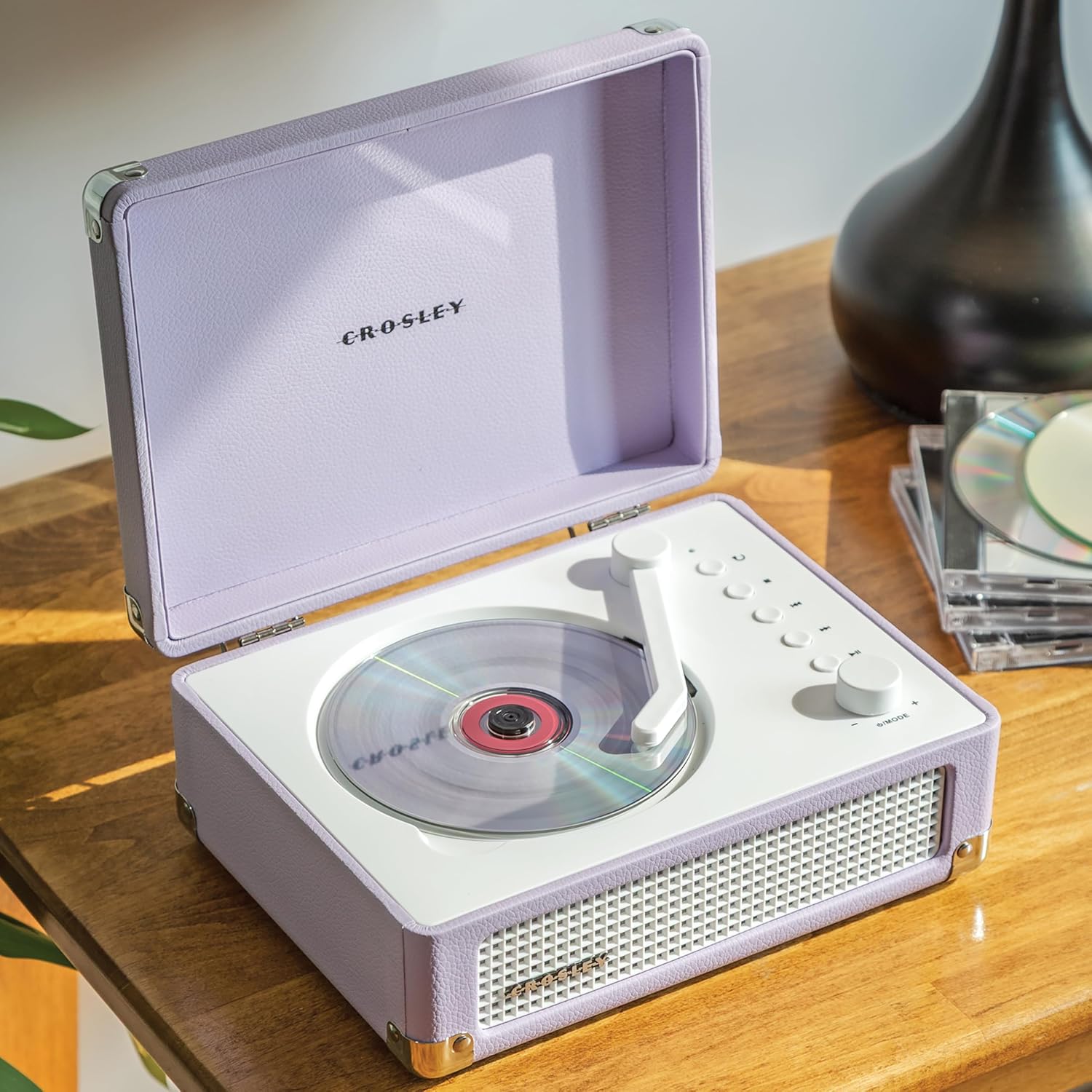
ຮູບທີ 1: ທາງເທິງ view of the Crosley CR3505A-LN with lid open, highlighting the CD compartment and control panel.

ຮູບ 2: ດ້ານຫລັງ view of the unit, displaying the headphone jack, AUX In port, and USB-C charging port.
ແຜງຄວບຄຸມຜ່ານview
- Tonearm-inspired Power Switch: Activates/deactivates the unit and initiates CD playback.
- Mode/Power Dial: Rotates to adjust volume. Press to cycle through modes (CD, Bluetooth, FM, AUX).
- ປຸ່ມຊ້ຳ: Repeats current track or album.
- ປຸ່ມຢຸດ: ຢຸດການຫຼິ້ນ CD.
- Previous Track/Rewind Button: ຂ້າມໄປຫາເພງກ່ອນໜ້ານີ້ ຫຼື ຖອຍຫຼັງໃນລະຫວ່າງການຫຼິ້ນຄືນ.
- Next Track/Fast Forward Button: ຂ້າມໄປຫາເພງຕໍ່ໄປ ຫຼື ໄປໜ້າໄວໃນລະຫວ່າງການຫຼິ້ນຄືນ.
- ປຸ່ມຫຼິ້ນ/ຢຸດຊົ່ວຄາວ: Controls playback for CD and Bluetooth.
- Bluetooth/FM Indicator Light: Indicates current mode and pairing status.
ຕັ້ງຄ່າ
ກຳລັງສາກແບັດເຕີຣີ
- Connect the supplied USB-C cable to the DC 5V port on the rear of the unit (Figure 2).
- ເຊື່ອມຕໍ່ອີກສົ້ນຂອງສາຍ USB-C ກັບອະແດັບເຕີໄຟ USB ທີ່ເຂົ້າກັນໄດ້ (ບໍ່ລວມ).
- ໄຟຕົວຊີ້ວັດຈະສະແດງສະຖານະການສາກໄຟ. ການສາກເຕັມໃຊ້ເວລາປະມານ 3.5 ຊົ່ວໂມງ.
ເປີດ/ປິດ
To power on the unit, move the tonearm-inspired switch over the CD spindle. To power off, move the switch back to its resting position.
ຄໍາແນະນໍາການດໍາເນີນງານ
ການຫຼິ້ນ CD
- ເປີດຝາປິດຂອງເຄື່ອງຫຼິ້ນ CD.
- Carefully place a CD onto the spindle in the CD compartment, label side up.
- ປິດຝາ.
- Move the tonearm-inspired switch over the CD spindle to power on and initiate playback.
- Use the Play/Pause, Stop, Previous Track/Rewind, and Next Track/Fast Forward buttons to control playback.
- Press the Repeat button to cycle through repeat modes (repeat one track, repeat all tracks, random play).
ການຈັບຄູ່ Bluetooth
- ເປີດເຄື່ອງ.
- Press the Mode/Power dial repeatedly until the Bluetooth indicator light flashes blue, indicating pairing mode.
- On your Bluetooth-enabled device (e.g., smartphone, tablet), search for "Crosley CR3505A-LN" in the Bluetooth settings.
- Select the device to pair. Once connected, the Bluetooth indicator light will turn solid blue.
- You can now stream audio from your device to the CD player.
ວິທະຍຸ FM
- ເປີດເຄື່ອງ.
- Press the Mode/Power dial repeatedly until the FM indicator light illuminates.
- Use the Previous Track/Rewind and Next Track/Fast Forward buttons to tune to desired FM stations.
ການປ້ອນຂໍ້ມູນຊ່ວຍ
- ເປີດເຄື່ອງ.
- Press the Mode/Power dial repeatedly until the AUX indicator light illuminates.
- Connect an external audio device (e.g., MP3 player) to the AUX In port on the rear of the unit (Figure 2) using a 3.5mm audio cable (not included).
- Audio from the external device will now play through the CD player's speakers.
ການຄວບຄຸມປະລິມານ
Rotate the Mode/Power dial clockwise to increase volume and counter-clockwise to decrease volume.
ບໍາລຸງຮັກສາ
ທໍາຄວາມສະອາດ
- ຖອດປລັກເຄື່ອງອອກຈາກແຫຼ່ງພະລັງງານກ່ອນທຳຄວາມສະອາດທຸກຄັ້ງ.
- ໃຊ້ຜ້າອ່ອນໆແຫ້ງເຊັດພື້ນຜິວພາຍນອກ. ຢ່າໃຊ້ນໍ້າຢາເຮັດຄວາມສະອາດທີ່ມີສີຂັດ, ຂີ້ເຜີ້ງ ຫຼື ຕົວລະລາຍ.
- For the CD lens, use a specialized CD lens cleaner. Avoid touching the lens directly.
ການດູແລຫມໍ້ໄຟ
- ເພື່ອຍືດອາຍຸແບັດເຕີລີ, ຫຼີກເວັ້ນການຖອດແບດເຕີລີ່ເຕັມເລື້ອຍໆ.
- If storing the unit for an extended period, charge the battery to approximately 50% every few months.
ການແກ້ໄຂບັນຫາ
| ບັນຫາ | ສາເຫດທີ່ເປັນໄປໄດ້ | ການແກ້ໄຂ |
|---|---|---|
| ບໍ່ມີພະລັງງານ | Battery is discharged; Unit is not powered on. | Charge the battery using the USB-C cable; Ensure the tonearm-inspired switch is moved to the ON position. |
| CD ບໍ່ໄດ້ຫຼິ້ນ | ໃສ່ຊີດີບໍ່ຖືກຕ້ອງ; ຊີດີເປື້ອນ ຫຼື ມີຮອຍຂີດຂ່ວນ; ເຄື່ອງບໍ່ໄດ້ຢູ່ໃນໂໝດຊີດີ. | Reinsert CD label side up; Clean or replace CD; Press Mode/Power dial to select CD mode. |
| Bluetooth ບໍ່ເຊື່ອມຕໍ່ | ຫນ່ວຍງານບໍ່ຢູ່ໃນຮູບແບບການຈັບຄູ່; ອຸປະກອນໄກເກີນໄປ; ເຊື່ອມຕໍ່ອຸປະກອນທີ່ຈັບຄູ່ກ່ອນໜ້ານີ້. | Press Mode/Power dial until Bluetooth light flashes; Move device closer; Disconnect from other Bluetooth devices. |
| ການຮັບວິທະຍຸ FM ບໍ່ດີ | ສັນຍານອ່ອນ; ແຊກແຊງ. | Adjust the unit's position; Try tuning to a stronger station. |
| ບໍ່ມີສຽງ | ລະດັບສຽງຕໍ່າເກີນໄປ; ເລືອກໂໝດບໍ່ຖືກຕ້ອງ; ເຊື່ອມຕໍ່ຫູຟັງແລ້ວ. | Increase volume; Ensure correct mode (CD, BT, FM, AUX) is selected; Disconnect headphones if using speakers. |
ຂໍ້ມູນຈໍາເພາະ
- ຂະໜາດຜະລິດຕະພັນ: 6.75 x 8.75 x 3.75 ນິ້ວ
- ນ້ໍາຫນັກລາຍການ: 2.54 ປອນ
- ໝາຍເລກຕົວແບບ: CR3505A-LN
- ຍີ່ຫໍ້: ຄຣອສລີ
- ສີ: ລາເວນເດີ
- ເຕັກໂນໂລຍີການເຊື່ອມຕໍ່: Bluetooth
- ຈໍານວນຂອງແຜ່ນ: 1
ຂໍ້ມູນຄວາມປອດໄພ
- ຫ້າມບໍ່ໃຫ້ອຸປະກອນຖືກອຸນຫະພູມສູງ, ຄວາມຊຸ່ມຊື່ນ, ຫຼືແສງແດດໂດຍກົງ.
- ຫຼີກລ່ຽງການວາງເຄື່ອງໃກ້ແຫຼ່ງຄວາມຮ້ອນ ຫຼື ໃນບໍລິເວນທີ່ມີລະບາຍອາກາດບໍ່ດີ.
- ຢ່າຖອດປະກອບ ຫຼື ພະຍາຍາມສ້ອມແປງເຄື່ອງດ້ວຍຕົວທ່ານເອງ. ໃຫ້ຕິດຕໍ່ພະນັກງານທີ່ມີຄຸນວຸດທິເພື່ອສ້ອມແປງທຸກຢ່າງ.
- ຮັກສາເຄື່ອງໃຫ້ຫ່າງຈາກນໍ້າ ຫຼື ຂອງແຫຼວອື່ນໆ.
- ໃຊ້ພຽງແຕ່ສາຍສາກທີ່ລະບຸ.
ການຮັບປະກັນແລະການສະຫນັບສະຫນູນ
Crosley products are designed in the USA and come with USA-based customer support. For warranty information or technical assistance, please refer to the official Crosley webເວັບໄຊ ຫຼືຕິດຕໍ່ບໍລິການລູກຄ້າຂອງເຂົາເຈົ້າໂດຍກົງ. ຮັກສາໃບຮັບເງິນການຊື້ຂອງທ່ານໄວ້ເປັນຫຼັກຖານການຊື້ສໍາລັບການຮ້ອງຂໍການຮັບປະກັນ.


