1. ຜະລິດຕະພັນເກີນview
The DREAME Aqua10 Roller Robot Vacuum & Side Brush is an advanced cleaning device designed to automate floor cleaning. It combines vacuuming and mopping functionalities with intelligent navigation and self-maintenance features.

Figure 1: DREAME Aqua10 Roller Robot Vacuum and its self-cleaning dock.
Key features include fresh water mopping, a fluff roll self-cleaning technology, carpet protection with auto-lifting, FlexRise obstacle climbing, and a powerful 30,000 Pascal suction. The device also features advanced OmniSight navigation and a self-maintaining power dock.
2. ອົງປະກອບແລະອຸປະກອນເສີມ
- DREAME Aqua10 Robot Vacuum
- Self-Cleaning Power Dock
- Roller Mop (pre-installed)
- ແປງຂ້າງ
- ຖົງຂີ້ຝຸ່ນ (ຕິດຕັ້ງໄວ້ລ່ວງຫນ້າໃນ dock)
- ສາຍໄຟ
- Cleaning Solution (if included)

Figure 2: The side brush component of the DREAME Aqua10.
3. ຄູ່ມືການຕິດຕັ້ງ
- ການຫຸ້ມຫໍ່: ເອົາສ່ວນປະກອບທັງຫມົດອອກຈາກການຫຸ້ມຫໍ່ຢ່າງລະມັດລະວັງ.
- ຕຳແໜ່ງທ່າເຮືອ: Place the self-cleaning power dock against a wall in an open area, ensuring at least 1.5 feet of clear space on either side and 5 feet in front. Plug the power cable into the dock and a wall outlet.
- ຄ່າ ທຳ ນຽມ: Place the robot vacuum onto the charging contacts of the dock. Ensure it is properly seated and charging. The robot will indicate charging status.
- ການກະກຽມຖັງນໍ້າ: Open the top cover of the power dock. Fill the clean water tank with fresh water. If using cleaning solution, add the recommended amount according to the solution's instructions.
- ການຕິດຕັ້ງຖົງຂີ້ຝຸ່ນ: Verify that a dust bag is correctly installed in the dock's dust collection compartment.
- ການຕິດຕັ້ງແອັບ (ບໍ່ຈຳເປັນແຕ່ແນະນຳ): Download the DREAME app from your device's app store. Follow the in-app instructions to connect your robot vacuum to your Wi-Fi network and complete the initial mapping process.
Video 1: This video demonstrates the initial setup and key features of the DREAME Aqua10, including water tank and dust bag access, and the robot's movement.
4. ຄໍາແນະນໍາການດໍາເນີນງານ
4.1 ເລີ່ມຕົ້ນທໍາຄວາມສະອາດ
- ຄູ່ມືເລີ່ມຕົ້ນ: Press the power button on the robot or the dock to initiate a cleaning cycle.
- ການຄວບຄຸມແອັບ: Use the DREAME app to start, pause, or stop cleaning, select specific rooms, or set no-go zones.
- ຄຳສັ່ງສຽງ: The robot supports voice commands for customized cleaning, such as lifting rollers, boosting suction, prioritizing carpets, or activating pet-friendly care.
4.2 ຮູບແບບການທໍາຄວາມສະອາດ ແລະຄຸນສົມບັດ
- ການດູດຝຸ່ນ: The robot utilizes 30,000 Pascals of suction power to effectively remove dirt, crumbs, and dust from various floor types.
- ຖູພື້ນ: The Aqua10 uses fresh water mopping, continuously spraying clean water onto the roller mop while collecting dirty water. This ensures floors are washed, not just wiped.
- ການປົກປ້ອງຜ້າພົມ: When the vacuum senses carpet, the AutoSeal Roller Guard automatically closes, and the chassis lifts by more than 0.5 inch to prevent dampening or odors on carpets.
- ການຫຼີກລ້ຽງອຸປະສັກ: The OmniSight 2.0 system, combining a retractable LiDAR sensor with binocular AI navigation, allows the robot to recognize and avoid over 240 different objects, including socks, toys, cords, and fragile items.
- ການປີນຂັ້ນໄດ: The FlexRise air suspension system enables the robot to climb over thresholds, rugs, and obstacles up to 3.15 inches tall, making it suitable for multi-surface homes.
- ການເຮັດຄວາມສະອາດຂອບ ແລະ ມຸມ: The roller mop extends by 1.57 inches to ensure 100% coverage cleaning of edges and corners.
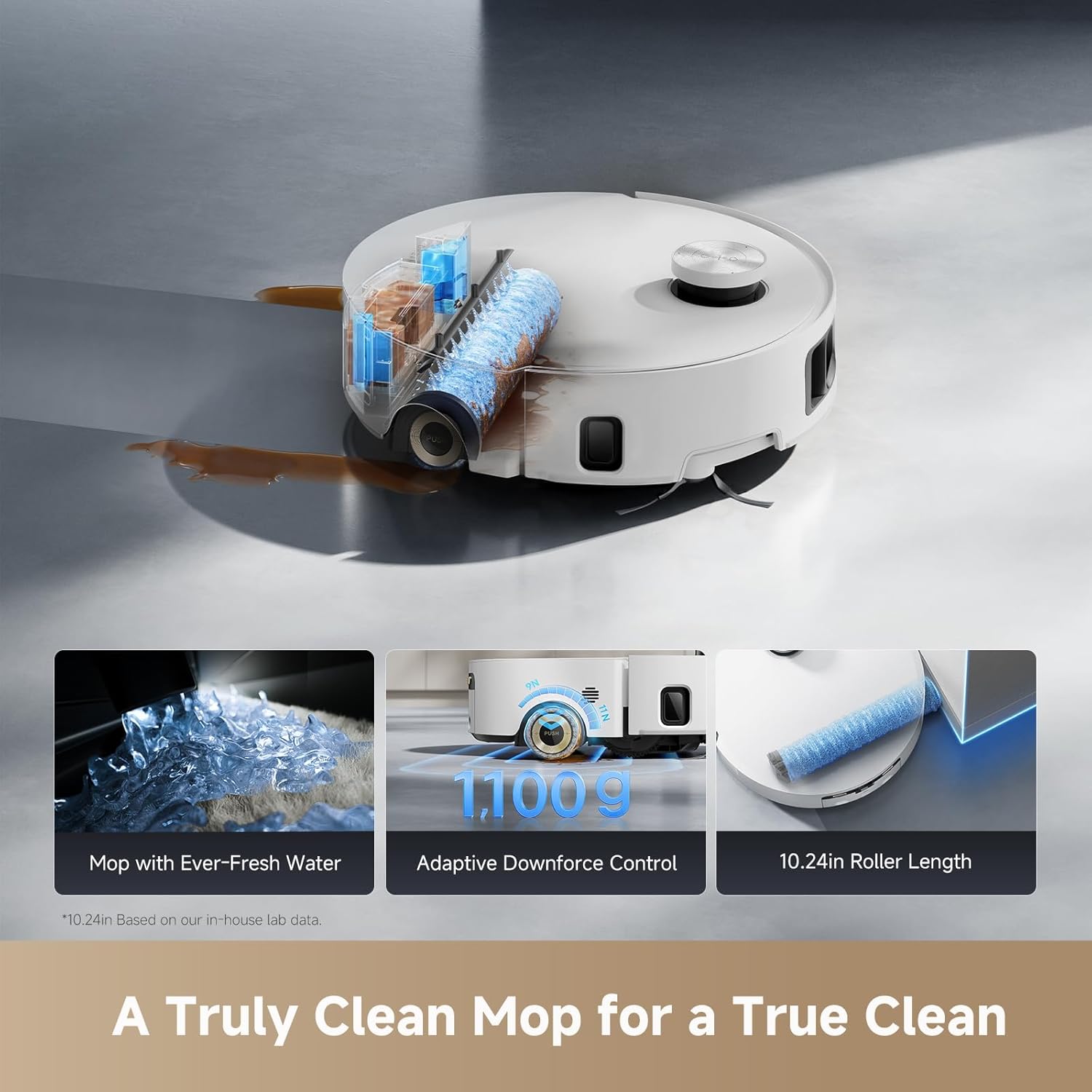
Figure 3: The DREAME Aqua10's mopping system with fresh water, adaptive downforce, and extended roller length.

Figure 4: Intelligent carpet protection feature, showing the AutoSeal Roller Guard in action.

Figure 5: The powerful 30,000 Pa suction effectively cleans various debris.

Figure 6: The robot's ability to clear obstacles and navigate complex layouts.

Figure 7: The extended roller mop ensures thorough cleaning along edges and in corners.
5. ບໍາລຸງຮັກສາ
5.1 Self-Cleaning Power Dock
The power dock is designed for hands-free maintenance:
- ການກຳຈັດຝຸ່ນອັດຕະໂນມັດ: The dock automatically empties the robot's dustbin into a sealed dust bag, storing debris for up to 100 days.
- Roller Mop Deep Cleaning: The dock deep cleans the roller mop with sterilizing 212°F hot water.
- ການອົບແຫ້ງດ້ວຍອາກາດຮ້ອນ: After cleaning, the mop is dried with hot air to prevent odors and mildew.
- Automatic Refill: The robot's water tank is automatically refilled with fresh water and cleaning solution from the dock.

Figure 8: The self-cleaning dock sterilizes the roller mop with 212°F hot water.
5.2 ການຮັກສາຜູ້ໃຊ້
- ການປ່ຽນຖົງຂີ້ຝຸ່ນ: Replace the dust bag in the power dock approximately every 100 days, or when indicated by the app/device.
- Clean Water Tank Refill: Regularly check and refill the clean water tank in the dock.
- Dirty Water Tank Emptying: Regularly check and empty the dirty water tank in the dock.
- Roller Brush Detangling: The HyperStream Duo brush actively detangles hair. Periodically check the roller brush for any remaining tangled hair and remove as needed.
- Side Brush Inspection: Inspect the side brush for wear or damage and replace if necessary.
- ການອະນາໄມເຊັນເຊີ: Wipe the robot's sensors with a dry cloth to ensure optimal navigation and obstacle avoidance.
6. ການແກ້ໄຂບັນຫາ
If you encounter issues with your DREAME Aqua10, please refer to the following common troubleshooting steps:
- ຫຸ່ນຍົນບໍ່ສາກໄຟ: Ensure the power dock is plugged in and the robot is correctly aligned with the charging contacts. Clean the charging contacts on both the robot and the dock.
- ປະສິດທິພາບທໍາຄວາມສະອາດບໍ່ດີ: Check if the dustbin is full or the dust bag needs replacement. Ensure the roller mop and side brush are clean and free of debris. Refill the clean water tank and empty the dirty water tank.
- Navigation errors or getting stuck: Clean all sensors on the robot. Remove any obstacles or loose cables from the cleaning path. Ensure the environment is well-lit for optimal visual navigation.
- ສຽງທີ່ຜິດປົກກະຕິ: Check the roller brush and side brush for any foreign objects or tangled hair. Ensure all components are correctly installed.
- ບັນຫາການເຊື່ອມຕໍ່ແອັບ: Ensure your Wi-Fi network is stable and the robot is within range. Restart the robot and your router.
For persistent issues, consult the DREAME app for further diagnostics or contact customer support.
7. ຂໍ້ມູນຈໍາເພາະ
| ຕົວແບບ | Aqua10 |
| ຍີ່ຫໍ້ | ຝັນ |
| ASIN | B0FSZ64GZ8 |
| ວັນທີທໍາອິດທີ່ມີ | ວັນທີ 21 ກັນຍາ 2025 |
| ພະລັງງານດູດ | 30,000 ປາສຄາລ |
| ຄວາມສູງຂອງການປີນຂ້າມອຸປະສັກ | ເຖິງ 3.15 ນິ້ວ |
| Mop Cleaning Water Temperature | 212°F (100°C) |
| ຄວາມອາດສາມາດຂອງຖົງຂີ້ຝຸ່ນ | Up to 100 days of debris storage |
| Roller Mop Extension | 1.57 inches for edge cleaning |
8. ການຮັບປະກັນແລະການສະຫນັບສະຫນູນ
For warranty information and customer support, please refer to the official DREAME webຫຼື ຕິດຕໍ່ຮ້ານຄ້າປີກໃນທ້ອງຖິ່ນຂອງທ່ານ. ເກັບໃບຮັບເງິນການຊື້ຂອງທ່ານໄວ້ສຳລັບການຮຽກຮ້ອງການຮັບປະກັນ.