1. ບົດແນະນຳ
This manual provides essential instructions for the installation, operation, and maintenance of your Anern AN-SCI-ECO 3200W 24V Hybrid Solar Inverter. This device is an integrated solution featuring a pure sine wave inverter, an 80A MPPT solar charge controller, and a battery charger, designed for off-grid photovoltaic systems. It is compatible with 24V lead-acid, gel, and lithium batteries, offering flexible power management for various applications.
Please read this manual thoroughly before installation and use to ensure proper operation and safety.
2. ຄໍາແນະນໍາຄວາມປອດໄພ
Observe the following safety precautions to prevent injury and damage to the inverter:
- ການຕິດຕັ້ງຕ້ອງໄດ້ປະຕິບັດໂດຍພະນັກງານທີ່ມີຄຸນວຸດທິຕາມລະຫັດໄຟຟ້າທ້ອງຖິ່ນທັງໝົດ.
- Do not attempt to disassemble or repair the inverter yourself. Refer all servicing to authorized service personnel.
- ຮັບປະກັນການຕໍ່ຫນ້າດິນທີ່ເຫມາະສົມຂອງ inverter ໄດ້.
- ຫຼີກລ່ຽງການໃຫ້ອິນເວີເຕີ້ຖືກຝົນ, ຫິມະ, ສະເປ, ຫຼື ຂອງແຫຼວໃດໆ.
- Do not operate the inverter if it has been physically damaged or if any cables are frayed or damaged.
- ຮັບປະກັນການລະບາຍອາກາດທີ່ພຽງພໍຢູ່ອ້ອມຕົວ inverter ເພື່ອປ້ອງກັນຄວາມຮ້ອນເກີນ.
- Always disconnect all power sources (PV array, battery, AC input) before performing any maintenance or wiring.
3. ຜະລິດຕະພັນເກີນview
The Anern AN-SCI-ECO 3200W 24V Hybrid Solar Inverter combines multiple functions into one compact unit, providing a reliable power solution for your off-grid needs.
ຄຸນນະສົມບັດທີ່ສໍາຄັນ:
- ການອອກແບບປະສົມປະສານ: Combines a 3200W pure sine wave inverter, an 80A MPPT solar charge controller, and a battery charger.
- High Efficiency MPPT: Maximizes solar power harvesting with up to 95% conversion efficiency.
- ຄວາມເຂົ້າກັນໄດ້ຂອງຫມໍ້ໄຟ: Supports 24V lithium, lead-acid, and gel batteries, with activation function for lithium batteries.
- Configurable LCD Display: User-friendly interface for monitoring and setting parameters such as charging current, AC/solar charger priority, and input voltage ຊ່ວງ.
- ການປົກປ້ອງທີ່ສົມບູນແບບ: Equipped with multiple safeguards against overheating, overcurrent, overvoltage, undervoltage, short circuit, and overload.

ຮູບ 3.1: ດ້ານຫນ້າ view of the Anern 3200W 24V Hybrid Solar Inverter, showing the integrated LCD display and control buttons.

Figure 3.2: Diagram illustrating the 'All-in-One' concept, combining an MPPT charge controller, AC battery charger, and power inverter into a single unit.
ຄຸນນະສົມບັດການປົກປັກຮັກສາ:
The inverter incorporates robust protection mechanisms to ensure safe and reliable operation:
- ການປ້ອງກັນວົງຈອນສັ້ນ: ປ້ອງກັນຄວາມເສຍຫາຍຈາກວົງຈອນສັ້ນ.
- ການປ້ອງກັນການໂຫຼດເກີນ: ມາດຕະການປ້ອງກັນການໃຊ້ພະລັງງານຫຼາຍເກີນໄປ.
- ການປົກປ້ອງກະແສໄຟຟ້າເກີນ: Protects components from high current.
- Overvoltage ການປົກປ້ອງ: Prevents damage from input voltagຮວງ e.
- Undervoltage ການປົກປ້ອງ: Ensures stable operation by preventing low voltage ເງື່ອນໄຂ.
- ການປ້ອງກັນອຸນຫະພູມເກີນ: ປິດເຄື່ອງຖ້າອຸນຫະພູມພາຍໃນສູງເກີນໄປ.
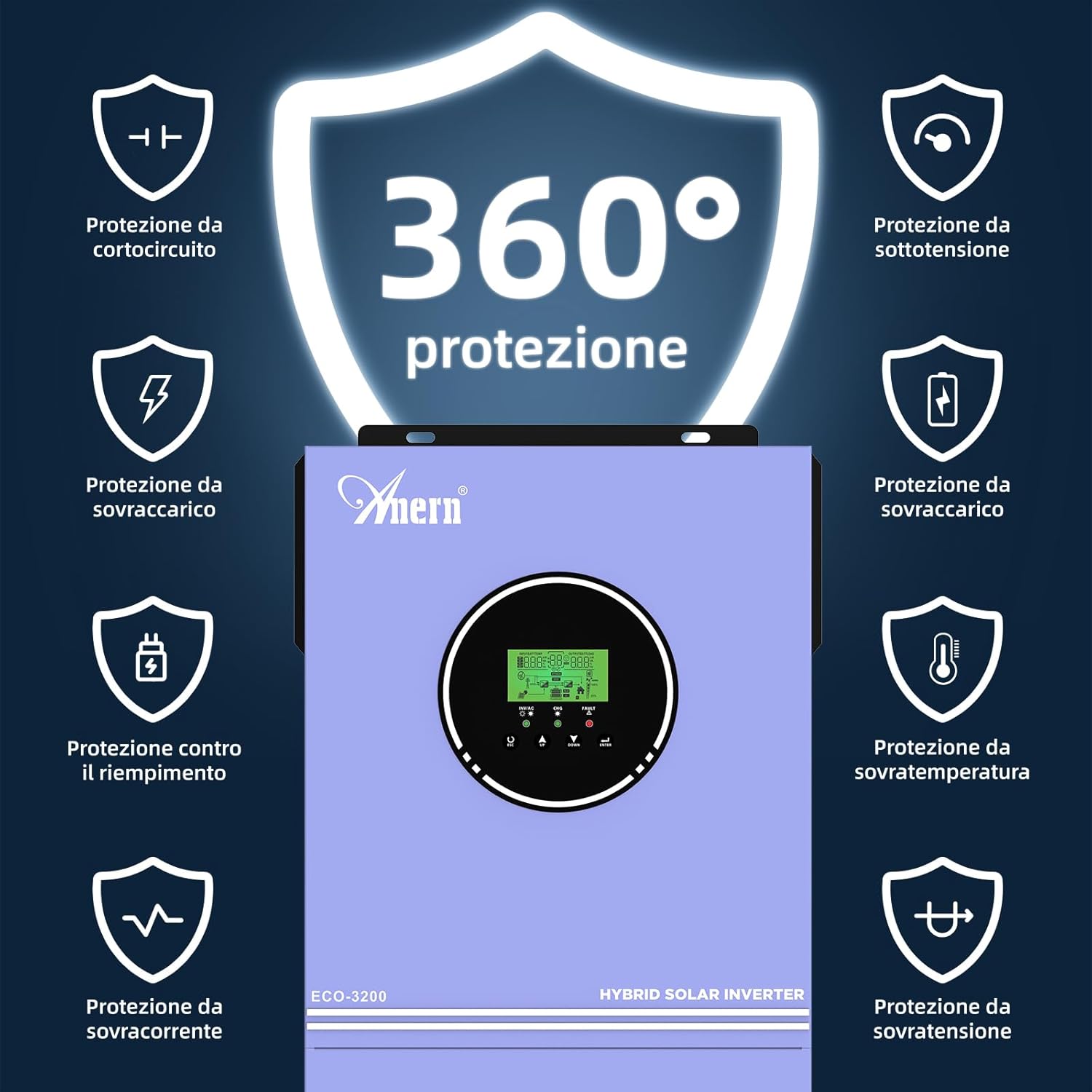
Figure 3.3: Visual representation of the comprehensive 360-degree protection features, including safeguards against short circuit, overload, overcurrent, overvoltage, undervoltage, ແລະ overtemperature.
4. ຕັ້ງຄ່າ
Careful installation is crucial for the performance and longevity of your hybrid inverter. Follow these general guidelines:
4.1 ການເລືອກເວັບໄຊ:
- Install the inverter indoors in a clean, dry, and well-ventilated area.
- ໃຫ້ແນ່ໃຈວ່າອຸນຫະພູມສະພາບແວດລ້ອມຢູ່ໃນຂອບເຂດການເຮັດວຽກທີ່ແນະນໍາ.
- Mount the inverter vertically on a non-flammable surface, allowing sufficient clearance for airflow around the unit.
4.2 ການເຊື່ອມຕໍ່ສາຍ:
All wiring should be done with appropriate gauge cables and connectors, following local electrical codes.
- ການເຊື່ອມຕໍ່ຫມໍ້ໄຟ: ເຊື່ອມຕໍ່ແບັດເຕີຣີ 24V ເຂົ້າກັບຂົ້ວແບັດເຕີຣີຂອງອິນເວີເຕີ. ຮັບປະກັນວ່າຂົ້ວທີ່ຖືກຕ້ອງ (ບວກຫາບວກ, ລົບຫາລົບ).
- ການເຊື່ອມຕໍ່ອາເຣ PV: Connect the solar panel array to the PV input terminals. Verify that the PV open circuit voltage does not exceed 400V DC.
- ການເຊື່ອມຕໍ່ຂາເຂົ້າ AC: Connect the utility grid (if applicable) to the AC input terminals.
- ການເຊື່ອມຕໍ່ຂາອອກ AC: Connect your loads (appliances) to the AC output terminals.
- ການຕໍ່ດິນ: Ensure the inverter chassis is properly grounded.

Figure 4.1: Connection diagram illustrating how solar collectors, utility grid, battery, and household appliances connect to the hybrid inverter for power management.
5. ການເຮັດວຽກ
Once installed, the inverter can be configured and operated via its LCD display and control buttons.
5.1 ການເພີ່ມພະລັງງານເບື້ອງຕົ້ນ:
- ໃຫ້ແນ່ໃຈວ່າການເຊື່ອມຕໍ່ທັງຫມົດແມ່ນປອດໄພແລະຖືກຕ້ອງ.
- ເປີດເບກເກີຫມໍ້ໄຟ.
- ເປີດຕົວເບຣກເກີ PV array.
- Turn on the AC input breaker (if connected to utility).
- Press the power button on the inverter to turn it on.
5.2 LCD Display and Settings:
The LCD display provides real-time status and allows configuration of various operating parameters. Refer to the detailed instructions in the full product manual for specific menu navigation and parameter adjustments.
5.3 ຮູບແບບການສາກໄຟ:
The inverter supports multiple charging priority modes to optimize energy usage:
- ຄວາມສຳຄັນຂອງແສງຕາເວັນ: Solar power is the primary source for charging batteries and powering loads. Utility power is used only when solar power is insufficient.
- ພະລັງງານແສງຕາເວັນ + ສາທາລະນູປະໂພກ: Both solar and utility power are used simultaneously to charge batteries and power loads.
- ແສງຕາເວັນເທົ່ານັ້ນ: Only solar power is used for charging. Utility power is not used for charging.
5.4 Output Modes:
The inverter can be configured to prioritize different power sources for output:
- Solar Priority, then Battery, then Utility: Loads are powered first by solar, then by battery, and finally by the utility grid if both solar and battery are insufficient.
- Solar Priority, then Utility, then Battery: Loads are powered first by solar, then by the utility grid, and finally by the battery if both solar and utility are unavailable.
Figure 5.1: Diagram detailing the three possible charging modes (Solar Priority, Solar+Utility, Solar Only) and two output modes (Solar then Battery then Utility, or Solar then Utility then Battery).
6. ບໍາລຸງຮັກສາ
Regular maintenance ensures optimal performance and extends the lifespan of your inverter.
- ທໍາຄວາມສະອາດ: ທຳຄວາມສະອາດພາຍນອກຂອງອິນເວີເຕີເປັນໄລຍະດ້ວຍຜ້າແຫ້ງ. ຮັບປະກັນວ່າຊ່ອງລະບາຍອາກາດບໍ່ມີຝຸ່ນ ແລະ ສິ່ງເສດເຫຼືອ.
- ກວດສອບການເຊື່ອມຕໍ່: Annually inspect all electrical connections (PV, battery, AC input/output) for tightness and signs of corrosion.
- ສຸຂະພາບຫມໍ້ໄຟ: ຕິດຕາມກວດກາ voltage and health according to the battery manufacturer's recommendations.
- ກວດສອບສິ່ງແວດລ້ອມ: Ensure the installation environment remains dry, well-ventilated, and within the specified temperature range.
7. ການແກ້ໄຂບັນຫາ
If you encounter issues with your inverter, refer to the following common problems and solutions. For complex issues, contact technical support.
ບັນຫາທົ່ວໄປ:
- ບໍ່ມີຜົນຜະລິດພະລັງງານ: Check battery connections, PV input, AC input, and ensure the inverter is turned on. Verify that no protection features (e.g., undervoltage, overload) have been triggered.
- ແບັດເຕີຣີບໍ່ໄດ້ສາກ: Check PV array connections and voltage. Ensure solar panels are receiving adequate sunlight. Verify charging settings on the LCD display.
- ຄຳເຕືອນການໂຫຼດເກີນ: Reduce the connected load. The inverter will automatically attempt to restart after an overload condition.
- Overtemperature Warning: Ensure adequate ventilation around the inverter. Clear any obstructions from cooling vents. Allow the unit to cool down.
- ລະຫັດຜິດ: Refer to the full product manual for a list of specific fault codes displayed on the LCD and their corresponding troubleshooting steps.
8. ຂໍ້ມູນຈໍາເພາະ
Detailed technical specifications for the Anern AN-SCI-ECO 3200W 24V Hybrid Solar Inverter:
| ພາລາມິເຕີ | ມູນຄ່າ |
|---|---|
| ຕົວແບບ | AN-SCI-ECO-3200W |
| ລະດັບພະລັງງານ | 3200W |
| ຊື່ DC Input Voltage | 24V |
| Vol ອອກ ACtage | 220V / 230V AC |
| ຄວາມຖີ່ | 50/60 Hz |
| ສູງສຸດ. PV Input Power | 3200W |
| PV Voltage ຂອບເຂດ | 30-400V ຊິງຕັນດີຊີ |
| Max. Open Circuit PV Voltage | 400V DC |
| Max. Charge Current (MPPT) | 80A |
| ປະເພດການສະແດງ | LED |
| ຂະ ໜາດ (ຜະລິດຕະພັນ) | 35 x 20 x 49 cm |
| ນ້ ຳ ໜັກ (ຜະລິດຕະພັນ) | 7 ກິໂລ |
| ແຫຼ່ງພະລັງງານ | ພະລັງງານແສງຕາເວັນ ແລະ ແບັດເຕີຣີ |
9. ການຮັບປະກັນແລະການສະຫນັບສະຫນູນ
Specific warranty details are not provided in this document. For warranty information, technical support, or service inquiries, please contact Anern customer service or your authorized dealer. Keep your purchase receipt as proof of purchase.