ແນະນຳ
This manual provides comprehensive instructions for the VINABTY Replacement Remote Control, designed for use with BLU:SENS TV models RC034, RC036, RC042, and RC044. This infrared remote control offers a straightforward, plug-and-play experience without the need for complex programming or setup. Its ergonomic design and durable construction ensure comfortable and reliable operation.
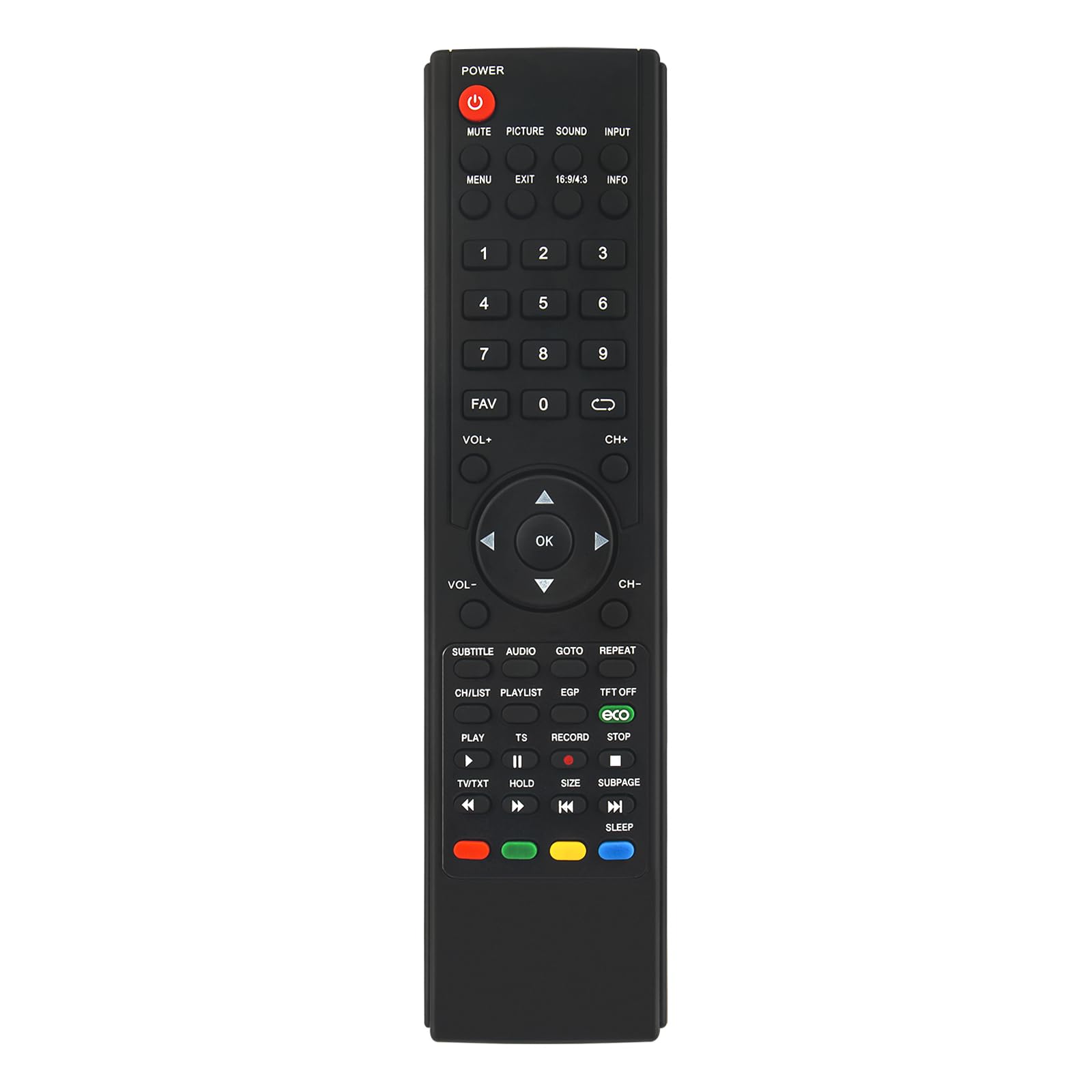
Figure 1: VINABTY Replacement Remote Control. This image shows the full remote control with its array of buttons, set against a blurred background of a modern living room with a television.
ຕັ້ງຄ່າ
The VINABTY Replacement Remote Control is designed for immediate use with compatible BLU:SENS TV models. No programming or pairing is required.
1. ການຕິດຕັ້ງຫມໍ້ໄຟ
- ຊອກຫາຊ່ອງໃສ່ຫມໍ້ໄຟຢູ່ດ້ານຫຼັງຂອງການຄວບຄຸມໄລຍະໄກ.
- ເລື່ອນເປີດcoverາປົກຊ່ອງຂອງbatteryໍ້ໄຟ.
- ໃສ່ໝໍ້ໄຟ AAA ສອງໜ່ວຍ (ບໍ່ລວມເຂົ້າ), ຮັບປະກັນການຂົ້ວທີ່ຖືກຕ້ອງ (+ ແລະ -) ຕາມທີ່ລະບຸໄວ້ພາຍໃນຊ່ອງ.
- ປິດຝາປິດຊ່ອງໃສ່ຫມໍ້ໄຟຢ່າງປອດໄພ.
2. ການກວດສອບຄວາມເຂົ້າກັນໄດ້
This remote is compatible with BLU:SENS TV models RC034, RC036, RC042, and RC044. Please verify your TV model number to ensure full functionality. If your TV model is not listed, contact customer support for assistance.
ຄໍາແນະນໍາການດໍາເນີນງານ
The remote control features a standard layout for intuitive operation of your BLU:SENS TV. Point the remote directly at your television's infrared receiver for optimal performance.

Figure 2: Diagram highlighting the sensitive and responsive buttons of the remote control, made from durable ABS material for a comfortable grip and quality assurance.
ຟັງຊັນພື້ນຖານ
- ພະລັງງານ (●): ເປີດ ຫຼື ປິດໂທລະພາບ.
- ປິດສຽງ: ປິດສຽງ ຫຼືປິດສຽງໂທລະພາບ.
- VOL + / VOL-: Increases or decreases the volume.
- CH+ / CH-: Changes the channel up or down.
- ປຸ່ມຕົວເລກ (0-9): ເລືອກຊ່ອງໂດຍກົງ.
- ເມນູ: ເຂົ້າເຖິງເມນູຫຼັກຂອງໂທລະພາບ.
- ອອກ: ອອກຈາກເມນູ ຫຼືຟັງຊັນປັດຈຸບັນ.
- ປ້ອນຂໍ້ມູນ: ເລືອກແຫຼ່ງປ້ອນຂໍ້ມູນ (HDMI, AV, ແລະອື່ນໆ).
- ຂໍ້ມູນ: ສະແດງຂໍ້ມູນກ່ຽວກັບໂປຣແກຣມປະຈຸບັນ.
- Navigation (Up, Down, Left, Right, OK): ນຳທາງຜ່ານເມນູ ແລະຢືນຢັນການເລືອກ.
ຟັງຊັນຂັ້ນສູງ
- ຮູບ: Adjusts picture settings.
- ສຽງ: Adjusts sound settings.
- 16:9/4:3: Toggles between aspect ratios.
- FAV: ເຂົ້າເຖິງລາຍຊື່ຊ່ອງທີ່ມັກ.
- ຫົວຂໍ້: Activates or deactivates subtitles.
- ສຽງ: ເລືອກແທຣັກສຽງ ຫຼື ໂໝດຕ່າງໆ.
- GOTO: Jumps to a specific time in media playback.
- ເຮັດຊ້ຳ: Repeats media playback.
- CH/LIST: ສະແດງລາຍຊື່ຊ່ອງ.
- ລາຍການຫຼິ້ນ: Accesses media playlists.
- EPG: ຄູ່ມືໂປຣແກຣມເອເລັກໂຕຣນິກ.
- TFT ປິດ: Turns off the TFT display (if applicable).
- ECO: Activates power-saving mode.
- ຫຼິ້ນ (►): Starts media playback.
- PAUSE (⏸): Pauses media playback.
- ບັນທຶກ (●): Initiates recording (if supported by TV).
- STOP (⏹): Stops media playback or recording.
- REWIND (⏪) / FAST FORWARD (⏩): Rewinds or fast forwards media.
- PREVIOUS (⏮) / NEXT (⏭): Skips to previous or next track/chapter.
- TV/TXT: Toggles between TV and Teletext modes.
- ຖື: Holds the current Teletext page.
- ຂະໜາດ: Changes Teletext display size.
- SUBPAGE: Accesses Teletext subpages.
- ປຸ່ມສີ (ສີແດງ, ສີຂຽວ, ສີເຫຼືອງ, ສີຟ້າ): Functions vary depending on the TV menu or interactive services.
- ນອນ: Sets the TV sleep timer.

Figure 3: The remote control demonstrating long-distance precise control, capable of transmitting signals up to 10 meters (33 feet) using infrared technology.
ບໍາລຸງຮັກສາ
ການດູແລ ແລະ ການບຳລຸງຮັກສາທີ່ເໝາະສົມຈະຊ່ວຍຍືດອາຍຸການໃຊ້ງານຂອງຣີໂໝດຄວບຄຸມຂອງທ່ານໄດ້.
- ທໍາຄວາມສະອາດ: Wipe the remote control with a soft, dry cloth. Do not use liquid cleaners or abrasive materials, as they may damage the surface or internal components.
- ການປ່ຽນແບັດ: Replace batteries when the remote's response becomes sluggish or it stops functioning. Always replace both batteries at the same time with new ones of the same type (AAA). Remove batteries if the remote will not be used for an extended period to prevent leakage.
- ການເກັບຮັກສາ: Store the remote control in a cool, dry place away from direct sunlight, extreme temperatures, and high humidity.
- ການຈັດການ: Avoid dropping the remote control or exposing it to strong impacts, as this can damage internal circuitry.
ການແກ້ໄຂບັນຫາ
If you experience issues with your VINABTY remote control, refer to the following common problems and solutions:
| ບັນຫາ | ສາເຫດທີ່ເປັນໄປໄດ້ | ການແກ້ໄຂ |
|---|---|---|
| ຣີໂໝດບໍ່ເຮັດວຽກ ຫຼື ບໍ່ຕອບສະໜອງ. |
|
|
| Remote has short range or intermittent response. |
|
|
| ປຸ່ມສະເພາະບໍ່ເຮັດວຽກ. |
|
|
| Remote does not control my BLU:SENS TV model. |
|
|
ຂໍ້ມູນຈໍາເພາະ

Figure 4: Diagram illustrating the dimensions of the VINABTY remote control: 22 cm (8.66 in) in length and 5.4 cm (2.13 in) in width.
- ຍີ່ຫໍ້: VINABTY
- ຈຳ ນວນຕົວແບບຜະລິດຕະພັນ: RC041 RC034
- ອຸປະກອນທີ່ເຂົ້າກັນໄດ້: BLU:SENS TV models RC034, RC036, RC041, RC042, RC044, RC054
- ເຕັກໂນໂລຊີການເຊື່ອມຕໍ່: ອິນຟາເຣດ
- ຂອບເຂດສູງສຸດ: 10 ແມັດ (33 ຟຸດ)
- ຈໍານວນປຸ່ມ: 25
- ວັດສະດຸ: ABS (Acrylonitrile Butadiene Styrene)
- ສີ: ສີດຳ
- ຂະໜາດ: 18 x 4 x 1 cm (7.09 x 1.57 x 0.39 ນິ້ວ)
- ນ້ຳໜັກ: 60 g (2.12 ອອນສ໌)
- ຕ້ອງໃຊ້ແບັດເຕີຣີ: 2 x AAA (ບໍ່ລວມ)
- ຄຸນນະສົມບັດພິເສດ: ການອອກແບບ ergonomic
ການຮັບປະກັນແລະການສະຫນັບສະຫນູນ
VINABTY is committed to providing quality products. If you encounter any issues with your remote control or have questions regarding its compatibility or operation, please do not hesitate to contact our customer support team.
- ການບໍລິການລູກຄ້າ: For any problems with the product, please contact us directly.
- Pre-Purchase Inquiry: If you are unsure about the compatibility of this remote control with your specific TV model, please contact us before making a purchase to ensure it meets your needs.
