1. ຜະລິດຕະພັນເກີນview
The OnePlus 15 is an advanced Android smartphone designed for high performance and extended usage. It features a powerful Snapdragon 8 Elite Gen 5 processor, a large 7,300mAh battery, and a vibrant 6.78-inch 165 Hz AMOLED display. The device is equipped with a triple 50 MP camera system for detailed photography and offers robust durability with IP66/IP68/IP69 and IP19K ratings for dust and water resistance.
ຄຸນນະສົມບັດທີ່ສໍາຄັນ:
- Massive 7,300 mAh Battery: Provides extended power for all-day use and beyond.
- Tri-Chip System: Integrates the Snapdragon 8 Elite Gen 5, a dedicated Wi-Fi chip, and a CPU scheduler for optimized performance, connectivity, and efficiency.
- Triple 50 MP Camera System: Captures high-quality images with wide, ultra-wide, and telephoto capabilities.
- ການອອກແບບທົນທານ: Built to resist dust and water, with IP66/IP68/IP69 and IP19K ratings for enhanced protection.
- 6.78-inch 165 Hz AMOLED Display: Delivers vivid colors, smooth motion, and exceptional clarity.
2. ສິ່ງທີ່ຢູ່ໃນກ່ອງ
ກວດສອບວ່າລາຍການທັງຫມົດແມ່ນມີຢູ່ໃນການຫຸ້ມຫໍ່ຜະລິດຕະພັນຂອງທ່ານ:
- OnePlus 15 Smartphone x1
- ເຄື່ອງສາກ x1
- ສາຍຂໍ້ມູນ USB x1
- SIM Ejector Tool x1
- ຄູ່ມືດ່ວນ x1
- Safety Guide x1

Image: Contents of the OnePlus 15 retail box, showing the smartphone, charger, USB data cable, SIM ejector tool, quick guide, and safety guide.
3. ຕັ້ງຄ່າ
3.1 ການຕິດຕັ້ງ SIM card
- ຊອກຫາຖາດຊິມກາດຢູ່ດ້ານຂ້າງຂອງ OnePlus 15 ຂອງທ່ານ.
- Insert the provided SIM ejector tool into the small hole on the SIM tray. Press firmly until the tray pops out.
- Place your Nano-SIM card(s) into the tray with the gold contacts facing down. Ensure they are correctly oriented according to the tray's outline.
- Carefully push the SIM tray back into the phone until it is flush with the device.
3.2 ການເປີດເຄື່ອງເບື້ອງຕົ້ນ ແລະການຕັ້ງຄ່າ
- ກົດປຸ່ມເປີດປິດຄ້າງໄວ້ (ຢູ່ເບື້ອງຂວາຂອງອຸປະກອນ) ຈົນກ່ວາໂລໂກ້ OnePlus ປະກົດຂຶ້ນ.
- ປະຕິບັດຕາມການເຕືອນໃນຫນ້າຈໍເພື່ອເລືອກພາສາຂອງທ່ານ, ເຊື່ອມຕໍ່ກັບເຄືອຂ່າຍ Wi-Fi, ແລະຕັ້ງຄ່າບັນຊີ Google ຂອງທ່ານ.
- You may be prompted to transfer data from an old device. Follow the instructions or skip this step to set up as a new device.
- ຕັ້ງຄ່າຄວາມປອດໄພ ເຊັ່ນ: ການປົດລັອກດ້ວຍລາຍນິ້ວມື, ການປົດລັອກດ້ວຍໃບໜ້າ ຫຼື PIN/ຮູບແບບ.

ຮູບພາບ: ທາງຫນ້າ view of the OnePlus 15 smartphone, showcasing its display and front camera.
4. ປະຕິບັດການອຸປະກອນຂອງທ່ານ
4.1 Screen and Navigation
The OnePlus 15 features a 6.78-inch 165 Hz AMOLED display. Navigate the interface using touch gestures:
- ແຕະ: ເລືອກລາຍການ ຫຼືເປີດໃຊ້ຟັງຊັນໃດໜຶ່ງ.
- ປັດ: ເລື່ອນຜ່ານໜ້າຈໍ ຫຼືລາຍການຕ່າງໆ.
- ເມື່ອເຂົ້າຕາຈົນ: ຊູມເຂົ້າ ຫຼືອອກໃນຮູບພາບ ແລະ web ໜ້າ.
- ຂ່າວຍາວ: ເຂົ້າເຖິງເມນູບໍລິບົດ ຫຼືຍ້າຍໄອຄອນ.
4.2 ປຸ່ມ ແລະ ພອດ
Familiarize yourself with the physical controls and connections:
- ປຸ່ມເປີດປິດ: Located on the right side. Press to wake/sleep the screen, long press to power off or restart.
- ປຸ່ມລະດັບສຽງ: Located on the left side. Adjust media volume, ringtone volume, and alarm volume.
- ພອດ USB Type-C: Located at the bottom. Used for charging, data transfer, and connecting Type-C headphones.
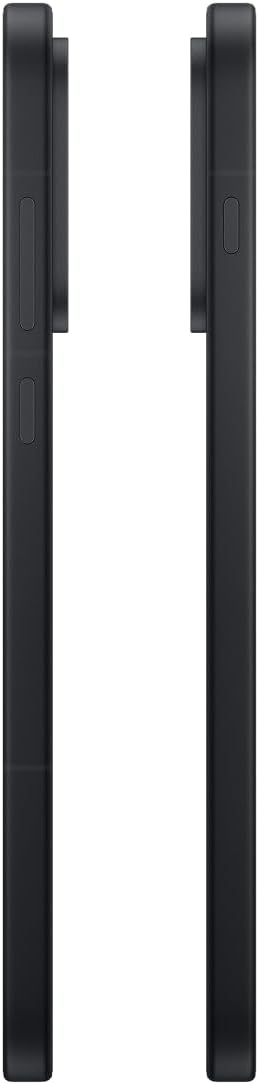
ຮູບພາບ: ຂ້າງ view of the OnePlus 15, showing the placement of the power and volume buttons.
4.3 ການໃຊ້ກ້ອງຖ່າຍຮູບ
The OnePlus 15 features a versatile triple 50 MP camera system. To open the camera app, tap the camera icon on your home screen or lock screen.
- ສະຫຼັບໂໝດ: Swipe left or right on the screen to switch between Photo, Video, Portrait, and other modes.
- ຊູມ: Pinch in or out on the viewfinder, or tap the zoom icons (e.g., 0.6x, 1x, 2x) to adjust magnification.
- ບັນທຶກ: ແຕະປຸ່ມຊັດເຕີເພື່ອຖ່າຍຮູບ ຫຼືເລີ່ມ/ຢຸດການບັນທຶກວິດີໂອ.
- ການຕັ້ງຄ່າ: Access camera settings for features like flash, timer, aspect ratio, and more.

ຮູບພາບ: ກັບຄືນໄປບ່ອນ view of the OnePlus 15, highlighting the triple 50 MP camera system.
4.4 ການຄຸ້ມຄອງຫມໍ້ໄຟ
Your OnePlus 15 is equipped with a 7,300 mAh battery. To optimize battery life:
- Adjust screen brightness and set a shorter screen timeout.
- ປິດໃຊ້ງານ Wi-Fi, Bluetooth, ແລະ GPS ເມື່ອບໍ່ໄດ້ໃຊ້.
- Close background apps that are consuming power.
- Utilize Battery Saver mode when your battery is low.
- Use the provided charger and USB cable for optimal fast charging.
5. ບໍາລຸງຮັກສາ
5.1 ການທໍາຄວາມສະອາດອຸປະກອນຂອງທ່ານ
To clean your OnePlus 15:
- ໃຊ້ຜ້າແພທີ່ອ່ອນນຸ້ມ, ບໍ່ມີສານດ່າງເພື່ອເຊັດໜ້າຈໍ ແລະແຜງຫຼັງ.
- ສໍາລັບ smudges stubborn, ເລັກນ້ອຍ dampໃສ່ຜ້າດ້ວຍນ້ໍາຫຼືເຄື່ອງເຮັດຄວາມສະອາດຫນ້າຈໍ.
- ຫຼີກເວັ້ນການນໍາໃຊ້ສານເຄມີທີ່ຮຸນແຮງ, ວັດສະດຸຂັດ, ຫຼືອາກາດບີບອັດ.
5.2 ການປັບປຸງຊອບແວ
ການອັບເດດຊອບແວແບບປົກກະຕິໃຫ້ຄຸນສົມບັດໃໝ່, ການປັບປຸງຄວາມປອດໄພ ແລະການແກ້ໄຂຂໍ້ຜິດພາດ. ເພື່ອກວດສອບການອັບເດດ:
- ໄປທີ່ ການຕັ້ງຄ່າ > ກ່ຽວກັບອຸປະກອນ > OxygenOS version.
- ແຕະ ກວດສອບການອັບເດດ.
- If an update is available, follow the on-screen instructions to download and install it. Ensure your device has sufficient battery and is connected to Wi-Fi before updating.
6. ການແກ້ໄຂບັນຫາ
If you encounter issues with your OnePlus 15, try the following common troubleshooting steps:
- ອຸປະກອນບໍ່ຕອບສະໜອງ: ກົດປຸ່ມເປີດປິດຄ້າງໄວ້ປະມານ 10 ວິນາທີເພື່ອບັງຄັບໃຫ້ຣີສະຕາດ.
- ແອັບຂັດຂ້ອງ: ລຶບລ້າງແຄດ ແລະຂໍ້ມູນສຳລັບແອັບທີ່ມີບັນຫາໃນ ການຕັ້ງຄ່າ > ແອັບ > [ຊື່ແອັບ] > ການເກັບຮັກສາ & cache.
- ແບັດເຕີຣີໝົດໄວ: Review ການນໍາໃຊ້ຫມໍ້ໄຟໃນ ການຕັ້ງຄ່າ > ແບັດເຕີຣີ to identify power-hungry apps. Adjust settings as described in Section 4.4.
- ບັນຫາການເຊື່ອມຕໍ່ເຄືອຂ່າຍ: Toggle Airplane Mode on and off, restart your device, or reset network settings in ການຕັ້ງຄ່າ > ການຕັ້ງຄ່າລະບົບ > ສໍາຮອງຂໍ້ມູນແລະຕັ້ງຄ່າໃຫມ່ > ຣີເຊັດໂທລະສັບ > ຣີເຊັດ Wi-Fi, ມືຖື ແລະ Bluetooth.
- Screen protector installation: For assistance with screen protector installation, refer to the following video guide:
Video: Installation guide for a screen protector on the OnePlus 15 5G. This video demonstrates the steps to correctly apply a screen protector to your device.
7. ຂໍ້ມູນຈໍາເພາະ
| ຊື່ຕົວແບບ | OnePlus 15 |
| ໝາຍເລກຕົວແບບ | CPH2749 |
| ຂະໜາດສິນຄ້າ | 6.36 x 3.02 x 0.33 ນິ້ວ |
| ນ້ໍາຫນັກລາຍການ | 1.29 ປອນ |
| ລະບົບປະຕິບັດການ | Android 16 |
| ຕົວແບບ CPU | Snapdragon 8 Elite Gen 5 |
| ຄວາມໄວ CPU | 4.61 GHz |
| RAM ຂະຫນາດທີ່ຕິດຕັ້ງ | 12 GB |
| ຄວາມອາດສາມາດເກັບຮັກສາຫນ່ວຍຄວາມຈໍາ | 256 GB |
| ຂະໜາດໜ້າຈໍ | 6.78 ນິ້ວ |
| ຄວາມລະອຽດ | 2772*1272 |
| ອັດຕາການໂຫຼດຂໍ້ມູນຄືນໃໝ່ | 165 Hz |
| ຄວາມອາດສາມາດຫມໍ້ໄຟ | 7300 ລ້ານamp ຊົ່ວໂມງ |
| ເວລາລົມໂທລະສັບ | 68.7 ຊົ່ວໂມງ |
| ເຕັກໂນໂລຊີການເຊື່ອມຕໍ່ | Bluetooth, ອິນຟາເລດ, NFC, USB, Wi-Fi |
| ຄຸນນະສົມບັດພິເສດ | Dual SIM, Wireless Charging |
| ຜູ້ຜະລິດ | OnePlus |
8. ຂໍ້ມູນຄວາມປອດໄພທີ່ສໍາຄັນ
Please read all safety information before using your device to ensure safe and proper use. Improper use may cause damage to the device or personal injury.
- ຢ່າເຮັດໃຫ້ອຸປະກອນຖືກອຸນຫະພູມທີ່ຮຸນແຮງ ຫຼືແສງແດດໂດຍກົງເປັນເວລາດົນ.
- ໃຊ້ສະເພາະເຄື່ອງສາກ, ແບັດເຕີຣີ ແລະອຸປະກອນເສີມທີ່ໄດ້ຮັບອະນຸມັດ.
- ຫຼີກລ້ຽງການຫຼຸດລົງຫຼືອຸປະກອນທີ່ມີການກະທົບຢ່າງຮຸນແຮງ.
- Keep the device away from water and liquids, despite its water resistance ratings, to prevent potential damage.
- ຢ່າພະຍາຍາມຖອດປະກອບ ຫຼືດັດແປງອຸປະກອນ.
9. ການຮັບປະກັນແລະການສະຫນັບສະຫນູນ
Your OnePlus 15 is covered by a manufacturer's warranty. For detailed warranty information, technical support, or service inquiries, please visit the official OnePlus webເວັບໄຊ ຫຼືຕິດຕໍ່ບໍລິການລູກຄ້າ.
ທ່ານສາມາດຊອກຫາສະຫນັບສະຫນູນເພີ່ມເຕີມແລະຂໍ້ມູນຜະລິດຕະພັນກ່ຽວກັບການ ຮ້ານ OnePlus.


