1. ບົດແນະນຳ
Welcome to the OnePlus 15 user manual. This guide provides essential information for setting up, operating, maintaining, and troubleshooting your new smartphone. The OnePlus 15 is designed for high performance and extended battery life, featuring a Snapdragon 8 Elite Gen 5 processor, a 7300mAh battery, and a triple 50 MP camera system. Please read this manual thoroughly to ensure optimal use of your device.
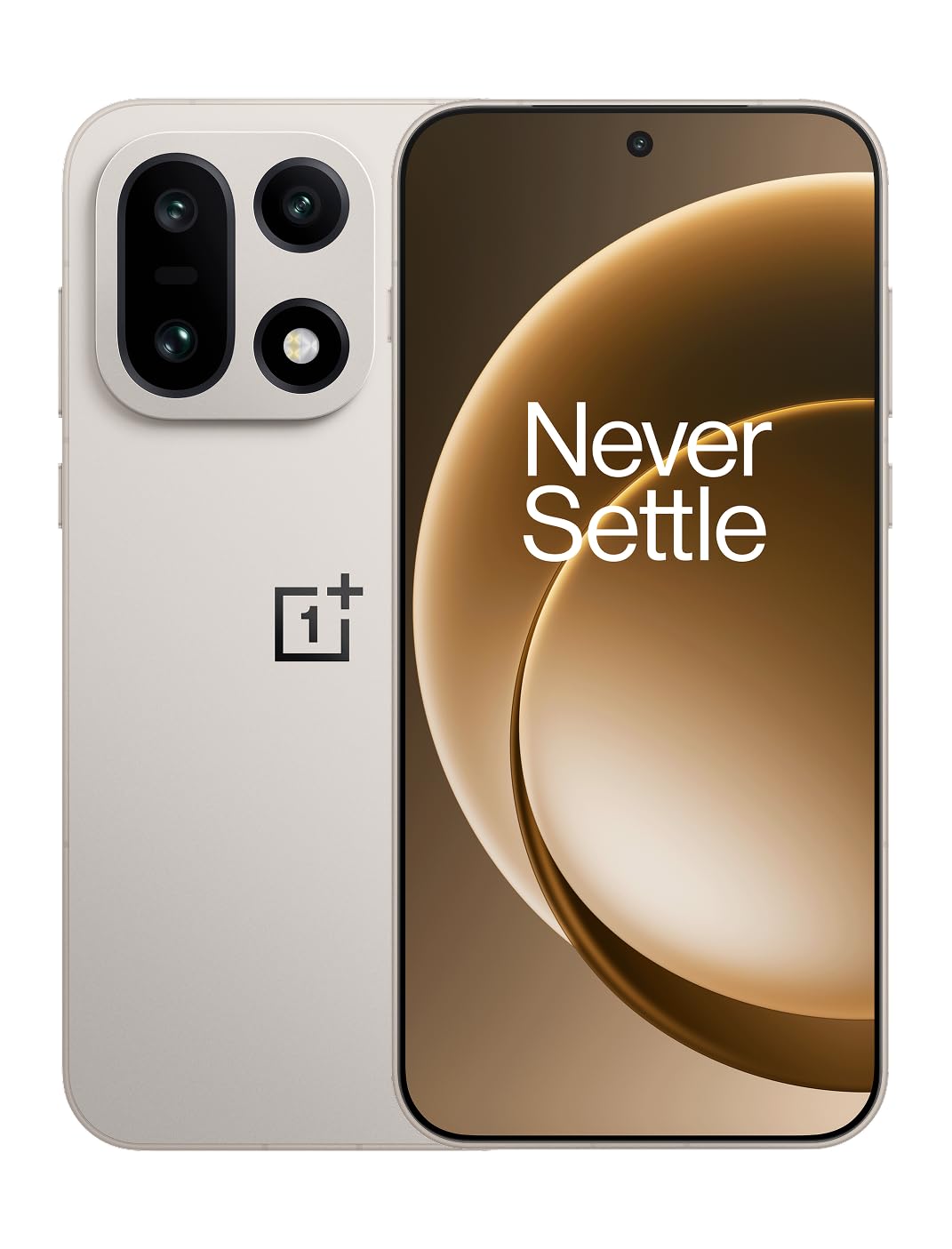
ຮູບ 1: ດ້ານຫນ້າ view of the OnePlus 15 smartphone.
2. ສິ່ງທີ່ຢູ່ໃນກ່ອງ
ກວດສອບວ່າລາຍການທັງຫມົດແມ່ນມີຢູ່ໃນການຫຸ້ມຫໍ່ຜະລິດຕະພັນຂອງທ່ານ:
- OnePlus 15 Smartphone (x1)
- ເຄື່ອງສາກ (x1)
- ສາຍຂໍ້ມູນ USB (x1)
- SIM Ejector Tool (x1)
- ຄູ່ມືແນະນຳດ່ວນ (x1)
- Safety Guide (x1)

Figure 2: Included items in the OnePlus 15 package.
3. ຕັ້ງຄ່າ
3.1. ການຕິດຕັ້ງຊິມກາດ
The OnePlus 15 supports Dual-SIM functionality. To install your SIM card(s):
- ຊອກຫາຖາດຊິມກາດຢູ່ດ້ານຂ້າງຂອງອຸປະກອນ.
- ສຽບເຄື່ອງມືຖອດ SIM ເຂົ້າໄປໃນຮູນ້ອຍໆທີ່ຢູ່ຂ້າງຖາດ ແລະກົດໃຫ້ແໜ້ນຈົນກວ່າຖາດຈະອອກມາ.
- ໃສ່ບັດ Nano-SIM ຂອງທ່ານລົງໃນຖາດໂດຍໃຫ້ໜ້າຕິດຕໍ່ສີທອງຫັນລົງ. ໃຫ້ແນ່ໃຈວ່າພວກມັນວາງໄວ້ຢ່າງຖືກຕ້ອງ.
- ໃສ່ຖາດຊິມກາດໃສ່ໂທລະສັບຄືນໃໝ່ຢ່າງລະມັດລະວັງ.

ຮູບ 3: ຂ້າງ view of the OnePlus 15, highlighting the SIM card tray.
3.2. ເປີດ ແລະ ຕັ້ງຄ່າເບື້ອງຕົ້ນ
ເພື່ອເປີດອຸປະກອນຂອງທ່ານເປັນຄັ້ງທຳອິດ:
- ກົດປຸ່ມເປີດ/ປິດຄ້າງໄວ້ (ຕັ້ງຢູ່ເບື້ອງຂວາ) ຈົນກວ່າໂລໂກ້ OnePlus ຈະປາກົດ.
- ປະຕິບັດຕາມຄຳແນະນຳໃນໜ້າຈໍເພື່ອເຮັດສຳເລັດການຕັ້ງຄ່າເບື້ອງຕົ້ນ, ລວມທັງການເລືອກພາສາ, ການເຊື່ອມຕໍ່ Wi-Fi, ການເຂົ້າສູ່ລະບົບບັນຊີ Google ແລະ ການຕັ້ງຄ່າຄວາມປອດໄພ.
3.3. ການສາກແບັດເຕີຣີ
The OnePlus 15 is equipped with a 7300mAh battery. To charge your device:
- ການສາກໄຟແບບມີສາຍ: Connect the provided USB Data Cable to the Type-C port on the bottom of the phone and the other end to the charger. Plug the charger into a power outlet.
- ການສາກໄຟໄຮ້ສາຍ: Place the phone on a compatible wireless charging pad. Ensure the phone is centered on the pad for efficient charging.
A full charge provides approximately 68.7 hours of talk time.

Figure 4: Illustration of the 7300mAh battery capacity.
4. ປະຕິບັດການອຸປະກອນຂອງທ່ານ
4.1. ຈໍສະແດງຜົນ
The OnePlus 15 features a 6.78-inch AMOLED display with a 2772x1272 resolution and a 165 Hz refresh rate. This provides smooth visuals and vibrant colors. Adjust display settings such as brightness, color mode, and refresh rate in the device settings menu.
4.2. ການປະຕິບັດ
Powered by the Snapdragon 8 Elite Gen 5 processor and 16GB of RAM, the OnePlus 15 delivers fast and efficient performance for multitasking, gaming, and demanding applications. The Tri-Chip System, combining the Snapdragon 8 Elite Gen 5 with a dedicated Wi-Fi chip and CPU scheduler, optimizes for speed, connectivity, and power efficiency.
ວິດີໂອ 1: ຫຼາຍກວ່າview of the OnePlus 15's performance capabilities and user experience.
4.3. ລະບົບກ້ອງຖ່າຍຮູບ
The device is equipped with a Triple 50 MP camera system, offering wide, ultra-wide, and telephoto lenses for versatile photography. The DetailMax Engine enhances photo quality in various lighting conditions, including day, night, and motion shots. Both front and rear cameras are available for capturing images and videos.

ຮູບ 5: ດ້ານຫລັງ view ຂອງ OnePlus 15, showcasing ລະບົບກ້ອງຖ່າຍຮູບສາມເທົ່າ.
Figure 6: DetailMax Engine for stunning photos.
4.4. ການເຊື່ອມຕໍ່
The OnePlus 15 supports a range of connectivity options:
- ໄຮ້ສາຍ: Wi-Fi, Bluetooth, NFC, Infrared.
- Wired: USB Type-C.
- ການນໍາທາງ: Dual-band GPS (L1+L5) and Galileo (E1+E5a).
- ຊິມ: Dual SIM support for managing multiple networks.
4.5. ລະບົບປະຕິບັດການ
The device runs on Android 16 with OxygenOS 16, providing a fast and smooth user experience. Regular software updates will be provided to enhance features and security.
5. ບໍາລຸງຮັກສາ
5.1. ຄວາມທົນທານແລະການປົກປ້ອງ
The OnePlus 15 is built with IP66/IP68/IP69 and IP19K ratings, offering resistance against dust and water. While designed to be durable, avoid exposing the device to extreme conditions or prolonged submersion in water.

Figure 7: OnePlus 15 demonstrating water resistance.
5.2. ການເຮັດຄວາມສະອາດອຸປະກອນຂອງທ່ານ
Use a soft, lint-free cloth to clean the screen and body of your phone. Avoid using abrasive materials or harsh chemicals, which can damage the display or finish.
5.3. ການປັບປຸງຊອບແວ
Periodically check for software updates in the device settings. Keeping your software up-to-date ensures you have the latest features, security patches, and performance improvements.
6. ການແກ້ໄຂບັນຫາ
This section addresses common issues you might encounter with your OnePlus 15.
6.1. ອຸປະກອນບໍ່ເປີດ
- ໃຫ້ແນ່ໃຈວ່າໄດ້ສາກໄຟແລ້ວ. ເຊື່ອມຕໍ່ໂທລະສັບກັບສາຍສາກ ແລະລໍຖ້າສອງສາມນາທີກ່ອນທີ່ຈະພະຍາຍາມເປີດເຄື່ອງອີກຄັ້ງ.
- ກົດປຸ່ມເປີດປິດຄ້າງໄວ້ຢ່າງໜ້ອຍ 10-15 ວິນາທີເພື່ອບັງຄັບໃຫ້ຣີສະຕາດ.
6.2. ການເຊື່ອມຕໍ່ເຄືອຂ່າຍບໍ່ດີ
- ກວດເບິ່ງວ່າຊິມກາດຂອງທ່ານໃສ່ຢ່າງຖືກຕ້ອງຫຼືບໍ່.
- Verify that airplane mode is not enabled.
- ປິດເປີດອຸປະກອນຄືນໃໝ່.
- If issues persist, contact your network provider.
6.3. ແອັບຂັດຂ້ອງ ຫຼື ຄ້າງ
- ປິດ ແລະເປີດແອັບຄືນໃໝ່.
- Clear the app's cache and data in device settings.
- ກວດໃຫ້ແນ່ໃຈວ່າແອັບໄດ້ຖືກອັບເດດເປັນເວີຊັນຫຼ້າສຸດຂອງມັນ.
- If the issue is widespread, consider restarting the phone.
6.4. ແບັດເຕີຣີໝົດໄວ
- ຫຼຸດຄວາມສະຫວ່າງໜ້າຈໍ ແລະໄລຍະເວລາໝົດເວລາໜ້າຈໍ.
- ປິດໃຊ້ງານຄຸນສົມບັດທີ່ບໍ່ໄດ້ໃຊ້ເຊັ່ນ: Wi-Fi, Bluetooth ຫຼື GPS ເມື່ອບໍ່ຈໍາເປັນ.
- ກໍານົດແລະປິດຄໍາຮ້ອງສະຫມັກທີ່ໃຊ້ພະລັງງານຫຼາຍທີ່ແລ່ນຢູ່ໃນພື້ນຫລັງ.
- Check for recent software updates, as they often include battery optimizations.
7. ຂໍ້ມູນຈໍາເພາະ
Detailed technical specifications for the OnePlus 15 (Model: CPH2749).
| ຄຸນສົມບັດ | ລາຍລະອຽດ |
|---|---|
| ຊື່ຕົວແບບ | OnePlus 15 |
| ໝາຍເລກຕົວແບບ | CPH2749 |
| ຂະໜາດສິນຄ້າ | 6.36 x 3.02 x 0.32 ນິ້ວ |
| ນ້ໍາຫນັກລາຍການ | 1.28 ປອນ |
| ລະບົບປະຕິບັດການ | Android 16 |
| ຕົວແບບ CPU | Snapdragon 8 Elite Gen 5 |
| ຄວາມໄວ CPU | 4.61 GHz |
| RAM ຂະຫນາດທີ່ຕິດຕັ້ງ | 16 GB |
| ຄວາມອາດສາມາດເກັບຮັກສາຫນ່ວຍຄວາມຈໍາ | 512 GB |
| ຂະຫນາດຈໍສະແດງຜົນຢືນ | 6.78 ນິ້ວ |
| ຄວາມລະອຽດ | 2772*1272 |
| ອັດຕາການໂຫຼດຂໍ້ມູນຄືນໃໝ່ | 165 Hz |
| ຄວາມອາດສາມາດຫມໍ້ໄຟ | 7300 ລ້ານamp Hours (7300mAh) |
| ເວລາລົມໂທລະສັບ | 68.7 ຊົ່ວໂມງ |
| ເຕັກໂນໂລຊີການເຊື່ອມຕໍ່ | Infrared, NFC, USB, Wi-Fi, Bluetooth |
| GPS | Dual band: GPS(L1+L5) Galileo(E1+E5a) |
| ຄຸນນະສົມບັດພິເສດ | Dual SIM, Wireless Charging |
| ສຽງ Jack | Type-C headphones: supported Type-C digital headphones & Type-C analog headphones |
| ຄຸນສົມບັດກ້ອງຖ່າຍຮູບອື່ນໆ | Front, Rear (Triple 50 MP Camera System) |
| ການຈັດອັນດັບ IP | IP66/IP68/IP69 and IP19K rated |
| ສີ | Sand Storm |
8. ຂໍ້ມູນການຮັບປະກັນ
Your OnePlus 15 device is covered by a limited manufacturer's warranty. Please refer to the included Safety Guide or visit the official OnePlus website for detailed warranty terms and conditions, including coverage duration and service procedures. Keep your proof of purchase for warranty claims.
9. ສະຫນັບສະຫນູນ
For further assistance, technical support, or to access additional resources, please visit the official OnePlus support website or contact customer service. You can find contact details and FAQs on the OnePlus webເວັບໄຊ.
ຊັບພະຍາກອນອອນໄລນ໌: www.oneplus.com/support


