1. ບົດແນະນຳ
ຂອບໃຈສໍາລັບການຊື້asing the MangoKit SR-L WiFi Internet Radio. This device offers a versatile listening experience, combining WiFi Internet Radio, FM Radio, a Podcast Player, and Bluetooth streaming capabilities. It also features an alarm clock and can be powered by mains or batteries for portability. This manual provides detailed instructions for setup, operation, and maintenance to ensure optimal performance and enjoyment of your radio.
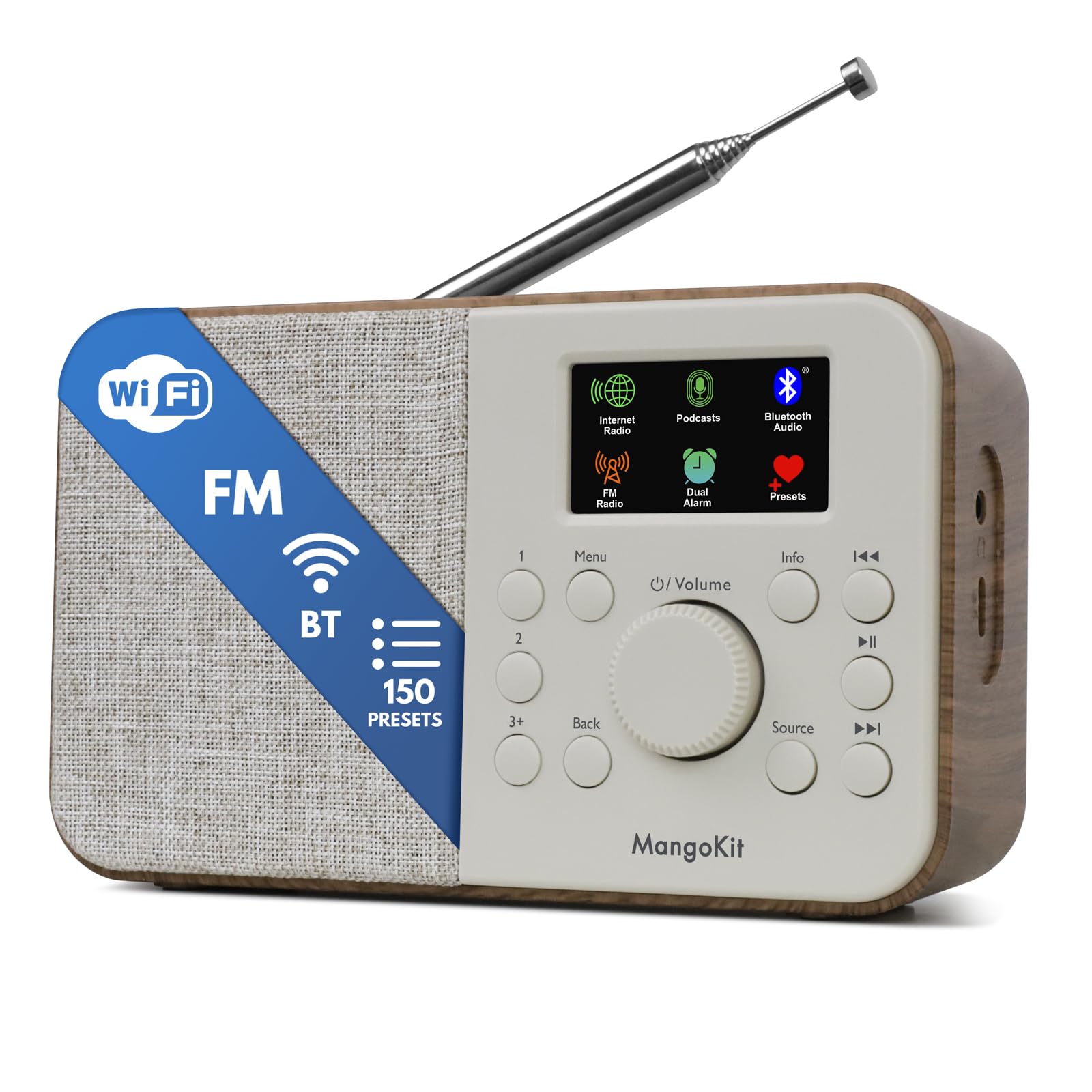
Image 1.1: The MangoKit SR-L WiFi Internet Radio in Walnut finish, showcasing ການອອກແບບຫນາແຫນ້ນຂອງມັນ.
2. ຂໍ້ມູນຄວາມປອດໄພທີ່ສໍາຄັນ
Please read all safety instructions before using the device. Keep this manual for future reference.
- ຫ້າມບໍ່ໃຫ້ອຸປະກອນຖືກຝົນ, ຄວາມຊຸ່ມຊື່ນ, ຫຼືອຸນຫະພູມທີ່ຮຸນແຮງ.
- ຫຼີກເວັ້ນການວາງເຄື່ອງໄວ້ໃກ້ກັບແຫຼ່ງຄວາມຮ້ອນ ຫຼືຢູ່ໃນແສງແດດໂດຍກົງ.
- ຮັບປະກັນການລະບາຍອາກາດທີ່ເຫມາະສົມ; ຫ້າມປິດປະຕູລະບາຍອາກາດ.
- ໃຊ້ພຽງແຕ່ອະແດັບເຕີໄຟທີ່ໃຫ້ມາ.
- ຢ່າພະຍາຍາມຖອດປະກອບຫຼືດັດແປງຫນ່ວຍງານ. ອ້າງອີງການບໍລິການທັງໝົດໃຫ້ກັບບຸກຄະລາກອນທີ່ມີຄຸນວຸດທິ.
- ຖິ້ມແບດເຕີລີ່ຢ່າງມີຄວາມຮັບຜິດຊອບຕາມກົດລະບຽບທ້ອງຖິ່ນ.
3. ເນື້ອໃນຊຸດ
ກວດສອບວ່າລາຍການທັງຫມົດແມ່ນມີຢູ່ໃນຊຸດ:
- MangoKit SR-L WiFi Internet Radio
- Power Adapter
- ຄູ່ມືເຈົ້າຂອງ
4. ຜະລິດຕະພັນເກີນview
The MangoKit SR-L features an intuitive control panel and a full-color display for easy navigation and information display.

ຮູບພາບທີ 4.1: ເປັນການປິດ view of the MangoKit SR-L's front panel, highlighting the display, rotary knob, and control buttons.
ການຄວບຄຸມ ແລະການສະແດງຜົນ:
- Full Colour Display: ສະແດງຂໍ້ມູນສະຖານີ, ເວລາ ແລະຕົວເລືອກເມນູ.
- Rotary Knob (Volume/Select): Turn to adjust volume or navigate menus; press to confirm selections.
- ປຸ່ມເມນູ: ເຂົ້າເຖິງເມນູຫຼັກ.
- ປຸ່ມກັບຄືນ: ກັບຄືນໄປຫາໜ້າຈໍ ຫຼືເມນູກ່ອນໜ້າ.
- ປຸ່ມທີ່ມາ: Switches between Internet Radio, FM, Bluetooth, and Podcast modes.
- ປຸ່ມທີ່ຕັ້ງໄວ້ລ່ວງໜ້າ (1, 2, 3+): Quick access to saved favorite stations.
- ປຸ່ມຂໍ້ມູນ: ສະແດງຂໍ້ມູນເພີ່ມເຕີມກ່ຽວກັບການອອກອາກາດປັດຈຸບັນ.
- ປຸ່ມຂ້າມ/ປັບແຕ່ງ: Navigate tracks or tune radio frequencies.
- ປຸ່ມເປີດປິດ: ເປີດ/ປິດ ໜ່ວຍ.
5. ການສະຫນອງພະລັງງານ
The MangoKit SR-L can be powered by the included mains adapter or by batteries for portable use.
5.1 ພະລັງງານຫຼັກ
ເຊື່ອມຕໍ່ອະແດບເຕີໄຟຟ້າທີ່ໃຫ້ມາເຂົ້າກັບພອດ DC IN ທີ່ຢູ່ດ້ານຫຼັງຂອງວິທະຍຸ ແລະ ຈາກນັ້ນສຽບມັນເຂົ້າກັບປລັກສຽບຝາຜະໜັງມາດຕະຖານ.
5.2 ພະລັງງານຫມໍ້ໄຟ
For portable operation, insert 4 AA batteries (not included) into the battery compartment on the back of the unit. Ensure correct polarity. The radio can provide up to 10 hours of portable listening on batteries.

Image 5.1: The MangoKit SR-L radio used outdoors, demonstrating its portability with battery power.
6. ການຕິດຕັ້ງເບື້ອງຕົ້ນ
Upon first power-on, the radio will guide you through the initial setup process.
- ການເລືອກພາສາ: ໃຊ້ປຸ່ມໝຸນເພື່ອເລືອກພາສາທີ່ທ່ານຕ້ອງການ ແລະ ກົດເພື່ອຢືນຢັນ.
- ເວລາ ແລະວັນທີ: Set the current time and date. This can often be synchronized automatically via the internet once connected.
- ການເຊື່ອມຕໍ່ເຄືອຂ່າຍ (Wi-Fi):
- ວິທະຍຸຈະສະແກນຫາເຄືອຂ່າຍ Wi-Fi ທີ່ມີຢູ່.
- ເລືອກເຄືອຂ່າຍຂອງທ່ານຈາກບັນຊີລາຍຊື່.
- ໃສ່ລະຫັດຜ່ານ Wi-Fi ຂອງທ່ານໂດຍໃຊ້ປຸ່ມໝຸນເພື່ອເລືອກຕົວອັກສອນ ແລະ ກົດເພື່ອຢືນຢັນແຕ່ລະຕົວອັກສອນ.
- Once connected, the radio will confirm the connection.
7. ຮູບແບບການເຮັດວຽກ
The MangoKit SR-L offers multiple listening modes. Press the ທີ່ມາ ປຸ່ມເພື່ອປ່ຽນລະຫວ່າງພວກມັນ.
7.1 ວິທະຍຸອິນເຕີເນັດ
ເຂົ້າເຖິງສະຖານີວິທະຍຸຫຼາຍພັນແຫ່ງທົ່ວໂລກຜ່ານການເຊື່ອມຕໍ່ Wi-Fi ຂອງທ່ານ.
- Select 'Internet Radio' from the source menu.
- Browse stations by location, genre, or use the search function.
- Use the rotary knob to navigate and select a station.
- ບັນທຶກການຕັ້ງຄ່າໄວ້ລ່ວງໜ້າ: To save a station, press and hold one of the preset buttons (1, 2, or 3+). To recall a preset, simply press the corresponding button. The radio supports up to 150 presets.
Video 7.1: An official product video demonstrating the features of the MangoKit SR-L, including Internet Radio, FM, and Bluetooth functionality.
ວິທະຍຸ 7.2 FM
Listen to local FM broadcasts.
- Select 'FM Radio' from the source menu.
- ຂະຫຍາຍເສົາອາກາດແບບຍືດຫຍໍ່ເພື່ອໃຫ້ຮັບສັນຍານໄດ້ດີທີ່ສຸດ.
- Use the skip/tune buttons to manually tune or auto-scan for stations.
- Save and recall FM stations using the preset buttons as described for Internet Radio.
7.3 Bluetooth Streaming
Connect your smartphone or tablet to play audio wirelessly.
- Select 'Bluetooth' from the source menu. The radio will enter pairing mode.
- On your device, enable Bluetooth and search for 'MangoKit SR-L'.
- Select the radio to pair. Once connected, you can stream audio from your device.
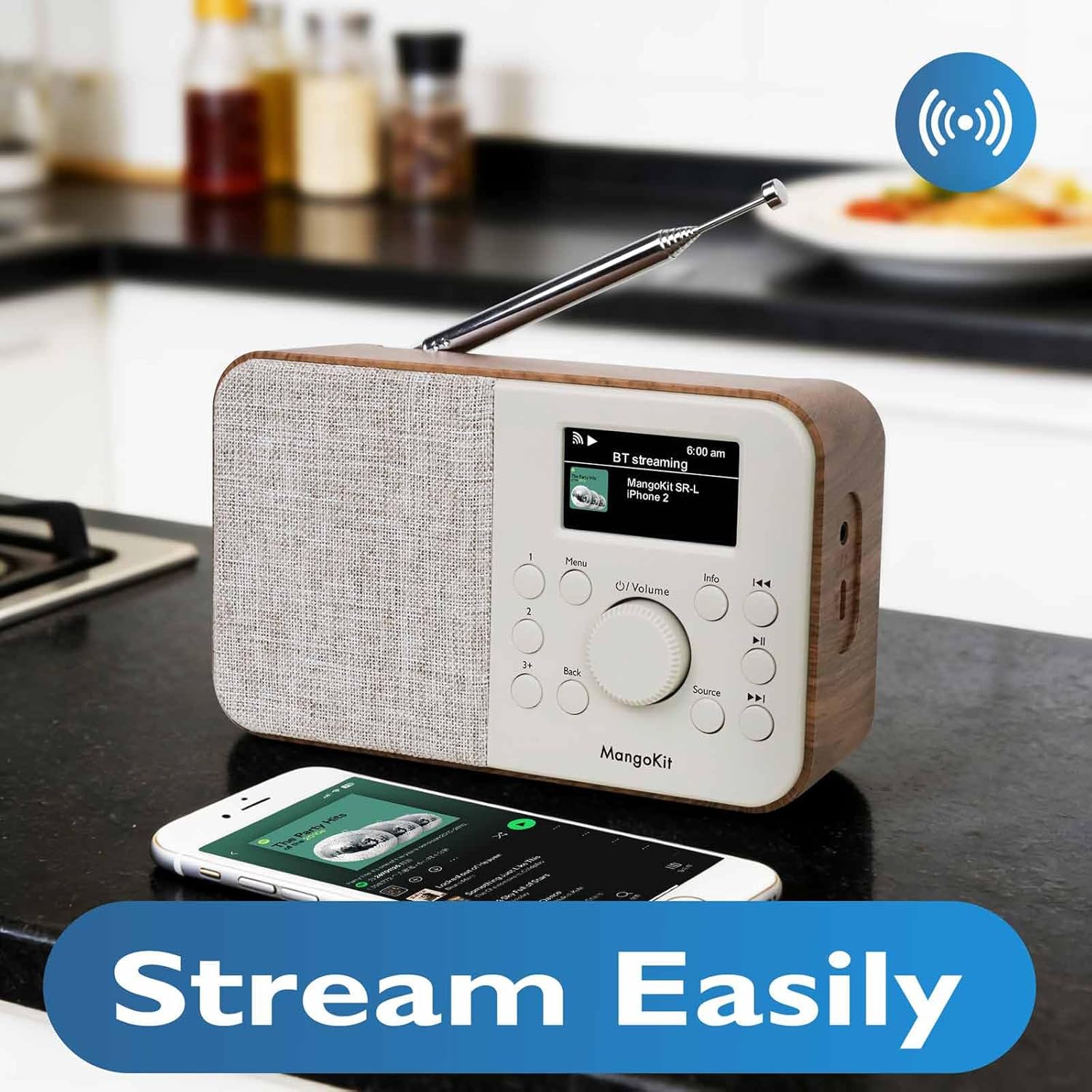
Image 7.2: The MangoKit SR-L radio connected via Bluetooth to a smartphone, demonstrating wireless audio streaming.
7.4 Podcast Player
Browse and listen to podcasts directly on the radio.
- Select 'Podcast' from the source menu.
- Browse podcasts by category, search, or view recently played.
- Select an episode to play. The player allows you to save and return to favorite episodes.
8. ໂມງປຸກ ແລະ ໂມງຈັບເວລານອນ
The MangoKit SR-L includes an alarm clock and a sleep timer function.
8.1 ການຕັ້ງໂມງປຸກ
- Access the 'Alarm' option from the main menu.
- ຕັ້ງຄ່າໂມງປຸກເອກະລາດໄດ້ສູງສຸດສອງອັນ.
- Configure alarm time, source (FM, Internet Radio, or buzzer), and volume.
- Enable or disable the alarm. When an alarm sounds, press any button to snooze or the power button to turn it off.
8.2 ຈັບເວລານອນ
ໂມງຈັບເວລາປິດເຄື່ອງຊ່ວຍໃຫ້ວິທະຍຸປິດໂດຍອັດຕະໂນມັດຫຼັງຈາກໄລຍະເວລາທີ່ກຳນົດໄວ້.
- Access the 'Sleep Timer' option from the main menu.
- ເລືອກໄລຍະເວລາທີ່ຕ້ອງການ (ຕົວຢ່າງ, 15, 30, 60 ນາທີ).
- The radio will count down and automatically switch off.
9. ບໍາລຸງຮັກສາ
To ensure the longevity and optimal performance of your MangoKit SR-L radio, follow these maintenance guidelines:
- ທໍາຄວາມສະອາດ: ໃຊ້ຜ້າປຽກແຫ້ງເພື່ອເຮັດຄວາມສະອາດດ້ານນອກຂອງວິທະຍຸ. ຢ່າໃຊ້ເຄື່ອງເຮັດຄວາມສະອາດຂັດ, ຂີ້ເຜີ້ງ, ຫຼືສານລະລາຍ.
- ເສົາອາກາດ: ຈັບເສົາອາກາດ telescopic ຢ່າງລະມັດລະວັງເພື່ອຫຼີກເວັ້ນການບິດຫຼືແຕກ.
- ການເກັບຮັກສາ: ຖ້າເກັບຮັກສາວິທະຍຸເປັນເວລາດົນ, ໃຫ້ຖອດແບດເຕີລີ່ອອກເພື່ອປ້ອງກັນການຮົ່ວໄຫຼ.
10. ການແກ້ໄຂບັນຫາ
ຖ້າທ່ານພົບບັນຫາກັບວິທະຍຸຂອງທ່ານ, ໃຫ້ອ້າງອີງເຖິງບັນຫາ ແລະ ວິທີແກ້ໄຂທົ່ວໄປຕໍ່ໄປນີ້:
| ບັນຫາ | ສາເຫດທີ່ເປັນໄປໄດ້ | ການແກ້ໄຂ |
|---|---|---|
| ບໍ່ມີພະລັງງານ | Power adapter not connected; batteries depleted or incorrectly inserted. | Check power adapter connection; replace batteries or ensure correct polarity. |
| No Internet Radio connection | Incorrect Wi-Fi password; Wi-Fi signal too weak; router issue. | Re-enter Wi-Fi password; move radio closer to router; restart router. |
| ການຮັບ FM ບໍ່ດີ | ເສົາອາກາດບໍ່ໄດ້ຂະຫຍາຍ; ແຊກແຊງ. | Fully extend the telescopic antenna; reposition the radio. |
| ການຈັບຄູ່ Bluetooth ລົ້ມເຫລວ | ວິທະຍຸບໍ່ຢູ່ໃນໂໝດຈັບຄູ່; ອຸປະກອນໄກເກີນໄປ; ອຸປະກອນທີ່ຈັບຄູ່ກັບຫນ່ວຍອື່ນແລ້ວ. | Ensure radio is in Bluetooth mode; bring devices closer; unpair from other devices. |
| ບໍ່ມີສຽງ | Volume too low; mute activated; headphones connected. | Increase volume; check if mute is active; disconnect headphones if not needed. |
11. ຂໍ້ມູນຈໍາເພາະ
| ຄຸນສົມບັດ | ລາຍລະອຽດ |
|---|---|
| ໝາຍເລກຕົວແບບ | SR-L |
| ຂະໜາດສິນຄ້າ | 7 x 3 x 2.5 ນິ້ວ |
| ນ້ໍາຫນັກລາຍການ | 1 ປອນ |
| ເຕັກໂນໂລຊີການເຊື່ອມຕໍ່ | Bluetooth, WiFi |
| ເທກໂນໂລຍີ Tuner | ວິທະຍຸອິນເຕີເນັດ, FM |
| ແຫຼ່ງພະລັງງານ | Corded Electric, Battery (4 AA, not included) |
| ຄຸນນະສົມບັດພິເສດ | Portable, Alarm Clock, Podcast Player, 150 Presets |
| ຈໍສະແດງຜົນ | Full Colour Display |
| Jack ຫູຟັງ | ແມ່ນແລ້ວ |
12. ການຮັບປະກັນແລະການສະຫນັບສະຫນູນ
MangoKit products are designed for reliability and performance. This product comes with a standard manufacturer's warranty. Please refer to the warranty card included in your package for specific terms and conditions.
ການຊ່ວຍເຫຼືອລູກຄ້າ:
For technical assistance, troubleshooting, or warranty inquiries, please contact MangoKit customer support through the retailer where you purchased the product or visit the official MangoKit webເວັບໄຊສໍາລັບຂໍ້ມູນຕິດຕໍ່.


