ແນະນຳ
This manual provides detailed instructions for the installation, operation, and maintenance of your TRYX Panorama WB CPU Water Block. Designed for custom liquid cooling systems, this water block features a 6.67-inch 2K AMOLED display, microchannel fins, a copper base, and an integrated VRM fan to ensure optimal thermal performance and visual customization. Please read this manual thoroughly before installation and use.
ແມ່ນຫຍັງຢູ່ໃນກ່ອງ
ກວດສອບວ່າອົງປະກອບທັງໝົດທີ່ລະບຸໄວ້ຂ້າງລຸ່ມນີ້ມີຢູ່ໃນຊຸດຂອງທ່ານ.
- CPU Water Block
- AMD/Intel Mounting Brackets
- Thermal Paste (α-01)
- 90° Rotary Fittings
- ຄູ່ມືການຕິດຕັ້ງ
- Accessories (screws, springs, etc.)

Image: Contents of the TRYX Panorama WB package.
ການຕິດຕັ້ງແລະການຕິດຕັ້ງ
Follow these steps carefully to install the TRYX Panorama WB CPU Water Block into your custom liquid cooling system. Ensure your system is powered off and disconnected from the mains before beginning.
1. Prepare Your CPU and Motherboard
- Remove any existing CPU cooler.
- Clean the CPU surface thoroughly with isopropyl alcohol to remove old thermal paste.
- Install the appropriate backplate and mounting standoffs for your CPU socket (Intel LGA 1851/1700/1200/115x or AMD AM4/AM5). Refer to your motherboard manual for specific backplate installation if needed.
ຮູບພາບ: ລະເບີດ view of the water block components, including mounting hardware.
2. ນຳໃຊ້ຢາລະບາຍຄວາມຮ້ອນ
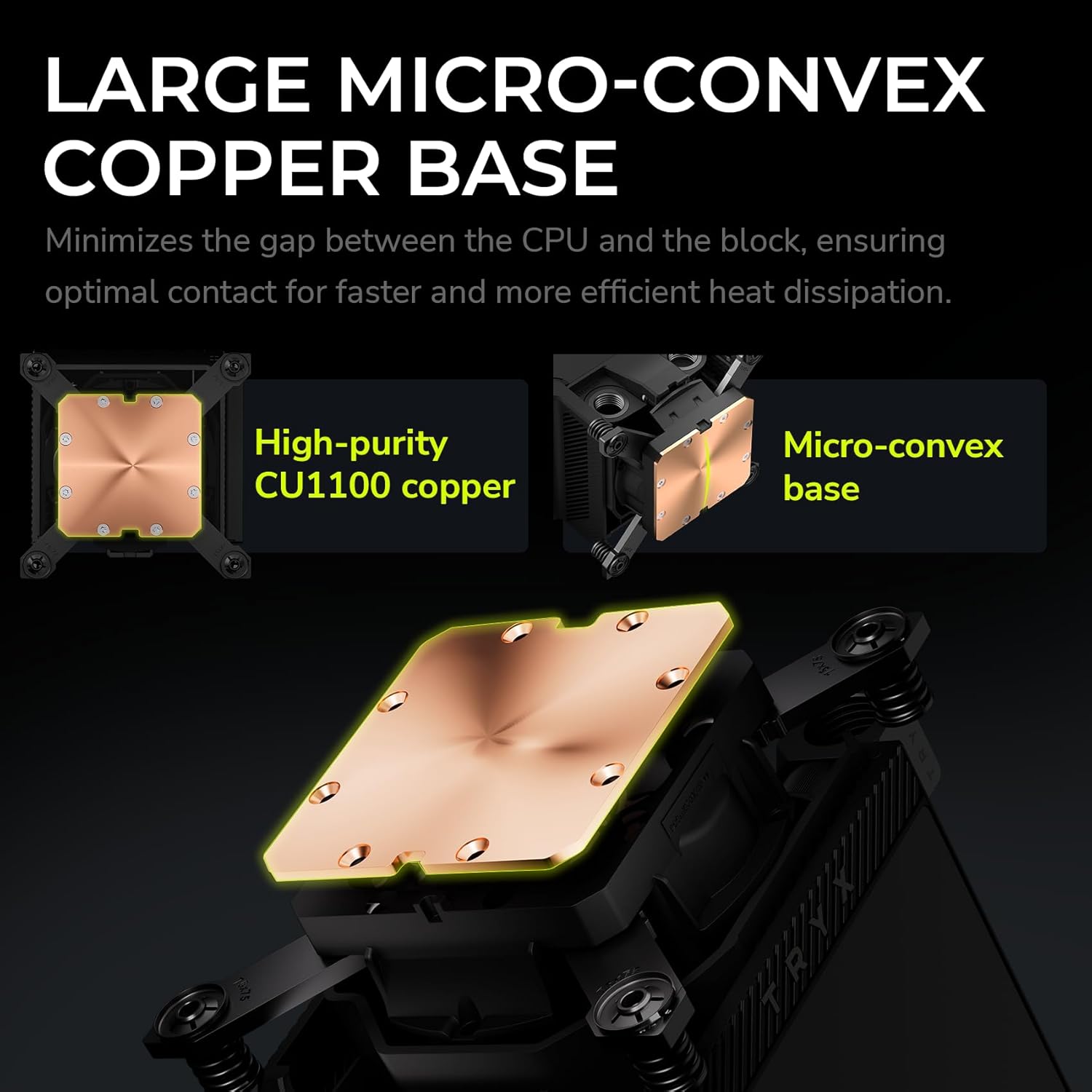
Apply a small amount of the provided thermal paste (α-01) to the center of your CPU's integrated heat spreader (IHS). A pea-sized dot is generally sufficient. The pressure from the water block will spread it evenly.

Image: Detail of the water block's copper base, designed for efficient heat transfer.
3. Mount the Water Block
- Carefully align the water block over the CPU and mounting standoffs.
- Place the adjustable mounting bracket over the water block.
- Secure the water block using the provided screws, tightening them in a diagonal pattern until snug. Avoid overtightening.
4. Connect to Your Liquid Cooling Loop
The TRYX Panorama WB features G1/4" threaded outlets for compatibility with standard liquid cooling components.
- Install the included 90° rotary fittings or your preferred G1/4" fittings into the water block's ports. Ensure a secure, leak-free connection.
- Connect your tubing to the fittings, ensuring proper flow direction within your custom loop.

Image: Detail of the 90° rotary fittings and G1/4" threaded ports for loop integration.

Image: The 90° rotary adapter fitting, highlighting its 360° rotation capability.
5. ການເຊື່ອມຕໍ່ພະລັງງານ
Connect the necessary cables from the water block to your motherboard or power supply. This typically includes a USB header for display and software control, and a fan header for the integrated VRM fan.
ຄໍາແນະນໍາການດໍາເນີນງານ
The 2K AMOLED Display
The TRYX Panorama WB features a vibrant 6.67-inch 2K AMOLED display operating at 60Hz. This display can show system information, custom images, and videos.

Image: The 6.67-inch curved AMOLED display showcasing ຄວາມສາມາດທາງສາຍຕາຂອງມັນ.

Image: Explanation of the triple-layer screen technology for optimal display quality.
KANALI Software Hub
The KANALI Software Hub is your control center for the Panorama WB. It allows for extensive customization of the display and monitoring of system parameters.
- ການຕິດຕາມລະບົບ: View real-time CPU temperature, frequency, usage, GPU temperature, and more.
- Content Customization: Upload custom images (PNG, JPG, GIF) and videos (MP4, AVI) up to 1080P and 500MB.
- Split-Screen Functionality: Display different content on separate sections of the screen simultaneously.
- Anamorphic Effects: Apply various visual effects to your content.
- VRM Fan Control: Adjust the speed of the integrated VRM fan.
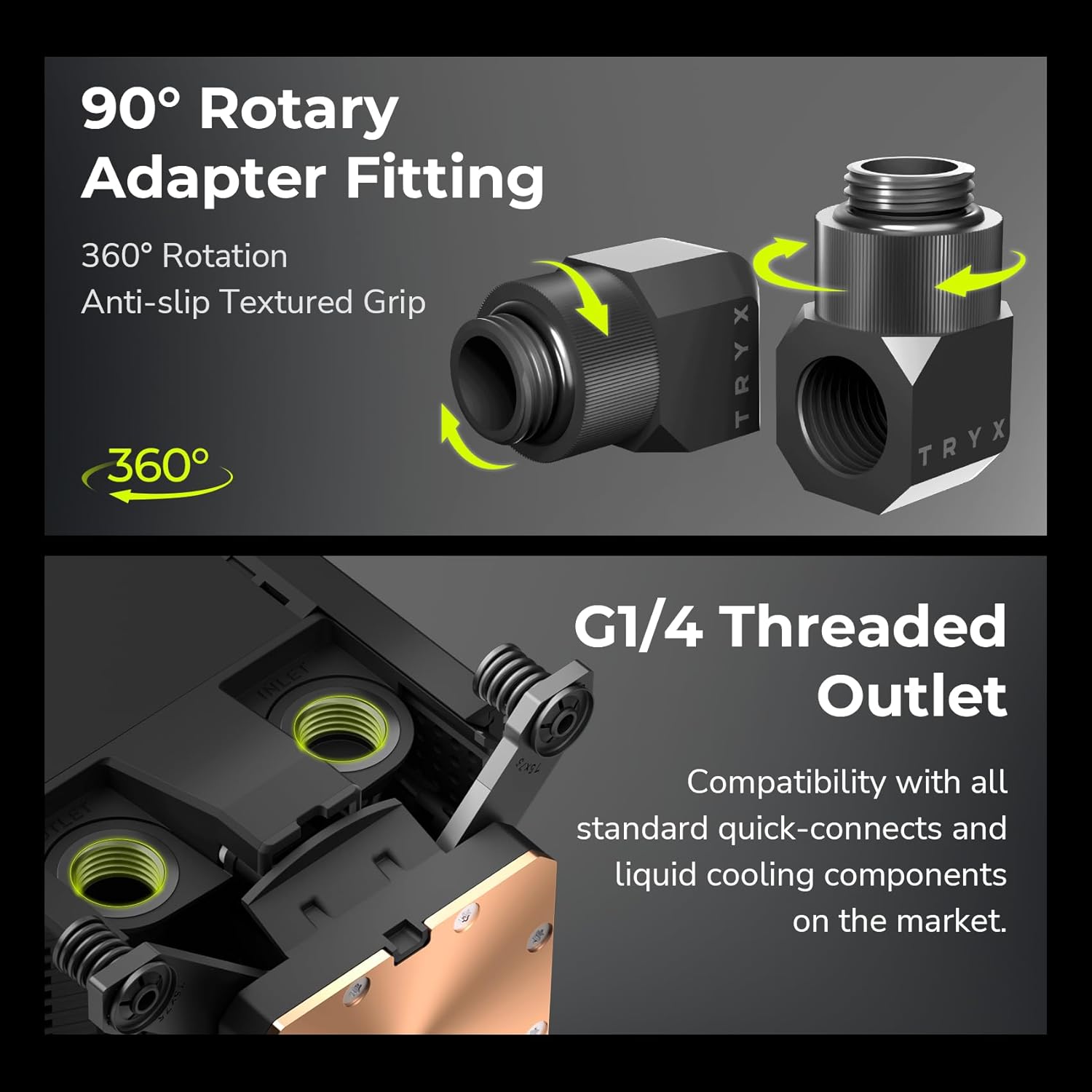
Image: KANALI software interface displaying system information options.

ຮູບພາບ: ຫຼາຍກວ່າview of the KANALI Software Hub for display configuration and system monitoring.

Image: The split-screen display feature in action, showing different content simultaneously.

Image: KANALI's content library options, including preloaded 3D content and custom upload.
Integrated VRM Fan
The integrated VRM fan provides additional cooling to your motherboard's Voltage Regulator Modules (VRMs), contributing to system stability, especially during overclocking. Control the fan speed via the KANALI software.

Image: The integrated VRM fan and its adjustable settings in KANALI software.
ບໍາລຸງຮັກສາ
Regular maintenance ensures the longevity and optimal performance of your TRYX Panorama WB.
- ການເຮັດຄວາມສະອາດຈໍສະແດງຜົນ: Gently wipe the AMOLED display with a soft, lint-free cloth. For stubborn smudges, use a screen-safe cleaning solution. Avoid abrasive materials.
- ການກວດສອບລະບົບນ້ຳຫລໍ່ເຢັນ: Periodically inspect your liquid cooling loop for any signs of leaks, kinks in tubing, or coolant discoloration. Address any issues promptly.
- ການປ່ຽນນໍ້າຢາຫລໍ່ເຢັນ: Follow the recommendations of your coolant manufacturer for replacement intervals.
- ການກຳຈັດຂີ້ຝຸ່ນ: Use compressed air to clear any dust accumulation around the VRM fan and water block fins to maintain airflow.
ການແກ້ໄຂບັນຫາ
If you encounter issues with your TRYX Panorama WB, refer to the following common problems and solutions.
| ບັນຫາ | ສາເຫດທີ່ເປັນໄປໄດ້ | ການແກ້ໄຂ |
|---|---|---|
| Display is blank or not showing content. |
|
|
| High CPU temperatures. |
|
|
| VRM fan is noisy or not spinning. |
|
|
| Software (KANALI) not detecting the device. |
|
|
ຂໍ້ມູນຈໍາເພາະ
| ຄຸນສົມບັດ | ລາຍລະອຽດ |
|---|---|
| ຂະໜາດສິນຄ້າ | 9.1"L x 6.1"W x 6.1"H |
| ຍີ່ຫໍ້ | TRYX |
| ປະເພດເຊື່ອມຕໍ່ໄຟຟ້າ | 4-Pin |
| ສະບັບtage | 12 ໂວນ (DC) |
| ວິທີການເຮັດຄວາມເຢັນ | ນ້ໍາ |
| ອຸປະກອນທີ່ເຂົ້າກັນໄດ້ | CPU |
| ລະດັບສຽງ | 22 Decibels |
| ວັດສະດຸ | Aluminum, Copper, Polybutylene Terephthalate |
| Maximum Rotational Speed (VRM Fan) | 3300 RPM |
| Air Flow Capacity (VRM Fan) | 17.4 ລູກບາດຟຸດຕໍ່ນາທີ |
| ນ້ໍາຫນັກລາຍການ | 2.62 ປອນ |
| ໝາຍເລກຕົວແບບ | L-P0CL-DS0M-G0K |
| ປະເພດການສະແດງ | 6.67-inch Curved 2K AMOLED |
| ສະແດງອັດຕາການໂຫຼດຂໍ້ມູນຄືນໃໝ່ | 60Hz |
| ອຸປະກອນເສີມ | G1/4" Threaded Outlet, 90° Rotary Fittings |
| ຄວາມເຂົ້າກັນໄດ້ຂອງຊັອກເກັດ CPU | Intel LGA 1851/1700/1200/115x, AMD AM4/AM5 |
ສິນຄ້າເກີນview ວິດີໂອ
ເບິ່ງວິດີໂອຢ່າງເປັນທາງການນີ້ສຳລັບພາບລວມview of the TRYX Panorama WB CPU Water Block's features and aesthetics.
ວິດີໂອ: ຜະລິດຕະພັນຢ່າງເປັນທາງການສິ້ນສຸດລົງview of the TRYX Panorama WB CPU Water Block, demonstrating its design and display features.
ການຮັບປະກັນແລະການສະຫນັບສະຫນູນ
For detailed warranty information, technical support, or to contact customer service, please visit the official TRYX webເວັບໄຊ ຫຼືອ້າງອີງໃສ່ບັດຮັບປະກັນລວມຢູ່ໃນຜະລິດຕະພັນຂອງທ່ານ.


