1. ບົດແນະນຳ
This manual provides essential information for the safe and efficient use of your Fossibot F107 Pro 5G Rugged Smartphone. Please read it thoroughly before operating your device.
ແມ່ນຫຍັງຢູ່ໃນກ່ອງ
- Fossibot F107 Pro 5G Smartphone
- ສາຍ USB Type-C
- ອະແດັບເຕີພະລັງງານ (66W)
- SIM Ejector Tool
- ຄູ່ມືຜູ້ໃຊ້
- ບັດຮັບປະກັນ
2. ຄຸນລັກສະນະຂອງຜະລິດຕະພັນ
The Fossibot F107 Pro is engineered for durability and high performance, offering a range of advanced features:
- Massive 28000mAh Battery with 66W Fast Charge: Experience extended usage with a large battery and rapid charging capabilities. The OTG function allows charging of other devices.
- ລະບົບກ້ອງຖ່າຍຮູບຂັ້ນສູງ: Features a 200MP AI main camera for detailed photos, a 2MP Night Vision Camera for clear low-light imaging, and a 50MP front camera for high-quality selfies. Supports 4K video recording and various modes including underwater, HDR, and 360° panorama.
- Robust Performance and Storage: Equipped with 12GB RAM (expandable up to 18GB virtual RAM for a total of 30GB) and 512GB internal storage, utilizing DDR5 technology for faster performance and lower power consumption.
- Immersive 6.95" FHD+ Display: A 2.4K display with 2400x1080 resolution and a 120Hz Smart Dynamic Refresh Rate provides smooth visuals and responsive interaction.
- 5G Network Connectivity: Supports 5G networks (T-Mobile compatible; Verizon and AT&T are not supported). Please verify local frequency band compatibility before purchase.
- ການອອກແບບ Rugged: Built to MIL-STD-810H standards, with IP68 and IP69K ratings for water, dust, and drop resistance.
- ໄຟສາຍແບບປະສົມປະສານ: A powerful flashlight with a 50-meter beam distance for outdoor activities and emergencies.
- ຄວາມປອດໄພແລະຄວາມສະດວກ: Includes NFC for contactless payments, Face ID, and Fingerprint unlock for secure and quick access.

ຮູບພາບ: ຫຼາຍກວ່າview of Fossibot F107 Pro's main features, highlighting its large battery, memory, camera, and rugged certifications.
3. ແຜນຜັງອຸປະກອນ
Familiarize yourself with the physical components of your Fossibot F107 Pro.

ຮູບພາບ: ດ້ານຫນ້າແລະດ້ານຫລັງ view of the Fossibot F107 Pro, showcasing its rugged design and camera module.

ຮູບພາບ: Side profile of the Fossibot F107 Pro, indicating the location of the power button, volume rocker, and SIM/TF card slot.
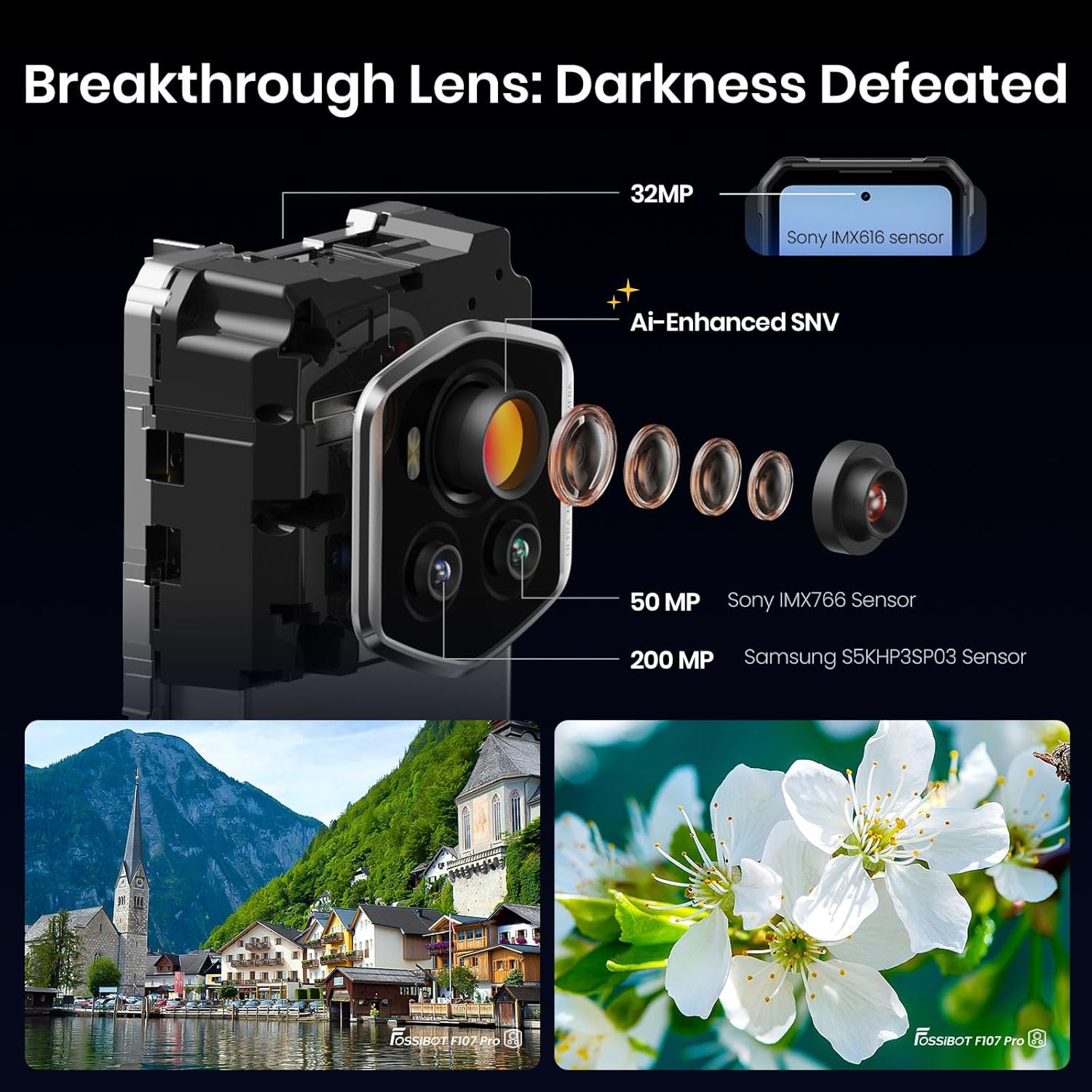
ຮູບພາບ: ລາຍລະອຽດ view of the Fossibot F107 Pro's multi-lens camera system, including the 200MP main sensor and night vision lens.
4. ຕັ້ງຄ່າ
4.1 ການຕິດຕັ້ງ SIM ແລະບັດ TF
- ຊອກຫາຖາດຊິມກາດ/TF ຢູ່ດ້ານຂ້າງຂອງອຸປະກອນ.
- ສຽບເຄື່ອງຖອດຊິມເຂົ້າໄປໃນຮູນ້ອຍຂ້າງຖາດແລະຍູ້ຄ່ອຍໆຈົນກວ່າຖາດຈະປົ່ງອອກ.
- Place your Nano-SIM card(s) and/or TF card (microSD) into the designated slots on the tray. Ensure the gold contacts face downwards.
- ໃສ່ຖາດໃສ່ໂທລະສັບຄືນໃໝ່ຢ່າງລະມັດລະວັງຈົນກວ່າມັນຈະກົດໃສ່ບ່ອນ.
4.2 ການສາກໄຟເບື້ອງຕົ້ນ
Before first use, fully charge your device. Use the provided 66W power adapter and USB Type-C cable for optimal charging speed.
- ເຊື່ອມຕໍ່ສາຍ USB Type-C ກັບຊ່ອງສາກໄຟຢູ່ລຸ່ມສຸດຂອງໂທລະສັບ.
- ເຊື່ອມຕໍ່ສົ້ນອື່ນຂອງສາຍກັບອະແດັບເຕີໄຟ.
- ສຽບອະແດບເຕີໄຟໃສ່ກັບປລັກສຽບໃສ່ຝາ.
- ຕົວຊີ້ວັດການສາກໄຟຈະປາກົດຢູ່ໃນຫນ້າຈໍ.
4.3 ການເປີດ/ປິດ
- ເພື່ອເປີດເຄື່ອງ: ກົດປຸ່ມເປີດປິດຄ້າງໄວ້ (ຕັ້ງຢູ່ຂ້າງໆ) ຈົນກວ່າໂລໂກ້ Fossibot ຈະປາກົດ.
- ປິດເຄື່ອງ: ກົດປຸ່ມເປີດປິດຄ້າງໄວ້, ຈາກນັ້ນເລືອກ "ປິດເຄື່ອງ" ຈາກຕົວເລືອກໃນໜ້າຈໍ.
- ເພື່ອເລີ່ມຕົ້ນໃໝ່: ກົດປຸ່ມເປີດປິດຄ້າງໄວ້, ຈາກນັ້ນເລືອກ "ຣີສະຕາດ" ຈາກຕົວເລືອກໃນໜ້າຈໍ.
4.4 ການຕິດຕັ້ງເບື້ອງຕົ້ນ
Upon first power-on, follow the on-screen prompts to configure your device, including language, Wi-Fi connection, Google account, and security settings.
5. ຄໍາແນະນໍາການດໍາເນີນງານ
5.1 ການນຳທາງພື້ນຖານ (Android 15)
Your Fossibot F107 Pro runs on Android 15. Navigate using gestures or the traditional three-button navigation bar (configurable in Settings).
- ໜ້າຈໍຫຼັກ: Swipe left/right to access app pages.
- App Drawer: ປັດຂຶ້ນຈາກລຸ່ມສຸດຂອງໜ້າຈໍໄປທີ່ view ແອັບພລິເຄຊັນທີ່ຕິດຕັ້ງທັງໝົດ.
- ການແຈ້ງເຕືອນ ແລະການຕັ້ງຄ່າດ່ວນ: ປັດລົງຈາກເທິງສຸດຂອງໜ້າຈໍເພື່ອເຂົ້າເຖິງການແຈ້ງເຕືອນ ແລະປຸ່ມສະຫຼັບການຕັ້ງຄ່າດ່ວນ.
5.2 ການໃຊ້ກ້ອງຖ່າຍຮູບ
The Fossibot F107 Pro features a versatile camera system.
- ເປີດແອັບກ້ອງຖ່າຍຮູບ.
- Select your desired mode (Photo, Video, Night Vision, Portrait, etc.).
- ແຕະປຸ່ມຊັດເຕີເພື່ອຖ່າຍຮູບ ຫຼືເລີ່ມ/ຢຸດການບັນທຶກວິດີໂອ.

ຮູບພາບ: ລະເບີດ view of the camera module, showing the 200MP Samsung S5KHP3SP03 sensor, 50MP Sony IMX766 sensor, and 32MP Sony IMX616 sensor.

Image: Demonstrates the difference between Starlight Night Vision (full-color) and traditional Infrared Night Vision (black and white).
5.3 ການເຮັດວຽກຂອງໄຟສາຍ
The powerful integrated flashlight can be accessed via Quick Settings or a dedicated button (if configured).

Image: The Fossibot F107 Pro's flashlight illuminating a path, highlighting its 50-meter beam distance.
5.4 ໜ້າທີ່ຂອງ OTG
The On-The-Go (OTG) feature allows your phone to act as a power bank to charge other devices or connect USB accessories.
- Connect an OTG adapter (not included) to your phone's USB-C port.
- Connect the device you wish to charge or the USB accessory to the OTG adapter.
- Ensure OTG is enabled in your phone's settings if it doesn't activate automatically.
5.5 Security Features (Face ID, Fingerprint)
Set up Face ID or Fingerprint unlock for convenient and secure access to your device.
- ໄປທີ່ ການຕັ້ງຄ່າ > ຄວາມປອດໄພ ແລະ ຄວາມເປັນສ່ວນຕົວ > ປົດລັອກອຸປະກອນ.
- Follow the on-screen instructions to register your face or fingerprint.
5.6 ການຕັ້ງຄ່າການສະແດງ
Customize your display experience, including the 120Hz refresh rate.

Image: Visual representation of the Fossibot F107 Pro's display specifications, including resolution, refresh rate, and brightness.
6. ບໍາລຸງຮັກສາ
To ensure the longevity and optimal performance of your Fossibot F107 Pro, follow these maintenance guidelines:
- ການຕໍ່ຕ້ານນ້ໍາແລະຝຸ່ນ: The device is IP68/IP69K rated. Ensure all port covers are securely closed before exposing the phone to water or dust. Do not intentionally submerge the phone in corrosive liquids or extreme temperatures.
- ທໍາຄວາມສະອາດ: ໃຊ້ອ່ອນ, ງamp ຜ້າເຊັດໜ້າຜິວໂທລະສັບ. ຫຼີກລ່ຽງສານເຄມີຮຸນແຮງ ຫຼື ວັດສະດຸຂັດ.
- ການດູແລຫມໍ້ໄຟ: Avoid extreme temperatures. Do not fully discharge the battery regularly. Use the original charger for optimal battery health.
- ການປ້ອງກັນ ໜ້າ ຈໍ: While the screen is durable, consider using a screen protector for added scratch resistance.
- ອຸນຫະພູມ: Operate the device within recommended temperature ranges (typically 0°C to 35°C).
7. ການແກ້ໄຂບັນຫາ
If you encounter issues with your Fossibot F107 Pro, refer to the following common solutions:
7.1 ໂທລະສັບບໍ່ເປີດ
- ໃຫ້ແນ່ໃຈວ່າໄດ້ສາກໄຟແລ້ວ. ເຊື່ອມຕໍ່ໂທລະສັບກັບສາຍສາກຢ່າງໜ້ອຍ 30 ນາທີ.
- ກົດປຸ່ມເປີດປິດຄ້າງໄວ້ 10-15 ວິນາທີເພື່ອບັງຄັບໃຫ້ຣີສະຕາດ.
7.2 ບັນຫາການສາກໄຟ
- ກວດສອບວ່າສາຍສາກແລະອະແດັບເຕີເຊື່ອມຕໍ່ຢ່າງປອດໄພແລະບໍ່ເສຍຫາຍ.
- Try using a different compatible charger and cable.
- Clean the charging port gently with a dry, soft brush to remove any debris.
7.3 ບັນຫາການເຊື່ອມຕໍ່ເຄືອຂ່າຍ
- ກວດເບິ່ງວ່າຊິມກາດຂອງທ່ານໃສ່ຢ່າງຖືກຕ້ອງຫຼືບໍ່.
- Ensure mobile data is enabled in Settings.
- ຣີສະຕາດໂທລະສັບ.
- Verify that your carrier (T-Mobile) has coverage in your area. Remember, Verizon and AT&T are not supported.
7.4 ກ້ອງຖ່າຍຮູບບໍ່ເຮັດວຽກ
- Restart the Camera app or the phone.
- ກວດເບິ່ງການອະນຸຍາດແອັບສຳລັບແອັບກ້ອງຖ່າຍຮູບໃນການຕັ້ງຄ່າ.
- ໃຫ້ແນ່ໃຈວ່າບໍ່ມີສິ່ງກີດຂວາງທາງກາຍະພາບຢູ່ເທິງເລນກ້ອງຖ່າຍຮູບ.
7.5 ການປະຕິບັດຊ້າ
- ປິດແອັບພລິເຄຊັນພື້ນຫຼັງທີ່ບໍ່ຈໍາເປັນ.
- ລຶບລ້າງຂໍ້ມູນແຄດສຳລັບແອັບຯທີ່ໃຊ້ເລື້ອຍໆ.
- ໃຫ້ແນ່ໃຈວ່າມີພື້ນທີ່ຈັດເກັບພຽງພໍ.
- ພິຈາລະນາການຣີເຊັດຄ່າໂຮງງານເປັນທາງເລືອກສຸດທ້າຍ (ສຳຮອງຂໍ້ມູນຂອງທ່ານກ່ອນ).
8. ຂໍ້ມູນຈໍາເພາະ
| ຄຸນສົມບັດ | ຂໍ້ມູນຈໍາເພາະ |
|---|---|
| ຍີ່ຫໍ້ | ຟອສຊິບອດ |
| ຊື່ຕົວແບບ | fossibot f107 pro |
| ລະບົບປະຕິບັດການ | Android 15 |
| ຂະໜາດໜ້າຈໍ | 6.95 ນິ້ວ |
| ຄວາມລະອຽດ | 2400 x 1080 |
| ອັດຕາການໂຫຼດຂໍ້ມູນຄືນໃໝ່ | 120 Hz |
| RAM ຂະຫນາດທີ່ຕິດຕັ້ງ | 12 GB (expandable to 30GB virtual RAM) |
| ຄວາມອາດສາມາດເກັບຮັກສາຫນ່ວຍຄວາມຈໍາ | 512 GB |
| ຄວາມອາດສາມາດຫມໍ້ໄຟ | 28000 ລ້ານamp ຊົ່ວໂມງ |
| ເຕັກໂນໂລຊີການເຊື່ອມຕໍ່ | 5G, NFC, OTG, GPS |
| Wireless Carrier Support | T-Mobile (Verizon and AT&T not supported) |
| ຄວາມທົນທານ | MIL-STD-810H, IP68, IP69K |
| ນ້ໍາຫນັກລາຍການ | 3.04 ປອນ |
| ຂະໜາດແພັກເກັດ | 9.25 x 8.19 x 2.4 ນິ້ວ |
| ວັນທີທໍາອິດທີ່ມີ | ວັນທີ 17 ກັນຍາ 2025 |
9. ການຮັບປະກັນແລະການສະຫນັບສະຫນູນ
Your Fossibot F107 Pro comes with a standard manufacturer's warranty. For detailed warranty information, please refer to the warranty card included in your product packaging or visit the official FOSSIBOT webເວັບໄຊ.
For technical support, troubleshooting assistance, or service inquiries, please contact FOSSIBOT customer support through their official channels. Keep your purchase receipt and product serial number handy when contacting support.
10. ວິດີໂອຜະລິດຕະພັນຫຼາຍກວ່າview
ວິດີໂອ: ຫຼາຍກວ່າview of the Fossibot F107 Pro, showcasing its features, ruggedness, and battery life in various usage scenarios.


