1. ຜະລິດຕະພັນເກີນview
The FOSSIBOT F110 Pro is a rugged smartphone designed for durability and high performance. It features a powerful processor, a large battery, advanced camera capabilities, and robust protection against environmental elements.
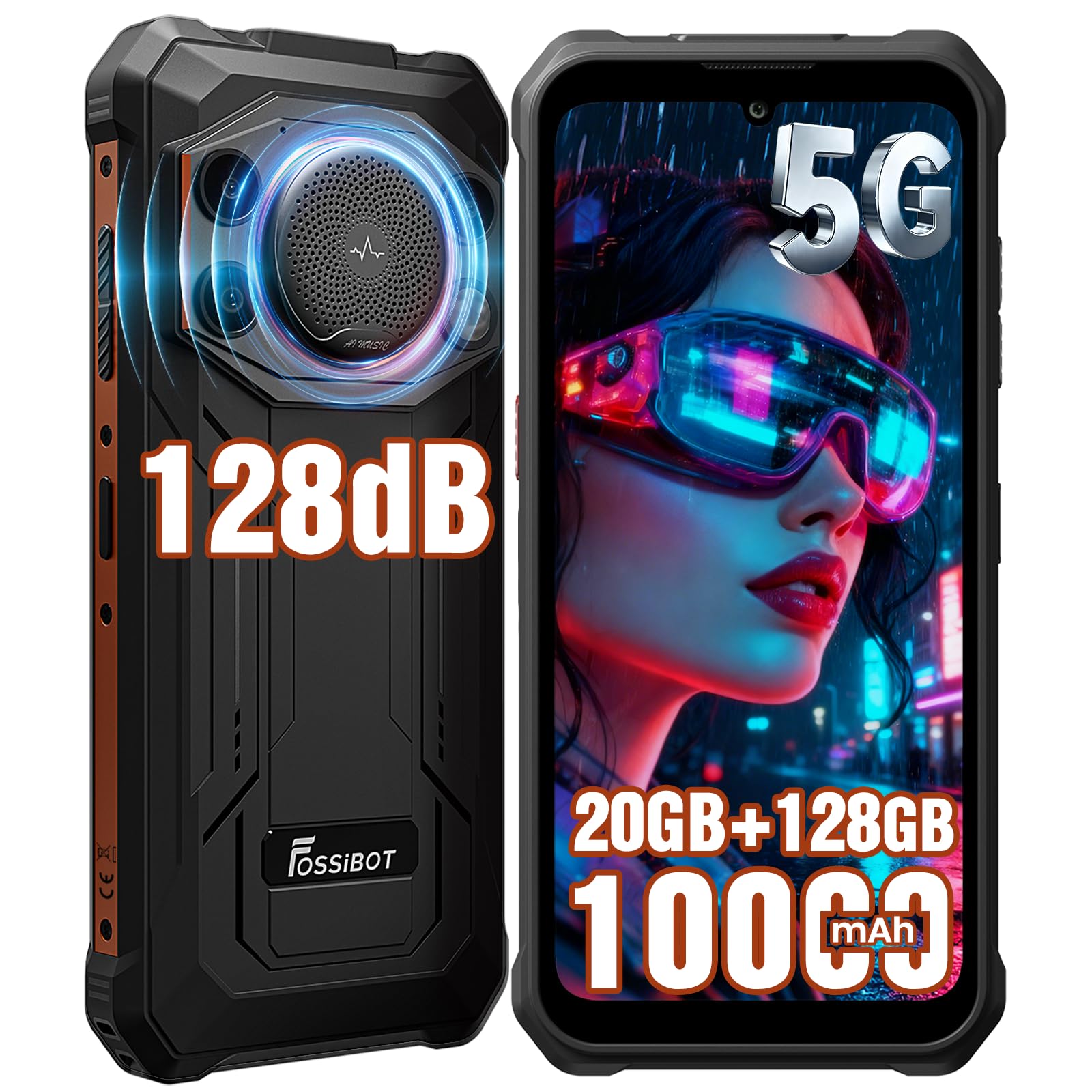
Image: FOSSIBOT F110 Pro Rugged Smartphone, front and back view.
2. ເນື້ອໃນຊຸດ
ກວດສອບວ່າລາຍການທັງຫມົດແມ່ນມີຢູ່ໃນຊຸດກ່ອນທີ່ຈະສືບຕໍ່ການຕັ້ງຄ່າ.

Image: Contents of the FOSSIBOT F110 Pro standard package, including the smartphone, charger, USB cable, screen protector, SIM ejector, user manual, and packaging box.
- FOSSIBOT F110 Pro Rugged Smartphone x1
- ເຄື່ອງສາກ x1
- ສາຍ Micro USB x1
- TP Screen Protector (Pre-applied) x1
- SIM Card Ejector x1
- ຄູ່ມືຜູ້ໃຊ້ x1
- ກ່ອງບັນຈຸ x1
3. ຄູ່ມືການຕິດຕັ້ງ
3.1. ການຕິດຕັ້ງ SIM ແລະບັດ TF
The FOSSIBOT F110 Pro supports either two Nano SIM cards or one Nano SIM card and one TF (MicroSD) card for expanded storage.
- ຊອກຫາຖາດຊິມກາດຢູ່ດ້ານຂ້າງຂອງອຸປະກອນ.
- ສຽບເຄື່ອງມືຖອດຊິມເຂົ້າໄປໃນຮູນ້ອຍໆຂ້າງຖາດ ແລະກົດຄ່ອຍໆຈົນກ່ວາຖາດຈະອອກມາ.
- ວາງ Nano SIM card(s) ແລະ/ຫຼື TF card ເຂົ້າໄປໃນຊ່ອງທີ່ກໍານົດໄວ້ເທິງຖາດ. ໃຫ້ແນ່ໃຈວ່າບັດຖືກຮັດກຸມຢ່າງຖືກຕ້ອງ.
- ໃສ່ຖາດໃສ່ໂທລະສັບຄືນໃໝ່ຢ່າງລະມັດລະວັງຈົນກວ່າມັນຈະກົດໃສ່ບ່ອນ.

Image: Diagram showing the installation of Nano SIM cards and a MicroSD card into the FOSSIBOT F110 Pro's tray.
3.2. ການສາກໄຟເບື້ອງຕົ້ນ
Before first use, it is recommended to fully charge the device. Use the provided charger and USB cable.
- ເຊື່ອມຕໍ່ສາຍ USB ກັບຊ່ອງສາກໄຟຢູ່ໃນໂທລະສັບ.
- ສຽບສາຍສາກໃສ່ປລັກສຽບໄຟ.
- The charging indicator will appear on the screen. The device supports 18W fast charging.
3.3. ເປີດ / ປິດພະລັງງານ
- ເພື່ອເປີດເຄື່ອງ: Press and hold the Power button until the FOSSIBOT logo appears.
- ປິດເຄື່ອງ: ກົດປຸ່ມເປີດປິດຄ້າງໄວ້, ຈາກນັ້ນເລືອກ "ປິດເຄື່ອງ" ຈາກຕົວເລືອກໃນໜ້າຈໍ.
3.4. ການຕັ້ງຄ່າອຸປະກອນເບື້ອງຕົ້ນ
ເມື່ອເປີດເຄື່ອງຄັ້ງທຳອິດ, ໃຫ້ປະຕິບັດຕາມຄຳແນະນຳໃນໜ້າຈໍເພື່ອເຮັດສຳເລັດການຕັ້ງຄ່າເບື້ອງຕົ້ນ, ລວມທັງ:
- ການເລືອກພາສາ
- ການເຊື່ອມຕໍ່ເຄືອຂ່າຍ Wi-Fi
- Google account setup
- Fingerprint and Face Recognition setup (optional)
4. ຄໍາແນະນໍາການດໍາເນີນງານ
4.1. ການສະແດງແລະການນໍາທາງ
The F110 Pro features a 6.745-inch HD+ display with a resolution of 720x1600 pixels and 480cd/m² peak brightness. It offers scratch resistance, high transparency, anti-fingerprint properties, and responsive touch sensitivity.

Image: Visual representation of the FOSSIBOT F110 Pro's 6.745-inch HD+ display highlighting its resolution, brightness, scratch resistance, transparency, anti-fingerprint, and touch sensitivity features.
4.2. ປະສິດທິພາບ ແລະ ລະບົບປະຕິບັດການ
Powered by a 5G Dimensity 6300 Octa-core processor (6nm process technology, 2.4GHz max clock speed), the F110 Pro delivers efficient performance. It runs on Android 15 OS, offering optimized performance, enhanced privacy, improved interaction experience, and system stability.

Image: Diagram illustrating the 5G Dimensity 6300 Processor with details on RAM (20GB: 8GB physical + 12GB virtual), ROM (128GB, expandable to 2TB via TF card), 6nm process, 2.4GHz clock speed, and octa-core architecture.

Image: Visual representation of the Android 15 OS interface on the FOSSIBOT F110 Pro, highlighting performance optimization, privacy & security, interaction experience, and system stability.
4.3. ຄຸນສົມບັດສຽງ
The F110 Pro is equipped with a 128dB loudest speaker, providing powerful and clear audio. This feature is beneficial for:
- Noisy Environments: Ensures clear calls and audio in construction sites or workshops.
- ງານລ້ຽງກາງແຈ້ງ: Provides powerful sound for entertainment.
- SOS Speaker: Loud enough to send help signals in emergencies.
- Hearing-Impaired Users: High volume for clear sound.

Image: Illustration of the FOSSIBOT F110 Pro's 128dB speaker, emphasizing larger clarity and improved visual experience, with a scene of people watching a movie with powerful sound.
4.4. ລະບົບກ້ອງຖ່າຍຮູບ
Capture moments with the F110 Pro's versatile camera system:
- ກ້ອງຫຼັກ 50MP AI: For stunning clarity and detail in various scenarios (Video, Picture, Beauty, Mono, Bokeh, AI Recognition, Underwater Camera, Night Scene, Macro, Scan Code).
- ກ້ອງໜ້າ 8MP: ສໍາລັບການ selfies ທີ່ຊັດເຈນແລະການໂທວິດີໂອ.
- ກ້ອງ Macro 5MP: ສໍາລັບການສັກຢາໃກ້ຊິດລາຍລະອຽດ.

ຮູບພາບ: ຫຼາຍກວ່າview of the FOSSIBOT F110 Pro's camera system, detailing the 50MP AI Main Camera, 8MP Front Camera, and 5MP Macro Camera, with example ຮູບ.
ໂໝດກ້ອງຖ່າຍຮູບໃຕ້ນ້ຳ
Utilize the dedicated Underwater Camera Mode to capture photos and videos while submerged. Ensure all ports are securely sealed before using the phone in water.

Image: A person using the FOSSIBOT F110 Pro in Underwater Camera Mode to photograph a sea turtle.
4.5. ຫມໍ້ໄຟແລະການສາກໄຟ
The F110 Pro is equipped with a 10000mAh long-lasting battery, providing extended usage times. It supports 18W fast charging and OTG (On-The-Go) reverse charging, allowing you to use your phone as a power bank for other devices.
- Usage Estimates: Up to 150H Music, 18H Video, 70H Calling, 135H Standby, 135H Gaming, 21H Flashlight, 16H GPS.
- ເວລາສາກໄຟ: Approximately 3 hours to reach 80%, and 4 hours 15 minutes to reach 100%.

Image: Visual of the FOSSIBOT F110 Pro's 10000mAh battery capacity, showing 18W fast charging and OTG reverse charging capabilities, along with charging time estimates.

Image: Illustration of the FOSSIBOT F110 Pro functioning as an OTG power bank, charging various devices like Bluetooth earphones, tablets, USB mini fans, smartwatches, portable speakers, and action cameras.
4.6. ການເຊື່ອມຕໍ່ແລະການນໍາທາງ
The F110 Pro supports 5G connectivity and a wide range of global network bands (GSM, 3G, 4G, 5G NR). It also includes Full-Scenario NFC for contactless payments and data transfer, and precise navigation with GPS, Galileo, Glonass, and Beidou.

Image: Diagram showing the FOSSIBOT F110 Pro's support for various global network bands (GSM, 3G, 4G, 5G NR) and its Full-Scenario NFC capability for mobile payments.
4.7. ຄຸນນະສົມບັດຄວາມປອດໄພ
The device offers multiple security options for unlocking and protecting your data:
- ປົດລັອກດ້ວຍລາຍນິ້ວມືດ້ານຂ້າງ: A fingerprint sensor integrated into the side button for quick and secure access.
- ການຮັບຮູ້ໃບ ໜ້າ: Unlock your phone using facial scanning technology.

Image: Close-up of the FOSSIBOT F110 Pro's side-mounted fingerprint sensor.

Image: A person using face recognition to unlock the FOSSIBOT F110 Pro.
4.8. Software Toolbox and Custom Button
The F110 Pro includes a software toolbox with various utility apps and a customizable button for quick access to frequently used functions.
- Software Toolbox: Compass, SoundMeter, Pic Hanging, StepCount, Gradlenter, HeightMeasure, Magnifier, Flashlight, Warning, Plumb Bob, Protractor.
- ປຸ່ມກຳນົດເອງ: A programmable button that can be set for single press, double press, or long press to launch specific apps or functions, enhancing usability and efficiency.

Image: Display of the FOSSIBOT F110 Pro's software toolbox applications and an explanation of the customizable button for quick access to functions like flashlight, camera, or SOS.
5. ການບໍາລຸງຮັກສາແລະຄວາມທົນທານ
The FOSSIBOT F110 Pro is built to withstand harsh environments, featuring IP68/IP69K waterproof and dustproof ratings, and MIL-STD-810H drop resistance.

Image: Visual representation of the FOSSIBOT F110 Pro's ruggedness, highlighting IP68 (1.5m depth, 30 minutes immersion), IP69K (high-temperature, high-pressure wash resistant), and MIL-STD-810H (1.5 meter drop resistance) certifications.
5.1. Water and Dust Resistance (IP68 & IP69K)
- IP68: The device is protected against dust ingress and can withstand immersion in water up to 1.5 meters for 30 minutes.
- IP69K: Provides protection against close-range high-pressure, high-temperature spray downs.
- ສຳຄັນ: Ensure all port covers are securely closed before exposing the device to water or dust. Do not intentionally submerge the device in corrosive liquids or saltwater.
5.2. Drop Resistance (MIL-STD-810H)
The F110 Pro meets MIL-STD-810H standards for drop resistance, capable of withstanding drops from up to 1.5 meters onto hard surfaces.
5.3. ການທໍາຄວາມສະອາດແລະການດູແລ
- ເພື່ອເຮັດຄວາມສະອາດອຸປະກອນ, ເຊັດດ້ວຍຜ້າອ່ອນ, damp ຜ້າ. ຫຼີກເວັ້ນການນໍາໃຊ້ສານເຄມີທີ່ຮຸນແຮງຫຼືວັດສະດຸຂັດ.
- If the device has been exposed to water, ensure it is completely dry before charging or opening any ports.
- Avoid extreme temperatures and direct sunlight for prolonged periods to maintain battery health.
6. ການແກ້ໄຂບັນຫາ
This section addresses common issues you might encounter with your FOSSIBOT F110 Pro.
| ບັນຫາ | ການແກ້ໄຂທີ່ເປັນໄປໄດ້ |
|---|---|
| ອຸປະກອນບໍ່ເປີດ | ໃຫ້ແນ່ໃຈວ່າໄດ້ສາກໄຟແລ້ວ. ເຊື່ອມຕໍ່ສາຍສາກແລ້ວລໍຖ້າສອງສາມນາທີກ່ອນທີ່ຈະພະຍາຍາມເປີດເຄື່ອງອີກຄັ້ງ. |
| ປະສິດທິພາບຊ້າ ຫຼືການແຊ່ແຂງ | Close unnecessary background applications. Restart the device. Clear cache from apps or perform a factory reset if the issue persists (back up data first). |
| Fingerprint sensor not working reliably | Ensure your finger and the sensor are clean and dry. Re-register your fingerprints in the settings. Try using face recognition or pattern/PIN unlock. |
| ບໍ່ມີສັນຍານເຄືອຂ່າຍ | Check if the SIM card is correctly inserted. Ensure mobile data is enabled in settings. Try restarting the device. Contact your carrier to verify service. |
| ແບັດເຕີຣີໝົດໄວ | Reduce screen brightness. Close power-intensive apps. Disable unused features like Wi-Fi, Bluetooth, GPS. Check battery usage in settings to identify problematic apps. |
| Speaker audio is distorted or too low | Ensure the speaker grille is not obstructed or dirty. Adjust volume settings. Restart the device. |
If issues persist, please contact FOSSIBOT customer support for further assistance.
7. ຂໍ້ມູນຈໍາເພາະ
| ຄຸນສົມບັດ | ລາຍລະອຽດ |
|---|---|
| ໝາຍເລກຕົວແບບ | F110Pro |
| ໂຮງງານຜະລິດ | 5G Dimensity 6300 Octa-core (6nm, 2.4GHz Max Clock Speed) |
| ລະບົບປະຕິບັດການ | Android 15 |
| RAM | 20 GB (8GB Physical + 12GB Virtual) |
| ບ່ອນຈັດເກັບຂໍ້ມູນພາຍໃນ (ROM) | 128 GB |
| ການເກັບຮັກສາທີ່ຂະຫຍາຍໄດ້ | Up to 2 TB via TF Card |
| ຈໍສະແດງຜົນ | 6.745 Inches HD+ (720x1600), 480cd/m² Peak Brightness |
| ກ້ອງຫຼັງ | 50 MP AI Main Camera, 5 MP Macro Camera |
| ກ້ອງໜ້າ | 8 MP |
| ຄວາມອາດສາມາດຫມໍ້ໄຟ | 10000 mAh |
| ກຳລັງສາກໄຟ | ການສາກໄວ 18W, OTG Reverse Charging |
| ການຈັດອັນດັບຄວາມທົນທານ | IP68, IP69K Waterproof & Dustproof, MIL-STD-810H Drop Resistance |
| ລໍາໂພງ | ລຳໂພງດັງ 128dB |
| ການເຊື່ອມຕໍ່ | 5G, NFC, Dual SIM |
| ການນໍາທາງ | GPS, Galileo, Glonass, Beidou |
| ຄວາມປອດໄພ | Side Fingerprint Unlock, Face Recognition |
| ນ້ໍາຫນັກລາຍການ | 1.43 ປອນ (ປະມານ 648 ກຣາມ) |
| ຂະໜາດແພັກເກັດ | 5.91 x 2.95 x 1.18 ນິ້ວ |
| ຜູ້ໃຫ້ບໍລິການໄຮ້ສາຍ | T-Mobile (compatible) |
8. ການຮັບປະກັນແລະການສະຫນັບສະຫນູນ
For warranty information and customer support, please refer to the warranty card included in your product package or visit the official FOSSIBOT website. You can also contact FOSSIBOT customer service through their official channels for technical assistance or inquiries.
ຢ້ຽມຢາມ FOSSIBOT Store ສໍາລັບຜະລິດຕະພັນແລະຂໍ້ມູນເພີ່ມເຕີມ.


