1. ຜະລິດຕະພັນເກີນview
The Baseus BS1 NC Semi-in-Ear Noise Cancelling Earbuds offer a blend of comfort and advanced audio technology. Featuring Adaptive Hybrid Active Noise Cancellation (ANC), Hi-Res Audio with LDAC support, and a lightweight design, these earbuds are engineered for extended listening and clear communication. They are also equipped with a 6-microphone AI system for clear calls and IP55 water and dust resistance.

Image: Baseus BS1 NC Semi-in-Ear Noise Cancelling Earbuds and their charging case in black.
2. ເນື້ອໃນຊຸດ
ໃຫ້ແນ່ໃຈວ່າທຸກລາຍການຢູ່ໃນຊຸດ:
- Baseus Bass BS1 NC Semi-in-Ear Earbuds (Left and Right)
- ກ່ອງສາກ
- ສາຍສາກ USB-C
- ຄູ່ມືເລີ່ມຕົ້ນດ່ວນ

Image: The complete retail package for the Baseus BS1 NC Earbuds, showing the earbuds, charging case, USB-C cable, and quick start guide.
3. ການສາກຫູຟັງ ແລະ ເຄສ
For optimal performance, fully charge the earbuds and charging case before first use.
3.1 ກຳລັງສາກຫູຟັງ
- ວາງຫູຟັງໃສ່ກະເປົ໋າສາກໄຟ. ໃຫ້ແນ່ໃຈວ່າພວກເຂົານັ່ງຢ່າງຖືກຕ້ອງຢູ່ໃນຊ່ອງຂອງເຂົາເຈົ້າ (L ສໍາລັບຊ້າຍ, R ສໍາລັບຂວາ).
- ປິດກ່ອງສາກໄຟ. ຫູຟັງເອຍບັດຈະເລີ່ມສາກໄຟໂດຍອັດຕະໂນມັດ.
3.2 ການສາກໄຟ Case
- ເຊື່ອມຕໍ່ສາຍສາກ USB-C ທີ່ໃຫ້ມາເຂົ້າກັບພອດສາກໄຟໃນເຄສ.
- ເຊື່ອມຕໍ່ອີກສົ້ນຂອງສາຍກັບອະແດັບເຕີໄຟ USB (ບໍ່ລວມ) ຫຼືພອດ USB ຂອງຄອມພິວເຕີ.
- The LED indicator on the case will show the charging status:
- ສີຂຽວ: ສາກໄຟແລ້ວ 75% - 100%
- ສີເຫຼືອງ: ສາກໄຟແລ້ວ 25% - 75%
- ສີແດງ: Below 25% charged
- A full charge for the case provides up to 40 hours of total playtime for the earbuds (with ANC off). A 10-minute charge can provide up to 2 hours of playback.

Image: The Baseus BS1 NC Earbuds resting in their open charging case, highlighting the 40-hour total playtime and rapid charging capabilities.
4. ການຈັບຄູ່ແລະການເຊື່ອມຕໍ່
4.1 ການຈັບຄູ່ເບື້ອງຕົ້ນ
- ເປີດກ່ອງສາກໄຟ. ຫູຟັງເອຍບັດຈະເຂົ້າສູ່ໂໝດຈັບຄູ່ໂດຍອັດຕະໂນມັດ.
- ໃນອຸປະກອນຂອງທ່ານ (ໂທລະສັບສະຫຼາດ, ແທັບເລັດ, ຄອມພິວເຕີ), ເປີດໃຊ້ Bluetooth.
- ຊອກຫາ "Baseus Bass BS1 NC" in the list of available Bluetooth devices.
- Select "Baseus Bass BS1 NC" to connect. A voice prompt will confirm successful pairing.
4.2 ການເຊື່ອມຕໍ່ອັດຕະໂນມັດ
Once paired, the earbuds will automatically reconnect to the last connected device when removed from the charging case and within Bluetooth range.
4.3 ການເຊື່ອມຕໍ່ຫຼາຍຈຸດ
The Baseus BS1 NC supports Baseus Smart-Connect (BSC) technology, allowing simultaneous connection to two devices. This enables seamless switching between audio sources without manual re-pairing.
To use multipoint connection:
- ຈັບຄູ່ຫູຟັງກັບອຸປະກອນທຳອິດຂອງທ່ານ.
- ຕັດເຊື່ອມຕໍ່ຫູຟັງຈາກການຕັ້ງຄ່າ Bluetooth ຂອງອຸປະກອນທຳອິດ (ຢ່າຍົກເລີກການຈັບຄູ່).
- ຈັບຄູ່ຫູຟັງເອຍບັດກັບອຸປະກອນທີສອງຂອງທ່ານ.
- ເຊື່ອມຕໍ່ຫູຟັງຫູຟັງກັບອຸປະກອນທໍາອິດຈາກການຕັ້ງຄ່າ Bluetooth ຂອງມັນ. ດຽວນີ້ຫູຟັງຫູຟັງຄວນເຊື່ອມຕໍ່ກັບອຸປະກອນທັງສອງ.
ສຽງຈະປ່ຽນເປັນອຸປະກອນທີ່ກຳລັງຫຼິ້ນເນື້ອຫາ ຫຼືຮັບສາຍໂດຍອັດຕະໂນມັດ.
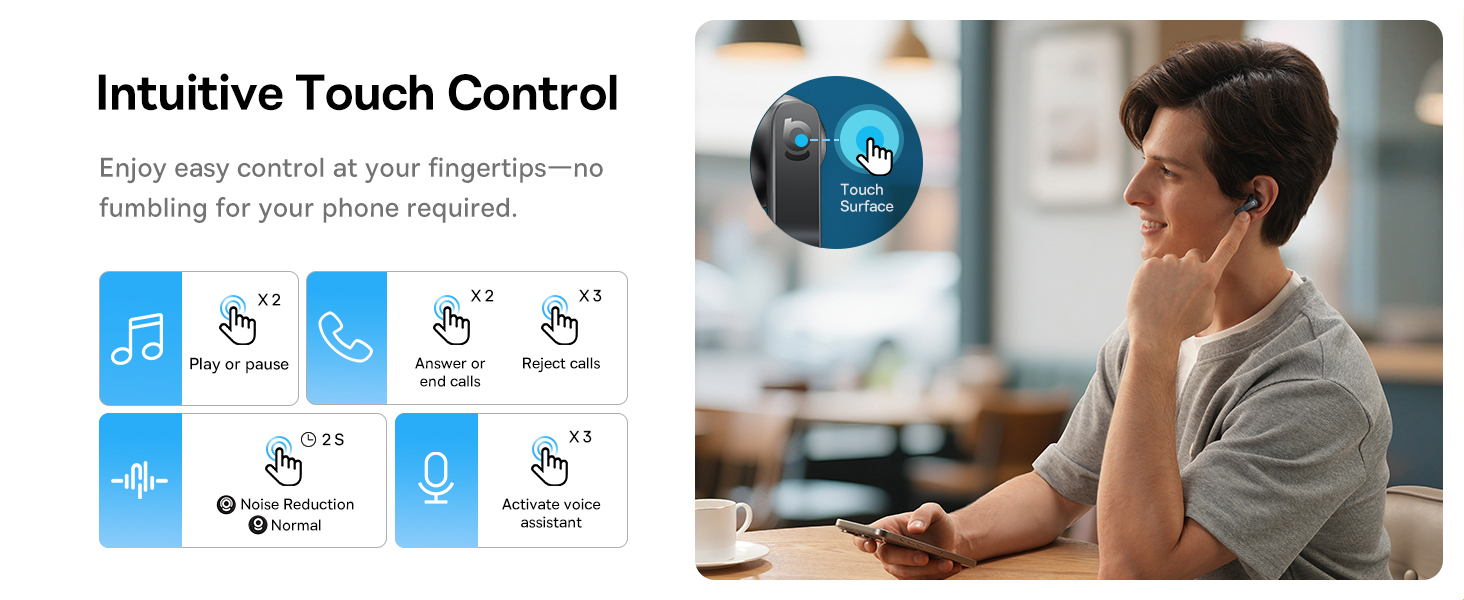
Image: A visual representation of the Baseus BS1 NC Earbuds connected to both a laptop and a smartphone, showcasing the instant multipoint connection feature.
5. ໃສ່ຫູຟັງ
The Baseus BS1 NC earbuds feature a semi-in-ear design for comfortable, pressure-free wear. For optimal sound quality and noise cancellation, ensure a proper fit.
- ລະບຸຫູຟັງຊ້າຍ (L) ແລະຂວາ (R).
- ສຽບຫູຟັງແຕ່ລະອັນໃສ່ຊ່ອງຫູຂອງເຈົ້າຄ່ອຍໆ.
- Adjust the earbud until it feels secure and comfortable. The stem should point slightly forward or downward.

Image: A person wearing the Baseus BS1 NC Earbuds, illustrating their ergonomic and lightweight design for all-day comfort.
6. ຄໍາແນະນໍາການດໍາເນີນງານ
6.1 ແຕະການຄວບຄຸມ
The earbuds feature intuitive touch controls on their stems. The following are default functions, which may be customizable via the Baseus app:
| ການປະຕິບັດ | ຟັງຊັນ |
|---|---|
| Double-tap (Left or Right Earbud) | ຫຼິ້ນ/ຢຸດເພງ, ຮັບສາຍ/ວາງສາຍ |
| Triple-tap (Left or Right Earbud) | Reject call, Activate voice assistant |
| ກົດຄ້າງໄວ້ (2 ວິນາທີ) | Switch Noise Control Mode (ANC/Normal/Transparency) |

Image: An illustration detailing the intuitive touch controls on the Baseus BS1 NC Earbuds for various functions like play/pause, call management, noise reduction, and voice assistant activation.
6.2 ຮູບແບບການຄວບຄຸມສຽງລົບກວນ
The Baseus BS1 NC earbuds offer three noise control modes:
- Adaptive Hybrid ANC (Active Noise Cancellation): Reduces ambient noise for an immersive listening experience. Ideal for noisy environments.
- ໂໝດຄວາມໂປ່ງໃສ: ອະນຸຍາດໃຫ້ທ່ານໄດ້ຍິນສິ່ງອ້ອມຂ້າງໃນຂະນະທີ່ຍັງເພີດເພີນກັບສຽງຂອງທ່ານ. ເປັນປະໂຫຍດສໍາລັບການຮັບຮູ້ໃນການຕັ້ງຄ່າຕົວເມືອງຫຼືການສົນທະນາ.
- ໂໝດປົກກະຕິ: ການຫຼິ້ນສຽງມາດຕະຖານໂດຍບໍ່ມີການຕັດສຽງລົບກວນ ຫຼື ຄຸນສົມບັດຄວາມໂປ່ງໃສ.
Switch between modes by pressing and holding the touch area on either earbud for 2 seconds.

Image: A cutaway diagram of a Baseus BS1 NC earbud in an ear, illustrating the semi-in-ear fit and the availability of Adaptive Noise Cancelling and Transparency Mode.
6.3 Hi-Res Audio with LDAC
These earbuds support LDAC technology, enabling high-resolution audio transmission for a detailed and rich sound experience. Ensure your device supports LDAC and activate it in your device's Bluetooth settings for the best audio quality.

Image: The Baseus BS1 NC Earbuds surrounded by sound waves, emphasizing features like Hi-Res Audio, SuperBass 2.0, and 13mm dynamic drivers for powerful sound.
6.4 6-Mic AI Clear Calls
The earbuds are equipped with 6 microphones and AI noise isolation technology to ensure your voice is clear during calls, even in noisy environments. Wind noise reduction further enhances call clarity outdoors.
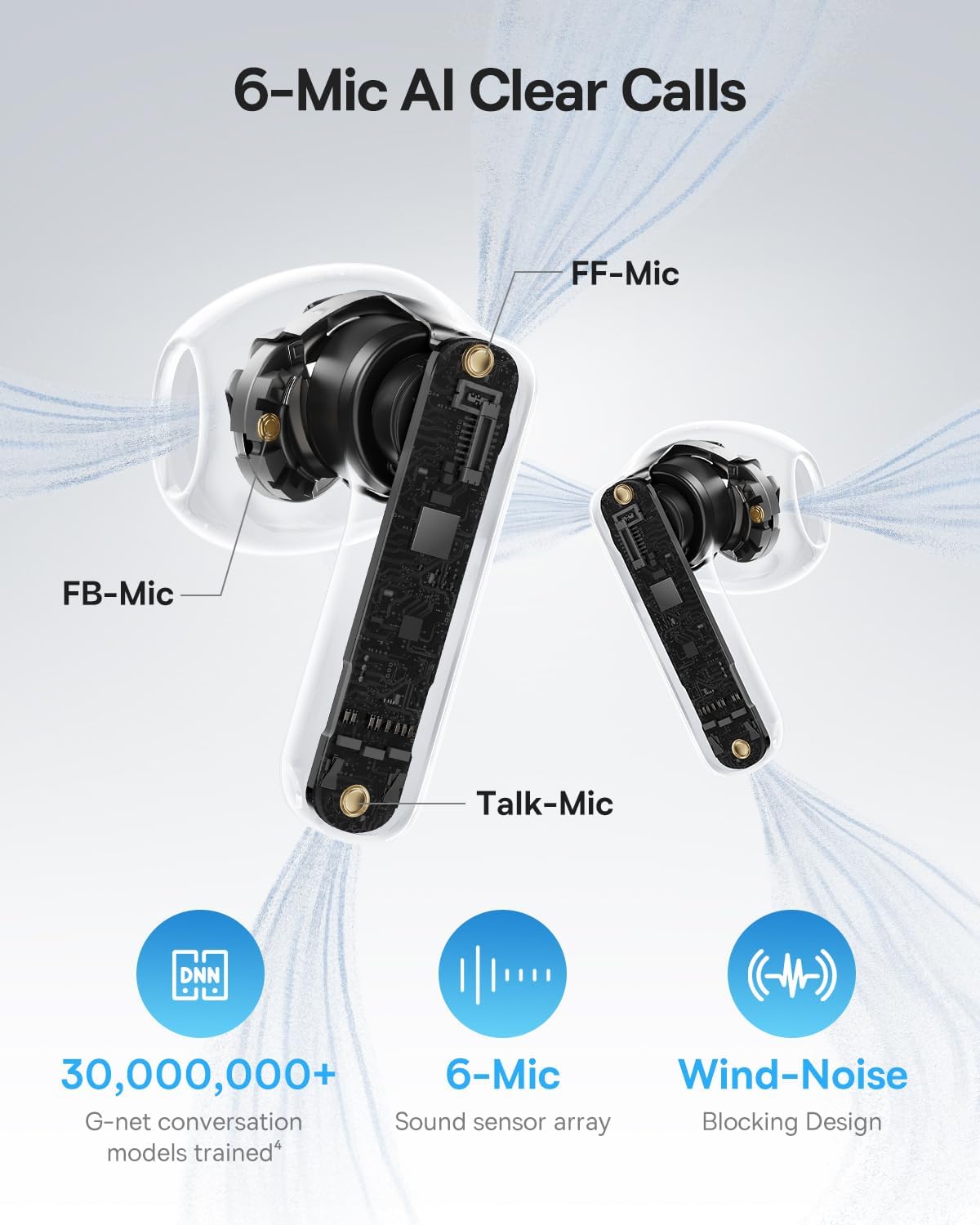
Image: A detailed diagram of the Baseus BS1 NC earbud, highlighting the placement of the FF-Mic, FB-Mic, and Talk-Mic, which contribute to the 6-Mic AI Clear Call technology and wind-noise blocking design.
6.5 ການຄວບຄຸມແອັບອັດສະລິຍະ
Download the dedicated Baseus app for enhanced control and customization options. The app allows you to:
- Adjust Bass Boost levels.
- Select from various EQ Modes.
- Control Spatial Acoustics settings.
- Use the "Find Your Earbuds" feature.
Note: In guest mode, no account creation or permissions are required to customize features, but GPS access is needed to locate lost earbuds.

Image: A smartphone displaying the Baseus app interface, which offers various sound control options including Bass Boost, EQ Modes, Spatial Acoustics, and a "Find Your Earbuds" function.
7. ການບໍາລຸງຮັກສາແລະການດູແລ
7.1 ການທໍາຄວາມສະອາດ
- ອະນາໄມຫູຟັງຫູຟັງ ແລະກະເປົ໋າສາກໄຟເປັນປະຈຳດ້ວຍຜ້າແພທີ່ອ່ອນ, ແຫ້ງ, ບໍ່ມີສານຂັດ.
- ຢ່າໃຊ້ສານເຄມີທີ່ຮຸນແຮງ, ສານລະລາຍທໍາຄວາມສະອາດ, ຫຼືຢາຊັກຟອກທີ່ເຂັ້ມແຂງ.
- Gently remove any earwax or debris from the earbud mesh and charging contacts using a small, soft brush or cotton swab.
7.2 ກັນນໍ້າ ແລະຝຸ່ນ (IP55)
The earbuds are rated IP55, meaning they are protected against limited dust ingress and low-pressure water jets from any direction. This makes them suitable for workouts and light rain exposure.
- ຢ່າເອົາຫູຟັງເອຍບັດໃສ່ນ້ຳ.
- ໃຫ້ແນ່ໃຈວ່າຫູຟັງແຫ້ງກ່ອນໃສ່ກັບຄືນໃນກ່ອງສາກໄຟເພື່ອປ້ອງກັນຄວາມເສຍຫາຍຕໍ່ຈຸດເຊື່ອມຕໍ່ການສາກໄຟ.
- ກ່ອງສາກບໍ່ທົນທານຕໍ່ນ້ໍາ.

Image: The Baseus BS1 NC Earbuds shown with water droplets, signifying their IP55 rating for dust and water resistance.
7.3 ການເກັບຮັກສາ
ເກັບຮັກສາຫູຟັງເອຍບັດໃສ່ໃນກະເປົ໋າສາກໄຟຂອງເຂົາເຈົ້າເມື່ອບໍ່ໄດ້ໃຊ້ເພື່ອປົກປ້ອງພວກມັນ ແລະ ສືບຕໍ່ສາກໄຟ.
8. ການແກ້ໄຂບັນຫາ
If you encounter issues with your Baseus BS1 NC earbuds, refer to the following common solutions:
- ບໍ່ມີບັນຫາສຽງ/ການເຊື່ອມຕໍ່:
- ກວດໃຫ້ແນ່ໃຈວ່າໄດ້ສາກຫູຟັງຫູຟັງແລ້ວ.
- Verify Bluetooth is enabled on your device and "Baseus Bass BS1 NC" is selected.
- Try placing earbuds back in the case, closing it, and then reopening to reset the connection.
- ລືມອຸປະກອນໃນການຕັ້ງຄ່າ Bluetooth ຂອງທ່ານແລະຈັບຄູ່ຄືນ.
- ຫູຟັງໜຶ່ງໜ່ວຍບໍ່ເຮັດວຽກ:
- ກວດໃຫ້ແນ່ໃຈວ່າໄດ້ສາກຫູຟັງທັງສອງອັນແລ້ວ.
- ວາງຫູຟັງຫູຟັງທັງສອງຂ້າງໃສ່ໃນກໍລະນີ, ປິດ ແລະເປີດຄືນໃໝ່.
- ລ້າງລາຍຊື່ຜູ້ຕິດຕໍ່ການສາກໄຟຢູ່ທັງຫູຟັງເອຍບັດ ແລະ ພາຍໃນເຄສ.
- ຄຸນະພາບສຽງບໍ່ດີ:
- ໃຫ້ແນ່ໃຈວ່າຫູຟັງເອຍບັດຢູ່ໃນຫູຂອງທ່ານຢ່າງຖືກຕ້ອງ.
- ເຮັດຄວາມສະອາດຕາໜ່າງຫູຟັງເພື່ອເອົາສິ່ງກີດຂວາງອອກ.
- Check your device's audio settings and ensure LDAC is enabled if supported.
- ANC ບໍ່ມີປະສິດທິພາບ:
- Ensure ANC mode is activated via touch control or the Baseus app.
- Adjust the earbuds for a better seal in your ears.
9. ຂໍ້ມູນຈໍາເພາະ
| ຄຸນສົມບັດ | ລາຍລະອຽດ |
|---|---|
| ຊື່ຕົວແບບ | Baseus Bass BS1 NC |
| ການຄວບຄຸມສິ່ງລົບກວນ | Adaptive Noise Cancellation, Environmental Noise Cancellation, Hybrid Noise Cancellation |
| ເຕັກໂນໂລຊີການເຊື່ອມຕໍ່ | Bluetooth 6.0, Wireless |
| ເຕັກໂນໂລຊີການສື່ສານໄຮ້ສາຍ | Bluetooth 6.0 |
| ຊ່ວງ Bluetooth | 10 ແມັດ |
| ປະເພດໄດເວີສຽງ | ໄດນາມິກໄດເວີ |
| ຂະໜາດໄດເວີສຽງ | 13 ມິນລິແມັດ |
| ການຕອບສະໜອງຄວາມຖີ່ | 40 KHz |
| ຄວາມຍືດຍຸ່ນສຽງ | 60 ມິນລິວິນາທີ |
| ອາຍຸແບັດເຕີຣີ (ຫູຟັງ) | 7 Hours (ANC off) |
| ເວລາຫຼິ້ນທັງໝົດ (ພ້ອມກໍລະນີ) | 40 Hours (ANC off) |
| Charging Time (Rapid Charge) | 10 ນາທີສໍາລັບການຫຼິ້ນ 2 ຊົ່ວໂມງ |
| ລະດັບຄວາມຕ້ານທານນ້ໍາ | IP55 (ຫູຟັງເທົ່ານັ້ນ) |
| ປະເພດການຄວບຄຸມ | ແຕະການຄວບຄຸມ |
| ວັດສະດຸ | Acrylonitrile Butadiene Styrene (ABS), Polycarbonate (PC) |
| ນ້ຳໜັກລາຍການ (ຫູຟັງ) | 4g ຕໍ່ຫູຟັງ |
| Product Dimensions (Earbuds) | 1.2 x 0.7 x 0.7 ນິ້ວ |
| ອຸປະກອນທີ່ເຂົ້າກັນໄດ້ | Devices with Bluetooth Audio Capability, including iOS, Android, Windows, Mac OS and Switch. |
10. ວິດີໂອຜະລິດຕະພັນຢ່າງເປັນທາງການ
Watch the official product video for a visual guide on the Baseus BS1 NC Earbuds:
Video: An official product video from Baseus showcasing the features and usage of the Baseus BS1 NC Semi-in-Ear True Wireless Earbuds.
11. ການຮັບປະກັນແລະການສະຫນັບສະຫນູນ
For warranty information, technical support, FAQs, and further assistance, please visit the official Baseus support center.
Refer to the Quick Start Guide included in your package for a direct link or visit the Baseus webເວັບໄຊ.
Note: Protection plans may be available for purchase separately.