1. ບົດແນະນຳ
Welcome to the user manual for your SGIN Android Tablet 10.1 Inch, Model GE8300. This manual provides essential information for setting up, operating, maintaining, and troubleshooting your new tablet. Designed with children in mind, this tablet features a durable case, parental controls, and pre-installed educational content through Kidoz software. Please read this manual thoroughly to ensure proper use and to maximize your tablet's potential.
2. ຜະລິດຕະພັນເກີນview
The SGIN Android Tablet 10.1 Inch is equipped with a 10.1-inch HD IPS display, a quad-core processor, 4GB RAM, and 64GB of internal storage. It runs on Android 13 and includes a protective case with an adjustable bracket.
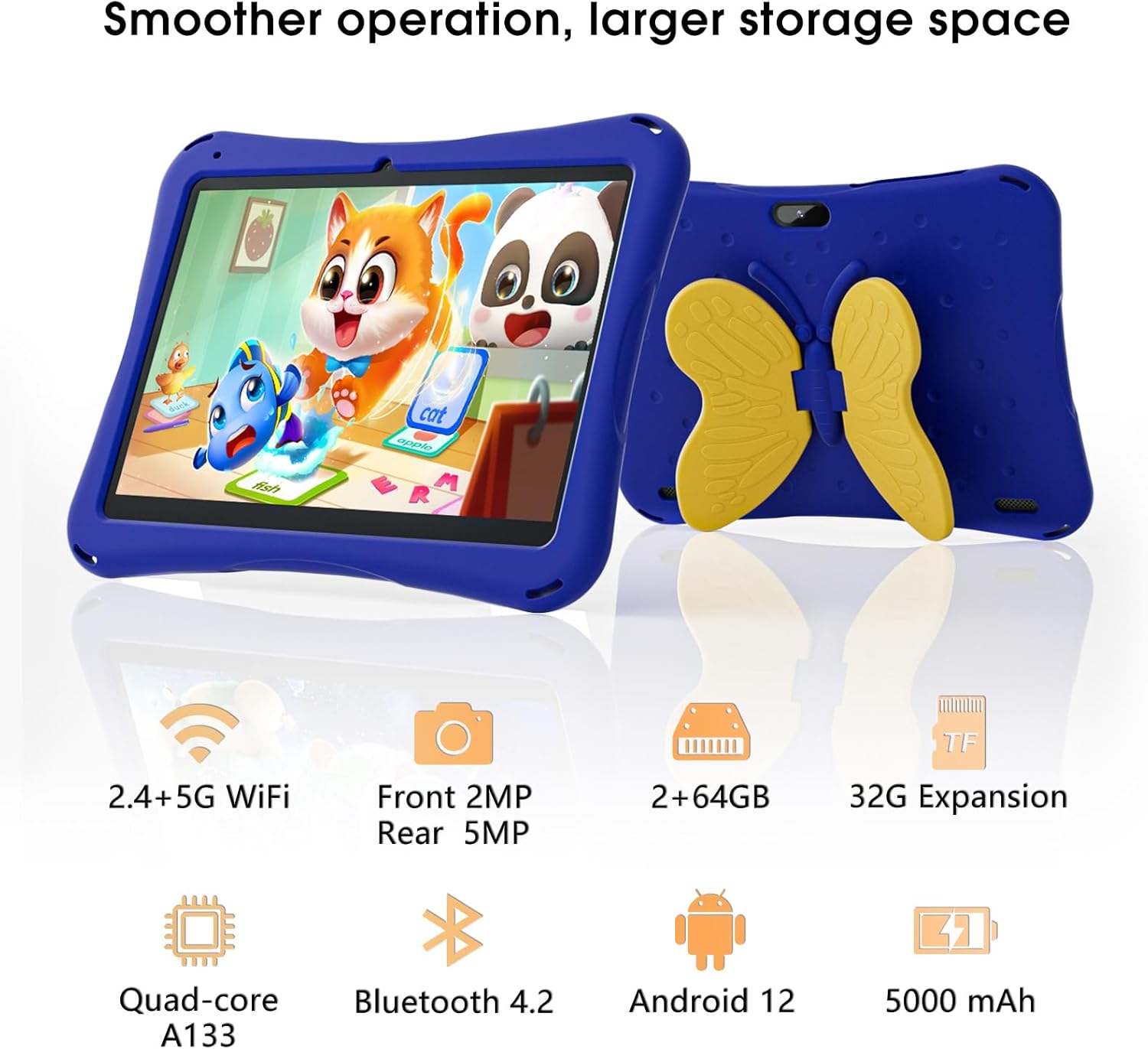
Image: SGIN Android Tablet 10.1 Inch with its protective blue case and yellow butterfly stand.
ອົງປະກອບຂອງແທັບເລັດ

Image: Detailed diagram illustrating the various components and ports of the SGIN Android Tablet.
- ກ້ອງໜ້າ: ສໍາລັບການໂທວິດີໂອ ແລະເຊວຟີ.
- ກ້ອງຫຼັງ: ສໍາລັບການຖ່າຍຮູບແລະວິດີໂອ.
- ລໍາໂພງ: ສໍາລັບຜົນຜະລິດສຽງ.
- Type-C Port: ສໍາລັບການສາກໄຟແລະການໂອນຂໍ້ມູນ.
- ສະລັອດຕິງບັດ TF: ສໍາລັບການເກັບຮັກສາທີ່ສາມາດຂະຫຍາຍໄດ້.
- ຫູຟັງ Jack: ສໍາລັບການເຊື່ອມຕໍ່ຫູຟັງແບບມີສາຍ.
- ເພີ່ມປະລິມານ: Button to raise the audio level.
- ຫຼຸດປະລິມານ: Button to lower the audio level.
- ວົງເລັບ: Adjustable stand integrated into the protective case.
3. ຕັ້ງຄ່າ
3.1 ການສາກແທັບເລັດ
Before first use, fully charge the tablet using the provided Type-C cable and power adapter. The 5000mAh battery provides approximately 6-8 hours of usage on a full charge. A charging indicator will typically appear on the screen.
3.2 ການເປີດ/ປິດ
- ເພື່ອເປີດເຄື່ອງ: Press and hold the power button (usually located on the side) until the SGIN logo appears.
- ປິດເຄື່ອງ: ກົດປຸ່ມເປີດປິດຄ້າງໄວ້, ຈາກນັ້ນເລືອກ 'ປິດເຄື່ອງ' ຈາກຕົວເລືອກຕ່າງໆໃນໜ້າຈໍ.
- ເພື່ອເລີ່ມຕົ້ນໃໝ່: Press and hold the power button, then select 'Restart' from the options.
3.3 ການຕັ້ງຄ່າເບື້ອງຕົ້ນ ແລະ ການເຊື່ອມຕໍ່ Wi-Fi
Upon first power-on, follow the on-screen prompts to complete the initial Android 13 setup. This includes selecting your language, region, and connecting to a Wi-Fi network. The tablet supports both 2.4G and 5G Wi-Fi for stable internet connectivity.
- ໄປທີ່ ການຕັ້ງຄ່າ > ເຄືອຂ່າຍ ແລະອິນເຕີເນັດ > Wi-Fi.
- ສະຫຼັບ Wi-Fi On.
- ເລືອກເຄືອຂ່າຍທີ່ທ່ານຕ້ອງການຈາກບັນຊີລາຍຊື່.
- ໃສ່ລະຫັດຜ່ານຖ້າຖືກຖາມ, ຈາກນັ້ນແຕະ ເຊື່ອມຕໍ່.
4. ຄໍາແນະນໍາການດໍາເນີນງານ
4.1 ການນໍາທາງພື້ນຖານ
The tablet uses a touch-sensitive screen for navigation. Common gestures include tapping to select, swiping to scroll, pinching to zoom, and long-pressing for additional options.
4.2 ການໃຊ້ກ້ອງຖ່າຍຮູບ
The tablet features a 2MP front-facing camera and a 5MP rear camera. To use the camera:
- ເປີດ ກ້ອງຖ່າຍຮູບ ຄໍາຮ້ອງສະຫມັກ.
- Select between front and rear cameras using the switch icon.
- ແຕະປຸ່ມຊັດເຕີເພື່ອຖ່າຍຮູບ ຫຼືເລີ່ມ/ຢຸດການບັນທຶກວິດີໂອ.
4.3 ການຄຸ້ມຄອງການເກັບຮັກສາ
The tablet comes with 64GB of internal storage. If more space is needed, you can expand it by inserting a TF (microSD) card into the TF card slot. The tablet supports expansion up to 34GB.
4.4 ການເຊື່ອມຕໍ່ Bluetooth
The tablet supports Bluetooth 4.2 for connecting to wireless accessories such as headphones or speakers.
- ໄປທີ່ ການຕັ້ງຄ່າ > ອຸປະກອນທີ່ເຊື່ອມຕໍ່ > ການຕັ້ງຄ່າການເຊື່ອມຕໍ່ > Bluetooth.
- ສະຫຼັບ Bluetooth On.
- ເລືອກອຸປະກອນຂອງທ່ານຈາກລາຍຊື່ອຸປະກອນທີ່ມີຢູ່ເພື່ອຈັບຄູ່.
5. Parental Control Features
The SGIN tablet includes a built-in parental control security system to manage your child's usage and content access.
- ຕັ້ງລະຫັດຜ່ານ: Create a password to secure parental control settings.
- Screen Time Limits: Define daily usage limits for the tablet.
- ການກັ່ນຕອງເນື້ອຫາ: Eliminate unwanted ads and create specific media files or approved websites for your children.
- Multiple Accounts: Set up individual accounts for each child, allowing personalized settings and content access.
6. Kidoz Kids Software
The tablet comes with the Kidoz Kid's software pre-installed, offering a safe and engaging environment for children.
- Accessing Kidoz: Launch the Kidoz app from the home screen.
- Kids Store: Explore thousands of free games and educational apps available for download within the Kidoz environment.
- ເນື້ອໃນການສຶກສາ: Kidoz provides content that supports learning in subjects like math, language, music, and painting.
7. ບໍາລຸງຮັກສາ
7.1 ການທໍາຄວາມສະອາດ
Use a soft, lint-free cloth to clean the screen and the tablet's body. For stubborn smudges, slightly dampen ຜ້າທີ່ມີນ້ໍາ. ຫຼີກເວັ້ນການສານເຄມີທີ່ຮຸນແຮງຫຼືວັດສະດຸຂັດ.
7.2 ການດູແລຫມໍ້ໄຟ
To prolong battery life, avoid exposing the tablet to extreme temperatures. Charge the tablet regularly and avoid letting the battery completely drain frequently.
7.3 ການປັບປຸງຊອບແວ
ກວດສອບການອັບເດດລະບົບເປັນໄລຍະເພື່ອຮັບປະກັນປະສິດທິພາບ ແລະ ຄວາມປອດໄພທີ່ດີທີ່ສຸດ. ໄປທີ່ ການຕັ້ງຄ່າ > ລະບົບ > ອັບເດດລະບົບ.
7.4 ກໍລະນີປ້ອງກັນ
The included kid-proof case is designed to protect the tablet from dust, bumps, and drops. It also features a hollow design for heat dissipation. Ensure the tablet is properly seated within the case for maximum protection.

Image: The durable anti-drop protective case with its adjustable bracket.
8. ການແກ້ໄຂບັນຫາ
If you encounter issues with your SGIN tablet, refer to the following common solutions:
- ແທັບເລັດບໍ່ເປີດ: ໃຫ້ແນ່ໃຈວ່າແທັບເລັດສາກແລ້ວ. ເຊື່ອມຕໍ່ມັນກັບເຄື່ອງສາກ ແລະລໍຖ້າສອງສາມນາທີກ່ອນທີ່ຈະພະຍາຍາມເປີດມັນອີກຄັ້ງ.
- ໜ້າຈໍທີ່ບໍ່ຕອບສະໜອງ: If the screen becomes unresponsive, try restarting the tablet by holding down the power button for approximately 10-15 seconds until it powers off, then power it on normally.
- ບັນຫາການເຊື່ອມຕໍ່ Wi-Fi: Check if other devices can connect to the Wi-Fi network. Restart your Wi-Fi router. On the tablet, forget the network and reconnect.
- ປະສິດທິພາບຊ້າ: Close unused applications running in the background. Clear cache data for apps. Consider performing a factory reset if performance issues persist (back up important data first).
- ແອັບຂັດຂ້ອງ: Ensure apps are updated to their latest versions. Clear the app's cache and data via ການຕັ້ງຄ່າ > ແອັບ > [ຊື່ແອັບ] > ການເກັບຮັກສາ & cache.
ສໍາລັບບັນຫາທີ່ບໍ່ໄດ້ຮັບການແກ້ໄຂໂດຍຂັ້ນຕອນເຫຼົ່ານີ້, ກະລຸນາຕິດຕໍ່ຝ່າຍຊ່ວຍເຫຼືອລູກຄ້າ.
9. ຂໍ້ມູນຈໍາເພາະ
Key technical specifications for the SGIN Android Tablet 10.1 Inch Model GE8300:
| ຄຸນສົມບັດ | ຂໍ້ມູນຈໍາເພາະ |
|---|---|
| ໝາຍເລກຕົວແບບ | GE8300 |
| ຂະໜາດໜ້າຈໍ | 10.1 ນິ້ວ |
| ຄວາມລະອຽດການສະແດງ | 1280 x 800 ພິກເຊລ (HD IPS) |
| ໂຮງງານຜະລິດ | 1.6 GHz Quad-core (Allwinner A133) |
| RAM | 4GB (2GB ທາງກາຍະພາບ + 2GB ສາມາດຂະຫຍາຍໄດ້) |
| ການເກັບຮັກສາພາຍໃນ | ROM 64GB |
| ການເກັບຮັກສາທີ່ຂະຫຍາຍໄດ້ | Up to 34GB via TF Card |
| ລະບົບປະຕິບັດການ | Android 13 |
| ຄວາມອາດສາມາດຫມໍ້ໄຟ | 5000mAh |
| ກ້ອງໜ້າ | 2MP |
| ກ້ອງຫຼັງ | 5MP |
| ການເຊື່ອມຕໍ່ໄຮ້ສາຍ | 2.4G/5G WiFi, Bluetooth 4.2 |
| ສີ | ສີຟ້າເລິກ |
| ຂະຫນາດ Parcel | 32.2 x 20.4 x 4.7 ຊມ; 1.04 ກິໂລ |
10. ການຮັບປະກັນແລະການສະຫນັບສະຫນູນ
10.1 ການຮັບປະກັນຜະລິດຕະພັນ
The SGIN Android Tablet 10.1 Inch Model GE8300 comes with a ຮັບປະກັນ 1 ປີ ຈາກວັນທີ່ຊື້. ການຮັບປະກັນນີ້ກວມເອົາຄວາມບົກຜ່ອງດ້ານການຜະລິດພາຍໃຕ້ການນໍາໃຊ້ປົກກະຕິ. ກະລຸນາຮັກສາຫຼັກຖານການຊື້ຂອງທ່ານສໍາລັບການຮຽກຮ້ອງການຮັບປະກັນ.
10.2 ສະຫນັບສະຫນູນລູກຄ້າ
If you require further assistance or have questions not covered in this manual, please contact SGIN customer support. Refer to the product packaging or the official SGIN webເວັບໄຊສໍາລັບຂໍ້ມູນຕິດຕໍ່ໃນປະຈຸບັນຫຼາຍທີ່ສຸດ.


