1. ບົດແນະນຳ
The FiiO K13 R2R is a high-fidelity desktop Digital-to-Analog Converter (DAC) and Headphone Amplifier designed to deliver exceptional audio performance. It features a proprietary 24-bit R2R DAC, powerful output capabilities, versatile connectivity, and advanced sound customization options. This manual provides essential information for setting up, operating, and maintaining your FiiO K13 R2R.
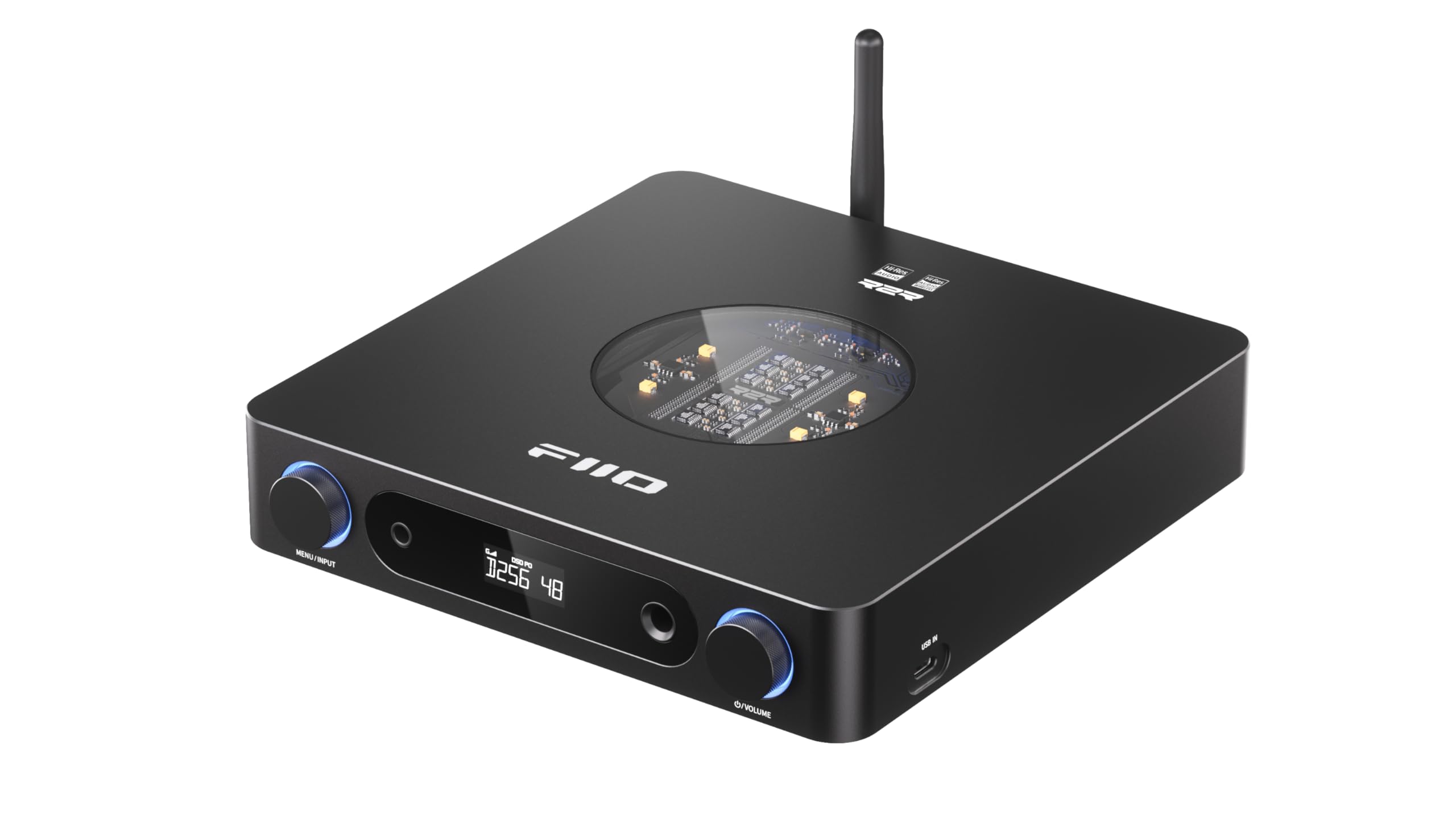
Figure 1: FiiO K13 R2R Desktop DAC & Headphone Amp (ສີດໍາ)
Key features include a fully differential 24Bit R2R DAC, NOS/OS dual modes for flexible listening, versatile desktop DAC and preamp/ ຫູຟັງ amp functionality, 10-band high-precision PEQ with auto EQ, and LDAC Bluetooth 5.4 wireless HiFi support.
2. ສິ່ງທີ່ຢູ່ໃນກ່ອງ
Please check the contents of your FiiO K13 R2R package:
- ຄູ່ມືເລີ່ມຕົ້ນດ່ວນ
- AC power cord*1
- Infrared remote control*1
- ສາຍຂໍ້ມູນ USB*1
- Headphone adapter*1

Figure 2: Package contents of the FiiO K13 R2R.
3. ຜະລິດຕະພັນເກີນview
ແຜງໜ້າ
The front panel of the FiiO K13 R2R features essential controls and output ports for easy access and operation.

ຮູບ 3: ດ້ານຫນ້າ view of the FiiO K13 R2R, showing the display, headphone outputs, and control knobs.
- Menu/Input Knob: Rotate to navigate menus or adjust settings. Press to confirm selection or switch input sources.
- ຈໍສະແດງຜົນ: ສະແດງອິນພຸດປັດຈຸບັນ, sampling rate, volume level, and menu options.
- ຜົນຜະລິດຫູຟັງປາຍດຽວ 6.35 ມມ: ຊ່ອງສຽບຫູຟັງມາດຕະຖານ.
- 4.4mm Balanced Headphone Output: Balanced headphone jack for enhanced audio performance.
- ປຸ່ມລະດັບສຽງ: ໝຸນເພື່ອປັບລະດັບສຽງອອກ.
ແຜງດ້ານຫລັງ
The rear panel provides a comprehensive array of input and output connections for integration into various audio systems.

ຮູບ 4: ດ້ານຫລັງ view of the FiiO K13 R2R, detailing the various input and output ports.
- Balanced XLR Output (L/R): ສຳລັບການເຊື່ອມຕໍ່ກັບຄວາມສົມດຸນ amplifiers ຫຼືລໍາໂພງທີ່ໃຊ້ວຽກ.
- RCA Line Out (L/R): ສຳລັບການເຊື່ອມຕໍ່ກັບອຸປະກອນທີ່ບໍ່ສົມດຸນ amplifiers ຫຼືລໍາໂພງທີ່ໃຊ້ວຽກ.
- ການປ້ອນຂໍ້ມູນ Coaxial: ການປ້ອນຂໍ້ມູນສຽງດິຈິຕອນ.
- Optical Input: ການປ້ອນຂໍ້ມູນສຽງດິຈິຕອນ.
- USB IN (ປະເພດ-C): For connecting to a computer or other USB audio sources.
- DC IN (12V): External DC power input option.
- AC Power Input (100-240V): Main power connection.
- ເສົາອາກາດ Bluetooth: ສຳລັບການຮັບສັນຍານ Bluetooth ໄຮ້ສາຍ.
ຈຸດເດັ່ນຂອງສະຖາປັດຕະຍະກໍາພາຍໃນ
The FiiO K13 R2R incorporates advanced internal components for superior audio fidelity.

Figure 5: Diagram illustrating the fully differential 24Bit R2R DAC resistor arrays.
- Fully Differential 24Bit R2R DAC: Composed of 192 ultra-precise 0.1% thin-film resistors for a unique analog-like timbre.
- Specially-designed DC/AC Dual Power Supplies: Built-in 30W switching power supply with alloy nickel-plated shielding, plus an external DC power input option for cleaner power.
- ELNA RA3 Audiophile-grade Electrolytic Capacitors: Ensures a pure, stable power supply for warm and natural sound.
- Fully Balanced Audio Ampວົງຈອນ lifier: Utilizes fully differential signal processing for excellent interference rejection, minimal distortion, and high dynamic range.
4. ຕັ້ງຄ່າ
ການເຊື່ອມຕໍ່ພະລັງງານ
- Connect the provided AC power cord to the AC Power Input on the rear panel of the K13 R2R.
- Plug the other end of the AC power cord into a suitable wall outlet.
- Alternatively, for an external DC power supply, connect a 12V-2.5A (or greater) supply with a 5.5*2.1mm connector to the DC IN port.
ການເຊື່ອມຕໍ່ສຽງ
Choose the appropriate connection method based on your audio source and output devices.
- ການເຊື່ອມຕໍ່ USB: Connect your computer or other USB audio source to the USB IN (Type-C) port using the provided USB data cable.
- ການເຊື່ອມຕໍ່ Optical/Coaxial: Connect your digital audio source (e.g., CD player, TV) to the Optical Input or Coaxial Input ports.
- ຫູຟັງ Output: Connect your headphones to either the 6.35mm Single-Ended or 4.4mm Balanced Headphone Output on the front panel. Use the provided adapter if necessary.
- Line Output: Connect the Balanced XLR Output or RCA Line Out to your amplifier ຫຼືລໍາໂພງທີ່ໃຊ້ວຽກ.
ການຈັບຄູ່ Bluetooth
The FiiO K13 R2R supports high-resolution Bluetooth 5.4 streaming.
- ໃຫ້ແນ່ໃຈວ່າເສົາອາກາດ Bluetooth ຖືກຕິດກັບແຜງດ້ານຫຼັງຢ່າງແໜ້ນໜາແລ້ວ.
- Power on the FiiO K13 R2R.
- Press the Menu/Input knob to cycle through input modes until 'BT' (Bluetooth) is selected on the display.
- On your mobile device or Bluetooth player, enable Bluetooth and search for available devices.
- Select 'FiiO K13 R2R' from the list to pair. Once connected, the display will indicate a successful Bluetooth connection.
Video 1: This video demonstrates Bluetooth receiver functionality using a similar FiiO product (K9 Pro). The pairing process for the K13 R2R is similar.
5. ຄໍາແນະນໍາການດໍາເນີນງານ
ການດໍາເນີນງານພື້ນຖານ
- ເປີດ/ປິດ: Press the power button (usually integrated with the Menu/Input knob or a dedicated button) to turn the device on or off.
- ການຄວບຄຸມລະດັບສຽງ: Rotate the Volume Knob on the front panel to adjust the output volume for headphones or line outputs.
- ການຄັດເລືອກການປ້ອນຂໍ້ມູນ: Press the Menu/Input knob to cycle through available input sources (USB, Optical, Coaxial, Bluetooth). The selected input will be shown on the display.
NOS/OS Dual Modes
The K13 R2R offers two distinct operating modes for audio processing:

Figure 6: Illustration of NOS (Non-Oversampling) ແລະ OS (Oversampling) modes.
- NOS (ບໍ່ໂອເວີ)ampໂໝດລິງ): Preserves the original sampling rate for a pure, natural, and organic sound.
- ລະບົບປະຕິບັດການ (ໂອເວີ)ampໂໝດລິງ): ອັບamples audio to 384kHz for improved audio metrics, delivering finer and clearer sound.
- To switch between modes, navigate through the device's menu using the Menu/Input knob.
10-Band High-Precision PEQ
Customize your sound with the integrated 10-band Parametric Equalizer (PEQ).

ຮູບທີ 7: ຕົວຢ່າງample of the 10-band high-precision PEQ interface.
- The PEQ can be accessed and customized via the FiiO Control app or a web ການໂຕ້ຕອບ.
- Adjust 10 frequency bands to tailor the sound to your preference or correct headphone response.
- Access presets like vintage PEQ or share EQ profiles.
6. ບໍາລຸງຮັກສາ
- ທໍາຄວາມສະອາດ: ໃຊ້ຜ້າອ່ອນແລະແຫ້ງເພື່ອທຳຄວາມສະອາດດ້ານນອກຂອງອຸປະກອນ. ຫຼີກລ່ຽງການໃຊ້ນ້ຳຢາທຳຄວາມສະອາດ ຫຼື ຕົວລະລາຍ.
- ການເກັບຮັກສາ: ເກັບຮັກສາອຸປະກອນໄວ້ໃນບ່ອນທີ່ເຢັນ, ແຫ້ງ, ຫ່າງຈາກແສງແດດໂດຍກົງ ແລະອຸນຫະພູມທີ່ຮ້າຍກາດ.
- ການຈັດການ: ໃຫ້ຈັບອຸປະກອນດ້ວຍຄວາມລະມັດລະວັງເພື່ອປ້ອງກັນຄວາມເສຍຫາຍຈາກການຕົກ ຫຼື ການກະທົບ.
7. ການແກ້ໄຂບັນຫາ
- ບໍ່ມີສຽງອອກ:
- Check all cable connections (power, input, output) are secure.
- Ensure the correct input source is selected on the K13 R2R.
- ກວດສອບວ່າລະດັບສຽງບໍ່ໄດ້ຖືກຕັ້ງເປັນຕໍາ່ສຸດທີ່ຫຼືປິດສຽງ.
- ທົດສອບດ້ວຍຫູຟັງ ຫຼື ລຳໂພງທີ່ແຕກຕ່າງກັນເພື່ອແຍກບັນຫາ.
- ບັນຫາການເຊື່ອມຕໍ່ Bluetooth:
- Ensure the K13 R2R is in Bluetooth pairing mode.
- Move your mobile device closer to the K13 R2R to improve signal strength.
- Forget the device on your mobile device's Bluetooth settings and attempt to re-pair.
- ສຽງບິດເບືອນ:
- ກວດເບິ່ງຄຸນນະພາບແຫຼ່ງສຽງ.
- Ensure the volume is not set too high, causing clipping.
- Verify that the correct sampling rate is being used.
8. ຂໍ້ມູນຈໍາເພາະ
| ຄຸນສົມບັດ | ຂໍ້ມູນຈໍາເພາະ |
|---|---|
| ໝາຍເລກຕົວແບບ | K13 R2R |
| ປະເພດ DAC | FiiO Self-Developed Fully Differential 24Bit R2R DAC |
| ພະລັງງານຜົນຜະລິດ | Powerful 2400mW Output |
| ລຸ້ນ Bluetooth | Bluetooth 5.4 (LDAC, AAC, SBC codecs) |
| ຮອງຮັບການຖອດລະຫັດ | PCM 384kHz/32bit, DSD256 |
| Equalizer | 10-Band High-Precision PEQ |
| ຜົນໄດ້ຮັບ | XLR Balanced Line Out, Dual RCA Outputs, 4.4mm Balanced Headphone Out, 6.35mm Single-Ended Headphone Out |
| ການສະຫນອງພະລັງງານ | Dual Power Supply (Built-in 30W, External DC 12V-2.5A option) |
| ນ້ໍາຫນັກລາຍການ | 3.24 ປອນ |
| ຂະໜາດແພັກເກັດ | 12.24 x 9.53 x 2.52 ນິ້ວ |
9. ການຮັບປະກັນແລະການສະຫນັບສະຫນູນ
For warranty information, technical support, and further assistance, please refer to the official FiiO webເວັບໄຊ ຫຼືຕິດຕໍ່ບໍລິການລູກຄ້າຂອງເຂົາເຈົ້າໂດຍກົງ. ຮັກສາໃບຮັບເງິນການຊື້ຂອງທ່ານສໍາລັບການຮ້ອງຂໍການຮັບປະກັນ.
FiiO ຢ່າງເປັນທາງການ Webເວັບໄຊ: www.fiio.com


