ແນະນຳ
This manual provides essential information for the setup, operation, maintenance, and troubleshooting of your suevery Gaming Desktop Computer. Please read this manual thoroughly before using your new computer to ensure proper function and longevity.
ຂໍ້ມູນຄວາມປອດໄພ
- Ensure the computer is placed on a stable, level surface with adequate ventilation. Do not block any ventilation openings.
- Connect the power cable to a grounded electrical outlet. Do not overload power strips.
- Keep the computer away from liquids, excessive heat, and direct sunlight.
- Do not open the computer case unless you are a qualified technician. High voltage ອົງປະກອບທີ່ມີຢູ່.
- Unplug the computer from the power outlet before cleaning or performing any maintenance.
ແມ່ນຫຍັງຢູ່ໃນກ່ອງ
ກວດສອບວ່າລາຍການທັງຫມົດແມ່ນມີຢູ່ໃນການຍົກເລີກການຫຸ້ມຫໍ່:
- suevery Gaming Desktop Computer (16G-512G-Vega R5 5600GT)
- ສາຍໄຟ
Additional peripherals such as a monitor, keyboard, and mouse are sold separately.
ຕັ້ງຄ່າ
1. ການຫຸ້ມຫໍ່
Carefully remove the computer from its packaging. Retain all packaging materials for future transport or servicing.
2. ເຊື່ອມຕໍ່ອຸປະກອນເສີມ
- ຈໍພາບ: Connect your monitor to the computer using an HDMI or VGA cable. Ensure the monitor's input source is set correctly.
- ແປ້ນພິມແລະຫນູ: Connect your USB keyboard and mouse to any available USB ports on the rear or front of the computer.
- ພະລັງງານ: Connect the provided power cable to the power supply unit (PSU) at the rear of the computer, then plug the other end into a grounded electrical outlet.

ຮູບພາບ: ດ້ານຫລັງ view of the suevery Gaming Desktop Computer, highlighting the available ports including USB, HDMI, and VGA connections, along with the power input.
3. ການເປີດເຄື່ອງເບື້ອງຕົ້ນ
Press the power button located on the front of the computer. The system will boot up. Follow any on-screen instructions for initial operating system setup (if applicable).
4. ການເຊື່ອມຕໍ່ເຄືອຂ່າຍ
This computer supports Wi-Fi connectivity. Once the operating system is loaded, navigate to the network settings to connect to your wireless network.
ປະຕິບັດການຄອມພິວເຕີຂອງທ່ານ
ລະບົບຈົບview
Your suevery Gaming Desktop Computer is equipped with an AMD Ryzen 5 5600GT processor, featuring integrated Radeon Vega Graphics, 16GB of DDR4 RAM, and a 512GB NVMe SSD for fast performance and storage.

ຮູບພາບ: ພາຍໃນ view of the suevery Gaming Desktop Computer, illustrating the 16GB DDR4-3200MHz high-frequency memory and the M.2 NVMe 512GB SSD hard disk.

Image: A visual representation of the AMD Radeon Vega Graphics 7, detailing its Zen 3 architecture, 1900MHz graphics card frequency, Vega 7 GPU core, and 7nm process technology, suitable for various applications including gaming and professional work.
ແສງ RGB
The computer features customizable RGB lighting effects for its chassis fans. A button on the top of the case (often the reset button) can be used to cycle through various lighting modes and colors.
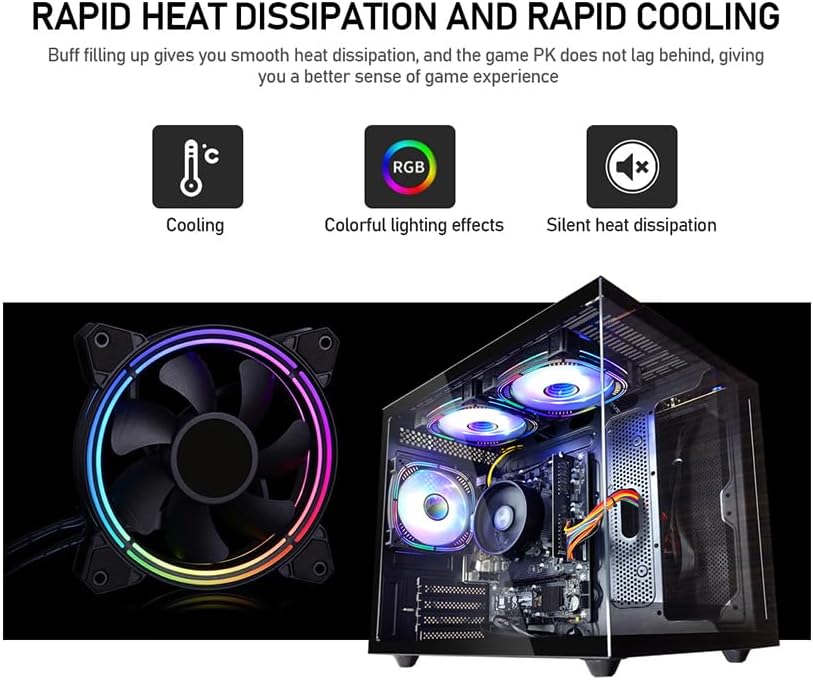
Image: Demonstrates the rapid heat dissipation and cooling capabilities of the system, featuring a close-up of an RGB fan and an internal view of the computer with multiple illuminated RGB fans, indicating colorful lighting effects and silent operation.
ບໍາລຸງຮັກສາ
ທໍາຄວາມສະອາດ
- ທຳຄວາມສະອາດດ້ານນອກຂອງຄອມພິວເຕີເປັນປະຈຳດ້ວຍຜ້າອ່ອນແລະແຫ້ງ.
- Use compressed air to clear dust from ventilation grilles and fan blades to maintain optimal airflow. Perform this with the computer powered off and unplugged.
ອັບເດດຊອບແວ
Keep your operating system, drivers, and applications updated to ensure system stability, security, and performance. Check for updates regularly.
ລະບາຍອາກາດ
Ensure the computer is placed in an area with good airflow. Avoid placing it in enclosed spaces or directly against walls that could obstruct vents. Proper ventilation is crucial for preventing overheating.
ການສໍາຮອງຂໍ້ມູນ
Regularly back up important data to an external drive or cloud storage. This protects your files in case of hardware failure or other unforeseen issues.
ການແກ້ໄຂບັນຫາ
ບໍ່ມີພະລັງງານ
- Check if the power cable is securely connected to both the computer and the electrical outlet.
- ກວດສອບວ່າປລັກສຽບໄຟເຮັດວຽກໄດ້ໂດຍການສຽບໃສ່ອຸປະກອນອື່ນ.
- Ensure the power switch on the back of the power supply unit (if present) is in the 'ON' position.
ບໍ່ມີຈໍສະແດງຜົນໃນຈໍສະແດງຜົນ
- Confirm that the monitor is powered on and its video cable (HDMI/VGA) is securely connected to both the computer and the monitor.
- Check the monitor's input source setting to ensure it matches the cable type you are using (e.g., HDMI 1, VGA).
System Performance Issues
- ປິດແອັບພລິເຄຊັນພື້ນຫຼັງທີ່ບໍ່ຈຳເປັນເພື່ອເພີ່ມຊັບພະຍາກອນຂອງລະບົບ.
- ໃຫ້ແນ່ໃຈວ່າລະບົບປະຕິບັດການ ແລະໄດເວີຂອງທ່ານອັບເດດແລ້ວ.
- Check for adequate ventilation to prevent thermal throttling.
Error Codes or Unexpected Shutdowns
If you encounter persistent error codes or unexpected shutdowns, note down the error message and contact customer support for assistance. This may indicate a hardware issue requiring professional diagnosis.
ຂໍ້ມູນຈໍາເພາະ

Image: Specifications diagram for the suevery Gaming Desktop Computer, illustrating its physical dimensions (339mm x 276mm x 330mm), USB 3.0 and 2.0 port configurations, HDMI and VGA signal interfaces, and the presence of built-in 3 x 120cm chassis fans.
| ຄຸນສົມບັດ | ລາຍລະອຽດ |
|---|---|
| ຍີ່ຫໍ້ | suevery |
| ໝາຍເລກຕົວແບບ | SUV9W1-SUV9W9 |
| ໂຮງງານຜະລິດ | AMD Ryzen 5 5600GT (3.6 GHz) |
| RAM | 16 GB DDR4 SDRAM (3200 MHz) |
| ການເກັບຮັກສາ | 512 GB NVMe SSD |
| Graphics Coprocessor | AMD Radeon Vega (Integrated) |
| ຂະໜາດຂອງບັດກາຟິກ RAM | 2 GB |
| ລະບົບປະຕິບັດການ | DOS (User may install preferred OS) |
| ພອດ USB 2.0 | 4 |
| ພອດ USB 3.0 | 2 |
| ຜົນຜະລິດວິດີໂອ | hdmi, vga |
| ເວທີຮາດແວ | PC |
| ນ້ໍາຫນັກລາຍການ | 19.8 ປອນ |
| ຂະໜາດແພັກເກັດ | 15.83 x 14.49 x 12.76 ນິ້ວ |
| ສີ | ດຳ |
| Wi-Fi | ແມ່ນແລ້ວ |
ການຮັບປະກັນແລະການສະຫນັບສະຫນູນ
ຂໍ້ມູນການຮັບປະກັນ
This suevery Gaming Desktop Computer comes with a ຮັບປະກັນ 1 ປີ. This warranty covers manufacturing defects and hardware malfunctions under normal use conditions. Please retain your proof of purchase for warranty claims.
ການຊ່ວຍເຫຼືອລູກຄ້າ
For technical assistance, troubleshooting, or warranty inquiries, please contact suevery customer service. Refer to the product packaging or the seller's webເວັບໄຊສໍາລັບລາຍລະອຽດການຕິດຕໍ່ສະເພາະ.