1. ຜະລິດຕະພັນເກີນview
The DOOGEE Note 56 is a modern smartphone designed for daily use, featuring a powerful Octa-Core processor, a large 6150 mAh battery, and a vibrant 6.56-inch HD+ display with a 90 Hz refresh rate. This manual provides essential information for setting up, operating, and maintaining your device.

ຮູບ 1.1: ດ້ານຫນ້າແລະດ້ານຫລັງ view of the DOOGEE Note 56, showcasing its sleek design and camera setup.
2. ສິ່ງທີ່ຢູ່ໃນກ່ອງ
- DOOGEE Note 56 Smartphone
- Power Adapter
- ສາຍ USB
- SIM Ejector Tool
- ຄູ່ມືເລີ່ມຕົ້ນດ່ວນ
- ກໍລະນີປ້ອງກັນ (ອາດຈະແຕກຕ່າງກັນໄປຕາມພາກພື້ນ)
- ຕົວປ້ອງກັນໜ້າຈໍ (ນຳໃຊ້ກ່ອນ ຫຼື ລວມມີ)
3. ຕັ້ງຄ່າ
3.1 ການໃສ່ແຜ່ນ SIM ແລະບັດ MicroSD
The DOOGEE Note 56 supports Dual SIM functionality and MicroSD card expansion up to 2TB. Follow these steps to insert your cards:
- ພະລັງງານປິດໂທລະສັບຂອງທ່ານ.
- ຊອກຫາຖາດຊິມກາດຢູ່ດ້ານຂ້າງຂອງອຸປະກອນ.
- ສຽບເຄື່ອງຖອດຊິມເຂົ້າໄປໃນຮູນ້ອຍຂ້າງຖາດແລະຍູ້ຄ່ອຍໆຈົນກວ່າຖາດຈະປົ່ງອອກ.
- ວາງແຜ່ນ Nano-SIM ແລະ/ຫຼືບັດ MicroSD ຂອງທ່ານໃສ່ໃນຊ່ອງທີ່ກຳນົດໄວ້ເທິງຖາດ. ໃຫ້ແນ່ໃຈວ່າພວກມັນຖືກຮັດກຸມຢ່າງຖືກຕ້ອງ.
- ຍູ້ຖາດກັບໃສ່ໂທລະສັບຢ່າງລະມັດລະວັງຈົນກວ່າມັນຈະກົດໃສ່ບ່ອນ.
3.2 Powering On/Off and Initial Setup
To power on your device, press and hold the Power button until the DOOGEE logo appears. To power off, press and hold the Power button, then select 'Power off' from the options. On first use, follow the on-screen instructions to set up your language, Wi-Fi, Google account, and security features.
4. ປະຕິບັດການອຸປະກອນຂອງທ່ານ
4.1 ການນໍາທາງພື້ນຖານ
The DOOGEE Note 56 runs on Android 16, offering an intuitive user interface. Use gestures or the navigation bar at the bottom of the screen to navigate:
- ຫນ້າທໍາອິດ: Swipe up from the bottom or tap the Home button to return to the home screen.
- ກັບຄືນໄປບ່ອນ: Swipe from the left or right edge, or tap the Back button to go back to the previous screen.
- ແອັບຫຼ້າສຸດ: Swipe up and hold from the bottom, or tap the Recent Apps button to view ແລະປ່ຽນລະຫວ່າງແອັບພລິເຄຊັນທີ່ເປີດ.
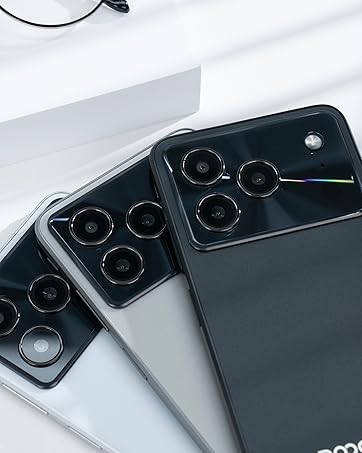
Figure 4.1: Android 16 operating system interface on the DOOGEE Note 56.
4.2 ໂທ ແລະ ການສົ່ງຂໍ້ຄວາມ
To make a call, open the Phone app, enter the number, and tap the call icon. For messaging, open the Messages app, select a contact or start a new conversation, type your message, and send.
4.3 ການທໍາງານຂອງກ້ອງຖ່າຍຮູບ
The DOOGEE Note 56 features an 8 MP rear camera and a 5 MP front camera. Open the Camera app to access various modes such as Photo, Video, Portrait, and more. Tap the shutter button to capture photos or start/stop video recording.

Figure 4.2: Camera features and AI scene recognition.
4.4 ການຕັ້ງຄ່າການສະແດງ
Customize your 6.56-inch HD+ 90 Hz IPS display by going to ການຕັ້ງຄ່າ > ຈໍສະແດງຜົນ. Here you can adjust brightness, dark mode, screen timeout, and refresh rate for a smoother visual experience.

Figure 4.3: The 90 Hz HD+ display provides smooth visuals.
5. ການເກັບຮັກສາແລະການປະຕິບັດ
The DOOGEE Note 56 is equipped with 24GB RAM (3GB physical + 21GB virtual) and 64GB of internal storage, expandable up to 2TB via a MicroSD card (sold separately). This configuration ensures smooth multitasking and ample ພື້ນທີ່ສໍາລັບແອັບຯ, ຮູບພາບ, ແລະວິດີໂອຂອງທ່ານ.
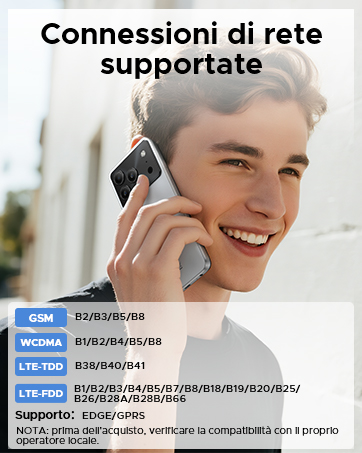
Figure 5.1: Memory configuration of the DOOGEE Note 56.
6. ການເຊື່ອມຕໍ່ ແລະຄວາມປອດໄພ
6.1 ການເຊື່ອມຕໍ່ເຄືອຂ່າຍ
The device supports 4G LTE for fast mobile data. Ensure your SIM cards are active and correctly inserted. For Wi-Fi, go to ການຕັ້ງຄ່າ > ເຄືອຂ່າຍ ແລະອິນເຕີເນັດ > Wi-Fi and connect to your preferred network.

Figure 6.1: Supported network connections for the DOOGEE Note 56.
6.2 Face ID
Unlock your phone quickly and securely using Face ID. To set it up, go to ການຕັ້ງຄ່າ > ຄວາມປອດໄພ > ການປົດລັອກດ້ວຍໜ້າ ແລະປະຕິບັດຕາມຄໍາແນະນໍາໃນຫນ້າຈໍເພື່ອລົງທະບຽນໃບຫນ້າຂອງທ່ານ.
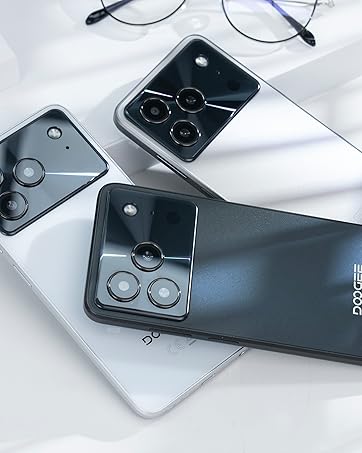
Figure 6.2: Instant facial recognition for unlocking.
6.3 OTG and GPS
The device supports OTG (On-The-Go) for connecting USB accessories like flash drives. GPS functionality provides accurate location services for navigation and location-based apps.
7. ການຄຸ້ມຄອງຫມໍ້ໄຟ
The DOOGEE Note 56 is equipped with a 6150 mAh silicon-carbon battery, offering extended usage. It supports 10W fast charging. To optimize battery life:
- ປັບຄວາມສະຫວ່າງຂອງຫນ້າຈໍ.
- ປິດແອັບທີ່ບໍ່ໄດ້ໃຊ້ເຮັດວຽກຢູ່ໃນພື້ນຫຼັງ.
- ເປີດໃຊ້ໂໝດປະຢັດແບັດເຕີຣີເມື່ອຕ້ອງການ.
- ຫຼີກເວັ້ນອຸນຫະພູມທີ່ຮຸນແຮງ.
Figure 7.1: The 6150 mAh battery provides long-lasting power.

Figure 7.2: Estimated usage times on a single charge.
8. ບໍາລຸງຮັກສາ
8.1 ການປັບປຸງຊອບແວ
ກວດສອບການອັບເດດຊອບແວເປັນປະຈຳເພື່ອຮັບປະກັນວ່າອຸປະກອນຂອງທ່ານມີຄຸນສົມບັດຫຼ້າສຸດ ແລະແພັດຄວາມປອດໄພ. ໄປທີ່ ການຕັ້ງຄ່າ > ລະບົບ > ການປັບປຸງລະບົບ ເພື່ອກວດສອບ ແລະຕິດຕັ້ງອັບເດດ.
8.2 ການທໍາຄວາມສະອາດອຸປະກອນຂອງທ່ານ
ໃຊ້ຜ້າແພທີ່ອ່ອນນຸ້ມ, ບໍ່ມີສານດ່າງເພື່ອທຳຄວາມສະອາດໜ້າຈໍ ແລະຕົວເຄື່ອງຂອງໂທລະສັບຂອງທ່ານ. ຫຼີກເວັ້ນການນໍາໃຊ້ສານເຄມີທີ່ຮຸນແຮງຫຼືວັດສະດຸຂັດ.
9. ການແກ້ໄຂບັນຫາ
9.1 ບັນຫາທົ່ວໄປ ແລະການແກ້ໄຂ
- ໂທລະສັບບໍ່ເປີດ: ໃຫ້ແນ່ໃຈວ່າໄດ້ສາກໄຟແລ້ວ. ເຊື່ອມຕໍ່ກັບສາຍສາກຢ່າງໜ້ອຍ 10 ນາທີ, ຈາກນັ້ນລອງເປີດເຄື່ອງ.
- ແອັບຂັດຂ້ອງ: Clear the cache of the problematic app (Settings > Apps > [App Name] > Storage & cache > Clear cache). If the issue persists, reinstall the app.
- ຊີວິດຫມໍ້ໄຟບໍ່ດີ: Review Section 7 for battery optimization tips.
- ບັນຫາການເຊື່ອມຕໍ່ເຄືອຂ່າຍ: Check if SIM cards are properly inserted. Restart the phone. Verify network settings in Settings > Network & internet.
10. ຂໍ້ມູນຈໍາເພາະ
| ຄຸນສົມບັດ | ຂໍ້ມູນຈໍາເພາະ |
|---|---|
| ຕົວແບບ | ໝາຍເຫດ56 |
| ລະບົບປະຕິບັດການ | Android 16 |
| ຈໍສະແດງຜົນ | 6.56-inch HD+ IPS, 90 Hz |
| ໂຮງງານຜະລິດ | Octa-Core |
| RAM | 24 GB (3GB + 21GB ເສມືນ) |
| ການເກັບຮັກສາພາຍໃນ | 64 GB |
| ການເກັບຮັກສາທີ່ຂະຫຍາຍໄດ້ | Up to 2 TB MicroSD |
| ກ້ອງຫຼັງ | 8 MP |
| ກ້ອງໜ້າ | 5 MP |
| ຄວາມອາດສາມາດຫມໍ້ໄຟ | 6150 mAh |
| ກຳລັງສາກໄຟ | ສາກໄວ 10W |
| ຂະໜາດ | ຄວາມຫນາ 8.45 ມມ |
| ນ້ຳໜັກ | 262 g |
| ການເຊື່ອມຕໍ່ | 4G, Dual SIM, Wi-Fi, Bluetooth, GPS, OTG |
| ຄວາມປອດໄພ | Face ID |
11. ວິດີໂອຜະລິດຕະພັນຢ່າງເປັນທາງການ
Video 11.1: DOOGEE Note 56 Plus Smartphone Overview. This video highlights the ultra-thin design, camera features, and overall elegance of the Note 56 Plus, which shares many characteristics with the Note 56 model.
Video 11.2: DOOGEE Note 56 Plus Ultra-thin Smartphone. This video focuses on the slim profile and aesthetic appeal of the Note 56 Plus, demonstrating its comfortable handling and modern look.
12. ການຮັບປະກັນແລະການສະຫນັບສະຫນູນ
Your DOOGEE Note 56 smartphone comes with a limited warranty. Please refer to the warranty card included in your product packaging for specific terms and conditions. For technical support or service inquiries, please visit the official DOOGEE webເວັບໄຊ ຫຼືຕິດຕໍ່ບໍລິການລູກຄ້າຂອງເຂົາເຈົ້າ.
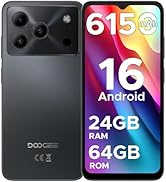
Figure 12.1: DOOGEE customer service details, including warranty and support options.


