1. ບົດແນະນຳ
The VEVOR Emergency Weather Radio MD-091 is a multi-functional device designed for emergency preparedness, outdoor activities, and daily use. It integrates FM/AM/WB/NOAA radio reception, multiple power sources, a powerful flashlight, a reading light, and an SOS alarm. This manual provides detailed instructions for the safe and effective operation of your radio.

ຫຼາຍກວ່າview of the VEVOR Emergency Weather Radio, showcasing its compact design, integrated flashlight, reading light, and connectivity options for charging a smartphone and using headphones.
2. ຄໍາແນະນໍາຄວາມປອດໄພ
- ຢ່າເຮັດໃຫ້ອຸປະກອນຢູ່ໃນອຸນຫະພູມທີ່ຮຸນແຮງ, ແສງແດດໂດຍກົງ, ຫຼືຄວາມຊຸ່ມຊື່ນສູງ.
- ຫຼີກລ້ຽງການຫຼຸດລົງຫຼືຖືກວິທະຍຸໄດ້ຮັບຜົນກະທົບທີ່ເຂັ້ມແຂງ.
- Keep the device away from water. While it has an IPX3 rating for damp conditions, it is not waterproof for submersion.
- ຢ່າພະຍາຍາມຖອດປະກອບ ຫຼື ດັດແປງວິທະຍຸ. ການເຮັດແບບນີ້ຈະເຮັດໃຫ້ການຮັບປະກັນເປັນໂມຄະ ແລະ ອາດຈະເຮັດໃຫ້ເກີດຄວາມເສຍຫາຍ ຫຼື ການບາດເຈັບ.
- ໃຊ້ສາຍ USB ທີ່ສະໜອງໃຫ້ ຫຼື ສາຍທີ່ໄດ້ຮັບການຮັບຮອງທຽບເທົ່າເທົ່ານັ້ນສຳລັບການສາກໄຟ.
- ຖິ້ມແບັດເຕີລີ ແລະອຸປະກອນຕາມລະບຽບການທ້ອງຖິ່ນ.
3. ຜະລິດຕະພັນເກີນview
Familiarize yourself with the various components and controls of your VEVOR Emergency Weather Radio.

A comprehensive diagram labeling the key features of the radio, such as the emergency power bank, Type-C input, reading light, survival bracelet with compass, headphone jack, dual USB output, flashlight, battery indicator, FM/AM/WB radio, weather alert radio, and SOS alarm.
ການຄວບຄຸມ ແລະຟັງຊັນ:
- ປຸ່ມພະລັງງານ/ປະລິມານ: Turn clockwise to power on and adjust volume.
- ຕົວເລືອກແຖບ: Switch between FM, AM, and WB (Weather Band).
- ປຸ່ມປັບ: Adjust frequency to find radio stations.
- ປຸ່ມ SOS: Press and hold to activate the emergency alarm and flashing light.
- ປຸ່ມໄຟສາຍ: Activate the front flashlight.
- Reading Light Switch: Turn on/off the top reading light.
- ພອດ USB Output: ສໍາລັບການສາກໄຟອຸປະກອນພາຍນອກ.
- ຜອດປ້ອນຂໍ້ມູນ Type-C: For charging the radio's internal battery.
- ຫູຟັງ Jack: ສໍາລັບການຟັງສ່ວນຕົວ.
- ເສົາອາກາດ Telescopic: ຂະຫຍາຍສໍາລັບການຮັບວິທະຍຸທີ່ດີກວ່າ.
- ແຜງແສງອາທິດ: For supplementary charging.
- Hand Crank: ສຳລັບການຜະລິດພະລັງງານດ້ວຍມື.
4. ຕັ້ງຄ່າ
4.1 ການສາກໄຟເບື້ອງຕົ້ນ
Before first use, fully charge the radio's internal 8000mAh battery using the provided USB-C cable. Connect the cable to the Type-C input port on the radio and a standard USB power adapter (not included) or a computer USB port. The battery indicator lights will show charging progress.
4.2 ການຂະຫຍາຍເສົາອາກາດ
For optimal radio reception, fully extend the telescopic antenna when listening to FM or Weather Band (WB) broadcasts.
5. ຄໍາແນະນໍາການດໍາເນີນງານ
5.1 ການເປີດ/ປິດ ແລະ ການຄວບຄຸມລະດັບສຽງ
ໝຸນ ປຸ່ມພະລັງງານ/ປະລິມານ clockwise to turn on the radio and increase the volume. Rotate counter-clockwise to decrease volume and turn off the radio.
5.2 Radio Operation (FM/AM/WB)
- Select the desired band (FM, AM, or WB) using the ຕົວເລືອກແຖບ ສະຫຼັບ.
- Extend the telescopic antenna for better reception, especially for FM and WB.
- ໝຸນ ປຸ່ມປັບ to scan for stations. The frequency will be displayed on the screen.
- For Weather Band (WB), tune to one of the 7 NOAA channels (162.400 MHz to 162.550 MHz).
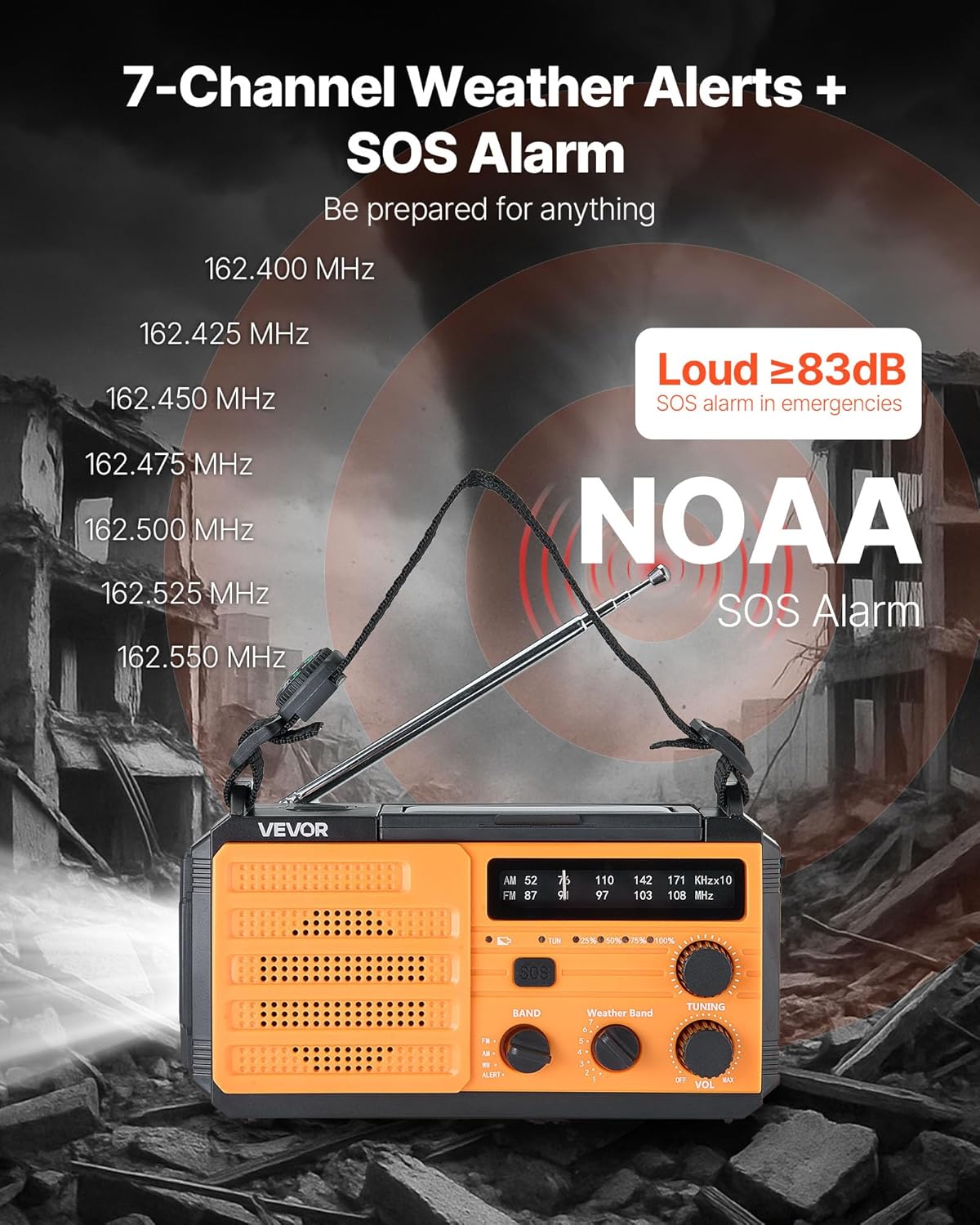
This image illustrates the radio's capability to receive 7 NOAA weather channels and activate a loud SOS alarm (over 83dB) during emergencies, with frequencies listed for reference.
5.3 NOAA Weather Alert Function
When the radio is set to the WB band, it can automatically detect and alert you to severe weather warnings from NOAA. A green light indicates normal operation, while a yellow light flashing with an alert sound warns of an impending weather event.
5.4 SOS ປຸກ
ໃນກໍລະນີສຸກເສີນ, ໃຫ້ກົດຄ້າງໄວ້ ປຸ່ມ SOS to activate a loud alarm (≥83dB) and a flashing light. This feature is designed to attract attention and signal for help. Press the button again briefly to deactivate.
5.5 ໜ້າທີ່ຂອງໄຟສ່ອງສະຫວ່າງ

This image displays the radio's versatile lighting features, including a soft 6500K reading light for tasks and a powerful flashlight for long-range illumination, suitable for various emergency and outdoor scenarios.
- ໄຟສາຍ: ກົດ ປຸ່ມໄຟສາຍ on the side to turn on the 1W high-beam LED flashlight. Press again to cycle through modes (high, low, off).
- ແສງອ່ານ: Flip up the solar panel to reveal the reading light. Use the ສະຫຼັບແສງອ່ານ to turn on/off the 6 COB LEDs for soft area lighting.
5.6 ການສາກໄຟອຸປະກອນພາຍນອກ (ພາວເວີແບ້ງ)
The radio can act as a power bank to charge your mobile devices. Connect your device's USB charging cable to one of the ຜອດອອກ USB on the radio. Ensure the radio has sufficient battery charge for this function.
5.7 Multiple Power Sources

A visual guide to the various power sources available for the radio, including USB charging, solar panel, hand crank, built-in lithium battery, and Type-C input, ensuring continuous operation in diverse situations.
- ການສາກ USB-C: Connect the provided USB-C cable to the ຜອດປ້ອນຂໍ້ມູນ Type-C and a power source. This is the primary method for a full charge.
- ສາກໄຟແສງຕາເວັນ: Place the radio with the solar panel facing direct sunlight. This method is primarily for maintaining the battery charge or for emergency trickle charging, not for a full charge from empty.
- Hand Crank: Rotate the hand crank clockwise or counter-clockwise at a steady pace (approximately 130-150 RPM) to generate power. Cranking for 1 minute can provide several minutes of radio use or flashlight operation.
- ແບັດເຕີຣີພາຍໃນ: The built-in 8000mAh battery powers all functions. Monitor the battery indicator for charge level.
6. ບໍາລຸງຮັກສາ
- ທໍາຄວາມສະອາດ: ເຊັດວິທະຍຸດ້ວຍສຽງອ່ອນ, ງamp ຜ້າ. ຢ່າໃຊ້ເຄື່ອງເຮັດຄວາມສະອາດຂັດຫຼືສານລະລາຍ.
- ການເກັບຮັກສາ: Store the radio in a cool, dry place away from direct sunlight and extreme temperatures. If storing for extended periods, charge the battery to at least 50% every 3-6 months to prolong battery life.
- ການດູແລຫມໍ້ໄຟ: Avoid fully discharging the battery frequently. Regular partial charges are better for lithium-ion battery longevity.
7. ການແກ້ໄຂບັນຫາ
| ບັນຫາ | ສາເຫດທີ່ເປັນໄປໄດ້ | ການແກ້ໄຂ |
|---|---|---|
| ວິທະຍຸບໍ່ເປີດ. | ແບັດເຕີຣີໝົດ. | ສາກວິທະຍຸໂດຍໃຊ້ USB-C, ແສງອາທິດ, ຫຼືມື crank. |
| ການຮັບວິທະຍຸທີ່ບໍ່ດີ. | ເສົາອາກາດບໍ່ໄດ້ຍືດອອກ; ສັນຍານອ່ອນ. | ຍືດເສົາອາກາດແບບຍືດໄດ້ອອກຈົນສຸດ. ລອງປັບຕຳແໜ່ງວິທະຍຸໃໝ່. |
| ອຸປະກອນພາຍນອກບໍ່ໄດ້ສາກໄຟ. | Radio battery too low; incorrect cable. | Ensure radio battery is sufficiently charged. Use a compatible USB cable. |
| Hand crank is stiff or not generating power. | Improper cranking speed; internal issue. | Crank at a steady, moderate pace. If issue persists, contact support. |
8. ຂໍ້ມູນຈໍາເພາະ

This image provides the physical dimensions of the radio (6.89 x 3.15 x 3.86 inches) and a summary of its technical specifications, including model number, power, battery capacity, waterproof rating, and materials.
| ຄຸນສົມບັດ | ລາຍລະອຽດ |
|---|---|
| ໝາຍເລກຕົວແບບ | MD-091 |
| ຄວາມອາດສາມາດຫມໍ້ໄຟ | 8000mAh |
| ແຖບວິທະຍຸສະຫນັບສະຫນູນ | FM, AM, WB (7-Band NOAA) |
| ແຫຼ່ງພະລັງງານ | Battery Powered (Internal), USB, Solar, Hand Crank |
| ເຕັກໂນໂລຊີການເຊື່ອມຕໍ່ | USB (Type-C input, Dual USB output) |
| ຄຸນນະສົມບັດພິເສດ | Portable, SOS Alarm, Flashlight (1W), Reading Light (6 COB LEDs), Compass |
| ການປະເມີນກັນນ້ໍາ | IPX3 |
| ຂະໜາດສິນຄ້າ | 6.89"L x 3.15"W x 3.86"H (175 x 80 x 98 ມມ) |
| ນ້ໍາຫນັກລາຍການ | 1.2 lbs (0.545 ກິໂລ) |
| Shell Main Material | ABS |
| ອົງປະກອບລວມ | 1 x Emergency Weather Radio, 1 x USB Cable, Owner's Manual |
9. ການຮັບປະກັນແລະການສະຫນັບສະຫນູນ
For warranty information, technical support, or any questions regarding your VEVOR Emergency Weather Radio MD-091, please refer to the official VEVOR webເວັບໄຊ ຫຼືຕິດຕໍ່ບໍລິການລູກຄ້າຂອງເຂົາເຈົ້າໂດຍກົງ. ຮັກສາໃບຮັບເງິນການຊື້ຂອງທ່ານສໍາລັບການຮ້ອງຂໍການຮັບປະກັນ.
ຢ່າງເປັນທາງການຂອງ VEVOR Webເວັບໄຊ: www.vevor.com


