ແນະນຳ
This manual provides comprehensive instructions for the safe and efficient operation of your NIIMBOT D110 Bluetooth Label Maker Machine. Please read this manual thoroughly before using the device to ensure proper setup, usage, and maintenance.
ເນື້ອໃນຊຸດ
ເມື່ອເປີດຊຸດ, ກວດເບິ່ງວ່າລາຍການຕໍ່ໄປນີ້ລວມທັງຫມົດ:
- 1 x NIIMBOT D110 Label Maker Machine
- 1 x 12x40mm Thermal Label Roll (pre-installed in printer)
- 1 x ສາຍ USB Type-C
- ຄູ່ມືຜູ້ໃຊ້ (ເອກະສານນີ້)
- Additional 3 rolls of clear labels (packaged separately)
ຕັ້ງຄ່າ
1. ການສາກອຸປະກອນ
Before initial use, fully charge the NIIMBOT D110 label maker.
- Connect the provided Type-C USB cable to the charging port on the label maker.
- ເຊື່ອມຕໍ່ປາຍອື່ນໆຂອງສາຍ USB ກັບອະແດັບເຕີໄຟ USB ມາດຕະຖານ (ບໍ່ລວມ) ຫຼືພອດ USB ຂອງຄອມພິວເຕີ.
- ໄຟສັນຍານຈະສະແດງສະຖານະການສາກໄຟ (ຕົວຢ່າງ: ສີແດງສຳລັບການສາກໄຟ, ສີຂຽວສຳລັບການສາກໄຟເຕັມແລ້ວ).
2. ການຕິດຕັ້ງແຜ່ນປ້າຍຊື່
The device comes with one roll of label tape pre-installed. To replace or install new tape:
- Open the label compartment cover by gently lifting it.
- Remove any empty label roll.
- Insert the new label roll with the printing surface facing upwards, ensuring the label edge extends slightly out of the slot.
- Close the compartment cover firmly until it clicks into place.

Image: NIIMBOT D110 Label Maker with a label roll being inserted and a smartphone displaying the NIIMBOT app interface for label creation.
3. ການດາວໂຫຼດແອັບ ແລະ ການເຊື່ອມຕໍ່ Bluetooth
The NIIMBOT D110 operates via a dedicated mobile application.
- Download the "NIIMBOT" app from the App Store (for iOS) or Google Play Store (for Android). You can search for "NIIMBOT" or scan the QR code provided in the quick start guide.
- ໃຫ້ແນ່ໃຈວ່າ Bluetooth ຖືກເປີດໃຊ້ງານຢູ່ໃນອຸປະກອນມືຖືຂອງທ່ານ.
- Open the NIIMBOT app.
- Turn on the D110 label maker by pressing and holding the power button.
- Within the app, search for available devices and select "D110" to connect. The indicator light on the printer will confirm a successful connection.
Image: The NIIMBOT D110 Bluetooth Label Maker, highlighting its wireless connectivity and showing icons for downloading the companion app from the App Store and Google Play.
4. ການເຊື່ອມຕໍ່ PC (ທາງເລືອກ)
For more versatile content editing, the D110 can also be connected to a computer.
- Download and install the necessary drivers from the official NIIMBOT webເວັບໄຊ.
- Connect the D110 to your computer using the provided Type-C USB cable.
- Follow the on-screen instructions in the NIIMBOT PC software to begin creating and printing labels.
ຄໍາແນະນໍາການດໍາເນີນງານ
1. Creating Labels with the NIIMBOT App
The NIIMBOT app offers various features for designing your labels.
- ການປ້ອນຂໍ້ຄວາມ: ໃສ່ຂໍ້ຄວາມທີ່ທ່ານຕ້ອງການ.
- ສັນຍາລັກ & ໄອຄອນ: ເຂົ້າເຖິງຫຼາຍກວ່າ 1500 ສັນຍາລັກເພື່ອເສີມຂະຫຍາຍປ້າຍຊື່ຂອງທ່ານ.
- ພາສາ: Supports over 10 languages for text input.
- ຂອບ: Choose from over 100 frames to customize label borders.
- QR Code & Barcode: ສ້າງ ແລະພິມລະຫັດ QR ຫຼືບາໂຄດໂດຍກົງຈາກແອັບ.
- ແມ່ແບບ: Utilize various built-in templates for quick label creation.
- ການພິມຊຸດ: Print multiple identical or different labels efficiently.

Image: The NIIMBOT app interface showcasing its powerful functions, including a wide selection of symbols, support for multiple languages, various frames, and the ability to generate QR codes and barcodes.
2. ການພິມປ້າຍ
After designing your label in the app:
- Review your label design on the app screen.
- Ensure the D110 is connected via Bluetooth and has sufficient battery.
- Tap the "Print" button in the app.
- The label maker will automatically feed and print the label.
- Tear off the printed label along the serrated edge.
3. ຂະໜາດປ້າຍກຳກັບທີ່ຮອງຮັບ
The D110 supports various label widths from 0.47 inches (12mm) to 0.59 inches (15mm). Ensure you use genuine NIIMBOT thermal labels for optimal performance.

Image: The NIIMBOT D110 Label Maker demonstrating its compatibility with various label sizes, including 12x22mm, 12x40mm, 14x40mm, 14x60mm, 15x30mm, and 15x50mm, with examples of printed labels.
4. ຄໍາຮ້ອງສະຫມັກ examples
The NIIMBOT D110 is suitable for a wide range of labeling needs, including:
- School supplies (notebooks, binders, pencil cases)
- Food storage and organization
- Reminder labels for medication or tasks
- Gift labeling
- Travel item identification
- Cosmetic organization
- Office filing and organization
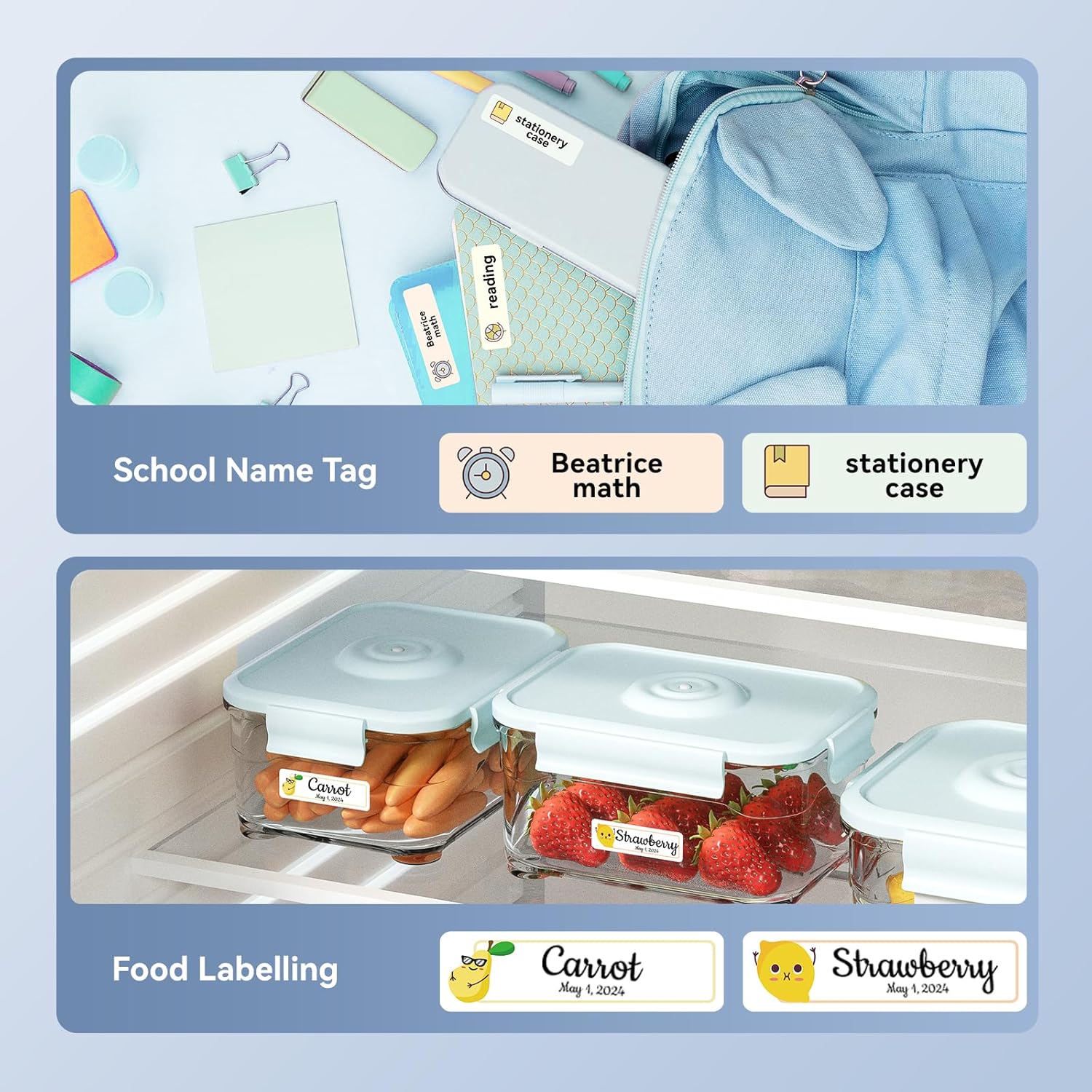
ຮູບພາບ: Examples of labels created with the NIIMBOT D110, demonstrating use for school name tags on backpacks and stationery, as well as for food labeling on storage containers with contents and dates.

ຮູບພາບ: Examples of labels created with the NIIMBOT D110, showing application for medication reminders in a pill organizer and decorative labels for gifts.

ຮູບພາບ: Examples of labels created with the NIIMBOT D110, illustrating use for organizing travel toiletries like shampoo and conditioner, and for identifying makeup products such as eyeliner and eyeshadow.
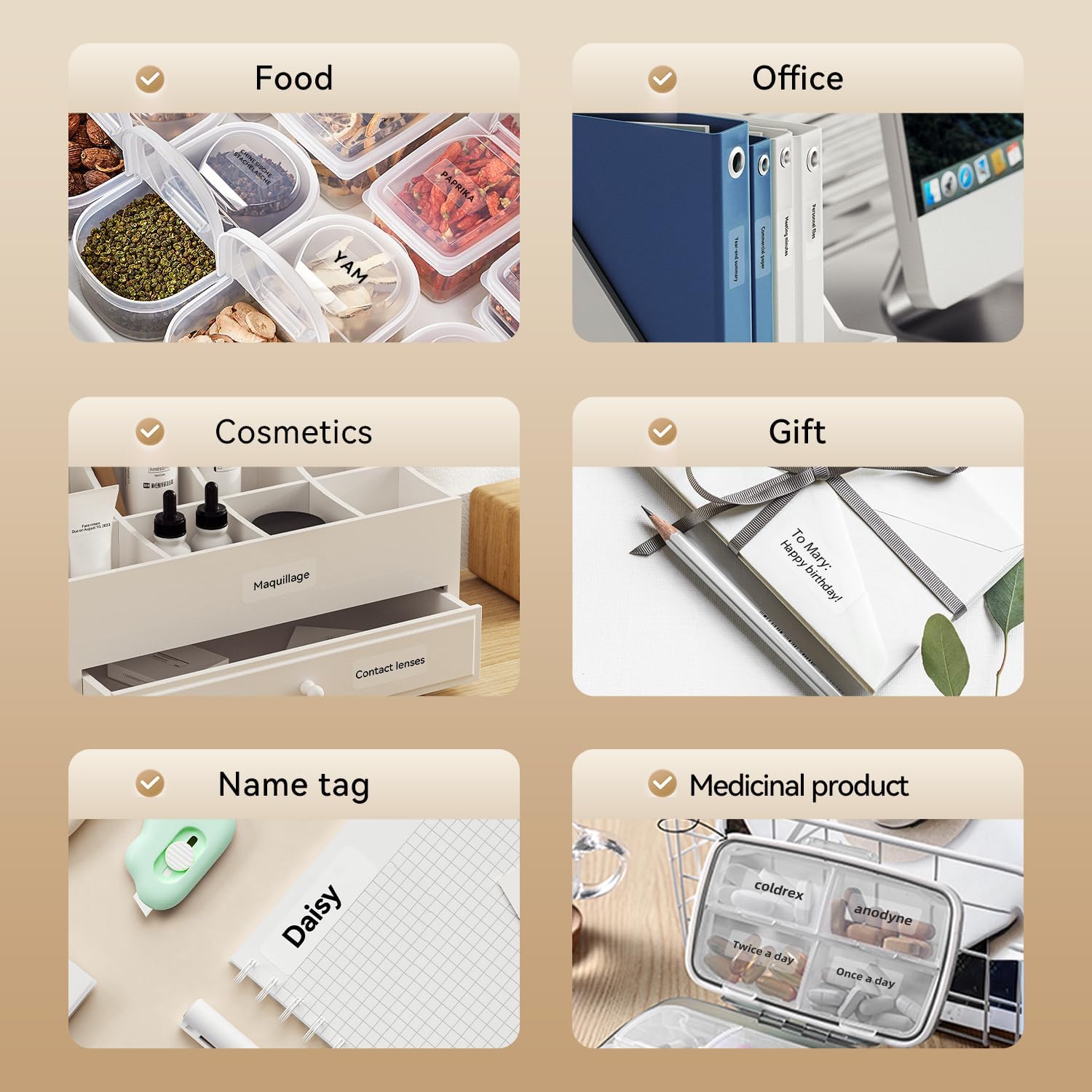
Image: A collage of various application examples for NIIMBOT D110 labels, including organizing food containers, office supplies, cosmetic items, gifts, creating name tags, and labeling medicinal products.
ບໍາລຸງຮັກສາ
1. ການເຮັດຄວາມສະອາດຫົວພິມ
ເພື່ອຮັບປະກັນຄຸນນະພາບການພິມທີ່ດີທີ່ສຸດ, ຄວນເຮັດຄວາມສະອາດຫົວພິມເປັນປະຈຳ.
- Turn off the label maker and disconnect it from any power source.
- ເປີດຝາປິດຊ່ອງໃສ່ປ້າຍ.
- ເຊັດຫົວພິມດ້ວຍຜ້າຝ້າຍຄ່ອຍໆ dampປະກອບດ້ວຍເຫຼົ້າ isopropyl.
- ປ່ອຍໃຫ້ຫົວພິມແຫ້ງໝົດກ່ອນທີ່ຈະປິດຝາປິດ ແລະ ສືບຕໍ່ນຳໃຊ້.
2. ການດູແລຫມໍ້ໄຟ
ເພື່ອຍືດອາຍຸແບັດເຕີຣີ:
- ຫຼີກລ້ຽງການປະຈຸຫມໍ້ໄຟຢ່າງເຕັມທີ່ເລື້ອຍໆ.
- ສາກອຸປະກອນເປັນປົກກະຕິ, ເຖິງແມ່ນວ່າບໍ່ໄດ້ຢູ່ໃນການນໍາໃຊ້ຢ່າງຕໍ່ເນື່ອງ.
- ເກັບຮັກສາອຸປະກອນໄວ້ໃນບ່ອນທີ່ເຢັນ, ແຫ້ງ, ເມື່ອບໍ່ໄດ້ໃຊ້ເປັນເວລາດົນນານ.
3. ການເກັບຮັກສາ
Store the label maker and label rolls in a dry environment, away from direct sunlight and extreme temperatures.
ການແກ້ໄຂບັນຫາ
| ບັນຫາ | ສາເຫດທີ່ເປັນໄປໄດ້ | ການແກ້ໄຂ |
|---|---|---|
| ອຸປະກອນບໍ່ເປີດ | ແບັດເຕີຣີຕໍ່າ | ສາກອຸປະກອນໂດຍໃຊ້ສາຍ USB ທີ່ສະໜອງໃຫ້. |
| ບໍ່ສາມາດເຊື່ອມຕໍ່ຜ່ານ Bluetooth ໄດ້ | Bluetooth is off; App not open; Device out of range | Ensure Bluetooth is enabled on your phone, open the NIIMBOT app, and keep the printer within close proximity. Restart both devices if necessary. |
| ຄຸນນະພາບການພິມບໍ່ດີ | ຫົວພິມເປື້ອນ; ປະເພດປ້າຍຊື່ບໍ່ຖືກຕ້ອງ; ແບັດເຕີຣີຕໍ່າ | Clean the print head (refer to Maintenance section). Ensure you are using genuine NIIMBOT thermal labels. Charge the device. |
| ປ້າຍກຳກັບບໍ່ຖືກຕ້ອງ | Label roll incorrectly installed; Label jammed | Open the cover and re-install the label roll, ensuring it is properly aligned. Remove any jammed labels carefully. |
| "No ink" message | Thermal printers do not use ink. This message is incorrect or a misunderstanding. | The D110 is a thermal printer and does not require ink. Ensure the label roll is correctly installed and is thermal paper. |
ຂໍ້ມູນຈໍາເພາະ
| ຄຸນສົມບັດ | ລາຍລະອຽດ |
|---|---|
| ຕົວແບບ | NIIMBOT D110 |
| ວິທີການພິມ | Thermal Printing (No Ink Required) |
| ການເຊື່ອມຕໍ່ | Bluetooth, USB (for PC) |
| ຄວາມກວ້າງຂອງປ້າຍທີ່ຮອງຮັບ | 0.47'' - 0.59'' (12mm - 15mm) |
| ນ້ຳໜັກ | 0.2 lb (approximately 90g) |
| ຂະໜາດ | 3.8'' x 2.9'' x 1.1'' (approximately 9.65cm x 7.37cm x 2.79cm) |
| ການປ້ອນຂໍ້ມູນພະລັງງານ | ປະເພດ -C USB |

Image: A visual comparison showing the NIIMBOT D110 as significantly smaller and lighter (0.2 lb, 3.8"x2.9"x1.1") compared to a traditional label printer (1.2 lb, 7"x6.3"x2.2").
ການຮັບປະກັນແລະການສະຫນັບສະຫນູນ
For warranty information and technical support, please refer to the official NIIMBOT website or contact NIIMBOT customer service directly. Details can typically be found on the product packaging or the manufacturer's webເວັບໄຊ.
ສະຫນັບສະຫນູນອອນໄລນ໌: ຢ້ຽມຢາມ www.niimbot.com ສຳລັບຄຳຖາມທີ່ຖືກຖາມເລື້ອຍໆ, ການດາວໂຫຼດໄດຣເວີ ແລະ ຂໍ້ມູນຕິດຕໍ່.


