1. ບົດແນະນຳ
This manual provides instructions for the KODAK 10.1-inch Digital Photo Frame, Model 1028c. Please read this manual thoroughly before using the device to ensure proper operation and to maximize your experience. This digital photo frame is designed to display photos and videos without requiring a Wi-Fi connection, offering a simple and direct way to enjoy your digital memories.
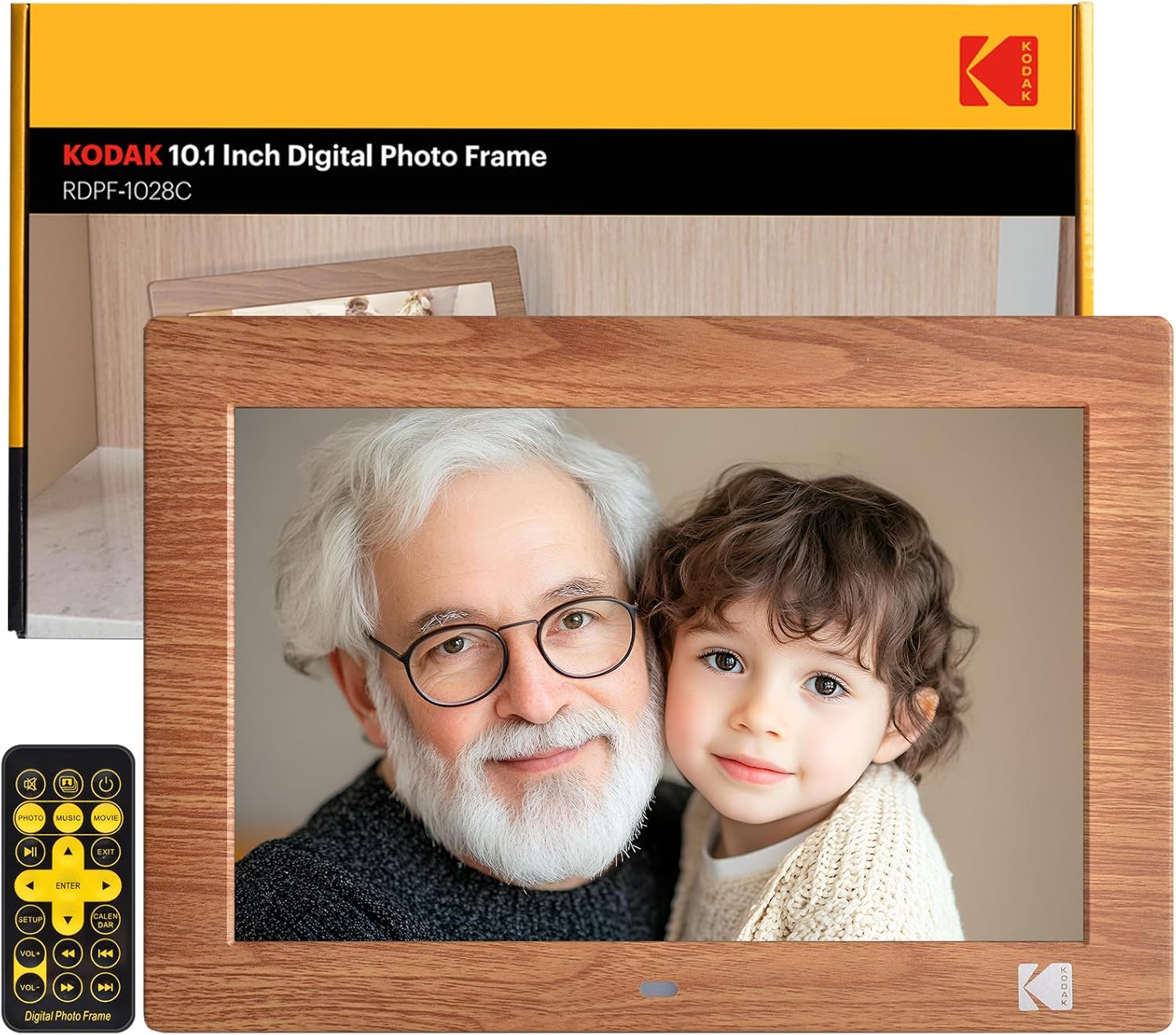
Image: The KODAK 10.1-inch Digital Photo Frame showcasing its vibrant display with a family photo.
2. ຜະລິດຕະພັນເກີນview
2.1 ລັກສະນະທີ່ສໍາຄັນ
- ຈໍສະແດງຜົນ IPS HD ຂະໜາດ 10.1 ນິ້ວ: Features a 1280x800 resolution screen with a 16:10 aspect ratio and 178° ultra-wide viewing angle for clear images.
- No Wi-Fi Required: Operates independently without internet connection or app downloads.
- ການດໍາເນີນງານທີ່ເປັນມິດກັບຜູ້ໃຊ້: Simple plug-and-play functionality with USB drives or SD cards (up to 256GB). Includes a remote control for easy navigation.
- Multifunctional: Supports photo, video, and music playback. Includes calendar, clock, and alarm functions.
- ເປີດ/ປິດອັດຕະໂນມັດ: Programmable power schedule for convenience.
- ການຈັດວາງແບບຍືດຫຍຸ່ນ: Supports horizontal or vertical orientation with auto-rotation, and can be wall-mounted.

Image: Visual representation of the frame's display specifications.
2.2 ເນື້ອໃນຊຸດ
ກວດສອບວ່າລາຍການທັງຫມົດແມ່ນມີຢູ່ໃນຊຸດ:
- KODAK 10.1-inch Digital Photo Frame
- ການຄວບຄຸມໄລຍະໄກ
- Photo Frame Stand
- ຄູ່ມືຜູ້ໃຊ້ (ເອກະສານນີ້)
- ສາຍໄຟ DC

ຮູບພາບ: ສ່ວນປະກອບທັງໝົດທີ່ລວມຢູ່ໃນຊຸດຜະລິດຕະພັນ.
2.3 ການໂຕ້ຕອບອຸປະກອນ
The frame is equipped with multiple ports for connectivity:
- ຊ່ອງໃສ່ບັດ SD: ຮອງຮັບ SD ກາດສູງສຸດ 256GB.
- ພອດ USB: For connecting USB flash drives up to 256GB.
- Jack ຫູຟັງ 3.5 ມມ: ສໍາລັບຜົນຜະລິດສຽງ.
- ຕົວເຊື່ອມຕໍ່ໄຟຟ້າ DC: ສໍາລັບການເຊື່ອມຕໍ່ອະແດບເຕີພະລັງງານ.

ຮູບພາບ: ລາຍລະອຽດ view of the various ports and interfaces on the back of the digital photo frame.
3. ຕັ້ງຄ່າ
3.1 ການເປີດເຄື່ອງເບື້ອງຕົ້ນ
- Connect the DC power cable to the DC power connector on the back of the frame.
- ສຽບອະແດບເຕີໄຟໃສ່ກັບປລັກສຽບໃສ່ຝາ.
- The frame will automatically power on. If not, press the power button on the back of the frame or on the remote control.
3.2 ການໃສ່ອຸປະກອນການເກັບຮັກສາ
To display photos and videos:
- Insert a USB flash drive or SD card (pre-loaded with your media files) into the corresponding port on the frame.
- Ensure the storage device is formatted to a compatible file system (e.g., FAT32, exFAT).
- The frame will automatically detect the device and begin playing media.
Image: Demonstrating the simple process of inserting an SD card and USB drive into the frame.
3.3 Frame Placement
The frame can be placed horizontally or vertically, and supports wall mounting:
- ການຈັດວາງ Desktop: Attach the included photo frame stand to the designated slot on the back for stable desktop use.
- ຕິດຝາ: Use the wall hanging hole on the back of the frame. Ensure appropriate wall anchors and screws are used (not included). The frame features auto-rotation to adjust orientation based on gravity sensing.

Image: Details of the frame's stand and wall mounting options, with examples of display orientation.
4. ຄໍາແນະນໍາການດໍາເນີນງານ
4.1 ການນໍາໃຊ້ການຄວບຄຸມໄລຍະໄກ
The included remote control provides full functionality for navigating menus and controlling playback.

Image: Illustrating the use of the remote control for convenient operation.
4.2 ການຫຼິ້ນສື່
- ຮູບພາບ: The frame supports JPG, BMP, PNG, GIF, and WEBP formats. Photos will display in a slideshow format.
- ວິດີໂອ: The frame supports MP4, MKV, MOV, and AVI formats.
- ດົນຕີ: The frame supports MP3, WMA, OGG, AAC, and FLAC formats. Music can be played as background audio during photo slideshows.
Use the remote control to navigate through files, adjust volume, and control playback (play, pause, next, previous).
4.3 ຄຸນສົມບັດຫຼາຍໜ້າທີ່
Beyond media display, the frame offers additional utilities:
- Calendar & Clock: ສະແດງວັນທີແລະເວລາປະຈຸບັນ.
- ໂມງປຸກ: ຕັ້ງໂມງປຸກເພື່ອເຕືອນ.
Image: The frame's versatility, showing calendar, automatic on/off, and media playback.
4.4 ເປີດ/ປິດອັດຕະໂນມັດ
You can program the frame to turn on and off at specific times:
- ເຂົ້າເຖິງເມນູການຕັ້ງຄ່າໂດຍໃຊ້ການຄວບຄຸມໄລຍະໄກ.
- Navigate to the 'Auto On/Off' option.
- ຕັ້ງເວລາເປີດ ແລະ ປິດເຄື່ອງທີ່ທ່ານຕ້ອງການ.
Image: Demonstrating the automatic on/off scheduling feature for convenient use.
5. ບໍາລຸງຮັກສາ
- ທໍາຄວາມສະອາດຫນ້າຈໍ: ໃຊ້ຜ້າທີ່ອ່ອນນຸ່ມ, ບໍ່ມີສານດ່າງເພື່ອເຊັດໜ້າຈໍຢ່າງຄ່ອຍໆ. ສໍາລັບ smudges stubborn, ເລັກນ້ອຍ dampໃສ່ຜ້າດ້ວຍນ້ໍາຫຼືການແກ້ໄຂເຮັດຄວາມສະອາດຫນ້າຈໍ. ຫຼີກເວັ້ນການສານເຄມີທີ່ຮຸນແຮງ.
- ທໍາຄວາມສະອາດກອບ: ເຊັດດ້ານນອກຂອງກອບດ້ວຍຜ້າແຫ້ງແລະອ່ອນ.
- ການເກັບຮັກສາ: When not in use for extended periods, disconnect the power adapter and store the frame in a cool, dry place.
- ຫຼີກລ້ຽງການຂອງແຫຼວ: ຢ່າເຮັດໃຫ້ກອບຖືກນ້ໍາຫຼືຄວາມຊຸ່ມຊື່ນຫຼາຍເກີນໄປ.
6. ການແກ້ໄຂບັນຫາ
| ບັນຫາ | ສາເຫດທີ່ເປັນໄປໄດ້ | ການແກ້ໄຂ |
|---|---|---|
| ເຟຣມບໍ່ເປີດ. | ສາຍໄຟບໍ່ໄດ້ເຊື່ອມຕໍ່ຢ່າງຖືກຕ້ອງ; ບັນຫາປລັກສຽບໄຟ. | Ensure power cable is securely connected to both the frame and the outlet. Test the outlet with another device. |
| No pictures or videos displayed. | Storage device not inserted; incompatible file ຮູບແບບ; ເສຍຫາຍ files. | Ensure SD card or USB drive is correctly inserted. Verify media files are in supported formats (JPG, MP4, etc.). Try another storage device or reformat the current one. |
| Frame shuts off unexpectedly. | Automatic On/Off schedule enabled; power supply issue. | Check the 'Automatic On/Off' settings in the menu. Ensure the power adapter is functioning correctly and providing stable power. |
| ການຄວບຄຸມໄລຍະໄກບໍ່ເຮັດວຽກ. | ແບັດເຕີຣີໝົດ; ມີສິ່ງກີດຂວາງ; ຣີໂໝດຢູ່ນອກຂອບເຂດສັນຍານ. | Replace remote control batteries. Ensure no obstructions between the remote and the frame's IR receiver. Operate within a reasonable range. |
| Some photos not displaying. | ບໍ່ເຂົ້າກັນໄດ້ file format (e.g., PNG not recognized); file ສໍ້ລາດບັງຫຼວງ. | Ensure all photos are in supported formats like JPG. Convert problematic files ຖ້າຈໍາເປັນ. |
7. ຂໍ້ມູນຈໍາເພາະ
- ຂະໜາດຜະລິດຕະພັນ: 8 x 10 x 0.99 ນິ້ວ
- ນ້ໍາຫນັກລາຍການ: 2.12 ປອນ
- ໝາຍເລກຕົວແບບ: 1028c
- ຍີ່ຫໍ້: KODAK
- ຂະໜາດໜ້າຈໍ: 10.1 ນິ້ວ
- ຄວາມລະອຽດ: 1280 x 800 (WXGA)
- ອັດຕາສ່ວນ: 16:10
- Viewໃນມຸມ: 178° IPS
- ອຸປະກອນທີ່ເຂົ້າກັນໄດ້: Personal Computer, SD Card, USB Flash Drive
- ຮູບແບບຮູບພາບສະຫນັບສະຫນູນ: JPG, BMP, PNG, GIF, WEBP
- ຮູບແບບວິດີໂອສະຫນັບສະຫນູນ: MP4, MKV, MOV, AVI
- ຮູບແບບດົນຕີສະຫນັບສະຫນູນ: MP3, WMA, OGG, AAC, FLAC
- ສະຫນັບສະຫນູນການຈັດເກັບ: SD Card (up to 256GB), USB Flash Drive (up to 256GB)
8. ການຮັບປະກັນແລະການສະຫນັບສະຫນູນ
KODAK provides professional technical support and after-sales service for this product. For assistance, please refer to the contact information provided with your purchase or visit the official KODAK support webເວັບໄຊ.
8.1 ວິດີໂອຜະລິດຕະພັນ
For visual guidance on setup and features, please refer to the following official product videos:
ວິດີໂອ: ທົ່ວໄປview and features of the KODAK Digital Photo Frame.
Video: Detailed demonstration of the frame's functionalities.
Video: Vertical orientation display and usage examples.
Video: Quick guide to setting up and using the frame.
Video: Exploring the various display modes and settings.
Video: Tips for optimizing your photo and video display.
Video: Comprehensive guide to all features and controls.
Video: Extended tutorial on advanced settings and customization.
Video: Short demonstration of key features in vertical mode.
ວິດີໂອ: ດ່ວນview of the frame's user interface.


