ແນະນຳ
This manual provides essential information for the safe and efficient use of your Philips Smart TV Ambilight THE ONE 55 inch 4K 144 Hz, model 55PUG8929/78. Please read these instructions carefully before operating the device and retain them for future reference.
Your Philips TV features Ambilight technology, a P5 processor for enhanced image quality, Dolby Vision and Dolby Atmos for immersive audiovisual experiences, a 144Hz refresh rate with VRR and AMD FreeSync Premium for gaming, and the Titan OS smart TV platform.
ຕັ້ງຄ່າ
1. Unboxing ແລະ Package Contents
ເອົາສ່ວນປະກອບທັງຫມົດອອກຈາກການຫຸ້ມຫໍ່ຢ່າງລະມັດລະວັງ. ໃຫ້ແນ່ໃຈວ່າທຸກລາຍການມີຢູ່ກ່ອນທີ່ຈະຖິ້ມວັດສະດຸຫຸ້ມຫໍ່.
- 1 Smart TV Philips 55"
- 1 ການຄວບຄຸມໄລຍະໄກ
- 2 ຫມໍ້ໄຟ AAA
- 1 ສາຍໄຟ
- 1 ຄູ່ມືເລີ່ມຕົ້ນໄວ
- 1 Legal and safety leaflet
- 1 ໂຕະຕັ້ງໂຕະ
Note: The product does not include installation services. For apartment delivery, lifting, or wall mounting, the customer is responsible. Philips is not responsible for installation or assembly.
2. ການປະກອບຂາຕັ້ງຫຼືການຕິດຕັ້ງຝາ
If using the included table stand, follow the instructions in the quick start guide to securely attach it to the TV. Ensure all screws are tightened properly. If wall mounting, use a VESA-compatible wall mount (sold separately) and consult a professional for installation to ensure safety and proper alignment. The TV supports VESA 30cm mounting.

ຮູບພາບ: ທາງຫນ້າ view of the Philips 55 inch Smart TV with its table stand assembled.
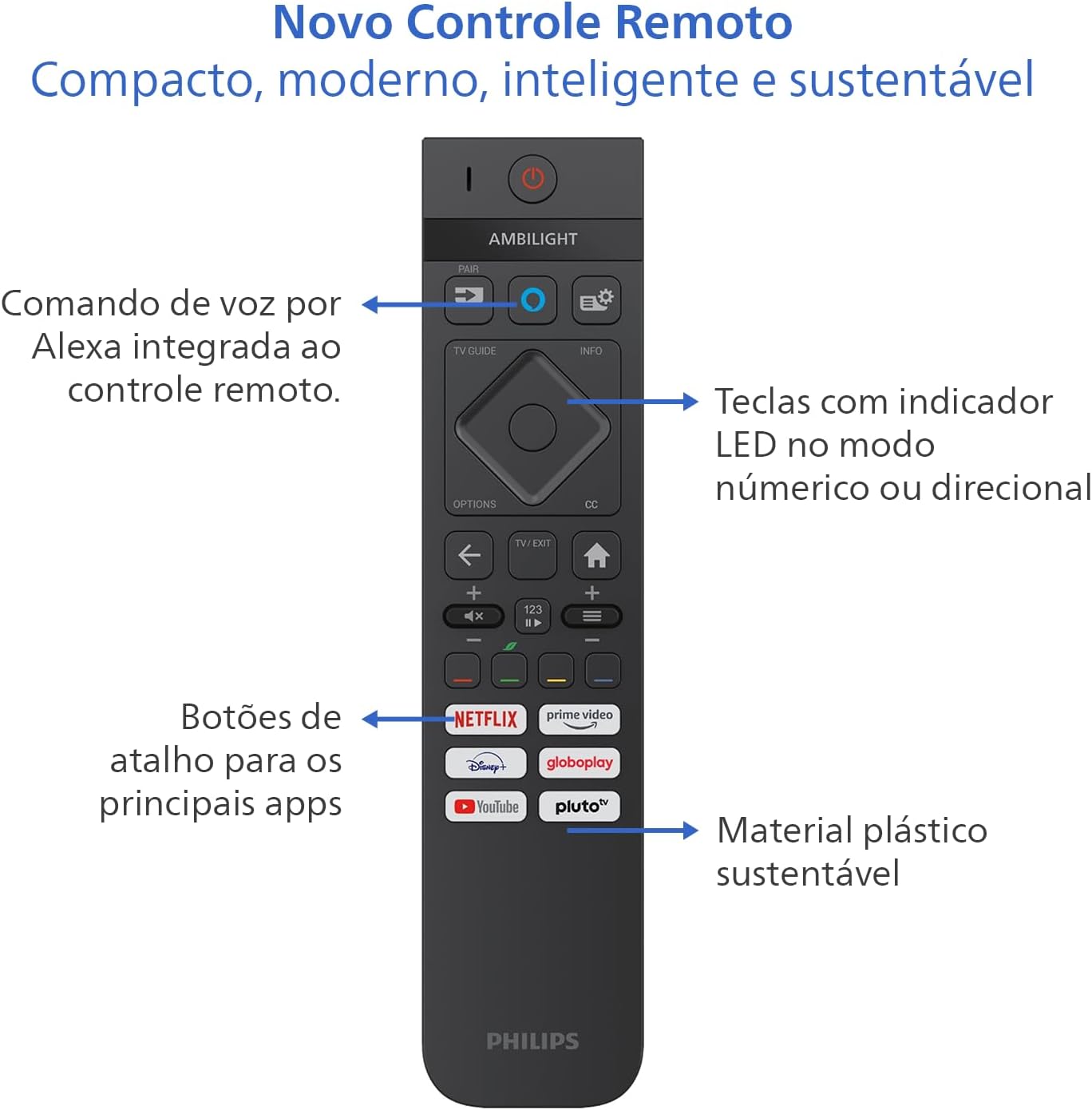
Image: Diagram showing the dimensions of the Philips 55 inch Smart TV with and without the stand, including VESA wall mount specifications (30cm).
3. ເຊື່ອມຕໍ່ອຸປະກອນເສີມ
Connect your devices to the TV's ports. Refer to the back and side views for port locations.
- ພະລັງງານ: Connect the power cable to the TV and a suitable electrical outlet (110V/220V compatible).
- HDMI: Use HDMI 2.1 ports for high-definition devices like gaming consoles, Blu-ray players, or set-top boxes. There are 4 HDMI ports available.
- USB: Connect USB drives for media playback or external devices. There are 2 USB ports.
- Antenna/RF: Connect your antenna cable for terrestrial TV reception.
- ອີເທີເນັດ (RJ-45): ສໍາລັບການເຊື່ອມຕໍ່ອິນເຕີເນັດແບບມີສາຍ.
- Audio L-R: ການປ້ອນຂໍ້ມູນສຽງອະນາລັອກ.
- SPDIF (ສຽງທາງແສງ): ສໍາລັບການສົ່ງສຽງດິຈິຕອນໄປຫາ soundbars ຫຼືລະບົບໂຮມເທຍເຕີ.
- ຫູຟັງ Output: ສໍາລັບການເຊື່ອມຕໍ່ຫູຟັງ.

ຮູບພາບ: Side profile of the Philips 55 inch Smart TV, highlighting the accessible USB ports and other side connections.

ຮູບພາບ: ດ້ານຫລັງ view of the Philips 55 inch Smart TV, displaying the full array of input and output ports for various connections.
4. ການເປີດເຄື່ອງເບື້ອງຕົ້ນ ແລະການຕັ້ງຄ່າເຄືອຂ່າຍ
After connecting the power cable, press the power button on the remote control. Follow the on-screen instructions to complete the initial setup, including language selection, country, and network connection (Wi-Fi or Ethernet). The TV supports Wi-Fi Dual Band and Bluetooth 5.2 for wireless connectivity.
ຄໍາແນະນໍາການດໍາເນີນງານ
1. ຟັງຊັນຄວບຄຸມໄລຍະໄກ
The included remote control is designed for intuitive navigation and features voice command with integrated Alexa. Insert the two AAA batteries into the remote control before use.

ຮູບພາບ: ລາຍລະອຽດ view of the Philips Smart TV remote control, highlighting the voice command button (Alexa), LED indicator keys, and dedicated shortcut buttons for popular streaming applications.
- ປຸ່ມເປີດປິດ: ເປີດ ຫຼືປິດໂທລະພາບ.
- Voice Command (Alexa): Press and hold to use voice commands for searching content, controlling smart home devices, and more.
- ແຜ່ນ ນຳ ທາງ: ໃຊ້ປຸ່ມທິດທາງເພື່ອນຳທາງໃນເມນູຕ່າງໆ ແລະເລືອກຕົວເລືອກ.
- ປຸ່ມລັດ: Direct access to popular streaming apps like Netflix, Prime Video, YouTube, and Pluto TV.
- ປະລິມານ/ຊ່ອງ: ປັບລະດັບສຽງ ແລະປ່ຽນຊ່ອງ.
- LED Indicator Keys: Keys with LED indicators for numeric or directional mode.
2. Smart TV Features (Titan OS)
Your TV runs on Titan OS, offering a user-friendly interface and quick access to various applications. The home screen is customizable, allowing you to prioritize your favorite apps and content.

Image: The Philips Smart TV's home screen, showing a selection of streaming applications and a personalized content layout.
- Personalized Home Screen: Access your favorite content and applications with recommendations tailored to your preferences.
- ການໂຕ້ຕອບທີ່ເຂົ້າໃຈງ່າຍ: Organize your home screen by prioritizing frequently used applications for easy daily access.
- ການຄົ້ນພົບເນື້ອຫາ: Easily find new content with agile navigation and smart search functions.
3. ເທັກໂນໂລຢີ Ambilight
Ambilight projects colors from the screen onto the surrounding wall, enhancing immersion. Your TV features three-sided Ambilight with 8 illumination modes.

Image: A Philips Ambilight TV displaying dynamic backlighting that extends the on-screen colors onto the wall, creating an immersive viewປະສົບການ.
- ທຳ ມະຊາດ: Softer colors and brightness for visual comfort.
- Vivid: Stronger, more vibrant Ambilight colors to create a sense of expanded imagery.
- ຫ້ອງນັ່ງຫຼິ້ນ: Can be active even when the TV is off, creating a cozy ambient atmosphere.
- ເກມ: Adapts lights to dark and dynamic scenes, enhancing gaming immersion.
- ດົນຕີ: Ambilight follows the rhythm of music, ideal for creating a festive home environment.
- AmbiWake Up: Simulates sunrise with soft Ambilight, gentle music, and weather forecast.
- Ambi-sleep: With the screen off, Ambilight emits an orange light and nature sounds to promote sleep.
- Aurora: Transforms the TV into a decorative piece, displaying continuous animations for a pleasant ambiance.

Image: Comparison of Ambilight's Natural mode (soft, comfortable lighting) and Vivid mode (strong, vibrant lighting for expanded imagery).

Image: Comparison of Ambilight's Lounge mode (ambient lighting when TV is off) and Game mode (dynamic lighting for gaming immersion).

Image: Comparison of Ambilight's Music mode (lights synchronize with music) and AmbiWake Up mode (simulates sunrise).

Image: Comparison of Ambilight's Ambi-sleep mode (orange light and nature sounds for sleep) and Aurora mode (decorative animations).
4. ຄຸນນະພາບຮູບພາບ ແລະ ສຽງ
The TV features a P5 processor, 4K resolution, Dolby Vision, and HDR10+ for exceptional image quality. The audio system includes 40W RMS, Dolby Atmos, and DTS Play-Fi for immersive sound.

Image: Explanation of the Philips P5 Perfect Picture Engine, illustrating how it optimizes colors, contrasts, and movements for realistic images.

Image: Visual comparison demonstrating the enhanced detail and richness of images with Dolby Vision and HDR compared to standard display.
- P5 Processor: Optimizes colors, contrasts, and movements in real-time for vivid and realistic images.
- Dolby Vision & HDR10+: Provides cinematic visual experience with impressive brightness, contrast, and color detail in 4K resolution.
- 40W RMS Audio: Powerful sound output that fills the environment with clarity and intensity.
- Dolby Atmos & DTS:X: Advanced audio technologies creating a three-dimensional sound effect for an immersive experience.
- Intellisound with AI: Automatic audio adjustment based on content, ensuring clear and balanced sound from subtle dialogues to intense soundtracks.
5. ຄຸນສົມບັດການຫຼິ້ນເກມ
Designed for gamers, this TV offers a fluid and responsive gaming experience.

Image: The Philips Smart TV's Game Bar interface, showing various settings for optimizing the gaming experience, including VRR, ALLM, and FreeSync Premium.
- 144Hz VRR: Variable Refresh Rate ensures ultra-fast, tear-free, and stutter-free motion.
- AMD FreeSync Premium: Provides stable, fluid, and lag-free gaming.
- ເກມແຖບ: Access gaming-specific settings quickly.
- ALLM (ໂໝດການຕອບສະໜອງຕໍ່າອັດຕະໂນມັດ): Automatically switches to low-latency mode for responsive gaming.
- Cloud Gaming: Compatible with cloud gaming services like Blacknut.
ບໍາລຸງຮັກສາ
1. ທໍາຄວາມສະອາດໂທລະພາບ
- ໜ້າຈໍ: ເຊັດໜ້າຈໍຢ່າງອ່ອນໂຍນດ້ວຍຜ້າອ່ອນໆ, ບໍ່ມີເຈັ້ຍ. ສໍາລັບຮອຍແຂງ, ເລັກນ້ອຍ dampໃສ່ຜ້າດ້ວຍນ້ໍາຫຼືເຄື່ອງເຮັດຄວາມສະອາດຫນ້າຈໍພິເສດ. ຢ່າສີດນໍ້າໂດຍກົງໃສ່ໜ້າຈໍ.
- ຕູ້: Use a soft, dry cloth to clean the TV cabinet. Avoid abrasive cleaners or solvents.
- ການຄວບຄຸມໄລຍະໄກ: ເຊັດດ້ວຍຜ້າອ່ອນໆ, ແຫ້ງ.
2. ການປັບປຸງຊອບແວ
Periodically check for software updates to ensure optimal performance and access to the latest features. You can usually find this option in the TV's settings menu under "System" or "About TV". Ensure your TV is connected to the internet for updates.
ການແກ້ໄຂບັນຫາ
ຖ້າທ່ານພົບບັນຫາກັບໂທລະພາບຂອງທ່ານ, ໃຫ້ອ້າງອີງເຖິງຂັ້ນຕອນການແກ້ໄຂບັນຫາທົ່ວໄປຕໍ່ໄປນີ້ກ່ອນທີ່ຈະຕິດຕໍ່ກັບຝ່າຍຊ່ວຍເຫຼືອ.
ບໍ່ມີພະລັງງານ
- Ensure the power cable is securely connected to both the TV and the electrical outlet.
- ກວດເບິ່ງວ່າປລັກສຽບໄຟເຮັດວຽກຫຼືບໍ່ໂດຍການສຽບອຸປະກອນອື່ນ.
- ລອງກົດປຸ່ມເປີດເຄື່ອງຢູ່ໂທລະທັດເອງ, ບໍ່ພຽງແຕ່ຣີໂມດເທົ່ານັ້ນ.
ບໍ່ມີຮູບພາບຫຼືຄຸນນະພາບຂອງຮູບພາບທີ່ບໍ່ດີ
- ກວດສອບວ່າແຫຼ່ງປ້ອນຂໍ້ມູນທີ່ຖືກຕ້ອງຖືກຄັດເລືອກ (ເຊັ່ນ: HDMI 1, TV).
- ກວດເບິ່ງການເຊື່ອມຕໍ່ສາຍທັງໝົດ (HDMI, ເສົາອາກາດ) ສໍາລັບການວ່າງ ຫຼືຄວາມເສຍຫາຍ.
- ປັບການຕັ້ງຄ່າຮູບພາບ (ຄວາມສະຫວ່າງ, ກົງກັນຂ້າມ, ສີ) ໃນເມນູໂທລະພາບ.
- If using an external device, try connecting it to a different HDMI port or another TV to rule out device issues.
ບໍ່ມີສຽງ ຫຼືຄຸນນະພາບສຽງບໍ່ດີ
- ກວດໃຫ້ແນ່ໃຈວ່າບໍ່ໄດ້ປິດສຽງ ແລະເປີດຂຶ້ນ.
- Check audio settings in the TV menu, ensuring the correct audio output is selected (e.g., TV speakers, external audio system).
- If using external speakers or a soundbar, check their power and connections.
ການຄວບຄຸມໄລຍະໄກບໍ່ເຮັດວຽກ
- ປ່ຽນແບັດເຕີລີ AAA ໃໝ່.
- ກວດໃຫ້ແນ່ໃຈວ່າບໍ່ມີສິ່ງກີດຂວາງລະຫວ່າງຣີໂໝດ ແລະເຊັນເຊີ IR ຂອງໂທລະທັດ.
- If the remote uses Bluetooth, try re-pairing it with the TV (refer to the TV's settings for pairing instructions).
ບັນຫາການເຊື່ອມຕໍ່ເຄືອຂ່າຍ/ອິນເຕີເນັດ
- ກວດສອບເຣົາເຕີ ແລະ ໂມເດັມຂອງທ່ານເພື່ອຮັບປະກັນວ່າພວກມັນເປີດຢູ່ ແລະ ເຮັດວຽກຢ່າງຖືກຕ້ອງ.
- ຣີສະຕາດເຣົາເຕີ ແລະໂມເດັມຂອງທ່ານ.
- If using Wi-Fi, ensure the TV is within range of your router. Try connecting via Ethernet cable if possible.
- Verify Wi-Fi password if prompted.
ຂໍ້ມູນຈໍາເພາະ
| ຄຸນສົມບັດ | ລາຍລະອຽດ |
|---|---|
| ຍີ່ຫໍ້ | ຟີລິບ |
| ຕົວແບບ | 55PUG8929/78 |
| ຂະໜາດໜ້າຈໍ | 55 ນິ້ວ |
| ເຕັກໂນໂລຊີການສະແດງ | 4K UHD, LED, IPS |
| ຄວາມລະອຽດ | 3840 x 2160 ພິກເຊລ (4K) |
| ອັດຕາການໂຫຼດຂໍ້ມູນຄືນໃໝ່ | 144 Hz |
| ເວລາຕອບສະຫນອງ | 8 ມິນລິວິນາທີ |
| Viewໃນມຸມ | 178 ອົງສາ |
| ອັດຕາສ່ວນ | 16:9 |
| ອັດຕາສ່ວນກົງກັນຂ້າມ | 1:200,000 |
| ລະບົບປະຕິບັດການ | Titan OS |
| ຄວາມອາດສາມາດເກັບຮັກສາຫນ່ວຍຄວາມຈໍາ | 8 GB |
| ຄຸນນະສົມບັດພິເສດ | Dolby Atmos / DTS-X, HDR10+/HLG/HDR10, Titan OS, Ambilight |
| ພະລັງງານສຽງອອກ | 40 ວັດ (RMS) |
| ຊ່ອງສຽງອ້ອມຮອບ | 2.0 |
| ເຕັກໂນໂລຊີການເຊື່ອມຕໍ່ | HDMI, USB, Wi-Fi, Bluetooth |
| ພອດ HDMI | 4 (ເຂົ້າກັນໄດ້ກັບ HDMI 2.1) |
| ພອດ USB | 2 |
| ການເຊື່ອມຕໍ່ອື່ນໆ | 1 Audio L-R, 1 RF (Antenna), 1 SPDIF (Optical Audio), 1 Headphone Output, 1 Ethernet RJ-45 |
| ການເຊື່ອມຕໍ່ໄຮ້ສາຍ | Bluetooth 5.2, Wi-Fi Dual Band |
| ສະບັບtage | 110 ໂວນ, 220 ໂວນ |
| ປ້າຍກຳກັບປະສິດທິພາບພະລັງງານ | ກ (ENCE) |
| ຂະຫນາດຜະລິດຕະພັນ (ໂດຍບໍ່ມີການຢືນ) | 123 x 8.1 x 72 ຊົມ (ກວ້າງ x ລ x ລ) |
| ນ້ຳໜັກຜະລິດຕະພັນ (ບໍ່ລວມຂາຕັ້ງ) | 14.2 ກິໂລ |
| ນ້ຳໜັກສິນຄ້າ (ພ້ອມຂາຕັ້ງ) | 14.6 ກິໂລ |
| ສີ | ດຳ |
| ການຢັ້ງຢືນ | INMETRO |
| ປີ | 2025 |
ຂໍ້ມູນການຮັບປະກັນ
Your Philips Smart TV model 55PUG8929/78 comes with a ການຮັບປະກັນຂອງຜູ້ຜະລິດ 1 ປີ. This warranty covers defects in materials and workmanship under normal use. Please retain your proof of purchase for warranty claims. For detailed terms and conditions, refer to the legal and safety leaflet included in your package.
ການຊ່ວຍເຫຼືອລູກຄ້າ
For further assistance, technical support, or warranty claims, please contact Philips customer service. You can find contact information on the Philips official webເວັບໄຊ ຫຼືໃນເອກະສານທີ່ສະໜອງໃຫ້ໂທລະພາບຂອງເຈົ້າ.
Philips ຢ່າງເປັນທາງການ Webເວັບໄຊ: www.philips.com