1. ບົດແນະນຳ
This manual provides essential instructions for the safe and efficient operation of your Minuteman EN450G 450VA Standby Uninterruptible Power Supply (UPS). The EN450G is designed to provide reliable backup power and surge protection for various electronic devices, including gaming consoles, desktop PCs, home office equipment, and network devices. Please read this manual thoroughly before installation and use, and retain it for future reference.
2. ຄໍາແນະນໍາຄວາມປອດໄພທີ່ສໍາຄັນ
WARNING: To reduce the risk of electric shock, fire, or injury to persons, read all instructions before using this product.
- UPS ນີ້ມີສານລະລາຍອັນຕະລາຍtages. Do not attempt to disassemble the unit. Servicing should be performed by qualified service personnel only.
- ຢ່າເຊື່ອມຕໍ່ສິ່ງຂອງທີ່ບໍ່ກ່ຽວຂ້ອງກັບຄອມພິວເຕີເຊັ່ນ: ອຸປະກອນການແພດ, ອຸປະກອນຊ່ວຍຊີວິດ, ເຕົາໄມໂຄເວຟ, ຫຼືເຄື່ອງດູດຝຸ່ນກັບ UPS.
- ຫ້າມປິດຊ່ອງລະບາຍອາກາດ. ຮັບປະກັນການໄຫຼວຽນຂອງອາກາດທີ່ພຽງພໍຢູ່ອ້ອມໜ່ວຍ.
- Do not install the UPS in direct sunlight, near heat sources, or in areas with excessive dust, moisture, or flammable liquids.
- Connect the UPS to a properly grounded AC power outlet.
- The battery is hot-swappable. Exercise caution when replacing the battery. Refer to the Maintenance section for instructions.
- In case of emergency, press the power button to turn off the UPS and disconnect the power cord from the AC power outlet.
3. ຜະລິດຕະພັນເກີນview
The Minuteman EN450G UPS provides comprehensive power protection. Familiarize yourself with its components:
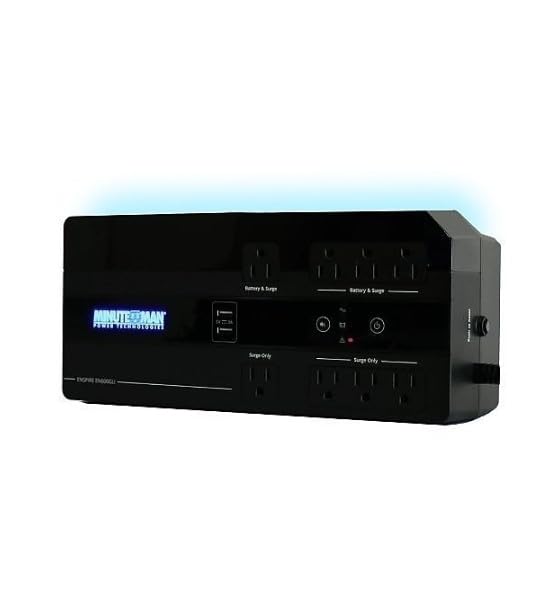
ຮູບທີ 1: Minuteman EN450G UPS Unit. This image displays the Minuteman EN450G UPS unit. The front panel features the 'Minuteman Power Technologies' logo, two USB charging ports, and control buttons. The top surface shows four 'Battery & Surge' protected outlets and four 'Surge Only' outlets, clearly labeled. The unit is black and designed for compact placement.
3.1 ຄຸນສົມບັດແຜງໜ້າ
- ປຸ່ມເປີດປິດ: Turns the UPS on or off.
- ພອດສາກ USB: Two ports for charging mobile devices.
- ຕົວຊີ້ບອກສະຖານະ: LEDs indicating power status, battery status, and fault conditions.
3.2 ຄຸນນະສົມບັດຂອງແຜງດ້ານຫລັງ
- Battery & Surge Outlets (x4): Provide battery backup power and surge protection for critical devices.
- Surge Only Outlets (x4): Provide surge protection only for non-critical devices.
- AC Input: ເຊື່ອມຕໍ່ UPS ກັບປລັກໄຟທີ່ຕິດຝາ.
- Breaker ວົງຈອນ: Resettable overload protection.
4. ການຕິດຕັ້ງແລະການຕິດຕັ້ງ
4.1 ການຫຸ້ມຫໍ່
ຄ່ອຍໆແກະກ່ອງ UPS ອອກ ແລະ ກວດສອບຄວາມເສຍຫາຍຈາກການຂົນສົ່ງ. ຖ້າພົບຄວາມເສຍຫາຍ, ຢ່າໃຊ້ງານເຄື່ອງ ແລະ ຕິດຕໍ່ຕົວແທນຈຳໜ່າຍຂອງທ່ານ.
4.2 ການຈັດວາງ
The EN450G is designed for versatile placement:
- ຄອມພິວເຕີ້: ວາງຫນ່ວຍງານຢູ່ເທິງພື້ນທີ່ຮາບພຽງທີ່ຫມັ້ນຄົງ.
- ຊັ້ນ: Position on the floor, ensuring ventilation is not obstructed.
- ຕົວຍຶດຕິດWallາ: The unit can be mounted on a wall using appropriate hardware (not included). Ensure the mounting surface can support the weight of the UPS.
Ensure the installation area is clean, dry, and has adequate ventilation. Avoid placing the UPS near heat-emitting appliances or in direct sunlight.
4.3 ການເຊື່ອມຕໍ່ກັບພະລັງງານ
- ໃຫ້ແນ່ໃຈວ່າ UPS ປິດ.
- Plug the UPS power cord into a grounded 120V AC wall outlet.
- Allow the UPS to charge for at least 8 hours before initial use to ensure optimal battery runtime.
4.4 ອຸປະກອນເຊື່ອມຕໍ່
- Battery & Surge Protected Outlets: Connect critical devices such as your computer, monitor, router, or other essential electronics that require continuous power during outages.
- ຈຳ ໜ່າຍ ສະເພາະຕົວແທນ ຈຳ ໜ່າຍ: Connect non-critical devices like printers, scanners, or desk lamps that only require surge protection.
CAUTION: Do not connect laser printers or shredders to the battery backup outlets, as their high power draw can overload the UPS.
5. ການດໍາເນີນງານ
5.1 ການເປີດ/ປິດ UPS
- ເພື່ອເປີດ: Press and hold the power button for approximately 2 seconds until you hear a beep and the power indicator illuminates.
- ປິດ: Press and hold the power button for approximately 2 seconds until you hear a beep and the power indicator turns off.
5.2 ຕົວຊີ້ວັດສະຖານະ
The front panel LEDs provide information about the UPS status:
- LED ສີຂຽວ (ແຂງ): UPS is operating normally, providing AC power.
- Green LED (Flashing) & Audible Alarm: UPS is operating on battery power during an outage.
- Red LED (Solid) & Audible Alarm: Battery low or fault condition. Refer to Troubleshooting.
5.3 Battery Runtime
The EN450G provides approximately 3 minutes of runtime at full load (450VA/255W) and 11 minutes at half load. Actual runtime may vary based on connected equipment and battery age.
6. ບໍາລຸງຮັກສາ
6.1 ການທົດແທນຫມໍ້ໄຟ
The EN450G features a hot-swappable Sealed Lead Acid (SLA) battery, allowing replacement without interrupting power to connected devices. Batteries typically last 3-5 years depending on usage and environmental conditions. A flashing red LED or continuous alarm may indicate a need for battery replacement.
- Ensure the UPS is connected to AC power and operating normally.
- Locate the battery access panel (refer to product diagram if available).
- Carefully slide out the old battery pack.
- Insert the new, fully charged replacement battery pack, ensuring correct orientation.
- Secure the battery access panel.
- Allow the new battery to charge for 8-12 hours to reach full capacity.
WARNING: Use only approved replacement batteries. Improper battery replacement can result in fire or explosion. Dispose of old batteries properly at a recycling facility.
6.2 ການທໍາຄວາມສະອາດ
Periodically clean the exterior of the UPS with a soft, dry cloth. Do not use liquid or aerosol cleaners. Ensure ventilation openings remain clear of dust and debris.
7. ການແກ້ໄຂບັນຫາ
This section addresses common issues you may encounter with the EN450G UPS. If a problem persists after attempting the solutions below, contact technical support.
| ບັນຫາ | ສາເຫດທີ່ເປັນໄປໄດ້ | ການແກ້ໄຂ |
|---|---|---|
| UPS ບໍ່ເປີດ. | ແບັດເຕີຣີບໍ່ໄດ້ເຊື່ອມຕໍ່ ຫຼື ສາກອອກ. ສາຍໄຟບໍ່ໄດ້ເຊື່ອມຕໍ່. | Ensure battery is properly connected and charged. Verify power cord is securely plugged into wall outlet and UPS. |
| UPS beeps continuously or red LED is solid. | Battery low or fault condition. Overload on battery outlets. | Allow battery to charge. If problem persists, battery may need replacement. Disconnect non-essential devices from battery outlets. Check circuit breaker. |
| UPS operates on battery frequently. | Unstable incoming AC power. UPS sensitivity setting (if applicable, though not specified for this model). | Check the quality of your incoming AC power. Consider connecting to a different outlet. |
| No power from surge-only outlets. | ເຄື່ອງຕັດວົງຈອນປິດ. | Press the circuit breaker reset button on the rear panel. Reduce load if necessary. |
8. ຂໍ້ມູນຈໍາເພາະ
| ຄຸນສົມບັດ | ລາຍລະອຽດ |
|---|---|
| ຕົວແບບ | EN450G |
| ຄວາມອາດສາມາດ | 450VA / 255W |
| Input/Output Voltage | 120V AC |
| Output Waveform | ຄື້ນ Sine ຈຳ ລອງ |
| ຮ້ານຄ້າ | 4 x Battery & Surge Protected, 4 x Surge Only |
| ປະເພດຫມໍ້ໄຟ | Sealed Lead Acid (SLA), Hot-Swappable |
| Typical Runtime (Full Load) | ເຖິງ 3 ນາທີ |
| Typical Runtime (Half Load) | ເຖິງ 11 ນາທີ |
| ຂະ ໜາດ (D x W x H) | 12.8 x 5.7 x 4.1 ນິ້ວ (32.5 x 14.5 x 10.4 cm) |
| ນ້ຳໜັກ | 4.4 ປອນ (2 ກິໂລ) |
| ຕົວເລືອກການຕິດຕັ້ງ | Desktop, Floor, Wall Mount |
9. ຂໍ້ມູນການຮັບປະກັນ
Please refer to the warranty card included with your product or visit the manufacturer's webເວັບໄຊສໍາລັບເງື່ອນໄຂການຮັບປະກັນລາຍລະອຽດ. ຮັກສາຫຼັກຖານການຊື້ຂອງທ່ານສໍາລັບການຮ້ອງຂໍການຮັບປະກັນ.
10. ສະຫນັບສະຫນູນດ້ານວິຊາການ
If you require technical assistance or have questions regarding your Minuteman EN450G UPS, please contact your dealer or the manufacturer's customer support. Have your model number (EN450G) and serial number ready when contacting support.
For more information, you may visit the official Minuteman webເວັບໄຊ.


