1. ບົດແນະນຳ
The Havit H2002BG Wireless Gaming Headphones are designed to provide a versatile audio experience for gaming and entertainment. Featuring tri-mode connectivity, these headphones offer seamless switching between 2.4GHz wireless, Bluetooth, and wired connections (3.5mm and Type-C). Enjoy immersive sound with 53mm dynamic drivers and virtual 7.1 surround sound support, all while benefiting from a comfortable design with an adjustable head beam and memory foam earcups. The detachable omnidirectional microphone ensures clear communication.
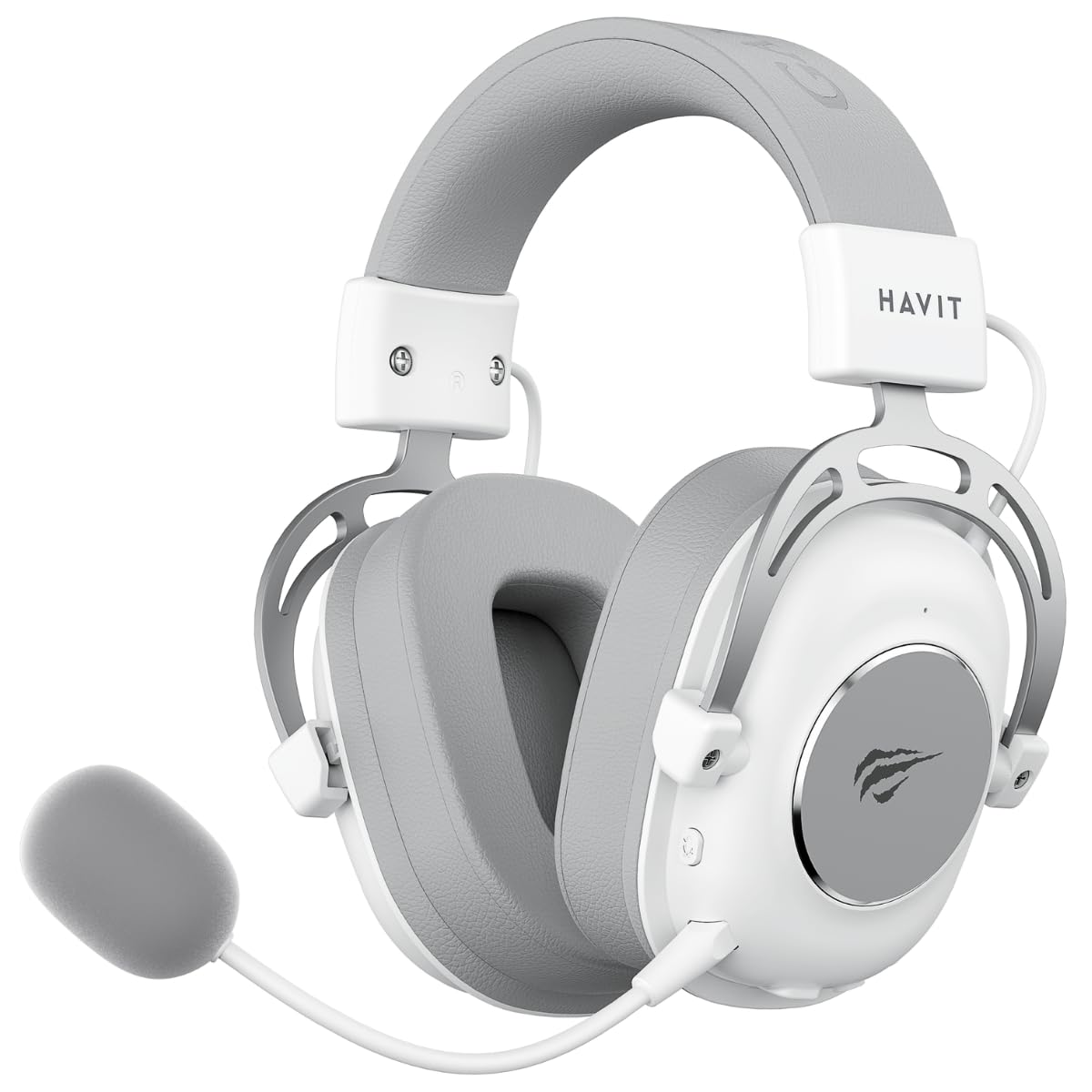
Figure 1: Havit H2002BG Wireless Gaming Headphones
2. ຄຸນລັກສະນະຂອງຜະລິດຕະພັນ
- ການເຊື່ອມຕໍ່ສາມໂຫມດ: Supports 2.4GHz wireless, Bluetooth, 3.5mm audio jack, and Type-C wired connections for broad compatibility.
- 53mm Dynamic Drivers: Delivers powerful and clear audio for an immersive experience.
- ສຽງຮອບທິດທາງ 7.1 ແບບເສມືນ: Enhances spatial audio awareness for gaming.
- ການອອກແບບທີ່ສະດວກສະບາຍ: Features an adjustable head beam and memory foam earcups for extended wear comfort.
- Detachable Omnidirectional Microphone: Provides clear voice communication and can be removed when not needed.
- ຊີວິດຫມໍ້ໄຟຍາວ: Up to 26 hours of playtime on a single charge with a 1200mAh battery.

Figure 2: Tri-Mode Connection Capabilities

Figure 3: Virtual 7.1 Surround Sound Feature
3. ເນື້ອໃນຊຸດ
ກະລຸນາກວດເບິ່ງຊຸດສຳລັບລາຍການຕໍ່ໄປນີ້:
- 1 x Havit H2002BG Wireless Gaming Headphones
- 1 x Detachable Omnidirectional Microphone
- 1 x 2.4GHz USB Dongle
- ສາຍສຽງ 1 x 3.5 ມມ
- 1 x ສາຍສາກ Type-C
- 1 x ຄູ່ມືຜູ້ໃຊ້ (ເອກະສານນີ້)
4. ຕັ້ງຄ່າ
4.1 ການສາກໄຟເບື້ອງຕົ້ນ
- ເຊື່ອມຕໍ່ສາຍສາກໄຟ Type-C ເຂົ້າກັບພອດສາກໄຟໃນຫູຟັງ.
- Plug the other end of the Type-C cable into a USB power source (e.g., computer USB port, USB wall adapter).
- Allow the headphones to fully charge before first use. The LED indicator will show charging status.
4.2 Microphone Attachment
- Locate the microphone port on the left earcup of the headphones.
- Insert the detachable microphone firmly into the port until it clicks into place.
4.3 ການເຊື່ອມຕໍ່ຫູຟັງ
The Havit H2002BG offers multiple connection options:

ຮູບທີ 4: ການຄວບຄຸມຫູຟັງ ແລະພອດ
4.3.1 2.4GHz Wireless Connection (PC/Console with USB-A)
- Plug the 2.4GHz USB dongle into an available USB-A port on your PC or compatible gaming console.
- Power on the headphones by pressing and holding the power button.
- The headphones should automatically connect to the dongle. The LED indicator will confirm connection.
- On your device, ensure the Havit H2002BG is selected as the audio output and input device.
4.3.2 Bluetooth Connection (Mobile Devices/PC with Bluetooth)
- Power on the headphones and switch to Bluetooth mode (refer to Operating Instructions for mode switching). The LED indicator will flash, indicating pairing mode.
- On your mobile device or PC, enable Bluetooth and search for new devices.
- Select "Havit H2002BG" from the list of available devices to pair.
- ເມື່ອຈັບຄູ່ແລ້ວ, ຕົວຊີ້ວັດ LED ຈະສະແດງແສງສະຫມໍ່າສະເຫມີ.
4.3.3 ການເຊື່ອມຕໍ່ແບບມີສາຍ (ຊ່ອງສຽບສຽງ 3.5 ມມ)
- Connect one end of the 3.5mm audio cable to the 3.5mm port on the headphones.
- Plug the other end of the 3.5mm audio cable into the audio output jack of your device (e.g., gaming console controller, PC, smartphone).
- The headphones will operate in passive wired mode.
4.3.4 Wired Connection (Type-C Cable)
- Connect the Type-C cable to the Type-C port on the headphones.
- Plug the other end of the Type-C cable into a compatible Type-C port on your device. This connection can provide both audio and charging simultaneously.
5. ຄໍາແນະນໍາການດໍາເນີນງານ
5.1 ເປີດ/ປິດ
- ເປີດ: ກົດປຸ່ມເປີດປິດຄ້າງໄວ້ປະມານ 3 ວິນາທີຈົນກວ່າໄຟ LED ຈະສະຫວ່າງຂຶ້ນ.
- ປິດພະລັງງານ: ກົດປຸ່ມເປີດປິດຄ້າງໄວ້ປະມານ 3 ວິນາທີຈົນກ່ວາຕົວຊີ້ວັດ LED ປິດ.
5.2 ການຄວບຄຸມປະລິມານ
- Use the volume wheel or dedicated volume buttons on the earcup to adjust the audio output level.
5.3 ໄມໂຄຣໂຟນ ປິດ/ເປີດສຽງ
- Press the microphone mute button to toggle the microphone on or off. An indicator light on the microphone or headphones may show its status.
5.4 ການປ່ຽນໂໝດ
- Use the mode button to cycle between 2.4GHz wireless, Bluetooth, and wired (3.5mm/Type-C) connection modes. The LED indicator will change to reflect the active mode.
5.5 ສຽງຮອບທິດທາງ 7.1 ແບບເສມືນ
- Activate or deactivate the virtual 7.1 surround sound feature using the dedicated button on the headphones or through compatible software on your PC.
5.6 ການຄວບຄຸມແສງ RGB
- If applicable, use the designated button to cycle through different RGB lighting effects or turn them off.
6. ບໍາລຸງຮັກສາ
6.1 ການທໍາຄວາມສະອາດ
- ເຊັດຫູຟັງດ້ວຍຜ້າອ່ອນໆ, ແຫ້ງ, ບໍ່ມີເສັ້ນດ່າງ.
- ຢ່າໃຊ້ສານເຄມີທີ່ຮຸນແຮງ, ສານລະລາຍທໍາຄວາມສະອາດ, ຫຼືຢາຊັກຟອກທີ່ເຂັ້ມແຂງ.
- ຫຼີກເວັ້ນການໄດ້ຮັບຄວາມຊຸ່ມຊື່ນເຂົ້າໄປໃນຊ່ອງເປີດໃດໆ.
6.2 ການເກັບຮັກສາ
- ເກັບຮັກສາຫູຟັງໄວ້ໃນບ່ອນທີ່ເຢັນ, ແຫ້ງ, ຫ່າງຈາກແສງແດດໂດຍກົງ ແລະອຸນຫະພູມທີ່ຮ້າຍກາດ.
- If storing for an extended period, ensure the battery is partially charged (around 50%) to maintain battery health.
6.3 ການດູແລຫມໍ້ໄຟ
- ຫຼີກລ້ຽງການປະຈຸຫມໍ້ໄຟຢ່າງເຕັມທີ່ເລື້ອຍໆ.
- Charge the headphones regularly, even if not in frequent use, to prevent deep discharge.
7. ການແກ້ໄຂບັນຫາ
7.1 ບໍ່ມີສຽງ
- ໃຫ້ແນ່ໃຈວ່າຫູຟັງເປີດຢູ່ ແລະ ສາກໄຟແລ້ວ.
- Check the volume levels on both the headphones and the connected device.
- Verify that the headphones are correctly connected (2.4GHz dongle, Bluetooth paired, or wired cable securely inserted).
- Confirm that the Havit H2002BG is selected as the primary audio output device in your PC or console settings.
7.2 ໄມໂຄຣໂຟນບໍ່ເຮັດວຽກ
- Ensure the detachable microphone is securely attached to the headphones.
- Check if the microphone mute function is active.
- Verify microphone input settings on your connected device and ensure Havit H2002BG is selected.
- Test the microphone in different applications or communication software.
7.3 ບັນຫາການເຊື່ອມຕໍ່
- 2.4GHz: Ensure the USB dongle is fully inserted and there are no significant obstructions or interference sources nearby. Try re-pairing by restarting both headphones and the device.
- Bluetooth: Ensure the headphones are in Bluetooth pairing mode and within the effective range (typically 10 meters). Try unpairing and re-pairing the device.
- Wired: Ensure all cables (3.5mm or Type-C) are fully inserted into their respective ports and are not damaged.
7.4 ບັນຫາການສາກໄຟ
- Ensure the Type-C charging cable is properly connected to both the headphones and the power source.
- Try using a different Type-C charging cable or a different USB power adapter/port.
- Check if the charging port on the headphones is clean and free of debris.
8. ຂໍ້ມູນຈໍາເພາະ
| ຄຸນສົມບັດ | ຂໍ້ມູນຈໍາເພາະ |
|---|---|
| ຕົວແບບ | H2002BG |
| ເສັ້ນຜ່າສູນກາງຄົນຂັບ | 53ມມ |
| impedance | 64 ± 15% Ω |
| ຄວາມອ່ອນໄຫວ | 111 ± 3dB |
| ການຕອບສະໜອງຄວາມຖີ່ | 20Hz - 20kHz |
| ຄວາມອາດສາມາດຫມໍ້ໄຟ | 1200mAh |
| ເວລາຫຼິ້ນ | ສູງສຸດ 26 ຊົ່ວໂມງ |
| ການເຊື່ອມຕໍ່ | 2.4GHz Wireless, Bluetooth, 3.5mm, Type-C |
| ໄມໂຄຣໂຟນ | Omnidirectional, Detachable |
| ປັດໄຈແບບຟອມ | ເກີນຫູ |
| ວັດສະດຸ | ໂລຫະ, ພາດສະຕິກ |
| ສີ | ສີຂາວ/ສີເທົາ |
9. ການຮັບປະກັນແລະການສະຫນັບສະຫນູນ
9.1 ຂໍ້ມູນການຮັບປະກັນ
The Havit H2002BG Wireless Gaming Headphones are covered by a ການຮັບປະກັນ 1 ປີຈໍາກັດ from the date of purchase. This warranty covers manufacturing defects and workmanship under normal use. It does not cover damage caused by misuse, accidents, unauthorized modifications, or normal wear and tear. Please retain your proof of purchase (receipt or invoice) for any warranty claims.
9.2 ສະຫນັບສະຫນູນລູກຄ້າ
For further assistance, technical support, or warranty inquiries, please contact Havit customer service or visit the official Havit website. You may find FAQs, additional troubleshooting guides, and contact information there.
ທາງການ Havit Webເວັບໄຊ: www.havit.com


