1. ບົດແນະນຳ
Welcome to the user manual for your new Forever iGo Watch 4 JW-600 Smartwatch. This guide provides essential information on how to set up, operate, and maintain your device, ensuring you get the most out of its features. The iGo Watch 4 combines modern design with advanced functionalities, including an AMOLED touch screen, comprehensive health monitoring, and over 100 sport modes.
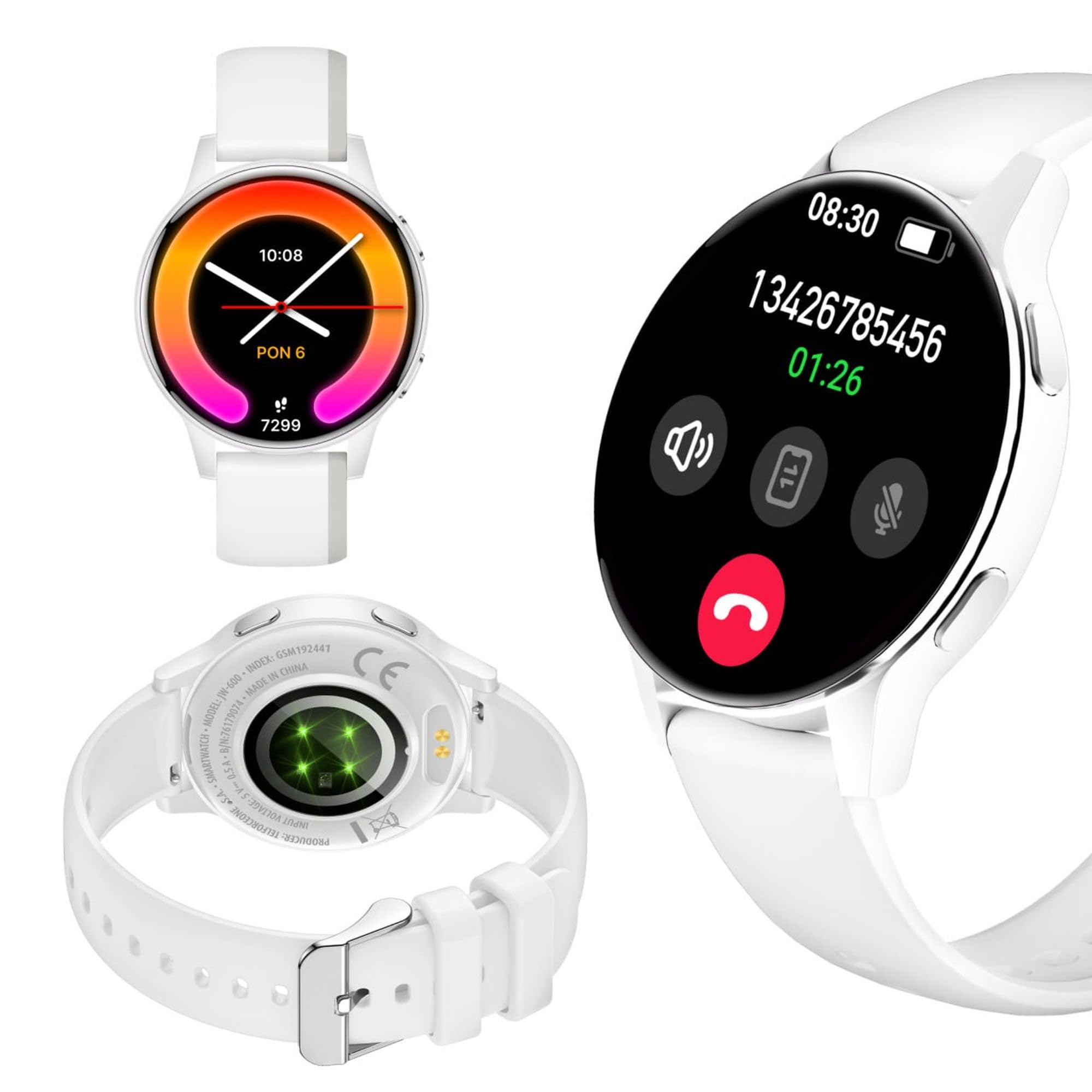
Image: Silhouette of a person wearing the Forever iGo Watch 4 smartwatch, highlighting its sleek design.

Image: Three Forever iGo Watch 4 smartwatches in black, white, and pink, illustrating the available color versions.
2. ເນື້ອໃນຊຸດ
Upon opening your Forever iGo Watch 4 package, please ensure all items are present and in good condition. Your package should contain:
- Forever iGo Watch 4 Smartwatch
- ສາຍສາກໄຟແມ່ເຫລັກ
- Two interchangeable straps (e.g., one pre-installed, one additional)
- ຄູ່ມືຜູ້ໃຊ້ (ເອກະສານນີ້)

Image: Packaging for the white Forever iGo Watch 4, indicating included items and features.

Image: Two Forever iGo Watch 4 smartwatches, one white and one black with an orange accent, highlighting the two included straps.
3. ຕັ້ງຄ່າ
3.1. ການສາກ Smartwatch
Before first use, fully charge your smartwatch. Connect the magnetic charging cable to the charging points on the back of the watch and plug the USB end into a power adapter (not included) or a computer's USB port. A full charge takes approximately 2 hours and provides up to 7 days of typical use.

Image: Illustration of the smartwatch's durable battery, capable of up to 7 days of typical usage.
3.2. ເປີດ / ປິດພະລັງງານ
- ເພື່ອເປີດເຄື່ອງ: ກົດປຸ່ມຂ້າງຄ້າງໄວ້ຈົນກວ່າໜ້າຈໍຈະສະຫວ່າງຂຶ້ນ.
- ປິດເຄື່ອງ: Navigate to the settings menu on the watch, select 'Power Off', and confirm. Alternatively, press and hold the side button and select 'Power Off' when prompted.
3.3. ການຕິດຕັ້ງແອັບ ແລະ ການຈັບຄູ່
To unlock the full potential of your iGo Watch 4, download the dedicated companion app on your smartphone (compatible with Android and iOS). ຊອກຫາ the app name (usually 'Forever Smart' or similar, check packaging for exact name) in your phone's app store.
- ດາວນ໌ໂຫລດແລະຕິດຕັ້ງ app ໃນໂທລະສັບສະຫຼາດຂອງທ່ານ.
- ເປີດໃຊ້ Bluetooth ໃນໂທລະສັບສະຫຼາດຂອງທ່ານ.
- ເປີດ app ແລະປະຕິບັດຕາມຄໍາແນະນໍາໃນຫນ້າຈໍເພື່ອສ້າງບັນຊີຫຼືເຂົ້າສູ່ລະບົບ.
- In the app, select 'Add Device' or 'Pair Device' and choose 'iGo Watch 4' from the list of available devices.
- ຢືນຢັນຄຳຮ້ອງຂໍການຈັບຄູ່ໃນສະມາດໂຟນ ແລະ smartwatch ຂອງທ່ານ.
4. ການໃຊ້ງານ Smartwatch
4.1. ການນຳທາງ ແລະ ການສະແດງຜົນ
The iGo Watch 4 features a responsive 1.28-inch AMOLED touch screen with a resolution of 416x416 pixels, providing clear visuals even in bright sunlight. Navigate through menus and functions by swiping across the screen and tapping icons.
- ປັດຂຶ້ນ/ລົງ: ເລື່ອນຜ່ານເມນູຫຼືການແຈ້ງເຕືອນ.
- ປັດຊ້າຍ/ຂວາ: ເຂົ້າເຖິງຟັງຊັນໄວ ຫຼື widget ທີ່ແຕກຕ່າງກັນ.
- ແຕະ: ເລືອກລາຍການ ຫຼືເປີດແອັບພລິເຄຊັນ.
- ປຸ່ມຂ້າງ: ກົດເພື່ອກັບຄືນຫາໜ້າຈໍຫຼັກ ຫຼືປຸກອຸປະກອນ.

ຮູບພາບ: A close-up view of the smartwatch display, showing its vibrant AMOLED screen and clear resolution.

Image: Visual representation of the AMOLED screen's size (1.28 inches) and resolution (416x416 pixels).
4.2. ໜ້າໂມງທີ່ສາມາດປັບແຕ່ງໄດ້
Personalize your smartwatch by choosing from a variety of free watch faces available through the companion app. You can switch between classic and futuristic designs to match your mood or style.

Image: A selection of customizable watch faces available for the iGo Watch 4.

Image: Different watch face options, illustrating the ability to change your watch's appearance daily.
4.3. Notifications and Bluetooth Calls
Once paired with your smartphone, the iGo Watch 4 allows you to receive notifications for calls, SMS messages, and various applications directly on your wrist. You can also make and receive Bluetooth calls without needing to take out your phone.
- ສາຍໂທເຂົ້າ: The watch will vibrate and display the caller ID. You can answer or reject calls directly from the watch.
- ຂໍ້ຄວາມ: Read SMS and app notifications (e.g., WhatsApp, Messenger) on the watch screen.

Image: A person interacting with the smartwatch, with icons representing phone calls and messages, demonstrating Bluetooth connectivity.

Image: Visual representation of the smartwatch's Bluetooth call and notification capabilities.
4.4. ການຕິດຕາມສຸຂະພາບ
The iGo Watch 4 is equipped with various sensors to help you monitor your health and well-being. Access these features through the watch's menu or the companion app.
- ການວັດແທກອັດຕາການເຕັ້ນຫົວໃຈ: ຕິດຕາມອັດຕາການເຕັ້ນຂອງຫົວໃຈຂອງທ່ານຕະຫຼອດມື້.
- ການຕິດຕາມການນອນ: Track your sleep patterns, including different sleep phases, to help improve your sleep quality.
- ການວັດແທກຄວາມກົດດັນ: Check your stress levels and receive suggestions for breathing exercises to help manage tension.
- ຄວາມອີ່ມຕົວຂອງອົກຊີໃນເລືອດ (SpO2): ວັດແທກລະດັບອົກຊີເຈນໃນເລືອດຂອງທ່ານ.
- ການວັດແທກຄວາມດັນເລືອດ: Monitor your blood pressure (note: this feature is for reference only and not a medical device).
- ສຸຂະພາບຂອງແມ່ຍິງ: Track menstrual cycles and related data.
- ການແຈ້ງເຕືອນການດື່ມນ້ຳ: Set reminders to drink water throughout the day.

Image: A smartphone displaying the health monitoring app, surrounded by icons for various health metrics like heart rate, blood pressure, and sleep.

Image: Illustration of the sleep monitoring feature, showing sleep duration and phases.

Image: The stress measurement feature, showing how the watch helps monitor stress levels and suggests breathing exercises.
4.5. ໂໝດກິລາ
With over 100 sport modes, the iGo Watch 4 is designed to track a wide range of physical activities, from running to tennis. The watch accurately counts your steps, distance, and burned calories, providing detailed insights into your workouts through the companion app.

Image: The smartwatch displaying activity data, including calories, steps, and distance, during a workout.

Image: Illustration of the smartwatch's capability to track over 100 sport modes, counting steps and calories.
4.6. ຟັງຊັນອັດສະລິຍະອື່ນໆ
The iGo Watch 4 offers several additional smart features to enhance your daily life:
- ການຄວບຄຸມດົນຕີ: ຄວບຄຸມການຫຼິ້ນເພງໃນສະມາດໂຟນຂອງທ່ານໂດຍກົງຈາກໂມງຂອງທ່ານ.
- ຜູ້ຊ່ວຍສຽງ: Access your smartphone's voice assistant.
- ພະຍາກອນອາກາດ: ຮັບການອັບເດດສະພາບອາກາດຕາມເວລາຈິງ.
- ຊອກຫາອຸປະກອນ: ຊອກຫາໂທລະສັບສະຫຼາດທີ່ຈັບຄູ່ຂອງທ່ານຖ້າມັນຢູ່ພາຍໃນຂອບເຂດ Bluetooth.
- ໂມງປຸກ: ຕັ້ງໂມງປຸກ ແລະ ການແຈ້ງເຕືອນ.
- ການຄວບຄຸມກ້ອງຖ່າຍຮູບທາງໄກ: ໃຊ້ໂມງຂອງທ່ານເປັນຣີໂໝດຊັດເຕີສຳລັບກ້ອງຖ່າຍຮູບໃນໂທລະສັບສະຫຼາດຂອງທ່ານ.

Image: The smartwatch displaying icons for various smart functions, including music control, weather, and remote camera.

Image: The smartwatch's interactive 3D menu, highlighting useful smart functions like music control and voice assistant.
5. ບໍາລຸງຮັກສາ
5.1. ທໍາຄວາມສະອາດ Smartwatch ຂອງທ່ານ
To keep your iGo Watch 4 in optimal condition, regularly clean the device. Use a soft, dry, lint-free cloth to wipe the screen and body. For stubborn smudges, slightly dampen the cloth with water. Avoid using harsh chemicals or abrasive materials, as these can damage the watch.
5.2. ກັນນ້ຳ (IP67)
The iGo Watch 4 is rated IP67, meaning it is protected against dust ingress and can withstand immersion in water up to 1 meter for up to 30 minutes. This makes it suitable for daily use, such as washing hands or being exposed to rain and splashes. However, it is not recommended for swimming, showering with hot water, or diving, as steam and high water pressure can compromise the seals.
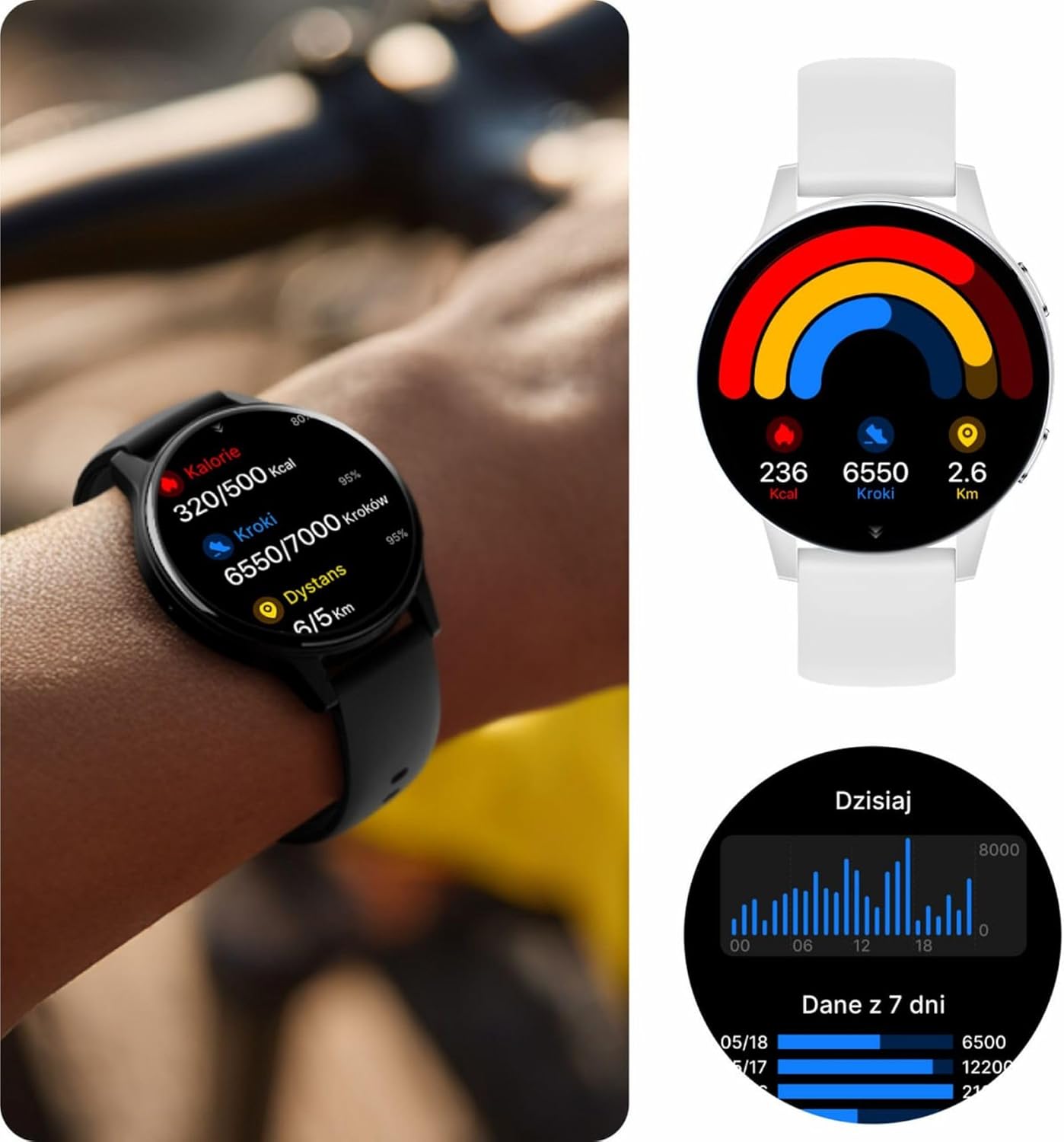
Image: Visual representation of the IP67 waterproof rating, indicating protection against water splashes and brief immersion.

Image: Stylized graphic emphasizing the IP67 waterproof feature of the smartwatch.
6. ການແກ້ໄຂບັນຫາ
If you encounter any issues with your Forever iGo Watch 4, please refer to the following common solutions:
- ໂມງບໍ່ເປີດ: ກວດໃຫ້ແນ່ໃຈວ່າໂມງຖືກສາກເຕັມແລ້ວ. ເຊື່ອມຕໍ່ມັນກັບເຄື່ອງສາກຢ່າງໜ້ອຍ 30 ນາທີ.
- ບໍ່ສາມາດຈັບຄູ່ກັບສະມາດໂຟນໄດ້:
- ໃຫ້ແນ່ໃຈວ່າ Bluetooth ຖືກເປີດໃຊ້ຢູ່ໃນໂທລະສັບສະຫຼາດຂອງທ່ານ.
- ໃຫ້ແນ່ໃຈວ່າໂມງຢູ່ໃນຂອບເຂດຂອງໂທລະສັບສະຫຼາດຂອງທ່ານ.
- ຣີສະຕາດທັງສະມາດໂຟນ ແລະໂມງອັດສະລິຍະຂອງທ່ານ.
- ກວດເບິ່ງວ່າແອັບຄູ່ໄດ້ຮັບການອັບເດດເປັນເວີຊັນຫຼ້າສຸດຫຼືບໍ່.
- ການແຈ້ງເຕືອນບໍ່ປາກົດ:
- ກວດສອບວ່າການອະນຸຍາດການແຈ້ງເຕືອນໄດ້ຖືກອະນຸຍາດໃຫ້ແອັບຊ່ວຍເຫຼືອໃນໂທລະສັບສະຫຼາດຂອງທ່ານແລ້ວ.
- ກວດໃຫ້ແນ່ໃຈວ່າໂມງເຊື່ອມຕໍ່ຢ່າງຖືກຕ້ອງຜ່ານ Bluetooth.
- Check the app's settings to ensure notifications for specific applications are enabled.
- ຂໍ້ມູນສຸຂະພາບບໍ່ຖືກຕ້ອງ:
- ໃຫ້ແນ່ໃຈວ່າໂມງຖືກໃສ່ຢູ່ໃນຂໍ້ມືຂອງທ່ານຢ່າງສະບາຍ, ບໍ່ວ່າງຫຼືແຫນ້ນເກີນໄປ.
- ເຮັດຄວາມສະອາດເຊັນເຊີຢູ່ດ້ານຫຼັງຂອງໂມງ.
- ຫຼີກເວັ້ນການເຄື່ອນໄຫວຫຼາຍເກີນໄປໃນລະຫວ່າງການວັດແທກ.
- ຊີວິດຫມໍ້ໄຟສັ້ນ:
- ຫຼຸດຄວາມສະຫວ່າງໜ້າຈໍ.
- Disable unnecessary features or continuous monitoring if not required.
- Limit the number of notifications received.
If the problem persists, please consult the official Forever support resources or contact customer service.
7. ຂໍ້ມູນຈໍາເພາະ
Below are the technical specifications for the Forever iGo Watch 4 JW-600 Smartwatch:
| ຄຸນສົມບັດ | ຂໍ້ມູນຈໍາເພາະ |
|---|---|
| ຍີ່ຫໍ້ | ຕະຫຼອດໄປ |
| ຕົວແບບ | iGo Watch 4 JW-600 (GSM192441) |
| ປະເພດການສະແດງ | AMOLED |
| ຂະຫນາດຈໍສະແດງຜົນ | 1.28 ນິ້ວ |
| ຄວາມລະອຽດການສະແດງ | 416 x 416 ພິກເຊລ |
| ຄວາມອາດສາມາດຫມໍ້ໄຟ | 280 mAh |
| ອາຍຸຫມໍ້ໄຟສະເລ່ຍ | ສູງສຸດ 7 ມື້ |
| ເວລາສາກໄຟ | 2 ຊົ່ວໂມງ |
| ການຕໍ່ຕ້ານນ້ໍາ | IP67 |
| ນ້ຳໜັກ | 33.9 g |
| ຄວາມຫນາ | 10.6 ມມ |
| ອຸປະກອນທີ່ເຂົ້າກັນໄດ້ | ໂທລະສັບສະຫຼາດ (Android, iOS) |
| ການໂຕ້ຕອບຂອງມະນຸດ | ແຕະແຜງ |
| ຄຸນນະສົມບັດພິເສດ | 100+ Sport Modes, Sleep Monitor, Heart Rate, Stress, Blood Oxygen, Blood Pressure, Bluetooth Calls, Notifications |
| ຄວາມອາດສາມາດເກັບຮັກສາ | 128 GB (for data storage, not app installation) |
| GPS | ບໍ່ມີ |
| ປະເພດໄຮ້ສາຍ | 802.11 ນ |

Image: Illustration of the smartwatch's ultra-slim and light form, detailing its weight and thickness.
8. ການຮັບປະກັນແລະການສະຫນັບສະຫນູນ
Your Forever iGo Watch 4 JW-600 Smartwatch comes with a manufacturer's warranty. Please refer to the warranty card included in your package or the official Forever webເວັບໄຊສຳລັບຂໍ້ມູນລະອຽດກ່ຽວກັບເງື່ອນໄຂການຮັບປະກັນ.
For technical support, troubleshooting assistance, or any other inquiries, please visit the official Forever support page or contact their customer service through the contact information provided on their webເວັບໄຊທ໌ຫຼືໃນເອກະສານຜະລິດຕະພັນຂອງທ່ານ.


