1. ບົດແນະນຳ
This manual provides detailed instructions for the installation, operation, and maintenance of your Anweller MD168 Keyless Entry Door Lock and Handle Set. Please read this manual thoroughly before installation and use to ensure proper functionality and safety. The Anweller MD168 offers multiple convenient unlocking methods and advanced security features for your home.
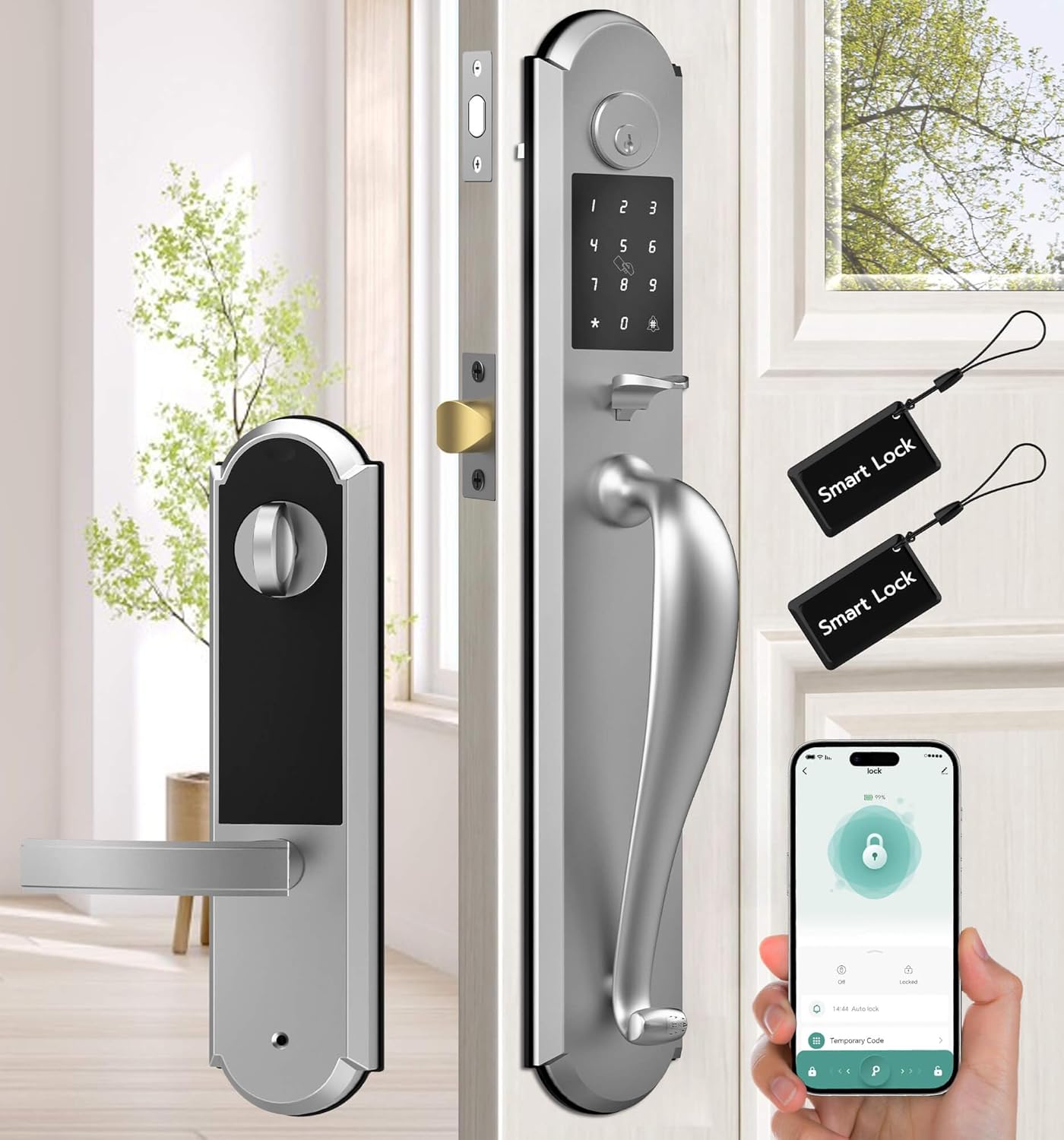
Figure 1: Anweller MD168 Keyless Entry Door Lock and Handle Set with mobile app interface.
2. ຜະລິດຕະພັນເກີນview ແລະອົງປະກອບ
The Anweller MD168 is an integrated smart deadbolt and knob set designed for front doors. It features a robust construction and multiple access options. Below are the components included in your package:
- 1 x Deadbolt Lock and Knob Handle Set (All Parts)
- 1 x ຄູ່ມືຜູ້ໃຊ້
- 2 x ປຸ່ມກົນຈັກ
- 2 x ບັດ RFID

Figure 2: Integrated design of the Anweller MD168, showcasing its zinc alloy material and oil-rubbed finish.
3. ຄູ່ມືການຕິດຕັ້ງ
Before beginning installation, ensure your door meets the compatibility requirements. The distance between the two door holes must be 5-1/2 inches (140mm). Door thickness should be between 1-3/8 inches to 2-1/8 inches (35mm to 55mm). The hole diameter should be greater than 1-17/20 inches (47mm).
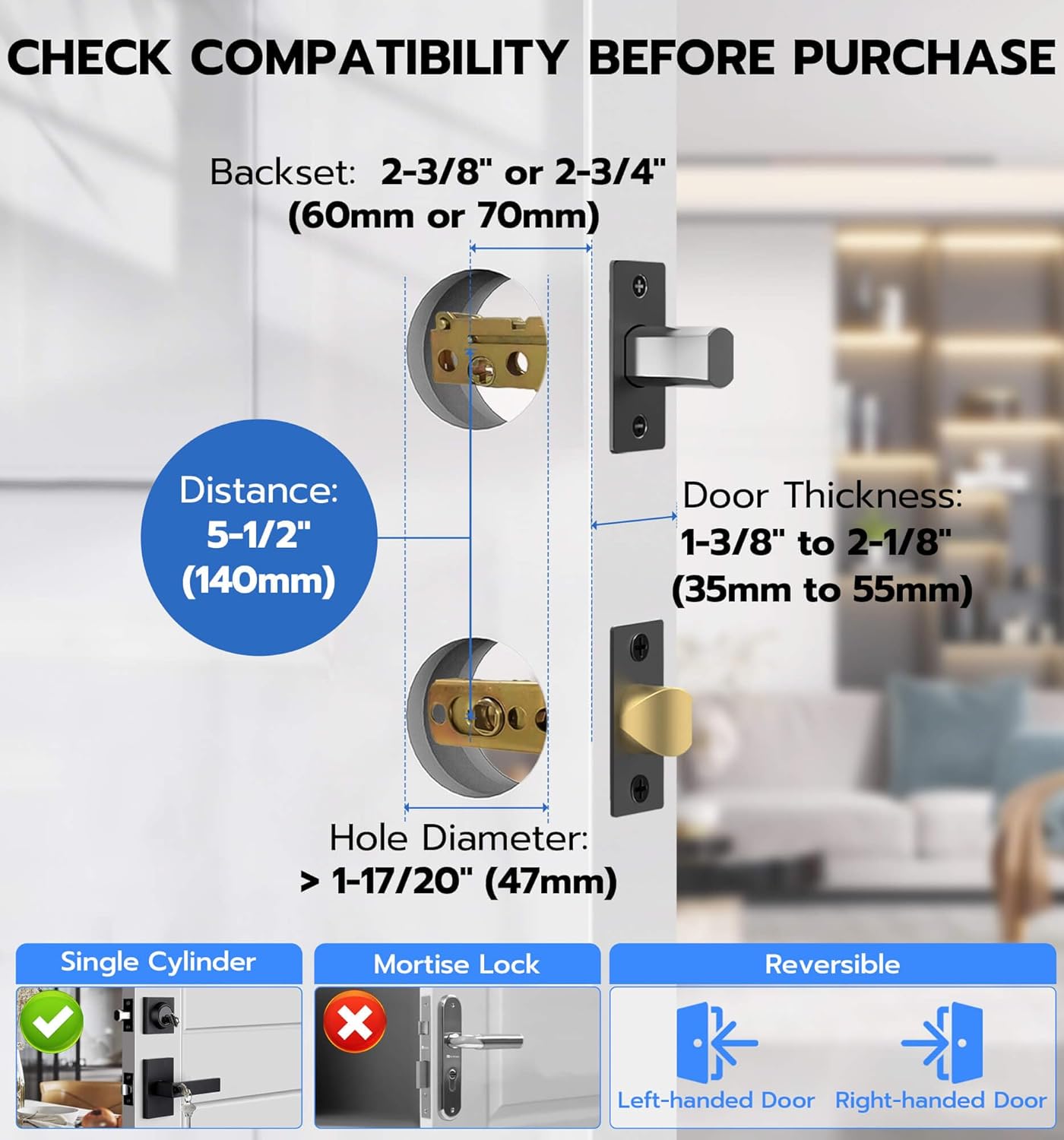
Figure 3: Door compatibility measurements for Anweller MD168 installation.
Step-by-Step Installation Video
ສຳລັບຄູ່ມືທີ່ເບິ່ງເຫັນໄດ້, ກະລຸນາອ້າງອີງເຖິງວິດີໂອຕິດຕັ້ງຢ່າງເປັນທາງການຂ້າງລຸ່ມນີ້:
Video 1: Official Anweller MD168 Installation Guide. This video provides a comprehensive walkthrough of the installation process, from unpacking to final testing.
Key Installation Steps (Refer to Video 1 for details):
- ແກະກ່ອງ ແລະ ລະບຸອົງປະກອບຕ່າງໆ: (Video 0:07-0:20) Verify all parts listed in Section 2 are present.
- Install Closed Bolt and Latch Bolt: (Video 0:21-1:13) Insert the closed bolt and latch bolt into the door edge, ensuring correct orientation and securing with screws.
- Install Front Panel Studs: (Video 1:14-1:27) Attach the studs to the front panel of the lock.
- Install Front Panel: (Video 1:28-1:45) Pass the power cord through the door hole and align the front panel with the lock ruler and square rod, then buckle them up.
- Install Rear Base Plate: (Video 1:46-2:15) Secure the rubber gasket and rear base plate, passing the power cord through the chassis.
- Adjust Front and Rear Panels: (Video 2:16-2:28) Ensure proper alignment of the front and rear panels and tighten all screws.
- Install Square Pole: (Video 2:29-2:40) Insert the spring into the square rod and then place the square rod into the latch bolt core hole.
- Remove Rear Lock Battery Box Cover: (Video 2:41-2:49) Press the groove on the top of the rear panel to remove the battery cover.
- Test Lock Sensitivity: (Video 2:50-2:58) Use pliers to test the lock ruler's rotation for smooth operation (right to lock, left to unlock).
- Install Rear Panel: (Video 2:59-3:16) Connect the front lock power cord (ensure correct orientation) and align the lock ruler and square rod before installing the rear panel. Tighten the fixing screws.
- ຕິດຕັ້ງແບດເຕີລີ່: (Video 3:17-3:26) Insert 4 AA batteries into the battery compartment and close the cover.
- Install Meson: (Video 3:27-3:36) Install the meson and tighten its screws.
4. ການດໍາເນີນງານ
ວິທີການປົດລັອກ
The Anweller MD168 offers four distinct ways to unlock your door:
- ລະຫັດ: Enter a personalized code on the keypad.
- ແອັບຯມືຖື: Use the dedicated smartphone application for remote unlocking.
- ບັດ RFID: Tap a programmed RFID card to the lock.
- Spare Key: Utilize traditional mechanical keys as a backup.

Figure 4: The four convenient unlocking methods available for the Anweller MD168.
ການຄວບຄຸມແອັບຯມືຖື
The mobile application provides extensive control over your smart lock:
- ການຄຸ້ມຄອງລະຫັດຜ່ານ: Set up, modify, or delete passcodes.
- RFID Card Programming: Program or delete RFID cards.
- ບັນທຶກການເຄື່ອນໄຫວ: View real-time unlocking reminders and historical records.
- Auto-Lock & Passage Mode: Configure automatic locking times and enable passage mode for temporary unrestricted access.
- ການຄວບຄຸມລະດັບສຽງ: Adjust the alarm volume (mute, low, medium, high).
- ກວດສອບສະຖານະ: Monitor the lock's status and battery level.

ຮູບ 5: ເກີນview of the convenient mobile app control features.
ຄຸນນະສົມບັດຄວາມປອດໄພ
- ລະຫັດຜ່ານປ້ອງກັນການແນມເບິ່ງ: Enter random digits before or after your actual passcode to obscure it from onlookers.
- ຂີດຈຳກັດການເຂົ້າຜິດ: The lock will temporarily disable for 3 minutes after 5 consecutive invalid passcode or RFID entries, and an alarm will be triggered.
- Tamper ປຸກ: A built-in alarm system activates if tampering is detected, providing an additional layer of security.

Figure 6: The anti-peeping passcode feature for enhanced security.

Figure 7: Visual representation of the lock's pick-resistant and alarm capabilities.
ໂໝດ
- ລັອກອັດຕະໂນມັດ: The lock can be configured to automatically secure the door after a set period of time.
- ໂໝດຜ່ານ: This mode allows the door to remain unlocked for continuous access, suitable for gatherings or when frequent entry/exit is required.

Figure 8: The Auto Lock feature for automatic door security.

Figure 9: The Passage Mode for temporary unrestricted access.
5. ບໍາລຸງຮັກສາ
- ການປ່ຽນແບັດເຕີຣີ: The lock requires 4 AA batteries. Replace them when the low battery reminder is activated.
- ພະລັງງານສຸກເສີນ: In case of complete battery depletion, the lock can be temporarily powered via a USB-C power bank for emergency unlocking.
- ທໍາຄວາມສະອາດ: ເຮັດຄວາມສະອາດດ້ານນອກຂອງລັອກດ້ວຍຜ້າອ່ອນ, ງamp cloth. Avoid using abrasive cleaners or harsh chemicals, as these can damage the finish and electronic components.

Figure 10: Battery compartment for 4 AA batteries, providing up to 180 days of power.
6. ການແກ້ໄຂບັນຫາ
If you encounter issues with your Anweller MD168 smart lock, consider the following:
- ລັອກບໍ່ຕອບສະໜອງ: ກວດສອບວ່າແບັດເຕີຣີຖືກຕິດຕັ້ງຢ່າງຖືກຕ້ອງ ແລະ ມີປະຈຸພຽງພໍຫຼືບໍ່. ປ່ຽນແບັດເຕີຣີຖ້າຈຳເປັນ.
- Incorrect Passcode Entry: Ensure you are entering the correct passcode. Remember the anti-peeping feature allows extra digits before or after the actual code. If 5 incorrect attempts are made, the lock will temporarily disable.
- ບັນຫາການເຊື່ອມຕໍ່ແອັບ: Ensure Bluetooth is enabled on your smartphone and you are within range of the lock. Restart the app or your phone if problems persist.
- Emergency Unlocking: If the battery is completely dead, use the mechanical key or connect a USB-C power bank to the emergency power port.
ສໍາລັບການຊ່ວຍເຫຼືອເພີ່ມເຕີມ, ກະລຸນາຕິດຕໍ່ຝ່າຍຊ່ວຍເຫຼືອລູກຄ້າ.
7. ຂໍ້ມູນຈໍາເພາະ
| ຄຸນສົມບັດ | ລາຍລະອຽດ |
|---|---|
| ໝາຍເລກຕົວແບບ | MD168 |
| ວັດສະດຸ | ສັງກະສີ |
| ສີ | ເງິນ |
| ສໍາເລັດຮູບພາຍນອກ | ລອກນ້ ຳ ມັນ |
| ປະເພດລັອກ | Deadbolt Lock, Keypad Lock, Pin Code, RFID |
| ນ້ໍາຫນັກລາຍການ | 8.8 ປອນ |
| ຂະໜາດສິນຄ້າ | 19.3 x 3.1 x 3.3 ນິ້ວ |
| ຕ້ອງໃຊ້ແບັດເຕີຣີ | 4 ຫມໍ້ໄຟ AA (ບໍ່ລວມ) |
| ຊີວິດຫມໍ້ໄຟ | ສູງສຸດເຖິງ 180 ວັນເວລາສະແຕນບາຍ |
| ຄຸນນະສົມບັດພິເສດ | Deadbolt and Knob Integrated Design, 4 Unlocking Ways, USB-C Emergency Power Unlock, Anti-Peeping Passcode, Auto Lock & Passage Mode, IP54 Waterproof |
8. ການຮັບປະກັນແລະການສະຫນັບສະຫນູນ
Anweller is committed to providing high-quality products and excellent customer service.
- ການຮັບປະກັນ: ຜະລິດຕະພັນນີ້ມາພ້ອມກັບການຮັບປະກັນ 12 ເດືອນນັບຕັ້ງແຕ່ວັນທີຊື້.
- ສະຫນັບສະຫນູນດ້ານວິຊາການ: Free lifetime technical support is available for all Anweller MD168 users.
- ຕິດຕໍ່: For any queries, technical assistance, or warranty claims, please contact us via email at hongjdzwj@outlook.com.
