1. ບົດແນະນຳ
The UNI-T UT217A/UT217B is a versatile 2-in-1 device combining the functions of an AC/DC clamp meter and an oscilloscope. This instrument is designed for comprehensive electrical measurements, offering high precision and a user-friendly interface. It features a 2.8-inch high-definition LCD display and supports Bluetooth connectivity for mobile application integration, allowing for data transmission, analysis, and storage.
This manual provides essential information for the safe and effective operation of your UNI-T UT217A/UT217B device. Please read it thoroughly before use and retain it for future reference.
2. ຂໍ້ມູນຄວາມປອດໄພ
To ensure safe operation and prevent damage to the device or injury, observe the following safety precautions:
- ປະຕິບັດຕາມລະຫັດຄວາມປອດໄພໃນທ້ອງຖິ່ນ ແລະລະດັບຊາດສະເໝີ.
- ຢ່າໃຊ້ອຸປະກອນຖ້າມັນເສຍຫາຍ ຫຼື ໃຊ້ງານຜິດປົກກະຕິ.
- Ensure the battery is adequately charged before use to avoid unexpected power loss during critical measurements.
- Avoid contact with live circuits when connecting or disconnecting test leads.
- Do not exceed the maximum input ratings specified for each function.
- Use only specified replacement parts and accessories.
- Keep the device dry and clean. Do not operate in wet or explosive environments.
- ລະວັງ voltage warning indicator on the device.
3. ເນື້ອໃນຊຸດ
ກວດສອບວ່າລາຍການທັງຫມົດແມ່ນມີຢູ່ແລະບໍ່ໄດ້ຮັບຄວາມເສຍຫາຍຫຼັງຈາກການຍົກເລີກການຫຸ້ມຫໍ່:
- UNI-T UT217A/UT217B Oscilloscope Clamp ແມັດ
- ທົດສອບຜູ້ນໍາ
- ສາຍໄຟແບບ Type-C
- ຄູ່ມືຜູ້ໃຊ້
- Carrying Pouch (may vary by model/region)
4. ຜະລິດຕະພັນເກີນview
Familiarize yourself with the components of your UNI-T UT217A/UT217B device:
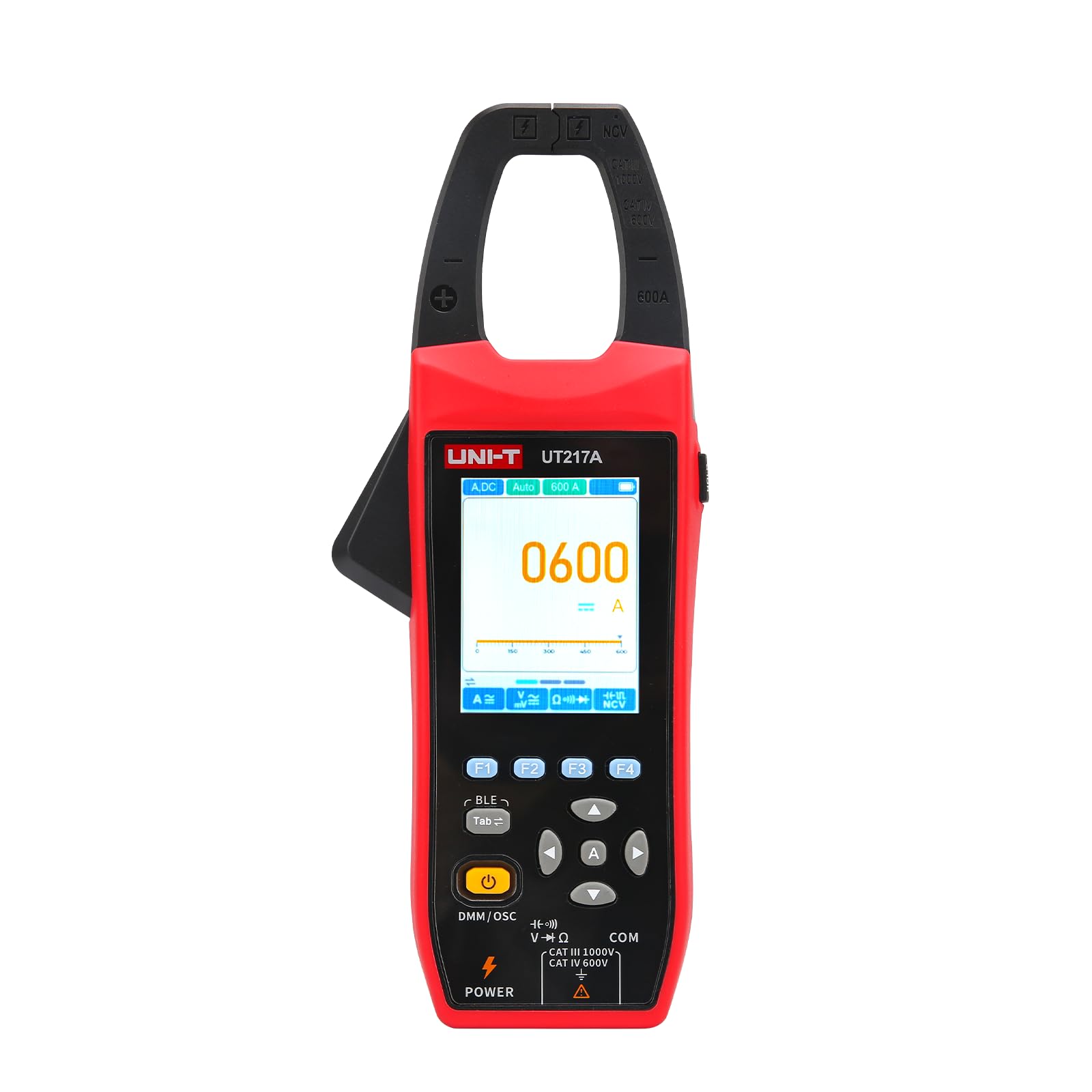
ຮູບ 1: ດ້ານຫນ້າ view of the UNI-T UT217A/UT217B Oscilloscope Clamp Meter, showing the display, function dial, and clamp ຄາງກະໄຕ.
- Clamp ຄາງກະໄຕ: Used for non-contact measurement of AC/DC current. The UT217A has a 31mm jaw opening, while the UT217B has a 38mm jaw opening.
- ຈໍ LCD: 2.8-inch high-definition screen displaying measurement readings, waveforms, and function indicators.
- ຟັງຊັນໂທ: Rotary switch to select measurement modes (e.g., ACV, DCV, ACA, DCA, Resistance, Capacitance, Frequency, Oscilloscope).
- ປຸ່ມຟັງຊັນ: Buttons for range selection, hold, backlight, peak hold, and other specific functions.
- ຂົ້ວຂາເຂົ້າ: Sockets for connecting test leads for voltage, resistance, capacitance, and other measurements.
- Type-C Port: For charging the built-in 2600mAh battery.
5. ຕັ້ງຄ່າ
Before first use, ensure the device is properly set up:
- ກຳລັງສາກແບັດເຕີຣີ:
- Connect the provided Type-C charging cable to the device's Type-C port.
- ເຊື່ອມຕໍ່ປາຍອີກດ້ານໜຶ່ງຂອງສາຍເຂົ້າກັບອະແດບເຕີໄຟ USB ມາດຕະຖານ (ບໍ່ລວມຢູ່) ຫຼື ພອດ USB ຂອງຄອມພິວເຕີ.
- The charging indicator on the display will show the charging status. Allow the device to fully charge before initial use. The built-in battery capacity is 2600mAh.
- ເປີດ/ປິດ:
- Rotate the function dial from the 'OFF' position to any desired measurement function to power on the device.
- To power off, rotate the function dial back to the 'OFF' position.
6. ຄໍາແນະນໍາການດໍາເນີນງານ
This section details the primary functions of the UNI-T UT217A/UT217B.
6.1 ຄamp Meter Function (AC/DC Current Measurement)
- Rotate the function dial to the 'ACA' (AC Current) or 'DCA' (DC Current) position.
- ກົດປຸ່ມປ່ອຍຄາງກະໄຕເພື່ອເປີດ clamp ຄາງກະໄຕ.
- Enclose a single conductor (not a power cord with multiple wires) within the clamp ຄາງກະໄຕ. ໃຫ້ແນ່ໃຈວ່າຄາງກະໄຕປິດสนิทແລ້ວ.
- Read the current value displayed on the LCD. The device features 20000 count true RMS automatic ranging.
- For surge current measurement (AC current only), select the appropriate function if available on the dial or via a button.
6.2 Oscilloscope Function (Waveform Measurement)
The oscilloscope function allows for simultaneous measurement of current and voltage waveforms.
- Rotate the function dial to the 'Oscilloscope' position.
- Connect the test leads to the appropriate input terminals for voltage measurement, or use the clamp jaw for current waveform measurement.
- The display will show the real-time waveform. Use the function buttons to adjust parameters such as time base, voltage scale, and trigger settings as needed.
- Analyze the waveform characteristics (e.g., frequency, amplitude, shape).
6.3 ການເຊື່ອມຕໍ່ Bluetooth
The device supports Bluetooth connection to a mobile phone application for enhanced functionality.
- Download and install the official UNI-T mobile application from your device's app store.
- ໃຫ້ແນ່ໃຈວ່າ Bluetooth ຖືກເປີດໃຊ້ຢູ່ໃນໂທລະສັບມືຖືຂອງທ່ານ.
- Power on the UT217A/UT217B.
- Open the UNI-T application and follow the on-screen instructions to search for and connect to your device.
- Once connected, you can transmit measurement data, analyze trends, and store readings directly on your mobile device.
7. ບໍາລຸງຮັກສາ
ການບຳລຸງຮັກສາທີ່ເໝາະສົມຮັບປະກັນອາຍຸການໃຊ້ງານທີ່ຍາວນານ ແລະ ຄວາມແມ່ນຍຳຂອງອຸປະກອນຂອງທ່ານ.
- ທໍາຄວາມສະອາດ: ໃຊ້ອ່ອນ, ງamp cloth with mild detergent to clean the casing. Do not use abrasive cleaners or solvents. Ensure the device is powered off and disconnected from any power source before cleaning.
- ການເກັບຮັກສາ: Store the device in a cool, dry place, away from direct sunlight and extreme temperatures. If storing for extended periods, ensure the battery is partially charged (around 50%) to preserve battery health.
- ການດູແລຫມໍ້ໄຟ: The device has a built-in 2600mAh rechargeable battery. Avoid fully discharging the battery frequently. Recharge it regularly, especially if not used for a long time.
- ການປັບທຽບ: For professional applications, periodic calibration by qualified personnel is recommended to maintain measurement accuracy.
8. ການແກ້ໄຂບັນຫາ
ເບິ່ງຕາຕະລາງຂ້າງລຸ່ມນີ້ສໍາລັບບັນຫາທົ່ວໄປແລະການແກ້ໄຂຂອງພວກເຂົາ:
| ບັນຫາ | ສາເຫດທີ່ເປັນໄປໄດ້ | ການແກ້ໄຂ |
|---|---|---|
| ອຸປະກອນບໍ່ເປີດ | Low battery; Function dial not set correctly | Charge the battery; Rotate dial to a measurement function |
| ການອ່ານບໍ່ຖືກຕ້ອງ | Improper connection; Environmental interference; Device malfunction | Check test lead connections; Move away from strong electromagnetic fields; Contact support if issue persists |
| ການເຊື່ອມຕໍ່ Bluetooth ລົ້ມເຫລວ | Bluetooth off on phone; App not installed; Device not discoverable | Enable Bluetooth; Install UNI-T app; Restart device and app |
| ຈໍສະແດງຜົນຫວ່າງເປົ່າ ຫຼືມືດ | Low battery; Backlight off; Display damage | Charge battery; Press backlight button; Contact support |
9. ຂໍ້ມູນຈໍາເພາະ
Key technical specifications for the UNI-T UT217A/UT217B Oscilloscope Clamp ແມັດ:
| ຄຸນສົມບັດ | ລາຍລະອຽດ |
|---|---|
| ຕົວແບບ | UT217A / UT217B |
| ຟັງຊັນ | AC/DC Clamp Meter, Oscilloscope |
| ຈໍສະແດງຜົນ | ໜ້າຈໍ LCD ຄວາມລະອຽດສູງ 2.8 ນິ້ວ |
| ນັບ | 20000 Count True RMS |
| ການເປີດຄາງກະໄຕ | UT217A: 31mm; UT217B: 38mm |
| ຟັງຊັນ Oscilloscope | Measures current and voltage waveforms simultaneously |
| ການເຊື່ອມຕໍ່ | Bluetooth to mobile phone APP (transmit, analyze, store) |
| ຄຸນນະສົມບັດພິເສດ | Surge current measurement (AC only), High voltage ເຕືອນ |
| ແຫຼ່ງພະລັງງານ | Type-C charging, Built-in 2600mAh battery |
| ຜູ້ຜະລິດ | ເທັກໂນໂລຍີ UNI-TREND (CHINA) CO., LTD. |
| ຈຳ ນວນຕົວແບບຜະລິດຕະພັນ | YQ-UT217A |
10. ການຮັບປະກັນແລະການສະຫນັບສະຫນູນ
UNI-T products are manufactured to high quality standards and are warranted against defects in materials and workmanship. For specific warranty terms and conditions, please refer to the warranty card included with your product or visit the official UNI-T webເວັບໄຊ.
For technical support, service, or inquiries, please contact your local distributor or the UNI-T customer service department. Ensure you have your product model number (UT217A/UT217B) and purchase information available when seeking support.