1. ບົດແນະນຳ
This manual provides essential information for the proper use and maintenance of your Baseus Inspire XH1 Adaptive Active Noise Cancelling Headphones. Please read this manual thoroughly before using the product to ensure optimal performance and longevity.

Image 1.1: Baseus Inspire XH1 Headphones
2. ເນື້ອໃນຊຸດ
ກວດສອບວ່າລາຍການທັງຫມົດແມ່ນມີຢູ່ໃນຊຸດ:
- ຫູຟັງຕັດສຽງລົບກວນ Baseus Inspire XH1 ×1
- ສາຍ Aux ×1
- ສາຍ USB-C ×1
- ກະເປົາຖື ×1

ຮູບພາບ 2.1: ເນື້ອໃນຊຸດ
3. ແຜນວາດຜະລິດຕະພັນ ແລະ ການຄວບຄຸມ
Familiarize yourself with the headphone's physical controls and ports.
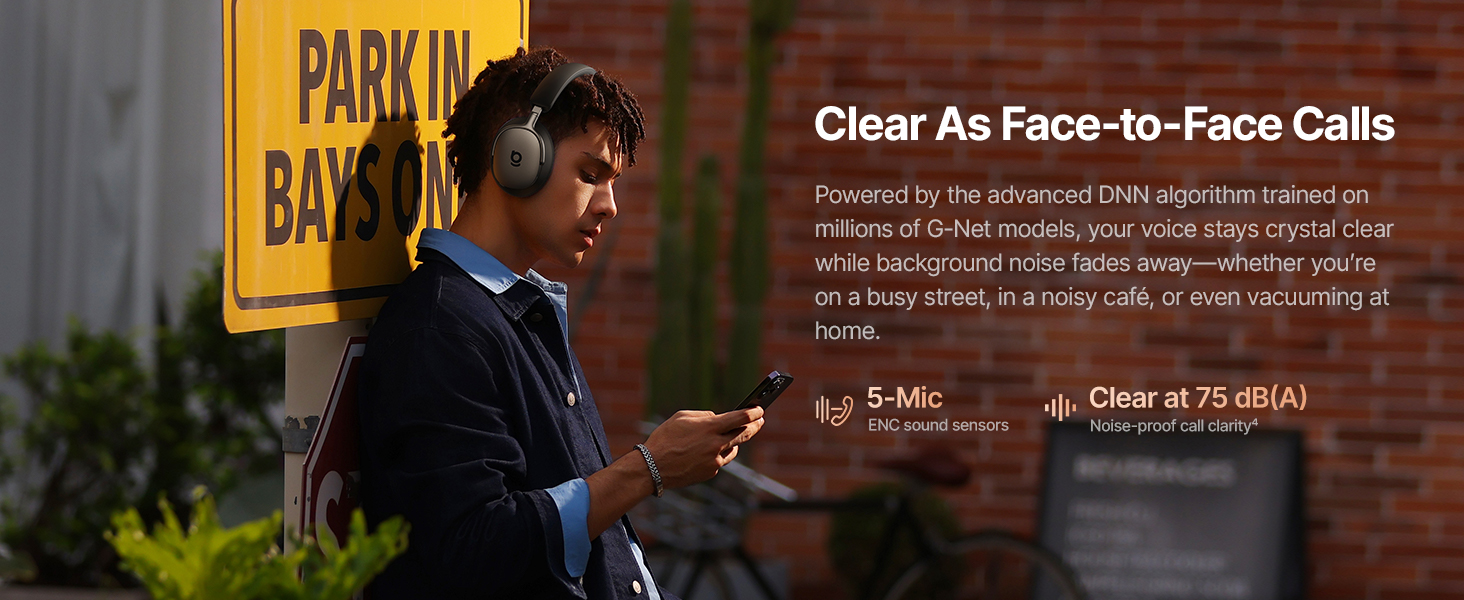
Image 3.1: Headphone Controls Overview
ຟັງຊັນປຸ່ມ:
- ປຸ່ມ ANC:
- Press once: Toggle ANC Mode (ANC On / ANC Off / Transparency).
- Press and hold for 2 seconds: Activate Quick Attention (one-press transparency and volume down).
- ປຸ່ມ Multifunction:
- Press once: Play or pause audio.
- Press once: Answer or end calls.
- Press twice: Toggle Dolby Audio off or on.
- Press twice: Reject calls.
- Press three times: Activate Low Latency mode.
- ປຸ່ມລະດັບສຽງ (+/-):
- Press once (+): Volume up.
- Press once (-): Volume down.
- Press and hold (+) for 2 seconds: Previous track.
- Press and hold (-) for 2 seconds: Next track.
4. ຕັ້ງຄ່າ
4.1 ການສາກໄຟເບື້ອງຕົ້ນ
Before first use, fully charge the headphones. Connect the supplied USB-C cable to the charging port on the headphones and to a compatible USB power source. The charging indicator will show the charging status.
4.2 ການເປີດ/ປິດ
- ເປີດ: Press and hold the Multifunction Button until the indicator light illuminates.
- ປິດພະລັງງານ: Press and hold the Multifunction Button until the indicator light turns off.
4.3 ການຈັບຄູ່ Bluetooth
- ກວດໃຫ້ແນ່ໃຈວ່າປິດຫູຟັງແລ້ວ.
- Press and hold the Multifunction Button for approximately 5 seconds until the indicator light flashes rapidly, indicating pairing mode.
- ໃນອຸປະກອນຂອງທ່ານ (ໂທລະສັບສະຫຼາດ, ແລັບທັອບ, ແລະອື່ນໆ), ເປີດໃຊ້ Bluetooth ແລະຄົ້ນຫາອຸປະກອນທີ່ມີຢູ່.
- Select "Baseus Inspire XH1" from the list of devices.
- ເມື່ອເຊື່ອມຕໍ່ແລ້ວ, ໄຟຕົວຊີ້ວັດຈະຢຸດກະພິບ ແລະຍັງຄົງແຂງຢູ່.
4.4 ການຕິດຕັ້ງແອັບ Baseus
For full functionality, including SoundFit hearing personalization, advanced EQ settings, and noise reduction modes, download and install the Baseus App (V2.8.9+) from your device's app store. Ensure your headphone firmware (V1.1.07+) is updated via the app for the best experience.

Image 4.1: Baseus App Interface
5. ການດໍາເນີນງານ
5.1 ໂໝດການຍົກເລີກສິ່ງລົບກວນທີ່ເຄື່ອນໄຫວ (ANC).
The Baseus Inspire XH1 features Adaptive ANC. Press the ANC button to cycle through modes:
- ANC ເປີດ: Reduces external noise by up to -48 dB. Ideal for noisy environments.
- ໂໝດຄວາມໂປ່ງໃສ: ອະນຸຍາດໃຫ້ສຽງອາກາດລ້ອມຮອບຜ່ານ, ເຮັດໃຫ້ທ່ານຮູ້ຈັກສິ່ງແວດລ້ອມຂອງທ່ານ.
- ANC ປິດ: ການຫຼິ້ນສຽງມາດຕະຖານໂດຍບໍ່ມີການຕັດສຽງລົບກວນ.

Image 5.1: Adaptive ANC in Action
5.2 ການຄຸ້ມຄອງການໂທ
The headphones feature 5-Mic ENC and AI-powered noise reduction for clear calls.
- ຮັບ/ສາຍໂທ: ກົດປຸ່ມ Multifunction ຫນຶ່ງຄັ້ງ.
- ປະຕິເສດການໂທ: Press the Multifunction Button twice.

Image 5.2: Clear Call Functionality
5.3 ການຫລີ້ນດົນຕີ
Control your audio playback directly from the headphones:
- ຫຼິ້ນ/ຢຸດ: ກົດປຸ່ມ Multifunction ຫນຶ່ງຄັ້ງ.
- ເພງຕໍ່ໄປ: ກົດປຸ່ມຫຼຸດສຽງ (-) ຄ້າງໄວ້ 2 ວິນາທີ.
- ຕິດຕາມກ່ອນ ໜ້າ ນີ້: ກົດປຸ່ມເພີ່ມລະດັບສຽງ (+) ຄ້າງໄວ້ 2 ວິນາທີ.
- ປະລິມານຂຶ້ນ/ລົງ: Press the respective Volume button once.
5.4 ການເຊື່ອມຕໍ່ຫຼາຍຈຸດ
The headphones support simultaneous connection to two devices via Bluetooth 6.1. This allows for seamless switching between audio sources. Enable multipoint connection through the Baseus App.
5.5 ການສາກໄຟ ແລະ ອາຍຸການໃຊ້ງານຂອງແບັດເຕີຣີ
The Inspire XH1 offers extended battery life:
- Up to 100 hours of playtime with ANC off.
- Up to 65 hours of playtime with ANC on.
- A 10-minute fast charge provides approximately 12 hours of playtime.
- Full charge time is approximately 1.5 hours.

Image 5.3: Battery Performance
6. ຄຸນສົມບັດສຽງ
The Baseus Inspire XH1 headphones are engineered for a premium audio experience.
- Sound by Bose: Delivers a signature premium audio experience.
- Dolby Spatial Audio: Provides immersive 360° sound. Can be toggled via the Multifunction Button or Baseus App.
- Hi-Res Audio & LDAC: Certified for high-resolution audio, with LDAC support for 3 times the audio detail of standard Bluetooth.
- SuperBass 3.0 & SuperBalance 3.0: Optimized acoustic chambers and angled drivers provide deep bass and balanced sound.
- ການປັບແຕ່ງການໄດ້ຍິນ SoundFit ໃຫ້ເປັນສ່ວນຕົວ: Available via the Baseus App, this feature customizes the sound profile based on your unique hearing.

Image 6.1: Sound by Bose Integration

Image 6.2: Internal Audio Components
7. ຄວາມສະດວກສະບາຍ ແລະການອອກແບບ
The Inspire XH1 headphones are designed for extended wear.
- Velvet-Like CloudComfort: Ergonomic over-ear design with protein leather and resilient memory foam padding for comfort.
- ສະດວກໃນການເດີນທາງ: Foldable design and included carrying case for easy transport.

Image 7.1: CloudComfort Earcup

Image 7.2: Travel-Friendly Carrying Case
8. ບໍາລຸງຮັກສາ
ເພື່ອຮັບປະກັນອາຍຸການໃຊ້ງານທີ່ຍາວນານ ແລະ ປະສິດທິພາບທີ່ດີທີ່ສຸດຂອງຫູຟັງຂອງທ່ານ, ໃຫ້ປະຕິບັດຕາມຄຳແນະນຳກ່ຽວກັບການບຳລຸງຮັກສາເຫຼົ່ານີ້:
- ທໍາຄວາມສະອາດ: Use a soft, dry cloth to clean the exterior surfaces of the headphones. Do not use abrasive cleaners or solvents.
- ການເກັບຮັກສາ: When not in use, store the headphones in their protective carrying case to prevent damage from dust, scratches, and impacts.
- ຫຼີກເວັ້ນຄວາມຊຸ່ມ: Do not expose the headphones to water or excessive moisture. If they get wet, dry them thoroughly before use or storage.
- ອຸນຫະພູມ: Avoid exposing the headphones to extreme temperatures (hot or cold) as this can affect battery life and internal components.
- ການດູແລສາຍໄຟ: Handle the Aux and USB-C cables gently. Avoid sharp bends or excessive pulling to prevent damage.
9. ການແກ້ໄຂບັນຫາ
If you encounter issues with your Baseus Inspire XH1 headphones, refer to the following common solutions:
| ບັນຫາ | ການແກ້ໄຂທີ່ເປັນໄປໄດ້ |
|---|---|
| ຫູຟັງບໍ່ເປີດ. | ກວດໃຫ້ແນ່ໃຈວ່າໄດ້ສາກຫູຟັງແລ້ວ. ເຊື່ອມຕໍ່ຫາແຫຼ່ງພະລັງງານໂດຍໃຊ້ສາຍ USB-C. |
| ບໍ່ສາມາດຈັບຄູ່ຜ່ານ Bluetooth ໄດ້. | Ensure headphones are in pairing mode (rapidly flashing indicator light). Turn off and on Bluetooth on your device. Forget the device in your Bluetooth settings and try pairing again. |
| ບໍ່ມີສຽງ ຫຼືສຽງຕໍ່າ. | ກວດສອບລະດັບສຽງຂອງຫູຟັງ ແລະ ອຸປະກອນ. ໃຫ້ແນ່ໃຈວ່າຫູຟັງເຊື່ອມຕໍ່ຢ່າງຖືກຕ້ອງແລ້ວ. ລອງຣີສະຕາດອຸປະກອນທັງສອງ. |
| ANC ບໍ່ເຮັດວຽກຢ່າງມີປະສິດທິພາບ. | Ensure ANC mode is activated (not Transparency or Off). Check for proper fit of earcups to create a seal. Update headphone firmware via the Baseus App. |
| ບັນຫາຄຸນນະພາບການໂທ. | Ensure microphone is not obstructed. Check for strong Bluetooth connection. Move to a quieter environment if possible. |
| Baseus App not connecting or features not working. | Ensure Bluetooth is enabled and headphones are connected. Update the Baseus App to the latest version (V2.8.9+). Update headphone firmware (V1.1.07+) via the app. |
If the problem persists, please contact Baseus customer support for further assistance.
10. ຂໍ້ມູນຈໍາເພາະ
| ຄຸນສົມບັດ | ລາຍລະອຽດ |
|---|---|
| ຊື່ຕົວແບບ | Baseus Inspire XH1 |
| ການຄວບຄຸມສິ່ງລົບກວນ | Adaptive Active Noise Cancellation (-48dB) |
| ເຕັກໂນໂລຊີການເຊື່ອມຕໍ່ | ໄຮ້ສາຍ (Bluetooth 6.1) |
| ປະເພດໄດເວີສຽງ | ໄດນາມິກໄດເວີ |
| ຂະໜາດໄດເວີສຽງ | 35 ມິນລິແມັດ |
| ຊ່ວງຄວາມຖີ່ | 20Hz - 40kHz |
| impedance | 16 ໂອມ |
| ປະເພດການຄວບຄຸມ | Button Control / APP Control |
| ວັດສະດຸ | Leather, Foam, Plastic/Silicone |
| ອາຍຸແບັດເຕີຣີ (ANC ປິດ) | ສູງສຸດ 100 ຊົ່ວໂມງ |
| ອາຍຸແບັດເຕີຣີ (ANC ເປີດ) | ສູງສຸດ 65 ຊົ່ວໂມງ |
| ສາກໄວ | 10 ນາທີສໍາລັບການຫຼິ້ນ 12 ຊົ່ວໂມງ |
| ເວລາສາກໄຟເຕັມ | ປະມານ. 1.5 ຊົ່ວໂມງ |
| ຂະໜາດສິນຄ້າ | 8.07 x 3.14 x 6.57 ນິ້ວ |
| ນ້ໍາຫນັກລາຍການ | 1.87 ປອນ |
| ອົງປະກອບລວມ | Headphones, Aux Cable, USB-C Cable, Carrying Case |
11. ການຮັບປະກັນແລະການສະຫນັບສະຫນູນ
For warranty information and customer support, please refer to the warranty card included in your product packaging or visit the official Baseus webເວັບໄຊ. ຮັກສາໃບຮັບເງິນການຊື້ຂອງທ່ານໄວ້ເປັນຫຼັກຖານການຊື້ສໍາລັບການຮ້ອງຂໍການຮັບປະກັນ.
ຜູ້ຜະລິດ: Baseus
ທາງການ Webເວັບໄຊ: Baseus Official Store on Amazon


