ຂໍ້ມູນຄວາມປອດໄພທີ່ສໍາຄັນ
- ອ່ານແລະປະຕິບັດຕາມຄໍາແນະນໍາເຫຼົ່ານີ້.
- ຢ່າໃຊ້ຜະລິດຕະພັນນີ້ຢູ່ໃກ້ກັບນ້ໍາ.
- ເຮັດຄວາມສະອາດດ້ວຍຜ້າແຫ້ງເທົ່ານັ້ນ.
- ກວດເບິ່ງ voltage ຂອງການສະຫນອງຕົ້ນຕໍໃນທ້ອງຖິ່ນຂອງທ່ານ.
- Do not block any ventilation openings. Install under the manufacturer's instructions.
- ຫ້າມຕິດຕັ້ງໃກ້ກັບແຫຼ່ງຄວາມຮ້ອນເຊັ່ນລັງສີ, ເຄື່ອງບັນທຶກຄວາມຮ້ອນ, ເຕົາຫຼືອຸປະກອນອື່ນໆ (ລວມທັງ. amplifiers) ທີ່ຜະລິດຄວາມຮ້ອນ.
- ໃຊ້ພຽງແຕ່ຄຸນສົມບັດ / ອຸປະກອນເສີມທີ່ລະບຸໄວ້ໂດຍຜູ້ຜະລິດ.
- ຖອດປລັກຜະລິດຕະພັນນີ້ໃນລະຫວ່າງພະຍຸຟ້າຜ່າ ແລະໃຊ້ເວລາດົນນານ.
- ອ້າງອີງການບໍລິການທັງໝົດໃຫ້ກັບພະນັກງານບໍລິການທີ່ມີຄຸນວຸດທິ.
ເນື້ອໃນຊຸດ
ດອນເນີ ມ.AMP4 5.1 Channel Audio Ampຊຸດ lifier ປະກອບມີ:
- Donner MAMP4 ເຄື່ອງຮັບ Stereo
- ການຄວບຄຸມໄລຍະໄກ
- ເສົາອາກາດ FM
- ຄູ່ມືຜູ້ໃຊ້
ຄູ່ມືການຕິດຕັ້ງ
1. Connecting Speakers and Subwoofer
ມAMP4 amplifier supports a 5.1 channel setup, allowing connection of 5 speakers and 1 subwoofer. Ensure correct polarity (+/-) when connecting speakers.

Image: Diagram showing the 5.1 channel speaker and subwoofer connections on the rear panel of the Donner MAMP4 ampມີຊີວິດຊີວາ.

ຮູບພາບ: ລາຍລະອຽດ view of the rear panel of the Donner MAMP4 amplifier, highlighting speaker terminals and various input/output ports.
2. ການເຊື່ອມຕໍ່ແຫຼ່ງສຽງ
ໄດ້ amplifier offers multiple input options for various audio sources:
- Bluetooth 5.3: ສໍາລັບການຖ່າຍທອດສຽງໄຮ້ສາຍຈາກອຸປະກອນທີ່ເຂົ້າກັນໄດ້.
- USB: Connect a USB drive (up to 64 GB) for direct music playback.
- RCA: Connect devices like CD/DVD players or other audio equipment.
- AC-3: For surround sound input.
- ອອບຕິກ/ໂຄແອກຊຽລ: Digital audio inputs for smart TVs and other digital sources.
- AUX ໃນ: General auxiliary input.
- ວິທະຍຸ FM: ເຊື່ອມຕໍ່ເສົາອາກາດ FM ທີ່ມີໃຫ້ສຳລັບການຮັບວິທະຍຸ.
- Microphone Inputs (2x 1/4''): For karaoke or public address.

Image: Front panel of the Donner MAMP4 amplifier showing various input options including USB, AUX, and microphone jacks, along with Bluetooth and FM indicators.
3. ການເຊື່ອມຕໍ່ພະລັງງານ
Connect the power cord to a wall outlet. Ensure the unit is turned off before making any connections.
4. ການເປີດເຄື່ອງເບື້ອງຕົ້ນ
Press the Power button on the front panel to turn the amplifier on. The LED display will illuminate.

Image: The Donner MAMP4 amplifier integrated into a home theater setup, demonstrating its role in enhancing stereo and surround sound.
ຄໍາແນະນໍາການດໍາເນີນງານ
1. ການເລືອກຂາເຂົ້າ
Use the 'MODE' button on the front panel or the 'INPUT' button on the remote control to cycle through available input modes: Bluetooth, USB, FM, RCA, AC-3, Optical, Coaxial, and AUX.
2. Volume and EQ Control
Adjust the master volume using the large knob on the front panel or the 'VOL+/-' buttons on the remote. The amplifier features independent controls for Treble, Midrange, and Bass on both the unit and the remote, allowing for customized sound profiles. The MAMP4 automatically saves your mode selection, volume, and EQ settings for convenience.
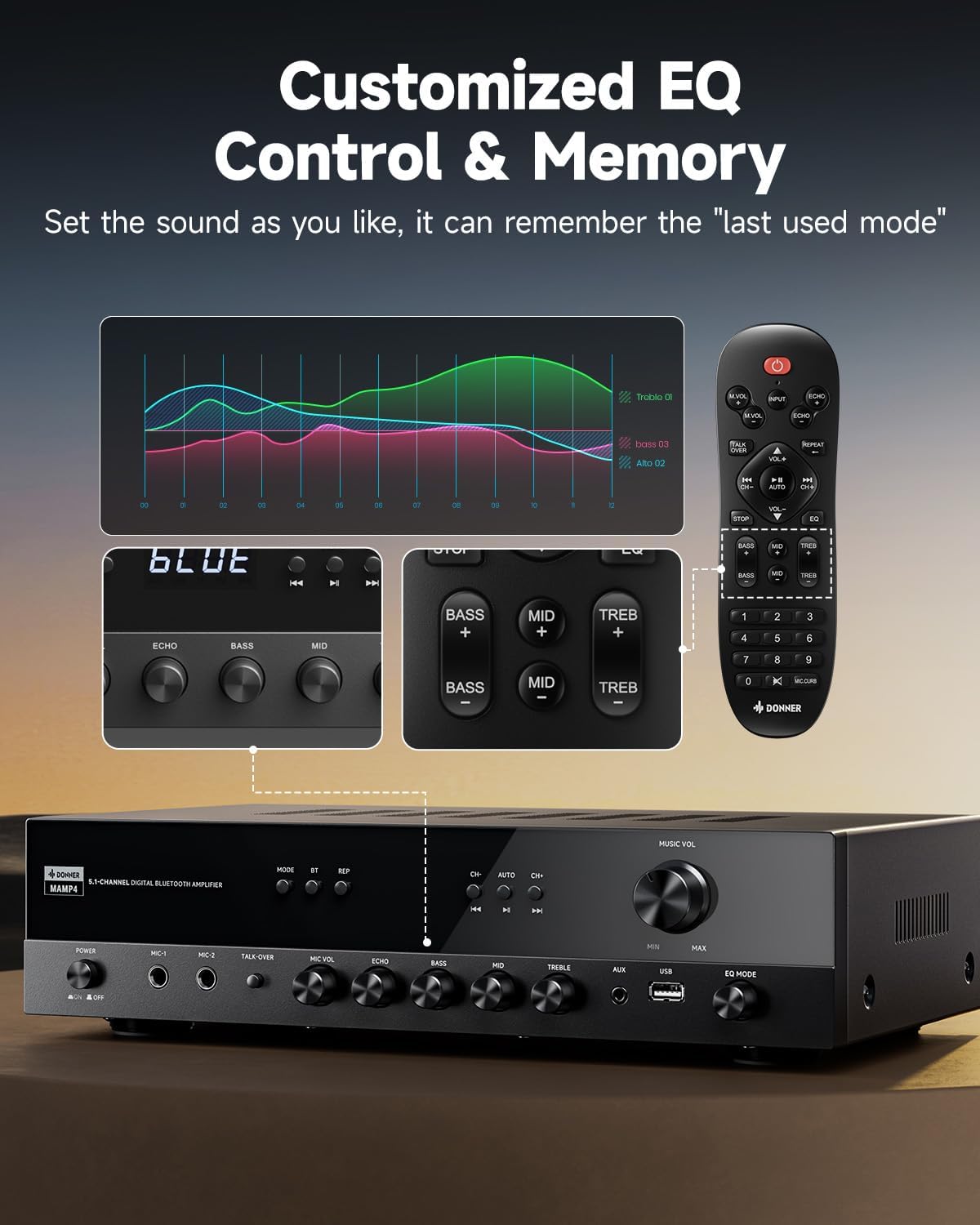
Image: Close-up of the Donner MAMP4 amplifier's front panel and remote control, illustrating the customizable EQ settings for bass, mid, and treble, and the memory function.
3. ການຈັບຄູ່ Bluetooth
Select 'Bluetooth' mode. On your device, search for 'DONNER MAMP4' and pair. Use the Play/Pause button or Prev/Next buttons on the remote to control playback.
4. ການດໍາເນີນງານວິທະຍຸ FM
In FM mode, you can quickly select your preferred FM frequency by entering the numbers directly using the remote control. Use the 'CH+/-' buttons for automatic channel search.

Image: The Donner MAMP4 amplifier with its remote control, demonstrating the ease of selecting FM frequencies by direct numerical input.
5. ໜ້າທີ່ຂອງໄມໂຄຣໂຟນ
ໄດ້ amplifier includes dual 1/4'' microphone jacks. Adjust microphone volume and echo effect using dedicated knobs. The 'Talk Over' function lowers background music for clearer voice output during events or speeches.
6. ການຄວບຄຸມໄລຍະໄກ
The upgraded remote control provides full functionality, including treble, midrange, bass, echo, and Talkover settings in any input mode.

Image: Comparison of the new and old style remote controls for the Donner amplifier, highlighting the expanded functionality of the upgraded remote for input selection, EQ, echo, and Talkover.
7. ວິດີໂອສະຫຼຸບຜະລິດຕະພັນ
Video: A product summary video for the Donner amplifier, showcasing its features and functionalities.
8. Donner 5.1 Channel Stereo Receiver Overview
ວີດີໂອ: ຢ່າງເປັນທາງການview video from DonnerDirect, detailing the features and benefits of the Donner 5.1 Channel Stereo Receiver.
ບໍາລຸງຮັກສາ
To ensure the longevity and optimal performance of your Donner MAMP4 amplifier, ປະຕິບັດຕາມຄໍາແນະນໍາການບໍາລຸງຮັກສາເຫຼົ່ານີ້:
- ທໍາຄວາມສະອາດ: ໃຊ້ຜ້າປຽກແຫ້ງເພື່ອເຮັດຄວາມສະອາດດ້ານນອກຂອງເຄື່ອງ. ຫຼີກເວັ້ນການເຮັດຄວາມສະອາດຂອງແຫຼວຫຼືວັດສະດຸຂັດ.
- ການລະບາຍອາກາດ: Ensure that all ventilation openings on the amplifier are clear and unobstructed to prevent overheating.
- ການເກັບຮັກສາ: If the unit will not be used for an extended period, unplug the power cord from the outlet.
- ຫມໍ້ໄຟຄວບຄຸມໄລຍະໄກ: Replace batteries in the remote control as needed. Dispose of used batteries properly according to local regulations.
ການແກ້ໄຂບັນຫາ
If you encounter issues with your Donner MAMP4 amplifier, ອ້າງເຖິງວິທີແກ້ໄຂທົ່ວໄປຕໍ່ໄປນີ້:
- ບໍ່ມີພະລັງງານ: ໃຫ້ແນ່ໃຈວ່າໄດ້ສຽບສາຍໄຟຢ່າງປອດໄພໃສ່ທັງສອງ amplifier and a working wall outlet. Check the power switch on the front panel.
- ບໍ່ມີສຽງ: Verify that the correct input source is selected. Check all speaker and audio source connections for proper seating and polarity. Adjust volume levels.
- Hissing Sound in Standby: ມAMP4 has optimized noise reduction with added relays. If a persistent hissing sound occurs, ensure all connections are secure and try unplugging the unit for a few minutes before reconnecting.
- ບັນຫາການຈັບຄູ່ Bluetooth: ຮັບປະກັນ amplifier is in Bluetooth mode and your device's Bluetooth is enabled and discoverable. Try restarting both devices.
- ການຮັບວິທະຍຸ FM ອ່ອນແອ: Ensure the FM antenna is properly connected and extended. Try repositioning the antenna for better signal.
- ໄມໂຄຣໂຟນບໍ່ເຮັດວຽກ: Ensure microphones are securely plugged into the correct jacks. Adjust 'MIC VOL' and 'ECHO' knobs.
For persistent issues, please contact Donner customer support or refer to qualified service personnel.
ຂໍ້ມູນຈໍາເພາະ
| ຄຸນສົມບັດ | ລາຍລະອຽດ |
|---|---|
| ຕົວແບບ | MAMP4 |
| ພະລັງງານອອກ (RMS) | L/R Speakers: 60W/4R; Surround & Center Speakers: 25W × 3 |
| ຊ່ອງ | 5.1 ຊ່ອງ |
| ລຸ້ນ Bluetooth | 5.3 |
| ຮອງຮັບ USB | ສູງສຸດ 64 GB |
| ການປ້ອນຂໍ້ມູນສຽງ | 1 RCA, 1 AC-3, 2 Mic-in, AUX IN, Optical, Coaxial |
| ຄວາມຖີ່ຂອງວິທະຍຸ FM | 76-108 MHz |
| ການຄວບຄຸມ EQ | ສຽງສູງ, ສຽງກາງ, ສຽງເບສ (ປັບໄດ້ເອງ) |
| ຄຸນນະສົມບັດພິເສດ | Talk Over function, Settings Memory, Low Noise Design |
| ຂະໜາດສິນຄ້າ | 9.76 x 14.96 x 3.86 ນິ້ວ |
| ນ້ໍາຫນັກລາຍການ | 13.2 ປອນ |
ການຮັບປະກັນ & ສະຫນັບສະຫນູນ
For warranty information, technical support, or any inquiries regarding your Donner MAMP4 amplifier, please contact Donner customer service.
- ຜູ້ຜະລິດ: ດອນເນີ
- ບໍລິການຫຼັງການຂາຍ E-mail: service@donnermusic.com
- ການຊ່ວຍເຫຼືອດ້ານວິຊາຊີບ: ອ້າງອີງການບໍລິການທັງໝົດໃຫ້ກັບພະນັກງານບໍລິການທີ່ມີຄຸນວຸດທິ.


