1. ບົດແນະນຳ
This manual provides essential information for the safe and efficient operation of your Anern FGI-DU4200 Dual Voltage Hybrid Solar Inverter. Please read this manual thoroughly before installation and use, and retain it for future reference. This inverter is designed to provide reliable power for various applications, integrating solar charging, AC utility charging, and inverter output functions.
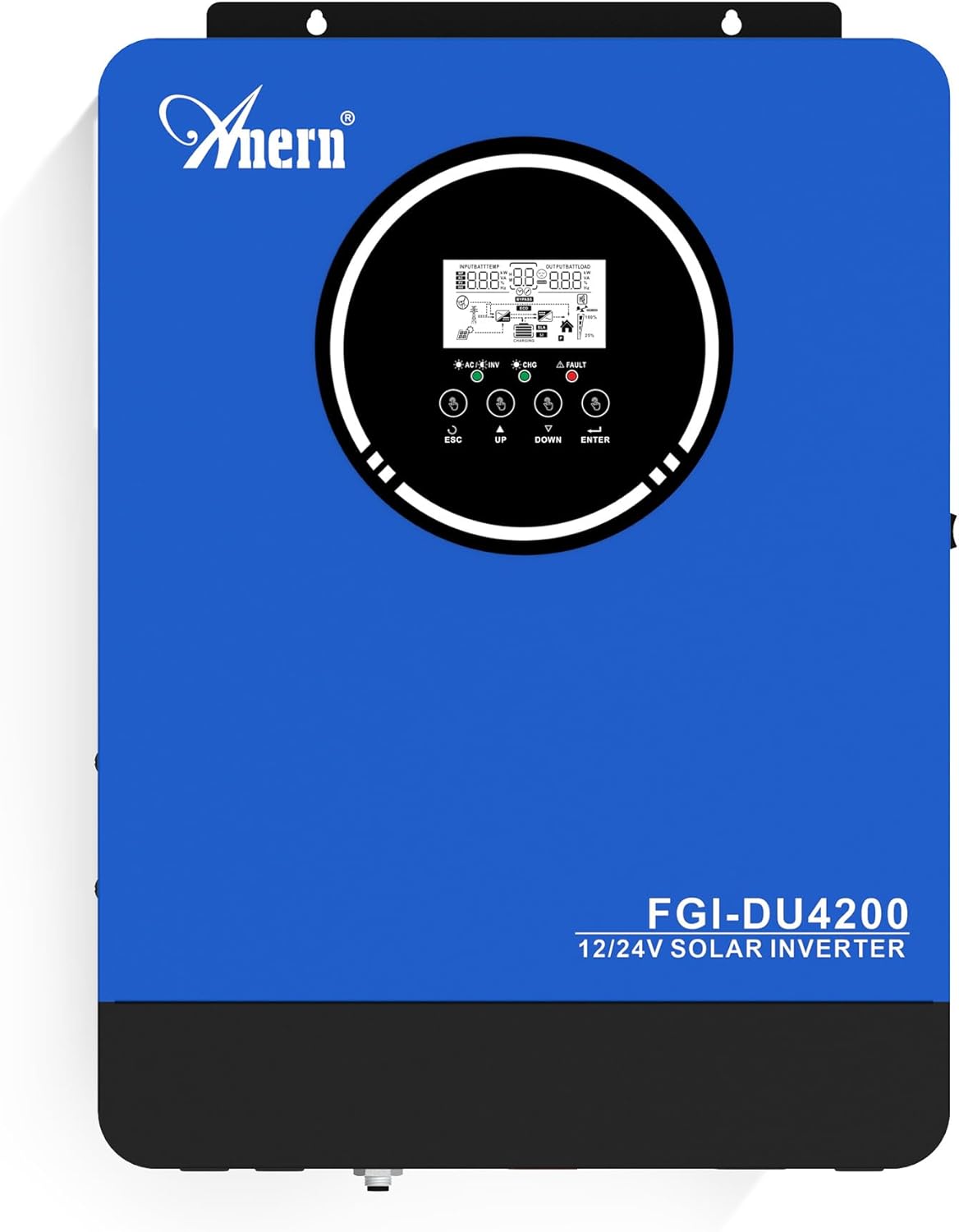
ຮູບທີ 1: Anern FGI-DU4200 ສອງລະດັບສຽງtage Hybrid Solar Inverter. This image shows the front panel of the inverter, featuring the display screen and control buttons.
2. ຄໍາແນະນໍາຄວາມປອດໄພ
Please observe the following safety precautions to prevent injury and damage to the inverter or connected equipment:
- ການຕິດຕັ້ງຕ້ອງໄດ້ປະຕິບັດໂດຍບຸກຄະລາກອນທີ່ມີຄຸນວຸດທິຕາມລະຫັດໄຟຟ້າທ້ອງຖິ່ນ.
- ຮັບປະກັນວ່າສາຍໄຟທັງໝົດມີຂະໜາດທີ່ຖືກຕ້ອງ ແລະ ເຊື່ອມຕໍ່ຢ່າງຖືກຕ້ອງ.
- ຢ່າຖອດເຄື່ອງແປງໄຟຟ້າອອກ. ບໍ່ມີຊິ້ນສ່ວນໃດໆທີ່ຜູ້ໃຊ້ສາມາດສ້ອມແປງໄດ້ພາຍໃນ.
- ເກັບຮັກສາອິນເວີເຕີໃຫ້ຫ່າງຈາກວັດສະດຸໄວໄຟ, ຄວາມຊຸ່ມຊື່ນ, ແລະ ແສງແດດໂດຍກົງ.
- ຮັບປະກັນການລະບາຍອາກາດທີ່ພຽງພໍຢູ່ອ້ອມຕົວ inverter ເພື່ອປ້ອງກັນຄວາມຮ້ອນເກີນ.
- ໃຫ້ຖອດສາຍໄຟທັງໝົດອອກ (ແສງຕາເວັນ, ແບັດເຕີຣີ, ສາທາລະນູປະໂພກ) ກ່ອນທີ່ຈະປະຕິບັດການບຳລຸງຮັກສາ ຫຼື ການເຊື່ອມຕໍ່ສາຍໄຟໃດໆສະເໝີ.
- ໃສ່ອຸປະກອນປ້ອງກັນສ່ວນບຸກຄົນທີ່ເຫມາະສົມ (PPE) ໃນລະຫວ່າງການຕິດຕັ້ງແລະບໍາລຸງຮັກສາ.
3. ຜະລິດຕະພັນເກີນview ແລະຄຸນສົມບັດ
The Anern FGI-DU4200 is a versatile hybrid solar inverter designed for both on-grid and off-grid applications. It features automatic dual-voltage operation and a 120A MPPT solar charge controller.
ຄຸນນະສົມບັດທີ່ສໍາຄັນ:
- Automatic Dual-Voltage ການດໍາເນີນງານ: Automatically recognizes 12VDC (2300W output) or 24VDC (4200W output) battery systems.
- High-Efficiency Pure Sine Wave Output: Provides stable 220-230VAC ±5% output (50Hz) with 90% efficiency.
- Integrated 120A MPPT Solar Charge Controller: Maximizes solar power harvesting.
- ໂໝດສາກຫຼາຍ: Solar, Solar and Utility, Solar Priority.
- ໂໝດຜົນອອກຫຼາຍຮູບແບບ: Solar Priority, Utility Priority, SBU (Solar-Battery-Utility) Mode.
- Seamless Transfer: Grid/generator transfer time less than 20ms for critical loads.
- ການປົກປ້ອງທີ່ສົມບູນແບບ: Overload, over-temperature, and short-circuit protection.
- ຄວາມເຂົ້າກັນໄດ້ຂອງຫມໍ້ໄຟ: Supports 12V/24V Lithium, Lead-Acid, and Gel batteries.
- Cold Start Capability: Ensures operation in extreme conditions.
- ການຕິດຕາມ Wi-Fi: Allows system operation control via mobile phone (requires optional Wi-Fi module).

ຮູບທີ 2: ເກີນview of key features including frequency range, waveform, charging currents, battery voltage, and protection mechanisms.

ຮູບທີ 3: Illustration of the inverter's dual voltage capability, supporting 4.2KW at 24V and 2.3KW at 12V battery systems.
4. ການຕິດຕັ້ງແລະການຕິດຕັ້ງ
4.1 ການຫຸ້ມຫໍ່ແລະການກວດກາ
ເມື່ອໄດ້ຮັບອິນເວີເຕີ, ໃຫ້ແກະກ່ອງມັນຢ່າງລະມັດລະວັງ ແລະ ກວດສອບຄວາມເສຍຫາຍຈາກການຂົນສົ່ງ. ຮັບປະກັນວ່າສ່ວນປະກອບທັງໝົດທີ່ລະບຸໄວ້ໃນລາຍການບັນຈຸແມ່ນມີຢູ່. ຖ້າພົບຄວາມເສຍຫາຍ ຫຼື ຊິ້ນສ່ວນທີ່ຂາດຫາຍໄປ, ໃຫ້ຕິດຕໍ່ຕົວແທນຈຳໜ່າຍຂອງທ່ານທັນທີ.
4.2 ການຕິດຕັ້ງ Inverter
Mount the inverter vertically on a sturdy wall or surface. Ensure there is sufficient clearance around the unit for proper ventilation (at least 20 cm on all sides). Avoid mounting in direct sunlight, near heat sources, or in areas with excessive dust or moisture.
4.3 ການເຊື່ອມຕໍ່ສາຍໄຟ
All wiring must comply with local electrical codes. Use appropriate wire gauges for all connections to prevent overheating and ensure efficient power transfer.
4.3.1 ການເຊື່ອມຕໍ່ຫມໍ້ໄຟ
The inverter supports both 12VDC and 24VDC battery systems. The inverter automatically detects the battery voltage. Ensure correct polarity when connecting batteries. For 12V systems, batteries are typically connected in parallel. For 24V systems, batteries are typically connected in series.

ຮູບທີ 4: Wiring diagram illustrating parallel connection for 12V battery systems (2300W output) and series connection for 24V battery systems (4200W output).

ຮູບທີ 5: The inverter is compatible with various battery types, including Gel, AGM, Flooded (FLD), Lithium (LI), and Sealed Lead-Acid (SLD) batteries.
4.3.2 ການເຊື່ອມຕໍ່ແຜງໂຊລາເຊວ
Connect your solar panels to the designated PV input terminals. Ensure the open circuit voltage (Voc) of your solar array does not exceed the inverter's maximum PV input voltage (500Vdc). Observe correct polarity.
4.3.3 AC Input Connection (Utility/Generator)
Connect the AC utility grid or a compatible generator to the AC input terminals. The inverter supports 220-230VAC input. Ensure proper grounding.
4.3.4 ການເຊື່ອມຕໍ່ຜົນຜະລິດ AC (ໂຫຼດ)
Connect your household or office loads to the AC output terminals. The inverter provides a pure sine wave output suitable for sensitive electronics. Do not exceed the rated output power of the inverter (2300W for 12VDC systems, 4200W for 24VDC systems).
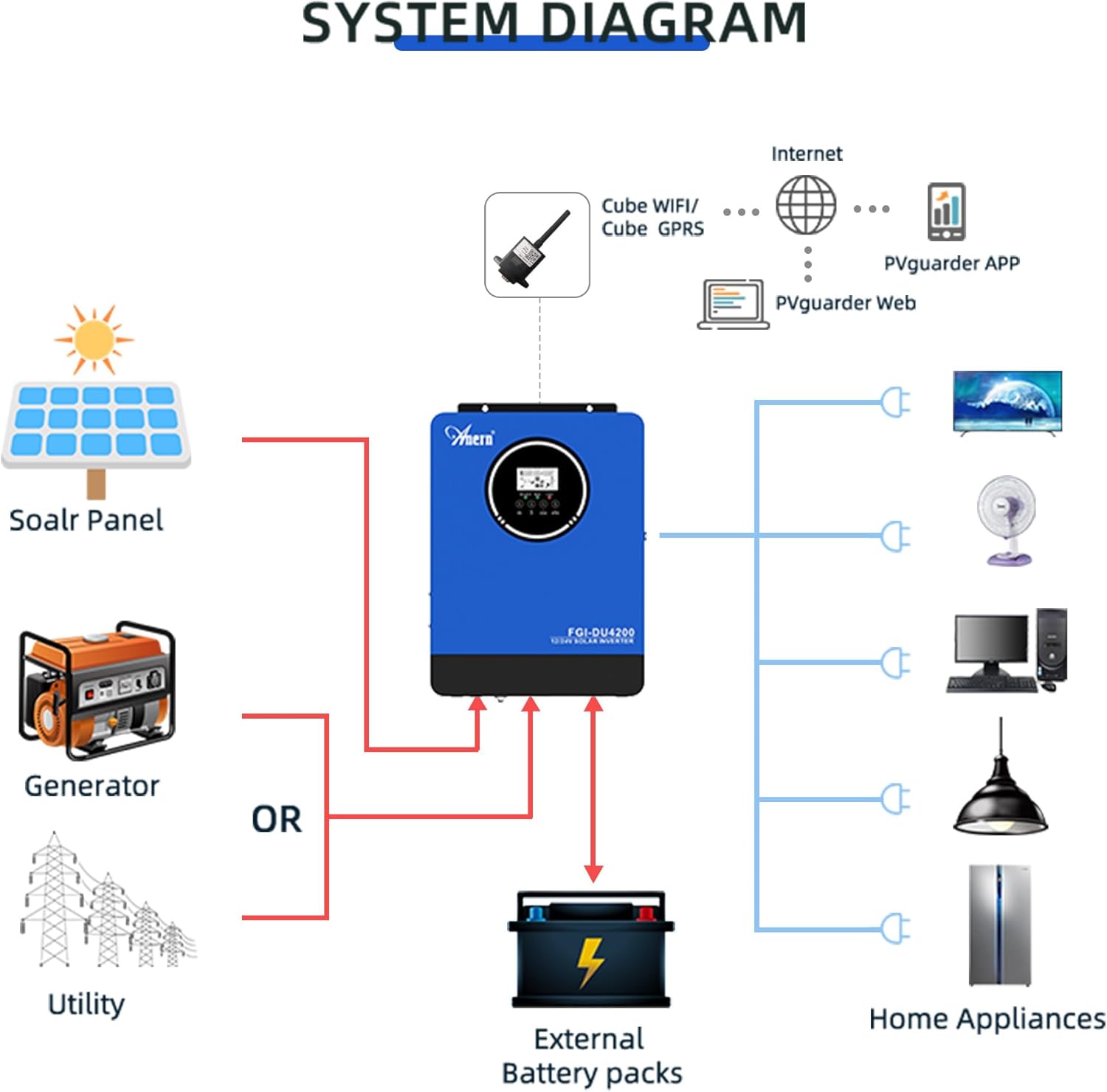
ຮູບທີ 6: Comprehensive system diagram showing connections for solar panels, generator/utility, external battery packs, and various home appliances.

ຮູບທີ 7: Example of an outdoor installation of the Anern FGI-DU4200 inverter, demonstrating its integration into a home solar power system.
5. ຄໍາແນະນໍາການດໍາເນີນງານ
5.1 ການເປີດ/ປິດ
After all connections are securely made, switch on the battery breaker first, then the solar array breaker, and finally the AC input breaker (if connected). Press the power button on the inverter to turn it on. To power off, reverse the sequence: turn off AC input, then solar, then battery, and finally the inverter power button.
5.2 ຈໍສະແດງຜົນ LCD ແລະປຸ່ມຄວບຄຸມ
The inverter features an LCD display that shows real-time operating status, input/output voltages, battery status, and error codes. Use the control buttons (ESC, UP, DOWN, ENTER) to navigate through menus and adjust settings.
5.3 ຮູບແບບການສາກໄຟ
The inverter offers four selectable charging modes:
- ຄວາມສຳຄັນຂອງແສງຕາເວັນ: Solar power charges the battery first. If solar is insufficient, utility power supplements.
- ບຸລິມະສິດດ້ານສາທາລະນູປະໂພກ: Utility power charges the battery first. Solar power supplements if utility is unavailable.
- ແສງຕາເວັນເທົ່ານັ້ນ: Only solar power charges the battery.
- ພະລັງງານແສງຕາເວັນ ແລະ ສາທາລະນູປະໂພກ: Both solar and utility power charge the battery simultaneously.
5.4 ໂຫມດຜົນຜະລິດ
The inverter offers three selectable output modes:
- ບຸລິມະສິດດ້ານສາທາລະນູປະໂພກ: Loads are primarily powered by utility. If utility fails, the inverter switches to battery power.
- ຄວາມສຳຄັນຂອງແສງຕາເວັນ: Loads are primarily powered by solar. If solar is insufficient, battery power is used. If both are insufficient, utility power is used (if connected).
- SBU (Solar-Battery-Utility) Mode: Loads are powered by solar first, then battery, and finally utility if both solar and battery are depleted or unavailable.
5.5 ການຕິດຕາມ Wi-Fi (ທາງເລືອກ)
If equipped with the optional Wi-Fi module, the inverter can be monitored and controlled via a mobile application. Connect the Wi-Fi module to the designated port on the inverter and follow the instructions provided with the module for setup.

ຮູບທີ 8: Diagram illustrating the connection of an optional Wi-Fi module for remote monitoring and control of the inverter system via a mobile application or web ການໂຕ້ຕອບ.
6. ບໍາລຸງຮັກສາ
ການບໍາລຸງຮັກສາເປັນປົກກະຕິຮັບປະກັນອາຍຸຍືນແລະການປະຕິບັດທີ່ດີທີ່ສຸດຂອງ inverter ຂອງທ່ານ.
- ທໍາຄວາມສະອາດ: ທຳຄວາມສະອາດພາຍນອກຂອງອິນເວີເຕີເປັນໄລຍະດ້ວຍຜ້າແຫ້ງ. ຮັບປະກັນວ່າຊ່ອງລະບາຍອາກາດບໍ່ມີຝຸ່ນ ແລະ ສິ່ງເສດເຫຼືອ.
- ການເຊື່ອມຕໍ່: Annually check all electrical connections for tightness and corrosion. Re-tighten if necessary.
- ການກວດກາຫມໍ້ໄຟ: ສຳລັບແບັດເຕີຣີກົດຕະກົ່ວ, ໃຫ້ກວດສອບລະດັບເອເລັກໂຕຣໄລຕ໌ ແລະ ສະພາບຂອງຂົ້ວຕໍ່ຕາມຄຳແນະນຳຂອງຜູ້ຜະລິດແບັດເຕີຣີ.
- ສະພາບແວດລ້ອມ: ໃຫ້ແນ່ໃຈວ່າສະພາບແວດລ້ອມການເຮັດວຽກຍັງຄົງຢູ່ໃນຂອບເຂດອຸນຫະພູມແລະຄວາມຊຸ່ມຊື່ນທີ່ກໍານົດ.
7. ການແກ້ໄຂບັນຫາ
ພາກນີ້ໃຫ້ວິທີແກ້ໄຂບັນຫາທົ່ວໄປ. ສຳລັບບັນຫາທີ່ບໍ່ໄດ້ລະບຸໄວ້ທີ່ນີ້, ໃຫ້ຕິດຕໍ່ຝ່າຍຊ່ວຍເຫຼືອດ້ານເຕັກນິກ.
| ບັນຫາ | ສາເຫດທີ່ເປັນໄປໄດ້ | ການແກ້ໄຂ |
|---|---|---|
| Inverter ບໍ່ເປີດ | ບໍ່ມີການເຊື່ອມຕໍ່ແບັດເຕີຣີ; ພະລັງງານແບັດເຕີຣີtagຕໍ່າເກີນໄປ; ບໍ່ໄດ້ກົດປຸ່ມເປີດປິດ. | ກວດສອບການເຊື່ອມຕໍ່ຫມໍ້ໄຟແລະ voltage; Charge battery; Press and hold power button. |
| ບໍ່ມີຜົນຜະລິດ AC | Overload; Short circuit; Battery low; Inverter fault. | Reduce load; Check for short circuits; Charge battery; Restart inverter. |
| ການສາກໄຟແສງອາທິດບໍ່ເຮັດວຽກ | Solar panels disconnected; Insufficient sunlight; PV voltage too low/high; MPPT fault. | ກວດສອບການເຊື່ອມຕໍ່ PV; ຮັບປະກັນແສງແດດພຽງພໍ; ກວດສອບປະລິມານ PVtage ພາຍໃນຂອບເຂດ. |
| ສະແດງລະຫັດຂໍ້ຜິດພາດ | Specific fault detected by the inverter. | Refer to the inverter's LCD display for the specific error code and consult the full manual (if available) or contact support for detailed interpretation and resolution. |
8. ຂໍ້ມູນຈໍາເພາະ
| ພາລາມິເຕີ | ມູນຄ່າ |
|---|---|
| ຕົວແບບ | FGI-DU4200 |
| Rated Power (12VDC) | 2300W |
| Rated Power (24VDC) | 4200W |
| ຫມໍ້ໄຟ Voltage | 12VDC / 24VDC (Auto-sensing) |
| ຜົນໄດ້ຮັບ Voltage | 220-230VAC ±5% (50Hz) |
| ຮູບແບບຄື້ນ | Sine Wave ບໍລິສຸດ |
| MPPT Solar Charge Controller Current | 120A |
| Max PV Array ເປີດວົງຈອນ Voltage | 500Vdc |
| AC Charging Current | 60A |
| ປະສິດທິພາບ | 90% |
| ເວລາໂອນ | <20ms |
| ຂະໜາດສິນຄ້າ | 16.9 x 8.27 x 21.6 ນິ້ວ |
| ນ້ໍາຫນັກລາຍການ | 19.14 ປອນ |
| ຜູ້ຜະລິດ | ອັນເນີ |
9. ການຮັບປະກັນແລະການສະຫນັບສະຫນູນ
Anern products are designed for reliability and performance. For warranty information, please refer to the warranty card included with your product or visit the official Anern website. For technical support, troubleshooting assistance, or spare parts, please contact Anern customer service through their official channels. Please have your model number (FGI-DU4200) and purchase date ready when contacting support.
ຂໍ້ມູນຕິດຕໍ່: Refer to your product packaging or the official Anern webເວັບໄຊສຳລັບລາຍລະອຽດການຕິດຕໍ່ທີ່ທັນສະໄໝທີ່ສຸດ.


