ແນະນຳ
ຂອບໃຈສໍາລັບການຊື້asing the Matbip Multi-Platform Wireless Gaming Controller. This controller is designed to enhance your gaming experience across various platforms, including Nintendo Switch, Android, iOS, and PC. It features advanced functions such as TURBO burst, macro programming, customizable RGB lighting, and HD vibration, providing precise control and immersive feedback. Please read this manual carefully before use to ensure proper operation and to fully utilize all features.
ສິນຄ້າເກີນview
Familiarize yourself with the various components and buttons of your Matbip controller.
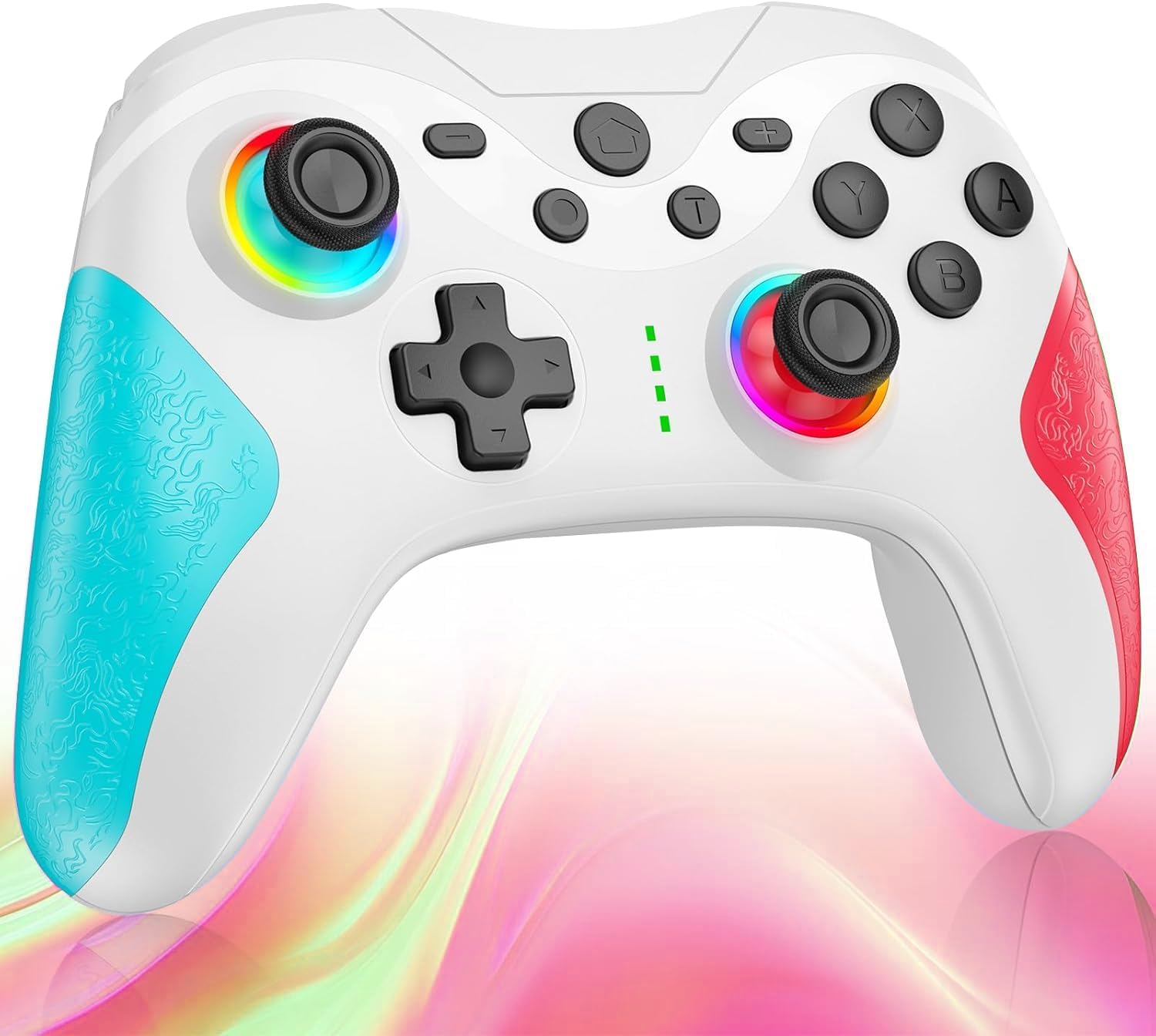
ຮູບພາບ: ດ້ານໜ້າ view of the Matbip Multi-Platform Wireless Gaming Controller. It features a white body with blue textured grips on the left and red textured grips on the right. The joysticks are illuminated with a rainbow RGB light. Standard buttons (A, B, X, Y), a D-pad, and central function buttons (Home, Plus, Minus, T) are visible.
ອົງປະກອບທີ່ສໍາຄັນ:
- Joysticks ຊ້າຍ/ຂວາ: For directional control, with customizable RGB lighting.
- D-Pad: ສໍາລັບການປ້ອນຂໍ້ມູນທິດທາງທີ່ຊັດເຈນ.
- ປຸ່ມປະຕິບັດການ (A/B/X/Y): ປຸ່ມປ້ອນຂໍ້ມູນຫຼິ້ນເກມມາດຕະຖານ.
- Shoulder Buttons (L/R/ZL/ZR): Top-mounted trigger and bumper buttons.
- Back Buttons: Additional programmable buttons on the rear for strategic gameplay.
- ປຸ່ມຫນ້າທໍາອິດ: ກັບໄປໜ້າຈໍຫຼັກຂອງລະບົບ.
- ປຸ່ມບວກ (+) / ລົບ (-): ປຸ່ມຟັງຊັນສະເພາະຂອງລະບົບ.
- T Button (TURBO): Activates and manages the TURBO burst function.
- ຊ່ອງສາກໄຟ: ພອດ USB-C ສໍາລັບການສາກໄຟ.
- ແສງຕົວຊີ້ວັດ: ສະແດງສະຖານະການເຊື່ອມຕໍ່ ແລະ ລະດັບແບັດເຕີຣີ.
ຕັ້ງຄ່າ
1. ການສາກໄຟ Controller
Before first use, fully charge the controller. Connect the provided USB-C cable to the controller's charging port and the other end to a USB power source (e.g., console, PC, or USB wall adapter). The indicator lights will show charging status and turn off when fully charged.
2. ການຈັບຄູ່ກັບອຸປະກອນ
The controller supports Bluetooth wireless connection across multiple platforms.
ສໍາລັບ Nintendo Switch:
- On the Switch HOME Menu, select ຜູ້ຄວບຄຸມ > ປ່ຽນ Grip/Order.
- ກົດຄ້າງໄວ້ ປຸ່ມຫນ້າທໍາອິດ on the Matbip controller for 3-5 seconds until the indicator lights flash rapidly.
- Once paired, the indicator light(s) on the controller will remain solid.
For Android/iOS Devices:
- ເປີດໃຊ້ Bluetooth ໃນອຸປະກອນ Android ຫຼື iOS ຂອງທ່ານ.
- ກົດຄ້າງໄວ້ ປຸ່ມຫນ້າທໍາອິດ on the Matbip controller for 3-5 seconds until the indicator lights flash rapidly.
- On your device's Bluetooth settings, select the controller (e.g., "Matbip Controller") from the list of available devices to pair.
ສໍາລັບ PC (Windows):
- Ensure your PC has Bluetooth enabled. Go to ການຕັ້ງຄ່າ > ອຸປະກອນ > Bluetooth ແລະອຸປະກອນອື່ນໆ.
- ກົດ ເພີ່ມ Bluetooth ຫຼືອຸປະກອນອື່ນໆ > Bluetooth.
- ກົດຄ້າງໄວ້ ປຸ່ມຫນ້າທໍາອິດ on the Matbip controller for 3-5 seconds until the indicator lights flash rapidly.
- Select the controller from the list of devices to pair.
ຄໍາແນະນໍາການດໍາເນີນງານ
ຟັງຊັນການລະເບີດຂອງ TURBO:
The TURBO function allows for rapid, automatic button presses, ideal for combat games.
- To activate TURBO: ກົດຄ້າງໄວ້ ປຸ່ມ T, then press the desired action button (e.g., A, B, X, Y, L, R, ZL, ZR). The button will now continuously activate when held down.
- ເພື່ອປັບຄວາມໄວ TURBO: ໃນຂະນະທີ່ຖື ປຸ່ມ T, ຍ້າຍ right joystick up or down to cycle through 3 different burst speeds.
- To deactivate TURBO: ກົດຄ້າງໄວ້ ປຸ່ມ T, then press the same action button again.
ຟັງຊັນ Macro:
Program a sequence of button presses to a single back button for complex actions.
- Specific instructions for macro programming will be detailed in the full manual. Generally, this involves entering a programming mode, pressing the sequence, and assigning it to a back button.
ໄຟ RGB ປັບແຕ່ງໄດ້:
The joysticks feature 9-color RGB lighting to enhance your gaming atmosphere.
- To change RGB color/mode: Press a specific button combination (e.g., T + Left Joystick click) to cycle through different colors and lighting effects.
HD Vibration Adjustment:
Adjust the intensity of the HD vibration feedback to your preference (4 levels).
- To adjust vibration: Press a specific button combination (e.g., T + D-Pad Up/Down) to cycle through the 4 vibration levels.
ເຊັນເຊີ Gyro:
The high-precision gyro sensor enables intuitive motion control in supported games.
- The gyro sensor is automatically active when connected to a compatible device (e.g., Nintendo Switch) and used in games that support motion controls.
Sleep Wake-up Function:
The controller supports waking up your Nintendo Switch console from sleep mode.
- When the Switch is in sleep mode, simply press the ປຸ່ມຫນ້າທໍາອິດ on the controller to wake it up and reconnect.
ບໍາລຸງຮັກສາ
Proper maintenance ensures the longevity and optimal performance of your controller.
- ທໍາຄວາມສະອາດ: ໃຊ້ຜ້າແຫ້ງອ່ອນໆເຊັດຕົວຄວບຄຸມ. ສໍາລັບຝຸ່ນ stubborn, ເລັກນ້ອຍ dampen ຜ້າທີ່ມີນ້ໍາ. ຢ່າໃຊ້ສານເຄມີທີ່ຮຸນແຮງຫຼືເຄື່ອງເຮັດຄວາມສະອາດຂັດ.
- ການເກັບຮັກສາ: ເກັບຮັກສາຕົວຄວບຄຸມໄວ້ໃນບ່ອນທີ່ເຢັນ, ແຫ້ງ ແລະ ຫ່າງຈາກແສງແດດໂດຍກົງ, ອຸນຫະພູມທີ່ຮຸນແຮງ ແລະ ຄວາມຊຸ່ມຊື່ນ.
- ການດູແລຫມໍ້ໄຟ: Avoid fully discharging the battery frequently. If storing for a long period, charge the controller to about 50% every few months.
- ຫຼີກລ້ຽງການຫຼຸດລົງ: ປົກປ້ອງຕົວຄວບຄຸມຈາກການຫຼຸດລົງແລະຜົນກະທົບ, ເຊິ່ງສາມາດທໍາລາຍອົງປະກອບພາຍໃນ.
ການແກ້ໄຂບັນຫາ
ຖ້າທ່ານພົບບັນຫາກັບຕົວຄວບຄຸມຂອງທ່ານ, ກະລຸນາອ້າງອີງເຖິງວິທີແກ້ໄຂທົ່ວໄປຕໍ່ໄປນີ້:
| ບັນຫາ | ການແກ້ໄຂທີ່ເປັນໄປໄດ້ |
|---|---|
| ຕົວຄວບຄຸມບໍ່ເປີດ. | ໃຫ້ແນ່ໃຈວ່າຕົວຄວບຄຸມໄດ້ສາກໄຟແລ້ວ. ເຊື່ອມຕໍ່ມັນກັບແຫຼ່ງພະລັງງານໂດຍໃຊ້ສາຍ USB-C. |
| Controller does not pair. | Ensure Bluetooth is enabled on your device. Make sure the controller is in pairing mode (flashing lights). Try restarting both the controller and the device. |
| Input lag or disconnection. | Ensure there are no strong wireless interferences nearby. Move closer to the device. Re-pair the controller. |
| ປຸ່ມ ຫຼື joysticks ບໍ່ຕອບສະໜອງ. | Try resetting the controller (refer to the full manual for reset instructions, usually a small pinhole button). Ensure no debris is obstructing the buttons. |
| ການສັ່ນສະເທືອນບໍ່ເຮັດວຽກ. | Check if vibration is enabled in the game or system settings. Adjust the vibration intensity on the controller. |
ຂໍ້ມູນຈໍາເພາະ
| ຄຸນສົມບັດ | ລາຍລະອຽດ |
|---|---|
| ຂະໜາດສິນຄ້າ | 10 x 15 x 6.5 cm |
| ນ້ຳໜັກ | 300 g |
| ການເຊື່ອມຕໍ່ | Bluetooth Wireless |
| ຄວາມເຂົ້າກັນໄດ້ | Nintendo Switch, Android, iOS, PC (Windows) |
| ຄຸນນະສົມບັດພິເສດ | TURBO Burst, Macro Function, 9-Color RGB Lighting, 4-Level HD Vibration, Gyro Sensor, Back Buttons, Sleep Wake-up |
| ASIN | B0FHWRK7CQ |
| ວັນທີປ່ອຍ | ວັນທີ 16 ກໍລະກົດ 2025 |
ການຮັບປະກັນແລະການສະຫນັບສະຫນູນ
Matbip is committed to providing high-quality products and customer satisfaction. This product comes with a standard manufacturer's warranty. For detailed warranty information, please refer to the documentation included with your purchase or contact Matbip customer support.
If you require further assistance, have questions, or encounter issues not covered in this manual, please contact our customer support team. A Japanese instruction manual is included with the product to ensure ease of use for first-time users.
ຂໍ້ມູນຕິດຕໍ່: Please refer to the packaging or the official Matbip webເວັບໄຊສໍາລັບລາຍລະອຽດຕິດຕໍ່ສະຫນັບສະຫນູນລູກຄ້າທີ່ທັນສະໄຫມທີ່ສຸດ.


