1. ບົດແນະນຳ
This manual provides essential information for the safe and effective operation of your ZENTALITY Mini Projector A10 PLUS. Please read this manual thoroughly before using the product and retain it for future reference.
ສິນຄ້າເກີນview
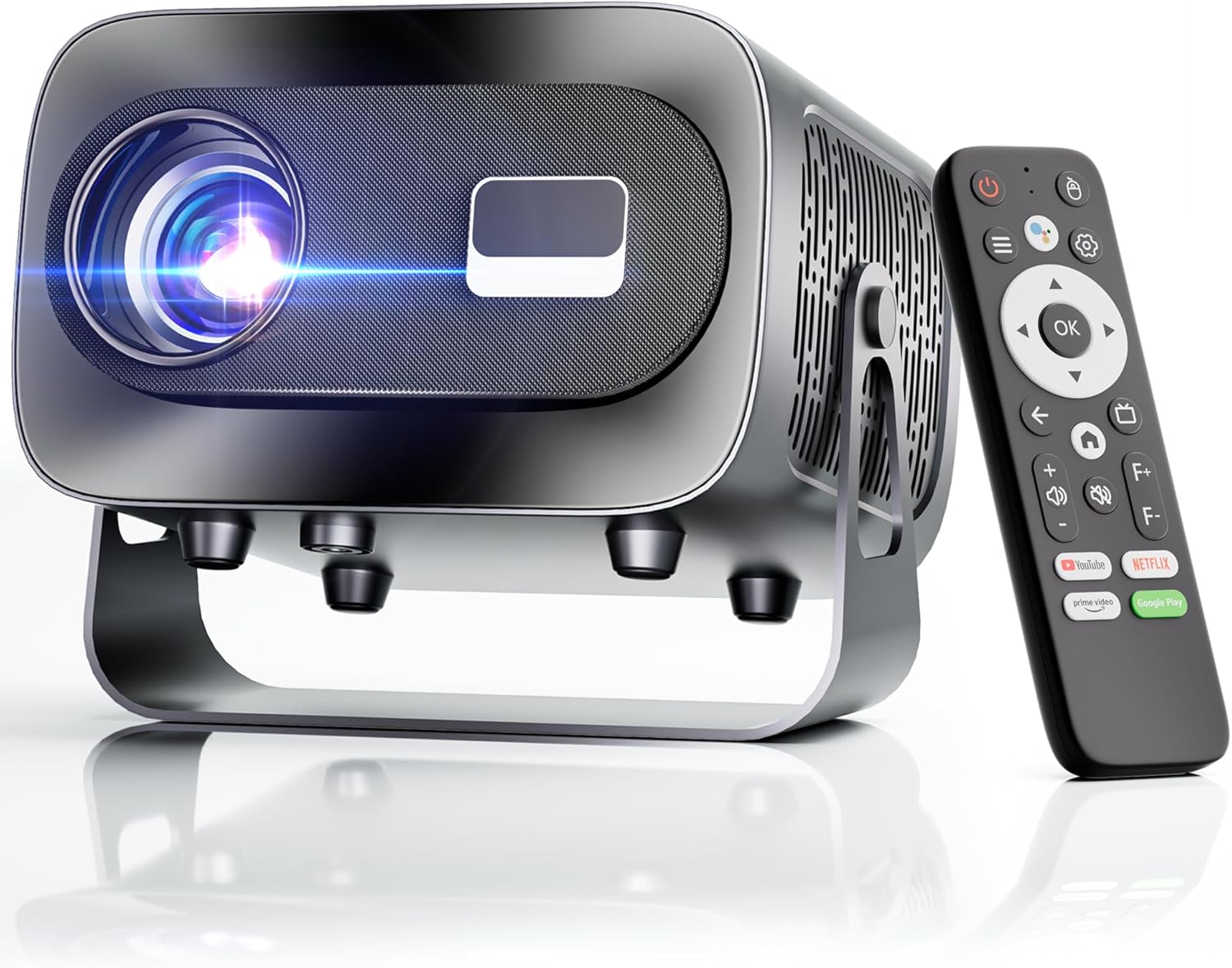
The ZENTALITY Mini Projector A10 PLUS is a smart projector featuring Android 13, designed for versatile home and outdoor entertainment. It supports 4K and 1080P HD content, offers electric focus, auto vertical keystone correction, and includes dual-band WiFi 6 and Bluetooth 5.1 connectivity. Its compact design and multiple input options make it suitable for various applications.
ແມ່ນຫຍັງຢູ່ໃນກ່ອງ
- ZENTALITY Mini Projector A10 PLUS
- ສາຍ HDMI
- Power Adapter
- ການຄວບຄຸມໄລຍະໄກ
- ຄູ່ມືຜູ້ໃຊ້ (ເອກະສານນີ້)
2. ຂໍ້ມູນຄວາມປອດໄພ
Please observe the following safety precautions to prevent damage to the projector and ensure user safety:
- ຢ່າອຸດຕັນຊ່ອງລະບາຍອາກາດ. ຮັບປະກັນໃຫ້ມີກະແສລົມໄຫຼວຽນພຽງພໍອ້ອມຮອບໂປເຈັກເຕີເພື່ອປ້ອງກັນຄວາມຮ້ອນເກີນໄປ.
- Avoid direct exposure to the projector lens light. The bright light can cause eye strain or damage.
- Use only the provided power adapter. Using an incompatible adapter may cause fire, electric shock, or damage.
- Keep the projector away from water or other liquids. Do not operate in damp ສະພາບແວດລ້ອມ.
- ຢ່າພະຍາຍາມຖອດປະກອບ ຫຼືສ້ອມແປງໂປເຈັກເຕີດ້ວຍຕົວເອງ. ອ້າງອີງການບໍລິການທັງໝົດໃຫ້ກັບບຸກຄະລາກອນທີ່ມີຄຸນວຸດທິ.
- ວາງໂປເຈັກເຕີຢູ່ເທິງພື້ນຜິວທີ່ມີລະດັບຄວາມຫມັ້ນຄົງເພື່ອປ້ອງກັນບໍ່ໃຫ້ມັນຫຼຸດລົງ.
- ຮັກສາໃຫ້ໄກຈາກເດັກນ້ອຍ.
3. ອົງປະກອບຜະລິດຕະພັນ ແລະ ພອດ
ເຮັດຄວາມຄຸ້ນເຄີຍກັບຄຸນສົມບັດທາງກາຍະພາບຂອງໂປເຈັກເຕີ ແລະຕົວເລືອກການເຊື່ອມຕໍ່.

ພອດທີ່ສາມາດໃຊ້ໄດ້:
- USB (x2): For connecting USB drives, external storage, or other USB-compatible devices.
- HDMI: For connecting devices such as laptops, gaming consoles, or TV sticks.
- ສຽງອອກ (ແຈັກ 3.5 ມມ): ສໍາລັບການເຊື່ອມຕໍ່ລໍາໂພງພາຍນອກຫຼືຫູຟັງ.
- ການປ້ອນຂໍ້ມູນພະລັງງານ: ສໍາລັບການເຊື່ອມຕໍ່ອະແດບເຕີພະລັງງານ.
4. ການຕິດຕັ້ງເບື້ອງຕົ້ນ
4.1 ການເຊື່ອມຕໍ່ພະລັງງານ
- ເຊື່ອມຕໍ່ອະແດບເຕີໄຟກັບຜອດປ້ອນຂໍ້ມູນພະລັງງານຂອງໂປເຈັກເຕີ.
- ສຽບອະແດບເຕີໄຟໃສ່ກັບປລັກສຽບໃສ່ຝາ.
- ກົດປຸ່ມເປີດປິດຢູ່ໂປເຈັກເຕີ ຫຼືຣີໂໝດຄວບຄຸມເພື່ອເປີດມັນ.
4.2 ຈັບຄູ່ຄວບຄຸມໄລຍະໄກ
Important: The remote control must be paired via Bluetooth before it can operate smoothly within 1-3 meters.
- ກວດໃຫ້ແນ່ໃຈວ່າໂປເຈັກເຕີເປີດຢູ່.
- Navigate to the projector's Bluetooth settings (usually found in the 'Settings' menu).
- Select 'Pair new device' or similar option.
- On the remote control, press and hold the designated pairing button (refer to the remote's specific instructions if available, often a combination of 'OK' and 'Volume Down' or a dedicated Bluetooth button).
- Once the remote appears in the projector's Bluetooth device list, select it to complete pairing.

4.3 ການຈັດວາງ ແລະ ການປັບໜ້າຈໍ
The projector offers automatic and electric adjustments for optimal image clarity and alignment.
- ໂຟກັສໄຟຟ້າ: The projector features electric focus for instant clarity. Use the 'F+' and 'F-' buttons on the remote control to fine-tune the image sharpness.
- ການແກ້ໄຂ Keystone ຕັ້ງອັດຕະໂນມັດ: The projector automatically corrects vertical image distortion up to ±15°. This ensures a rectangular image even if the projector is not perfectly perpendicular to the screen.
- ຟັງຊັນຊູມ: Adjust the image size from 50% to 100% without moving the projector. This is useful for fitting the projection to your screen size.


5. ຄໍາແນະນໍາການດໍາເນີນງານ
5.1 Android 13 Interface and App Access
The projector runs on Android 13, providing access to a wide range of streaming applications.
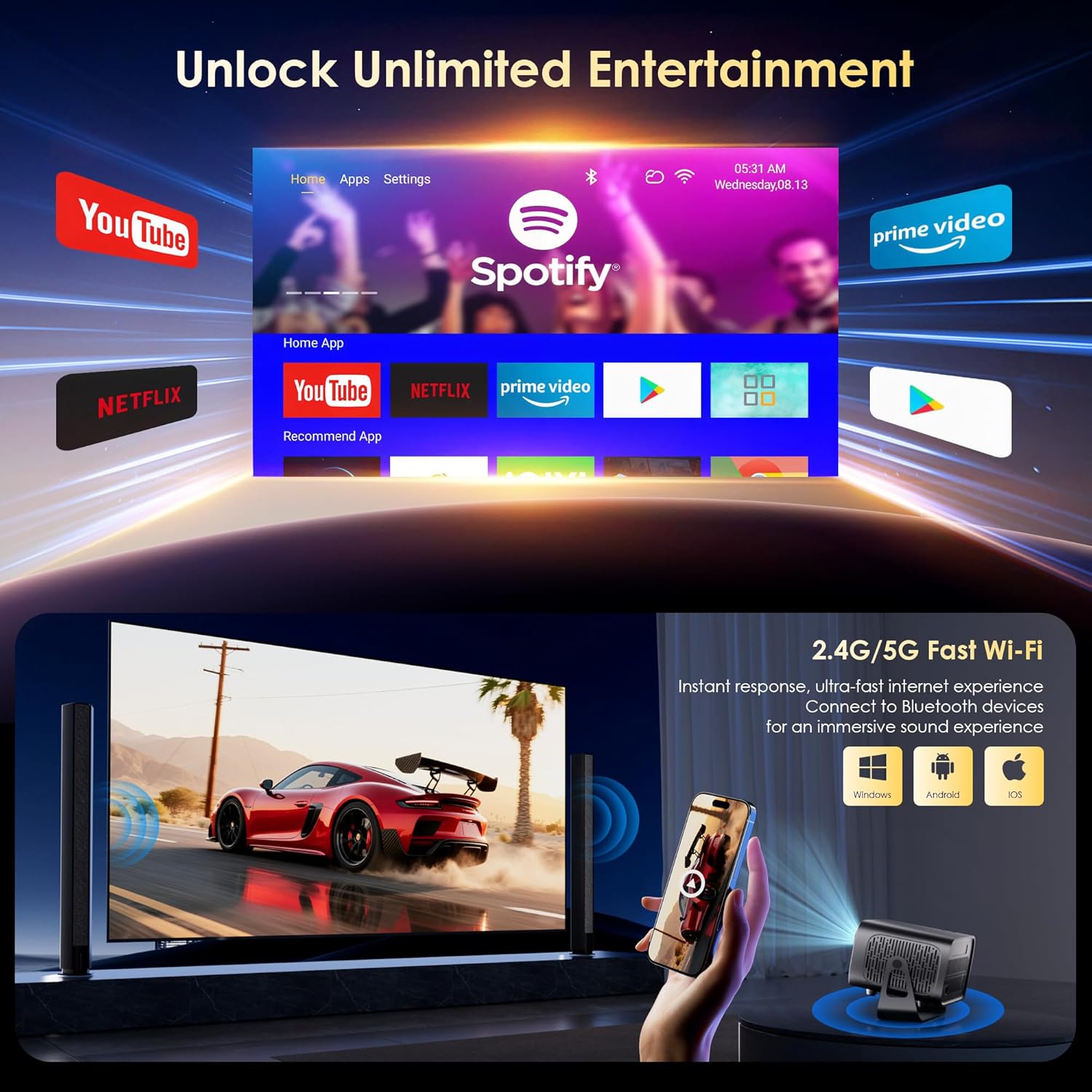
- Upon startup, the home screen will display pre-installed applications like Netflix, Prime Video, and YouTube.
- Navigate using the remote control's directional pad and 'OK' button.
- Access the built-in app store (e.g., Google Play Store) to download additional applications.
- Use the voice assistant feature on the remote control for quick app launching or content search.

5.2 ການເຊື່ອມຕໍ່ WiFi
The projector supports dual-band 5G/2.4G WiFi 6 for stable internet access and screen mirroring.
- Go to 'Settings' on the home screen.
- ເລືອກ 'ເຄືອຂ່າຍ ແລະອິນເຕີເນັດ'.
- ເປີດ Wi-Fi ແລະເລືອກເຄືອຂ່າຍທີ່ທ່ານຕ້ອງການຈາກລາຍຊື່.
- ໃສ່ລະຫັດຜ່ານຖ້າຖືກຖາມ ແລະ ເຊື່ອມຕໍ່.
Note: WiFi is required for the first setup or online apps. If you prefer not to connect to WiFi, you can use the projector offline by connecting external devices via the included HDMI cable or the USB port.

5.3 ການເຊື່ອມຕໍ່ Bluetooth
The projector features Bluetooth 5.1 for audio streaming.
- Go to 'Settings' on the home screen.
- Select 'Connected Devices' or 'Bluetooth'.
- ເປີດ Bluetooth ແລະຊອກຫາອຸປະກອນທີ່ມີຢູ່.
- Select your Bluetooth speaker, headphones, or soundbar from the list to pair.
Note: Bluetooth supports audio output only, not video transmission.
5.4 ການເຊື່ອມຕໍ່ອຸປະກອນພາຍນອກ
The projector supports various external devices via its HDMI and USB ports.
- HDMI: Connect your laptop, gaming console, or TV stick using an HDMI cable. The projector will automatically detect the input or you may need to select the HDMI source from the input menu.
- USB: ໃສ່ໄດຣຟ໌ USB ເພື່ອຫຼິ້ນສື່ files directly. The projector's media player will typically launch automatically or can be accessed from the home screen.
5.5 Projection Modes
The projector can be used in various orientations:
- ການຄາດຄະເນເດັສທັອບ: ວາງໂປເຈັກເຕີໃສ່ພື້ນຮາບພຽງຢູ່ທາງໜ້າຂອງໜ້າຈໍ.
- Ceiling Projection: Mount the projector upside down on the ceiling. Adjust the projection settings in the menu to flip the image.
- ການຕິດຕັ້ງ Tripod: Use the 1/4'' screw hole at the bottom to mount the projector on a tripod for flexible positioning.

6. ບໍາລຸງຮັກສາ
6.1 ການທໍາຄວາມສະອາດ
- ເລນ: ໃຊ້ຜ້າທີ່ອ່ອນນຸ່ມ, ບໍ່ມີເສັ້ນດ່າງທີ່ອອກແບບມາໂດຍສະເພາະສໍາລັບເລນ optical. ຫ້າມໃຊ້ເຄື່ອງຊັກຜ້າ ຫຼືຜ້າເຊັດຕົວ.
- ພາຍນອກ: ເຊັດດ້ານນອກຂອງໂປເຈັກເຕີດ້ວຍຜ້າອ່ອນ, ແຫ້ງ. ສໍາລັບຝຸ່ນ stubborn, a ເລັກນ້ອຍ damp ຜ້າສາມາດນໍາໃຊ້ໄດ້, ຕິດຕາມດ້ວຍເຊັດແຫ້ງ.
- ການເປີດລະບາຍອາກາດ: Periodically check and gently clean the ventilation openings to ensure they are free from dust and debris. Use a soft brush or compressed air.
6.2 ລະບົບເຮັດຄວາມເຢັນ
The projector features an advanced dual-fan cooling system designed for low noise and efficient heat dissipation. To ensure its longevity and stable performance:
- Always ensure the projector has adequate space around its ventilation openings.
- Avoid placing the projector on soft surfaces (e.g., blankets, carpets) that might block airflow.
- Operating the projector in extremely hot or humid environments may affect its performance and lifespan.
7. ການແກ້ໄຂບັນຫາ
ຖ້າເຈົ້າພົບບັນຫາກັບໂປເຈັກເຕີຂອງເຈົ້າ, ໃຫ້ອ້າງອີງເຖິງບັນຫາ ແລະວິທີແກ້ໄຂບັນຫາທົ່ວໄປຕໍ່ໄປນີ້:
| ບັນຫາ | ສາເຫດທີ່ເປັນໄປໄດ້ | ການແກ້ໄຂ |
|---|---|---|
| No power/Projector won't turn on | ສາຍໄຟບໍ່ໄດ້ເຊື່ອມຕໍ່; ປລັກສຽບໄຟມີບັນຫາ | ກວດສອບການເຊື່ອມຕໍ່ສາຍໄຟ; ລອງຮ້ານອື່ນ |
| No image/Blank screen | Incorrect input source; Device not connected properly | Select correct input source (HDMI, USB); Reconnect external device |
| Image blurry/Out of focus | ໂຟກັສບໍ່ໄດ້ປັບ | Use the 'F+' and 'F-' buttons on the remote for electric focus adjustment |
| Image distorted/Trapezoid shape | Keystone not corrected | The projector has auto vertical keystone correction. Ensure it's on or manually adjust if needed. |
| ການຄວບຄຸມໄລຍະໄກບໍ່ເຮັດວຽກ | Not paired via Bluetooth; Low battery | Pair the remote control via Bluetooth (Section 4.2); Replace remote batteries |
| ບໍ່ມີສຽງ | Volume too low; Incorrect audio output; Bluetooth not connected | Increase volume; Check audio output settings; Ensure Bluetooth speaker is paired |
| ບັນຫາການເຊື່ອມຕໍ່ WiFi | Incorrect password; Router issues; Out of range | Verify WiFi password; Restart router; Move projector closer to router |
8. ຂໍ້ມູນຈໍາເພາະ
Detailed technical specifications for the ZENTALITY Mini Projector A10 PLUS:
- ຍີ່ຫໍ້: ZENTALITY
- ໝາຍເລກຕົວແບບ: A10 ບວກ
- ນ້ໍາຫນັກລາຍການ: 3.1 ປອນ
- ຂະໜາດຜະລິດຕະພັນ: 7.4 x 6.22 x 4.8 ນິ້ວ
- ລະບົບປະຕິບັດການ: Android 13
- ຄວາມລະອຽດການສະແດງ: 1920 x 1080 (Native 1080P Full HD)
- ຮອງຮັບ 4K: ແມ່ນແລ້ວ
- ຄວາມສະຫວ່າງ: 350 ANSI Lumens
- ອັດຕາສ່ວນກົງກັນຂ້າມ: 10,000:1
- ເຕັກໂນໂລຍີການເຊື່ອມຕໍ່: 3.5mm Jack, Bluetooth 5.1, HDMI, USB (x2), Wi-Fi 6 (2.4G/5G)
- ຄຸນນະສົມບັດພິເສດ: Built-In Media Player, Built-In Speaker, Electric Focus, Portable, Wi-Fi Ready, Auto Vertical Keystone Correction
- ການນໍາໃຊ້ທີ່ແນະນໍາ: ທຸລະກິດ, ການສຶກສາ, ເກມ, ໂຮງໜັງໃນບ້ານ
- Lamp ອາຍຸການ: ສູງສຸດ 100,000 ຊົ່ວໂມງ

9. ການຮັບປະກັນແລະການສະຫນັບສະຫນູນ
ZENTALITY is committed to providing quality products and customer satisfaction.
- ການຮັບປະກັນຄຸນນະພາບ: 360-Day Quality Guarantee.
- ຜົນຕອບແທນ: 180-Day Free Returns.
- ສະຫນັບສະຫນູນດ້ານວິຊາການ: ສະຫນັບສະຫນູນດ້ານວິຊາການຕະຫຼອດຊີວິດ.
- ບໍລິການລູກຄ້າ: 24/7 Fast Customer Service.
For support inquiries, please refer to the contact information provided on the ZENTALITY official webເວັບໄຊ ຫຼືເວທີການຊື້ຂອງທ່ານ.


