1. ຄໍາແນະນໍາຄວາມປອດໄພທີ່ສໍາຄັນ
ກະລຸນາອ່ານຄໍາແນະນໍາທັງໝົດຢ່າງລະອຽດກ່ອນທີ່ຈະນໍາໃຊ້ເຄື່ອງໃຊ້ໄຟຟ້ານີ້. ເກັບຄູ່ມືນີ້ໄວ້ເພື່ອອ້າງອີງໃນອະນາຄົດ.
- ຮັບປະກັນ voltage ທີ່ລະບຸໄວ້ໃນປ້າຍການຈັດອັນດັບກົງກັບແຮງດັນໄຟຟ້າຫຼັກຂອງທ່ານtage.
- ຢ່າເອົາພັດລົມ, ປລັກສຽບ ຫຼືສາຍໄຟໃສ່ໃນນໍ້າ ຫຼືຂອງແຫຼວອື່ນໆ.
- ຖອດພັດລົມອອກຈາກເຕົ້າສຽບໃນເວລາທີ່ບໍ່ໄດ້ໃຊ້, ກ່ອນທີ່ຈະເຮັດຄວາມສະອາດ, ຫຼືກ່ອນການເຄື່ອນຍ້າຍ.
- Do not operate the fan with a damaged cord or plug. Contact authorized service personnel for repair.
- ຮັກສານິ້ວມື ແລະສິ່ງຂອງອື່ນໆໃຫ້ຫ່າງຈາກໃບພັດລົມ ແລະຊ່ອງເປີດ.
- Do not use the fan near windows, in bathrooms, or in wet environments.
- ເຄື່ອງໃຊ້ນີ້ບໍ່ໄດ້ມີຈຸດປະສົງເພື່ອໃຊ້ໂດຍບຸກຄົນ (ລວມທັງເດັກນ້ອຍ) ທີ່ມີຄວາມສາມາດທາງຮ່າງກາຍ, ຄວາມຮູ້ສຶກ, ຫຼືຈິດໃຈທີ່ຫຼຸດລົງ, ຫຼືຂາດປະສົບການ ແລະຄວາມຮູ້, ເວັ້ນເສຍແຕ່ວ່າພວກເຂົາໄດ້ຮັບການຊີ້ນໍາ ຫຼືຄໍາແນະນໍາກ່ຽວກັບການໃຊ້ເຄື່ອງໃຊ້ໂດຍບຸກຄົນທີ່ຮັບຜິດຊອບຄວາມປອດໄພຂອງເຂົາເຈົ້າ. .
- ເດັກນ້ອຍຄວນໄດ້ຮັບການເບິ່ງແຍງເພື່ອຮັບປະກັນວ່າພວກເຂົາບໍ່ໄດ້ຫຼີ້ນກັບເຄື່ອງໃຊ້.
2. ຜະລິດຕະພັນເກີນview
The Mistral MFD4389DRW is a 43-inch DC Turbo Tower Fan designed for efficient air circulation. It features a DC brushless motor, 12 speed settings, and multiple operating modes. Control options include a full touch screen, remote control, and Wi-Fi with online voice control capabilities. The fan also offers a unique height conversion feature and 60-degree left-right oscillation.

ຮູບ 2.1: ດ້ານຫນ້າ view of the Mistral MFD4389DRW DC Turbo Tower Fan, showcasing its sleek design and touch control panel.

ຮູບ 2.2: ຂ້າງ view of the Mistral MFD4389DRW DC Turbo Tower Fan, highlighting its slim profile.

ຮູບ 2.3: ກັບຄືນໄປບ່ອນ view of the Mistral MFD4389DRW DC Turbo Tower Fan, showing the air intake grille.
3. ເນື້ອໃນຊຸດ
ກວດສອບວ່າອົງປະກອບທັງຫມົດແມ່ນມີຢູ່ໃນການຫຸ້ມຫໍ່:
- Mistral MFD4389DRW DC Turbo Tower Fan Unit
- ການຄວບຄຸມໄລຍະໄກ
- ຄູ່ມືຜູ້ໃຊ້ (ເອກະສານນີ້)
- Base components (if not pre-assembled)
- Height extension component (for convertible height models)
4. ສະພາ
The Mistral MFD4389DRW fan features simple assembly. Typically, this involves attaching the base to the main fan unit. For models with height conversion, an additional extension piece may need to be secured.
- ເອົາສ່ວນປະກອບທັງຫມົດອອກຈາກການຫຸ້ມຫໍ່ຢ່າງລະມັດລະວັງ.
- Place the main fan unit upside down on a soft, flat surface to avoid scratching.
- ຈັດຕຳແໜ່ງຖານໃຫ້ກົງກັບດ້ານລຸ່ມຂອງເຄື່ອງພັດລົມ. ໃຫ້ແນ່ໃຈວ່າສາຍໄຟຜ່ານຊ່ອງເປີດທີ່ກຳນົດໄວ້ໃນຖານ.
- Secure the base to the fan unit using the provided screws (if applicable).
- For height conversion, insert the extension component between the base and the main unit, ensuring it clicks securely into place or is fastened as per instructions.
- Place the fan upright on a stable, level surface.
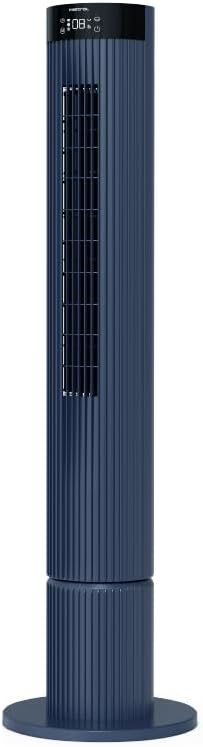
Figure 4.1: The fan demonstrating its convertible height feature, allowing adjustment between two different heights.
5. ການຕິດຕັ້ງແລະການນໍາໃຊ້ເບື້ອງຕົ້ນ
After assembly, position the fan in your desired location. Ensure it is on a stable, flat surface and away from curtains or objects that could obstruct airflow.
- Plug the power cord into a suitable electrical outlet (220-240V~, 50-60Hz).
- The fan will enter standby mode. The touch screen display may illuminate briefly.
- To power on, touch the power icon on the control panel or press the power button on the remote control.
6. ຄໍາແນະນໍາການດໍາເນີນງານ
The fan can be operated via the full touch screen control panel on the unit or the included remote control.
6.1 ການທໍາງານຂອງກະດານຄວບຄຸມ
The touch screen control panel provides access to all fan functions:
- ປຸ່ມເປີດປິດ: ເປີດ ຫຼື ປິດພັດລົມ.
- ການປັບຄວາມໄວ: Cycles through 12 fan speeds.
- ການເລືອກໂໝດ: Switches between Turbo, One-key Cycle, and Baby modes.
- ການສັ່ນ: Activates or deactivates 60-degree left-right oscillation.
- ໂມງຈັບເວລາ: Sets the pre-set On/Off timer for up to 12 hours.
- ຕົວຊີ້ວັດ Wi-Fi: ສະແດງສະຖານະການເຊື່ອມຕໍ່ Wi-Fi.
6.2 ການຄວບຄຸມໄລຍະໄກ
The remote control duplicates all functions available on the touch screen panel for convenient operation from a distance.
- ໃຫ້ແນ່ໃຈວ່າການຄວບຄຸມໄລຍະໄກມີຫມໍ້ໄຟເຮັດວຽກ.
- Point the remote control towards the fan's control panel for optimal signal reception.
6.3 ຮູບແບບການໃຊ້ງານ
- ໂໝດ Turbo: ສະຫນອງການໄຫຼຂອງອາກາດສູງສຸດສໍາລັບການເຮັດຄວາມເຢັນຢ່າງໄວວາ.
- One-key Cycle Mode: Automatically cycles through different fan speeds to simulate natural breeze.
- ແບບເດັກນ້ອຍ: Operates at a gentle, quiet speed suitable for nurseries or light sleeping.
7. Wi-Fi and Online Voice Control
The Mistral MFD4389DRW fan can be connected to your home Wi-Fi network for smart control via a mobile application and online voice commands.
7.1 ການເຊື່ອມຕໍ່ Wi-Fi
- Download the official Mistral smart home application from your device's app store.
- ລົງທະບຽນຫຼືເຂົ້າສູ່ລະບົບບັນຊີຂອງທ່ານພາຍໃນ app ໄດ້.
- ໃຫ້ແນ່ໃຈວ່າອຸປະກອນມືຖືຂອງທ່ານເຊື່ອມຕໍ່ກັບເຄືອຂ່າຍ Wi-Fi 2.4GHz.
- Follow the in-app instructions to add a new device. This typically involves putting the fan into pairing mode (refer to the app or fan display for specific instructions, often by holding a Wi-Fi button).
- Once connected, the Wi-Fi indicator on the fan's control panel will illuminate steadily.
7.2 Online Voice Control
After successful Wi-Fi connection, you can link your fan to compatible smart home voice assistants (e.g., Google Assistant, Amazon Alexa) through the Mistral app settings.
- Open the Mistral app and navigate to the 'Integrations' or 'Voice Control' section.
- Select your preferred voice assistant and follow the prompts to link your Mistral account.
- ເມື່ອເຊື່ອມຕໍ່ແລ້ວ, ທ່ານສາມາດໃຊ້ຄຳສັ່ງສຽງໄດ້ເຊັ່ນ:
- "Turn on the fan."
- "Set fan speed to 5."
- "Turn off oscillation."
- "Change fan mode to Baby."
8. ບໍາລຸງຮັກສາ
ການເຮັດຄວາມສະອາດປົກກະຕິຈະຊ່ວຍຮັກສາປະສິດທິພາບຂອງພັດລົມແລະຍືດອາຍຸຂອງມັນ.
8.1 ການທໍາຄວາມສະອາດ
- ຖອດພັດລົມອອກຈາກປລັກສຽບໄຟກ່ອນທຳຄວາມສະອາດທຸກຄັ້ງ.
- ໃຊ້ອ່ອນ, ງamp ຜ້າເຊັດຜິວດ້ານນອກຂອງພັດລົມ. ຢ່າໃຊ້ເຄື່ອງເຮັດຄວາມສະອາດຂັດຫຼືສານລະລາຍ.
- ໃຊ້ເຄື່ອງດູດຝຸ່ນທີ່ມີແປງຕິດຢູ່ເພື່ອກຳຈັດຝຸ່ນອອກຈາກທໍ່ລະບາຍອາກາດເຂົ້າ ແລະ ທໍ່ລະບາຍອາກາດອອກ.
- ກວດໃຫ້ແນ່ໃຈວ່າພັດລົມແຫ້ງໝົດກ່ອນທີ່ຈະສຽບໃສ່ຄືນ ແລະເຮັດວຽກ.
8.2 ການເກັບຮັກສາ
If storing the fan for an extended period, unplug it, clean it thoroughly, and store it in its original packaging or a dust-free environment.
9. ການແກ້ໄຂບັນຫາ
ຖ້າເຈົ້າພົບບັນຫາກັບພັດລົມຂອງເຈົ້າ, ໃຫ້ອ້າງອີງເຖິງບັນຫາທົ່ວໄປ ແລະວິທີແກ້ໄຂບັນຫາຕໍ່ໄປນີ້:
| ບັນຫາ | ສາເຫດທີ່ເປັນໄປໄດ້ | ການແກ້ໄຂ |
|---|---|---|
| ພັດລົມບໍ່ເປີດ. | ບໍ່ມີການສະຫນອງພະລັງງານ. | ກວດເບິ່ງວ່າສາຍໄຟຖືກສຽບຢ່າງປອດໄພກັບປລັກສຽບທີ່ເຮັດວຽກຫຼືບໍ່. |
| ກະແສລົມອ່ອນແອ. | ທໍ່ລະບາຍອາກາດເຂົ້າ/ອອກຖືກອຸດຕັນ; ຄວາມໄວພັດລົມຕໍ່າເກີນໄປ. | Clean grilles to remove dust. Increase fan speed. |
| ພັດລົມເຮັດໃຫ້ສຽງຜິດປົກກະຕິ. | Obstruction; Loose parts. | Unplug and check for any foreign objects. Ensure base is securely attached. |
| ການຄວບຄຸມໄລຍະໄກບໍ່ເຮັດວຽກ. | Dead batteries; Obstruction. | ປ່ຽນແບັດເຕີຣີຣີໂໝດຄວບຄຸມ. ຮັບປະກັນວ່າບໍ່ມີວັດຖຸໃດກີດຂວາງເສັ້ນທາງສັນຍານ. |
| ການເຊື່ອມຕໍ່ Wi-Fi ລົ້ມເຫລວ. | Incorrect Wi-Fi password; Router issues; Fan too far from router. | Verify Wi-Fi password. Ensure fan is within range of a 2.4GHz Wi-Fi network. Restart router and fan. |
ຖ້າບັນຫາຍັງຄົງຢູ່ຫຼັງຈາກພະຍາຍາມແກ້ໄຂເຫຼົ່ານີ້, ກະລຸນາຕິດຕໍ່ຝ່າຍຊ່ວຍເຫຼືອລູກຄ້າ.
10. ຂໍ້ມູນຈໍາເພາະ
| ຄຸນສົມບັດ | ຂໍ້ມູນຈໍາເພາະ |
|---|---|
| ຕົວແບບ | MFD4389DRW |
| ສະບັບtage | 220-240V~, 50-60Hz 1.3A |
| ວັດtage | 40W |
| ປະລິມານອາກາດ | 29.54 m³ / ນາທີ |
| ກະແສລົມສູງສຸດ | 4.26 m / s |
| ລະດັບສຽງລົບກວນ (ຄວາມໄວຕໍ່າສຸດ) | 33.2dB |
| Noise Level (Highest Speed) | 68.3dB |
| ຂະໜາດສິນຄ້າ (L*W*H) | 168 * 300 * 900 OR 1104 mm |
| ນ້ຳໜັກສຸດທິ | 4.46 ກິໂລ |
| ເຄື່ອງSafetyາຍຄວາມປອດໄພ | 250467-11 |
| ຄຸນນະສົມບັດພິເສດ | Remote Controlled, Timer, Wi-Fi Enabled |
| ຈໍານວນຄວາມໄວ | 12 |
11. ການຮັບປະກັນແລະການສະຫນັບສະຫນູນ
This Mistral MFD4389DRW DC Turbo Tower Fan comes with a comprehensive warranty:
- ການຮັບປະກັນທົ່ວໄປ: 1 ປີນັບຈາກວັນທີຊື້.
- ການຮັບປະກັນມໍເຕີ: An additional 3 Years for the motor only, totaling 4 years for the motor.
For warranty claims, technical support, or service inquiries, please contact your local Mistral authorized service center or refer to the contact information provided on the official Mistral webເວັບໄຊ.