1. ບົດແນະນຳ
This manual provides detailed instructions for the safe and efficient use of your boAt Rockerz Plus 550 Bluetooth Headphones. Please read this manual thoroughly before using the product and retain it for future reference.
2. ສິ່ງທີ່ຢູ່ໃນກ່ອງ
- boAt Rockerz Plus 550 Headphones
- ສາຍສາກ
- ສາຍ AUX
- ຄູ່ມືຜູ້ໃຊ້

Image: boAt Rockerz Plus 550 Bluetooth Headphones, showcasing the Blue Psyche color variant and customizable earcups.
3. ຜະລິດຕະພັນເກີນview ແລະການຄວບຄຸມ
ຄຸ້ນເຄີຍກັບສ່ວນຕ່າງໆ ແລະ ການຄວບຄຸມຕ່າງໆຂອງຫູຟັງຂອງທ່ານ.

ຮູບພາບ: ລາຍລະອຽດ view of the headphone's control buttons and ports, including the charging port and AUX input.
ການຄວບຄຸມປຸ່ມ:
- ປຸ່ມເປີດປິດ: ກົດຄ້າງໄວ້ເພື່ອເປີດ/ປິດ.
- ເພີ່ມລະດັບສຽງຂຶ້ນ/ເພງຕໍ່ໄປ: ກົດສັ້ນເພື່ອປະລິມານຂຶ້ນ, ກົດຄ້າງໄວ້ສຳລັບເພງຕໍ່ໄປ.
- ຫຼຸດສຽງລົງ/ເພງກ່ອນ ໜ້າ: ກົດສັ້ນເພື່ອປະລິມານລົງ, ກົດຄ້າງໄວ້ສຳລັບເພງກ່ອນໜ້າ.
- ປຸ່ມຫຼາຍຟັງຊັນ (MFB): ຫຼິ້ນ/ຢຸດ, ຮັບສາຍ/ວາງສາຍ, ເປີດໃຊ້ຜູ້ຊ່ວຍສຽງ.
- ພອດ AUX: ສໍາລັບການເຊື່ອມຕໍ່ສາຍ.
- ຊ່ອງສາກໄຟ: ສໍາລັບການສາກໄຟຫູຟັງ.
4. ຕັ້ງຄ່າ
4.1 ການສາກຫູຟັງ
- ເຊື່ອມຕໍ່ສາຍສາກໄຟເຂົ້າກັບພອດສາກໄຟໃນຫູຟັງ.
- ເຊື່ອມຕໍ່ອີກສົ້ນຂອງສາຍກັບອະແດັບເຕີໄຟ USB (ບໍ່ລວມ) ຫຼືພອດ USB ຂອງຄອມພິວເຕີ.
- ຕົວຊີ້ວັດ LED ຈະສະແດງສະຖານະການສາກໄຟ. ມັນຈະປິດ ຫຼືປ່ຽນສີເມື່ອສາກເຕັມ.
ການສາກໄຟເຕັມສາມາດຫຼິ້ນໄດ້ເຖິງ 100 ຊົ່ວໂມງ.

Image: The boAt Rockerz Plus 550 headphones highlighting their extended battery life of up to 100 hours.
4.2 ການຈັບຄູ່ Bluetooth
- ກວດໃຫ້ແນ່ໃຈວ່າຫູຟັງຖືກສາກເຕັມແລ້ວ.
- ກົດປຸ່ມເປີດປິດຄ້າງໄວ້ຈົນກ່ວາຕົວຊີ້ວັດ LED ຈະກະພິບສີຟ້າແລະສີແດງ, ສະແດງເຖິງຮູບແບບການຈັບຄູ່.
- ໃນອຸປະກອນຂອງທ່ານ (ໂທລະສັບສະຫຼາດ, ແທັບເລັດ, ແລັບທັອບ), ເປີດໃຊ້ Bluetooth ແລະຊອກຫາອຸປະກອນທີ່ມີຢູ່.
- Select "boAt Rockerz Plus 550" from the list of devices.
- ເມື່ອເຊື່ອມຕໍ່ແລ້ວ, ຕົວຊີ້ວັດ LED ຈະກະພິບເປັນສີຟ້າຊ້າ slowly.
4.3 ການຈັບຄູ່ຄູ່
The headphones support dual pairing, allowing connection to two devices simultaneously.
- ຈັບຄູ່ຫູຟັງກັບອຸປະກອນທໍາອິດຕາມທີ່ໄດ້ອະທິບາຍໄວ້ໃນພາກ 4.2.
- ປິດໃຊ້ງານ Bluetooth ໃນອຸປະກອນທໍາອິດ. ຫູຟັງຈະເຂົ້າສູ່ໂໝດຈັບຄູ່ຄືນໃໝ່.
- ຈັບຄູ່ຫູຟັງກັບອຸປະກອນທີສອງ.
- Enable Bluetooth on the first device. The headphones will automatically connect to both devices.
You can now seamlessly switch between audio sources from both connected devices.
Image: Visual representation of the dual pairing functionality, showing a phone and a tablet simultaneously connected to the headphones.
4.4 ການເຊື່ອມຕໍ່ AUX
For a wired connection, use the provided AUX cable.
- Connect one end of the AUX cable to the headphone's AUX port.
- Connect the other end to your audio device's 3.5mm audio jack.
- ຫູຟັງຈະປ່ຽນໄປໃຊ້ໂໝດ AUX ໂດຍອັດຕະໂນມັດ.
5. ຄໍາແນະນໍາການດໍາເນີນງານ
5.1 ການຫລີ້ນດົນຕີ
- ຫຼິ້ນ/ຢຸດ: ກົດ MFB ຫນຶ່ງຄັ້ງ.
- ເພງຕໍ່ໄປ: ກົດປຸ່ມເພີ່ມສຽງຄ້າງໄວ້.
- ຕິດຕາມກ່ອນ ໜ້າ ນີ້: ກົດປຸ່ມ Volume Down ຄ້າງໄວ້.
- ປະລິມານຂຶ້ນ: ກົດສັ້ນກົດປຸ່ມເພີ່ມສຽງ.
- ປະລິມານລົງ: ກົດສັ້ນ ປຸ່ມປະລິມານລົງ.
5.2 ການຄຸ້ມຄອງການໂທ
- ຮັບ/ສາຍໂທ: ກົດ MFB ຫນຶ່ງຄັ້ງ.
- ປະຕິເສດການໂທ: ກົດ MFB ຄ້າງໄວ້ 2 ວິນາທີ.
5.3 ຜູ້ຊ່ວຍສຽງ
Activate your device's voice assistant (Siri, Google Assistant) directly from the headphones.
- ກະຕຸ້ນຜູ້ຊ່ວຍສຽງ: ກົດສອງຄັ້ງ MFB.
5.4 Customizable Earcups
The boAt Rockerz Plus 550 features customizable earcups, allowing you to change their appearance.
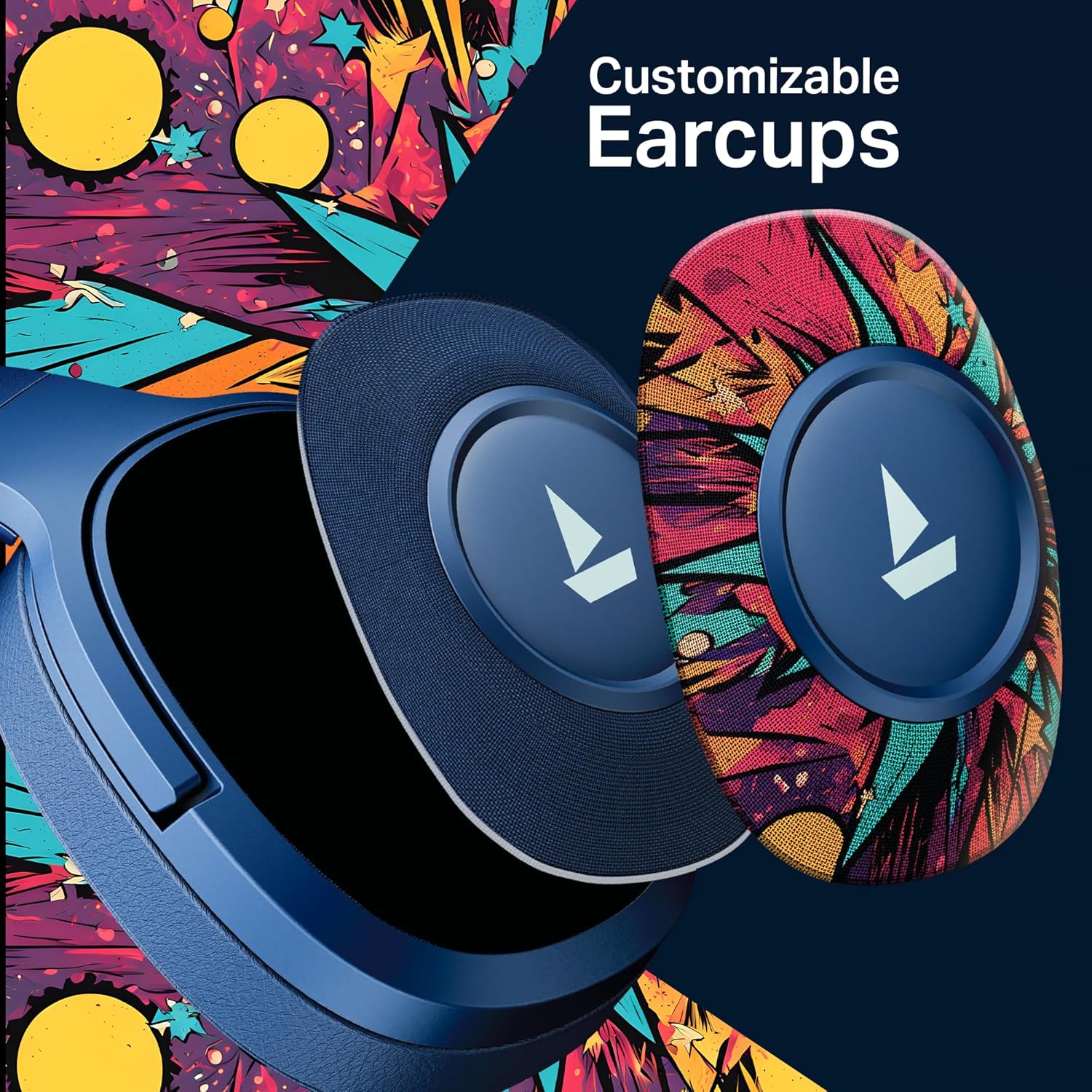
ຮູບພາບ: A ລາຍລະອຽດ view demonstrating how the customizable earcups can be removed and replaced on the headphones.
5.5 ການສະໜັບສະໜູນແອັບ boAt Hearables
Enhance your experience by downloading the boAt Hearables App. The app provides additional features and user guides.

Image: A smartphone showing the boAt Hearables App interface, including a QR code for easy access. Scan the QR code or visit https://l.ead.me/bdAX6k ເພື່ອດາວໂຫລດແອັບ.
6. ບໍາລຸງຮັກສາ
- ທໍາຄວາມສະອາດ: ເຊັດຫູຟັງດ້ວຍຜ້າອ່ອນ, ແຫ້ງ. ຢ່າໃຊ້ເຄື່ອງເຮັດຄວາມສະອາດຂັດຫຼືສານລະລາຍ.
- ການເກັບຮັກສາ: ເກັບຮັກສາຫູຟັງໄວ້ໃນບ່ອນທີ່ເຢັນ, ແຫ້ງ, ຫ່າງຈາກແສງແດດໂດຍກົງ ແລະອຸນຫະພູມທີ່ຮ້າຍກາດ.
- ການດູແລຫມໍ້ໄຟ: ເພື່ອຍືດອາຍຸການໃຊ້ງານຂອງແບັດເຕີຣີ, ໃຫ້ສາກຫູຟັງເປັນປະຈຳ, ເຖິງແມ່ນວ່າຈະບໍ່ໄດ້ໃຊ້ເລື້ອຍໆກໍຕາມ. ຫຼີກລ່ຽງການສາກແບັດເຕີຣີຈົນໝົດເປັນເວລາດົນ.
7. ການແກ້ໄຂບັນຫາ
| ບັນຫາ | ສາເຫດທີ່ເປັນໄປໄດ້ | ການແກ້ໄຂ |
|---|---|---|
| ຫູຟັງບໍ່ເປີດ. | ແບັດເຕີຣີຕໍ່າ. | ສາກຫູຟັງໃຫ້ເຕັມ. |
| ບໍ່ສາມາດຈັບຄູ່ກັບອຸປະກອນໄດ້. | Bluetooth not enabled, headphones not in pairing mode, or device too far. | Ensure Bluetooth is on, headphones are in pairing mode (flashing red/blue), and within range (10 meters). Try restarting both devices. |
| ບໍ່ມີສຽງ ຫຼືສຽງຕໍ່າ. | Volume too low on headphones or device, incorrect audio output selected, or loose AUX cable. | Adjust volume on both devices. Check audio output settings. Ensure AUX cable is securely connected. |
| ການເຊື່ອມຕໍ່ແບບບໍ່ຢຸດຢັ້ງ. | Interference, device too far, or low battery. | Move closer to the device, avoid obstacles, and ensure headphones are charged. Avoid environments with strong Wi-Fi or other Bluetooth signals. |
8. ຂໍ້ມູນຈໍາເພາະ
| ຄຸນສົມບັດ | ລາຍລະອຽດ |
|---|---|
| ຊື່ຕົວແບບ | Rockerz 550 |
| ເຕັກໂນໂລຊີການເຊື່ອມຕໍ່ | Bluetooth v5.4, 3.5 mm Jack |
| ປະເພດໄດເວີສຽງ | ໄດນາມິກໄດເວີ |
| ຂະໜາດຄົນຂັບ | 50ມມ |
| ຊີວິດຫມໍ້ໄຟ | ສູງສຸດ 100 ຊົ່ວໂມງ |
| ຮູບຮ່າງຫູຫູ | ເກີນຫູ |
| ການຄວບຄຸມສິ່ງລົບກວນ | ການແຍກສຽງແບບ passive |
| ວິທີການຄວບຄຸມ | ປຸ່ມກົດ |
| ນ້ໍາຫນັກລາຍການ | 250 ກຣາມ |
| ຂະໜາດສິນຄ້າ | 17 x 9 x 20 cm |
| ປະເພດຫມໍ້ໄຟ | Lithium Ion (ສາມາດສາກໄຟໄດ້) |
| ຜູ້ຜະລິດ | ບໍລິສັດ ຈິນຕະນາການ ກາລະຕະຫຼາດ ຈຳກັດ |
| ປະເທດຕົ້ນກໍາເນີດ | ຈີນ |

ຮູບພາບ: ພາຍໃນ view highlighting the 50mm audio drivers, responsible for the boAt Signature Sound.
9. ການຮັບປະກັນແລະການສະຫນັບສະຫນູນ
Your boAt Rockerz Plus 550 headphones come with a standard manufacturer's warranty. Please refer to the warranty card included in your package for specific terms and conditions.
For technical support, service, or warranty claims, please contact boAt customer service:
- ຜູ້ຜະລິດ: ບໍລິສັດ ຈິນຕະນາການ ກາລະຕະຫຼາດ ຈຳກັດ
- ອີເມວ: info@imaginemarketingindia.com
- ສະຫນັບສະຫນູນອອນໄລນ໌: ເຂົ້າເບິ່ງທີ່ໂບນັດຢ່າງເປັນທາງການ webເວັບໄຊທ໌ສໍາລັບ FAQs ແລະຊັບພະຍາກອນສະຫນັບສະຫນູນ.


