1. ບົດແນະນຳ
The Baseus Bass BH1 NC headphones are designed to provide an immersive audio experience with advanced noise cancellation technology. Featuring Real-Time Adaptive Hybrid ANC, SuperBass 2.0, LDAC Hi-Res Sound, and an extended 80-hour playtime, these headphones are engineered for comfort and superior sound quality. This manual provides detailed instructions for setup, operation, maintenance, and troubleshooting to ensure optimal performance.
2. ສິ່ງທີ່ຢູ່ໃນກ່ອງ

Image: The product packaging displaying the headphones, charging cable, and quick start guide.
- Baseus Bass BH1 NC Noise Cancelling Headphones
- ສາຍຂໍ້ມູນ USB-C
- ຄູ່ມືຜູ້ໃຊ້
3. ຜະລິດຕະພັນເກີນview
Familiarize yourself with the physical components and controls of your Baseus Bass BH1 NC headphones.

ຮູບພາບ: ມຸມທາງໜ້າ view of the Baseus Bass BH1 NC headphones in Moon White, highlighting the earcups and headband.
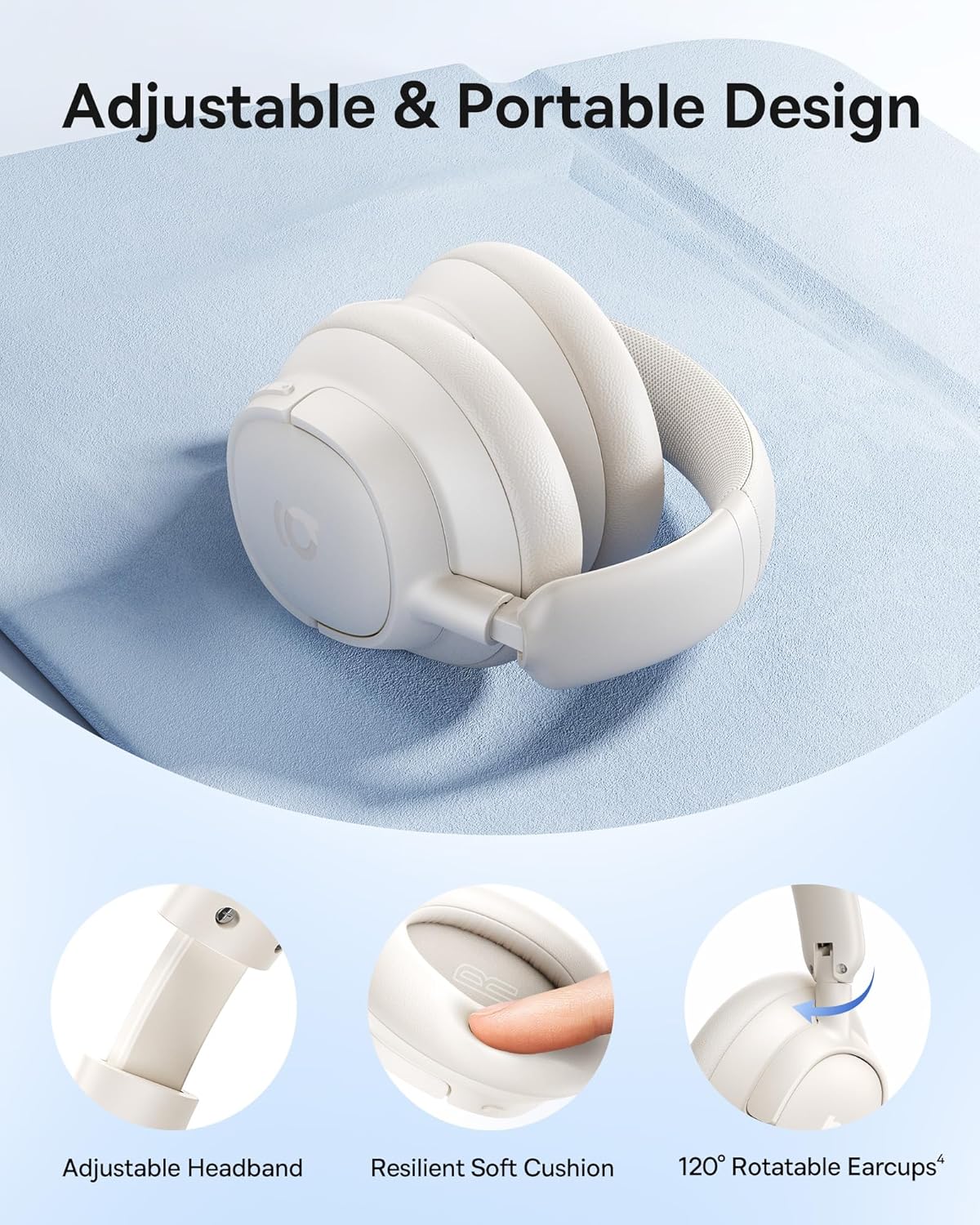
ຮູບພາບ: ລາຍລະອຽດ view of the adjustable headband, resilient soft cushion, and 120-degree rotatable earcups, illustrating the ergonomic design.
ການຄວບຄຸມ ແລະພອດ:

Image: An illustration detailing the functions of each physical button on the headphones, including controls for music playback, call management, and ANC mode switching.
- ປຸ່ມເປີດປິດ: Used for powering on/off and initiating Bluetooth pairing.
- ປຸ່ມເພີ່ມສຽງຂຶ້ນ/ຕິດຕາມຕໍ່ໄປ: ກົດສັ້ນເພື່ອປະລິມານຂຶ້ນ, ກົດຄ້າງໄວ້ສຳລັບເພງຕໍ່ໄປ.
- ປະລິມານລົງ/ປຸ່ມຕິດຕາມກ່ອນໜ້າ: ກົດສັ້ນເພື່ອປະລິມານລົງ, ກົດຄ້າງໄວ້ສຳລັບເພງກ່ອນໜ້າ.
- ປຸ່ມຫຼາຍຟັງຊັນ: ຫຼິ້ນ/ຢຸດເພງ, ຮັບສາຍ/ວາງສາຍ, ເປີດໃຊ້ຜູ້ຊ່ວຍສຽງ.
- ປຸ່ມ ANC: Toggles between ANC On, Transparency Mode, and ANC Off.
- ຜອດ USB-C: ສໍາລັບການສາກໄຟຫູຟັງ.
4. ຕັ້ງຄ່າ
4.1 ການສາກຫູຟັງ
Before first use, fully charge your headphones. Connect the provided USB-C cable to the charging port on the headphones and the other end to a USB power adapter (not included) or a computer's USB port. The LED indicator will show charging status.
- ການສາກເຕັມໃຫ້ເວລາຫຼິ້ນສູງສຸດ 80 ຊົ່ວໂມງ (ປິດ ANC) ຫຼື 55 ຊົ່ວໂມງ (ເປີດ ANC).
- ການສາກໄຟໄວພຽງ 10 ນາທີສາມາດຫຼິ້ນໄດ້ປະມານ 10 ຊົ່ວໂມງ.

Image: Visual representation of the headphones' battery life, indicating 80 hours with ANC off and 55 hours with ANC on, along with the rapid charging capability.
4.2 ການຈັບຄູ່ Bluetooth
- ກວດໃຫ້ແນ່ໃຈວ່າປິດຫູຟັງແລ້ວ.
- ກົດປຸ່ມເປີດປິດຄ້າງໄວ້ປະມານ 3-5 ວິນາທີ ຈົນກວ່າໄຟ LED ຈະກະພິບເປັນສີຟ້າ ແລະ ສີແດງ, ເຊິ່ງຊີ້ບອກເຖິງໂໝດການຈັບຄູ່.
- ໃນອຸປະກອນຂອງທ່ານ (ໂທລະສັບສະຫຼາດ, ແທັບເລັດ, ແລັບທັອບ), ເປີດໃຊ້ Bluetooth ແລະຊອກຫາອຸປະກອນທີ່ມີຢູ່.
- Select "Baseus Bass BH1 NC" from the list of found devices.
- ເມື່ອເຊື່ອມຕໍ່ແລ້ວ, ຕົວຊີ້ວັດ LED ຈະປ່ຽນເປັນສີຟ້າແຂງ ຫຼືກະພິບສີຟ້າຊ້າໆ.
4.3 ການຄວບຄຸມແອັບອັດສະລິຍະ
For enhanced functionality and personalization, download the Baseus app from your device's app store. The app allows you to fine-tune sound settings, adjust EQ modes, manage noise reduction settings, and more.

Image: A visual guide to the Baseus app, showcasing its various control options for sound customization and headphone management.
5. ຄໍາແນະນໍາການດໍາເນີນງານ
5.1 ເປີດ/ປິດ
- ເປີດ: ກົດປຸ່ມເປີດປິດຄ້າງໄວ້ 2 ວິນາທີ.
- ປິດພະລັງງານ: ກົດປຸ່ມເປີດປິດຄ້າງໄວ້ 3 ວິນາທີ.
5.2 ການຫລີ້ນດົນຕີ
- ຫຼິ້ນ/ຢຸດ: ກົດປຸ່ມ Multi-function ຄັ້ງດຽວ.
- ປະລິມານຂຶ້ນ: ກົດສັ້ນກົດປຸ່ມເພີ່ມສຽງ.
- ປະລິມານລົງ: ກົດສັ້ນ ປຸ່ມປະລິມານລົງ.
- ເພງຕໍ່ໄປ: ກົດປຸ່ມເພີ່ມສຽງຄ້າງໄວ້ 2 ວິນາທີ.
- ຕິດຕາມກ່ອນ ໜ້າ ນີ້: Long press the Volume Down button for 2 seconds.
5.3 ການຄຸ້ມຄອງການໂທ
- ຮັບ/ສາຍໂທ: ກົດປຸ່ມ Multi-function ຄັ້ງດຽວ.
- ປະຕິເສດການໂທ: ກົດປຸ່ມຫຼາຍຟັງຊັນຄ້າງໄວ້ 2 ວິນາທີ.
- ກະຕຸ້ນຜູ້ຊ່ວຍສຽງ: ກົດປຸ່ມຫຼາຍຟັງຊັນສາມເທື່ອ.

Image: A user demonstrating the call clarity feature of the headphones, emphasizing the AI-powered voice boost and 5-mic sound sensors.
5.4 ຮູບແບບການຄວບຄຸມສຽງລົບກວນ
The Baseus Bass BH1 NC headphones feature Adaptive Hybrid ANC, offering up to -45dB noise reduction. Use the ANC button to cycle through modes:

Image: A visual representation of the noise cancellation capabilities, showing the headphones within a bubble indicating -45dB noise reduction.
- ANC ເປີດ: Activates active noise cancellation to reduce ambient sound.
- ໂໝດຄວາມໂປ່ງໃສ: Allows you to hear your surroundings without removing the headphones. Press and hold the ANC button for 2 seconds for Quick Attention.
- ANC ປິດ: ປິດການຍົກເລີກສຽງລົບກວນ.
5.5 ການເຊື່ອມຕໍ່ຫຼາຍຈຸດ
The headphones support Instant Multipoint Connection, allowing seamless switching between two connected devices without manual re-pairing.
5.6 ຄຸນສົມບັດສຽງ
Experience pristine audio with:
- ຊຸບເປີເບສ 2.0: Dynamically enhances low frequencies for rich, punchy bass.
- LDAC Hi-Res Sound: Transmits 3X more data than standard Bluetooth codecs for ultra-clear, lossless audio.
- 40mm Dynamic Drivers: Equipped with bio-cellulose diaphragms for immersive depth and detailed clarity.

ຮູບພາບ: A profile view of a person wearing the headphones, with text overlays emphasizing the SuperBass 2.0 and Hi-Res audio features.
6. ບໍາລຸງຮັກສາ
- ທໍາຄວາມສະອາດ: ເຊັດຫູຟັງດ້ວຍຜ້າອ່ອນ, ແຫ້ງ. ຢ່າໃຊ້ສານເຄມີທີ່ຮຸນແຮງຫຼືວັດສະດຸຂັດ.
- ການເກັບຮັກສາ: ເກັບຮັກສາຫູຟັງໄວ້ໃນບ່ອນທີ່ເຢັນ, ແຫ້ງ, ຫ່າງຈາກແສງແດດໂດຍກົງ ແລະອຸນຫະພູມທີ່ຮ້າຍກາດ.
- ການດູແລຫມໍ້ໄຟ: ເພື່ອຍືດອາຍຸແບັດເຕີຣີ, ຫຼີກເວັ້ນການຖອດຫູຟັງອອກເຕັມທີ່ເລື້ອຍໆ. ໄລ່ພວກມັນເປັນປົກກະຕິ, ເຖິງແມ່ນວ່າບໍ່ໄດ້ໃຊ້ສໍາລັບໄລຍະເວລາທີ່ຍາວນານ.
- ຄວາມຕ້ານທານນ້ໍາ: ຫູຟັງເຫຼົ່ານີ້ແມ່ນບໍ່ກັນນ້ໍາ. ຫຼີກເວັ້ນການສໍາຜັດກັບນ້ໍາຫຼືຄວາມຊຸ່ມຊື່ນຫຼາຍເກີນໄປ.
7. ການແກ້ໄຂບັນຫາ
7.1 ບໍ່ສາມາດເປີດເຄື່ອງໄດ້
- ກວດໃຫ້ແນ່ໃຈວ່າໄດ້ສາກຫູຟັງແລ້ວ. ເຊື່ອມຕໍ່ພວກມັນກັບແຫຼ່ງພະລັງງານໂດຍໃຊ້ສາຍ USB-C.
- Press and hold the Power button for a few seconds to confirm it's not just a short press.
7.2 ບໍ່ສາມາດຈັບຄູ່ກັບອຸປະກອນໄດ້
- ກວດໃຫ້ແນ່ໃຈວ່າຫູຟັງຢູ່ໃນໂໝດຈັບຄູ່ (LED ກະພິບສີຟ້າ ແລະ ສີແດງ).
- Ensure Bluetooth is enabled on your device and it's within range (typically 10 meters).
- ລືມອຸປະກອນຈາກການຕັ້ງຄ່າ Bluetooth ຂອງໂທລະສັບຂອງທ່ານ ແລະລອງຈັບຄູ່ອີກຄັ້ງ.
- ຣີສະຕາດທັງຫູຟັງ ແລະອຸປະກອນຂອງທ່ານ.
7.3 ບໍ່ມີສຽງຫຼືສຽງຕ່ໍາ
- ກວດເບິ່ງລະດັບສຽງໃນທັງຫູຟັງ ແລະອຸປະກອນທີ່ເຊື່ອມຕໍ່ຂອງທ່ານ.
- ໃຫ້ແນ່ໃຈວ່າຫູຟັງໄດ້ເຊື່ອມຕໍ່ກັບອຸປະກອນຂອງທ່ານຢ່າງຖືກຕ້ອງແລ້ວ.
- ລອງຫຼິ້ນສຽງຈາກແອັບພລິເຄຊັນ ຫຼືແຫຼ່ງອື່ນ.
7.4 ANC ບໍ່ເຮັດວຽກຢ່າງມີປະສິດທິພາບ
- Ensure ANC mode is activated (not Transparency Mode or ANC Off).
- Check for proper fit of the earcups over your ears to create a good seal.
- Environmental factors can affect ANC performance; it is most effective against low-frequency, constant noise.
8. ຂໍ້ມູນຈໍາເພາະ
| ຊື່ຕົວແບບ | Baseus Bass BH1 NC |
| ເຕັກໂນໂລຊີການເຊື່ອມຕໍ່ | Bluetooth 6.0, Wireless |
| ເຕັກໂນໂລຊີການສື່ສານໄຮ້ສາຍ | Bluetooth 6.0 |
| ວັດສະດຸ | ພາດສະຕິກ |
| ການນໍາໃຊ້ສະເພາະສໍາລັບຜະລິດຕະພັນ | Entertainment, Fitness, Travel |
| ການນໍາໃຊ້ທີ່ແນະນໍາສໍາລັບຜະລິດຕະພັນ | Calling, Cycling, Exercising, Music, Running, Travel, Work Out |
| ອຸປະກອນທີ່ເຂົ້າກັນໄດ້ | Cellphones, Devices with Bluetooth Audio Capability (iOS, Android, Windows, Mac OS, Switch), Laptops, Tablets |
| ປະເພດການຄວບຄຸມ | ການຄວບຄຸມປຸ່ມ |
| ວິທີການຄວບຄຸມ | ປຸ່ມກົດ |
| ຈໍານວນລາຍການ | 1 |
| ປະເພດໄດເວີສຽງ | ໄດນາມິກໄດເວີ |
| ລຸ້ນ Bluetooth | 6.0 |
| ຂະໜາດໄດເວີສຽງ | 40 ມິນລິແມັດ |
| UPC | 810196181533 |
| ຜູ້ຜະລິດ | Baseus |
| ນ້ໍາຫນັກລາຍການ | 15.2 ອອນ |
| ໝາຍເລກຕົວແບບ | Baseus Bass BH1 NC |
| ໝໍ້ໄຟ | Nonstandard Battery batteries required. (included) |
| ສີ | Moon White |
| ການຈັດວາງຫູ | ເກີນຫູ |
| ປັດໄຈແບບຟອມ | ເກີນຫູ |
| ການຄວບຄຸມສິ່ງລົບກວນ | ການຍົກເລີກສິ່ງລົບກວນແບບປັບຕົວ |

Image: A technical drawing illustrating the precise measurements of the headphones, including earcup dimensions and overall weight.
9. ການຮັບປະກັນແລະການສະຫນັບສະຫນູນ
Baseus products are designed and manufactured to the highest quality standards. For warranty information, please refer to the warranty card included with your product or visit the official Baseus website. If you encounter any issues or require technical assistance, please contact Baseus customer support through their official channels.
ສໍາລັບການຊ່ວຍເຫຼືອເພີ່ມເຕີມ, ກະລຸນາໄປຢ້ຽມຢາມ ຮ້ານ Baseus ໃນ Amazon.


