ແນະນຳ
Thank you for choosing the Baseus Bass BH1 NC Adaptive Active Noise Cancelling Headphones. These headphones are designed to provide an immersive audio experience with advanced noise cancellation, high-resolution sound, and exceptional comfort. This manual will guide you through the setup, operation, and maintenance of your new headphones.
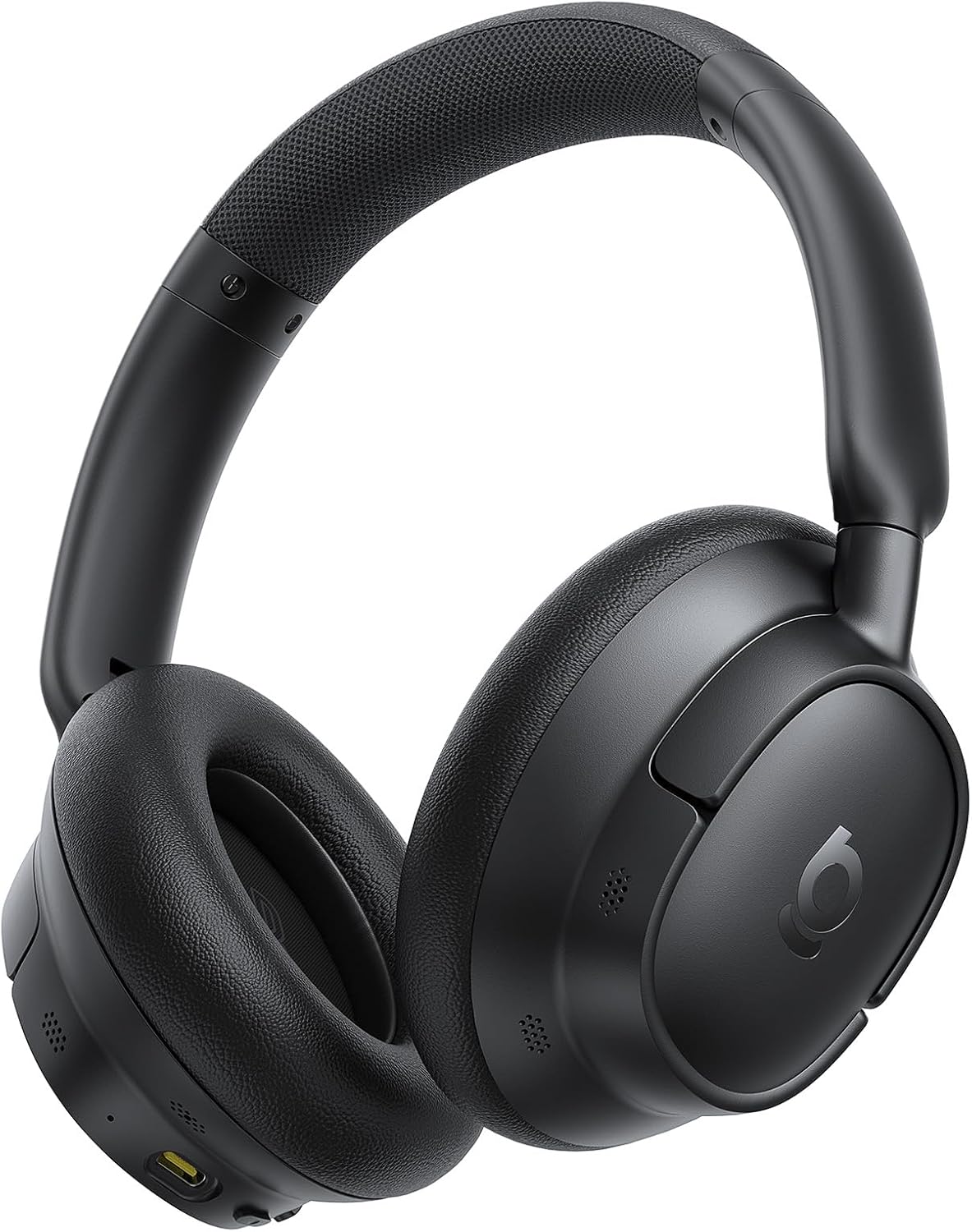
Image: The Baseus Bass BH1 NC headphones in Space Black, showcasing ການອອກແບບ sleek ຂອງເຂົາເຈົ້າ.
ແມ່ນຫຍັງຢູ່ໃນກ່ອງ
ກະລຸນາກວດສອບເນື້ອໃນຂອງຊຸດເພື່ອໃຫ້ແນ່ໃຈວ່າລາຍການທັງຫມົດມີຢູ່:
- Baseus Bass BH1 NC Noise Cancelling Headphones
- ສາຍຂໍ້ມູນ USB-C
- ຄູ່ມືຜູ້ໃຊ້
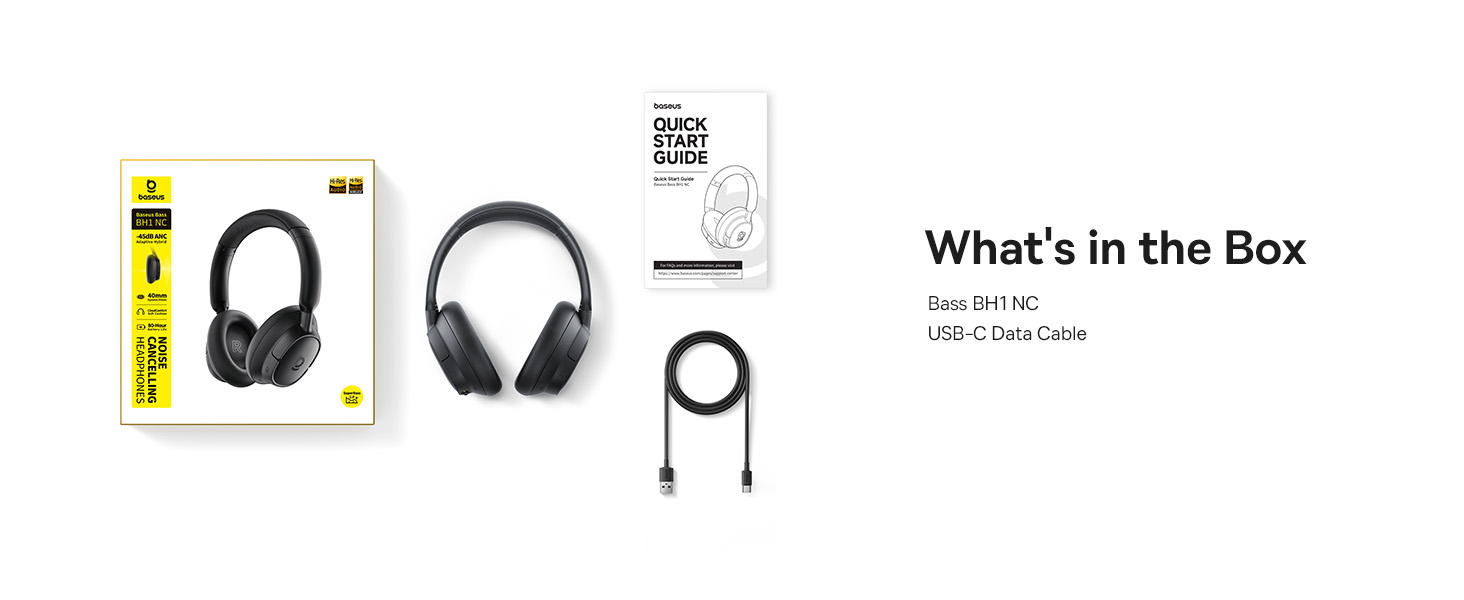
Image: A visual representation of the items included in the Baseus Bass BH1 NC headphone package.
ຄຸນສົມບັດຜະລິດຕະພັນ
The Baseus Bass BH1 NC headphones are equipped with a range of features designed for superior audio and user convenience:
- Real-Time Adaptive Hybrid ANC: Advanced 4-layer adaptive noise cancellation reduces up to -45dB of background noise, adapting to your surroundings for optimal quiet.
- Pristine Hi-Res Sound: Hi-Res and Hi-Res Wireless certifications with LDAC support deliver ultra-clear, lossless audio quality, transmitting 3X more data than standard Bluetooth codecs.
- ຊຸບເປີເບສ 2.0: Experience rich, punchy bass and detailed clarity with dynamic low-frequency enhancement and bio-cellulose diaphragms with dynamic drivers.
- Cloud-Like Comfort: Designed for all-day listening with feather-soft memory foam, contoured earcups, and a breathable headband lining for an ergonomic fit.
- Week-Long Playtime: Enjoy up to 80 hours of playtime with ANC off (55 hours with ANC on). A quick 10-minute charge provides 10 hours of listening.
- ການໂທທີ່ລຶບລ້າງດ້ວຍ AI 5 ໄມໂຄຣໂຟນ: Five built-in sound sensors with AI-powered ENC and voice boost ensure crystal-clear voice capture for calls and meetings.
- Bluetooth 6.0: Provides stable, lag-free, ultra-fast wireless connectivity.
- ການເຊື່ອມຕໍ່ຫຼາຍຈຸດທັນທີ: ສະຫຼັບລະຫວ່າງສອງອຸປະກອນເຊື່ອມຕໍ່ຢ່າງບໍ່ຢຸດຢັ້ງ.

Image: Illustration of the powerful -45dB Adaptive Hybrid ANC technology.

Image: Demonstrating the lossless Hi-Res audio capabilities with LDAC technology.

Image: Visualizing the impressive 80-hour battery life.
ຄູ່ມືການຕິດຕັ້ງ
1. ການສາກໄຟເບື້ອງຕົ້ນ
Before first use, fully charge your headphones. Connect the provided USB-C data cable to the charging port on the headphones and the other end to a USB power adapter (not included) or a computer's USB port. The charging indicator light will show the charging status.
2. ເປີດ / ປິດພະລັງງານ
- ເປີດ: ກົດປຸ່ມເປີດປິດຄ້າງໄວ້ປະມານ 3 ວິນາທີຈົນກວ່າໄຟສັນຍານຈະກະພິບ.
- ປິດພະລັງງານ: ກົດປຸ່ມເປີດປິດຄ້າງໄວ້ປະມານ 3 ວິນາທີຈົນກວ່າໄຟສະແດງຈະປິດ.
3. ການຈັບຄູ່ Bluetooth
- ກວດໃຫ້ແນ່ໃຈວ່າປິດຫູຟັງແລ້ວ.
- Press and hold the Power button for 5 seconds until the indicator light flashes blue and red alternately, indicating pairing mode.
- ໃນອຸປະກອນຂອງທ່ານ (ໂທລະສັບສະຫຼາດ, ແທັບເລັດ, ແລັບທັອບ), ເປີດໃຊ້ Bluetooth ແລະຊອກຫາອຸປະກອນທີ່ມີຢູ່.
- Select "Baseus Bass BH1 NC" from the list of found devices.
- ເມື່ອເຊື່ອມຕໍ່ແລ້ວ, ໄຟຕົວຊີ້ວັດຈະປ່ຽນເປັນສີຟ້າແຂງ.
4. Installing the Baseus App
For enhanced features and customization, download the official Baseus app from your device's app store. The app allows you to adjust EQ settings, noise reduction modes, and more.

Image: The Baseus app interface for smart control and personalization.
ຄໍາແນະນໍາການດໍາເນີນງານ
ການຄວບຄຸມປຸ່ມ
The headphones feature intuitive button controls for easy management of audio and calls:
| ການປະຕິບັດ | ປຸ່ມ/ທ່າທາງ | ຟັງຊັນ |
|---|---|---|
| ເປີດ/ປິດ | ປຸ່ມເປີດປິດ (ກົດຄ້າງໄວ້ 3ວິ) | ເປີດ ຫຼືປິດຫູຟັງ. |
| ແບບການຈັບຄູ່ | Power Button (Press & Hold 5s from off) | ເຂົ້າສູ່ໂໝດຈັບຄູ່ Bluetooth. |
| ຫຼິ້ນ/ຢຸດຊົ່ວຄາວ | Multi-function Button (1 click) | ຫຼິ້ນ ຫຼືຢຸດສຽງ. |
| ຕິດຕາມຕໍ່ໄປ | Volume + Button (Press & Hold 2s) | ຂ້າມໄປເພງຕໍ່ໄປ. |
| ເພງກ່ອນໜ້າ | Volume - Button (Press & Hold 2s) | ຂ້າມໄປເພງກ່ອນໜ້າ. |
| ປະລິມານຂຶ້ນ | Volume + Button (1 click) | ເພີ່ມປະລິມານ. |
| ປະລິມານລົງ | Volume - Button (1 click) | ຫຼຸດສຽງລົງ. |
| ຕອບ/ວາງສາຍ | Multi-function Button (1 click) | Answers or ends an incoming/active call. |
| ປະຕິເສດການໂທ | Multi-function Button (Press & Hold 2s) | ປະຕິເສດສາຍໂທເຂົ້າ. |
| Toggle ANC/Transparency | ANC Button (1 click) | Cycles through ANC On, Transparency Mode, and ANC Off. |
| ເປີດໃຊ້ຜູ້ຊ່ວຍສຽງ | Multi-function Button (3 clicks) | ເປີດໃຊ້ຜູ້ຊ່ວຍສຽງຂອງອຸປະກອນຂອງທ່ານ. |

Image: Detailed diagram of headphone button functions.
ການເຊື່ອມຕໍ່ຫຼາຍຈຸດ
The Baseus Bass BH1 NC headphones support simultaneous connection to two Bluetooth devices. To use this feature:
- Connect the headphones to the first device as per the Bluetooth pairing instructions.
- ປິດໃຊ້ງານ Bluetooth ໃນອຸປະກອນທໍາອິດ.
- ເຊື່ອມຕໍ່ຫູຟັງກັບອຸປະກອນທີສອງ.
- Re-enable Bluetooth on the first device. The headphones should now be connected to both devices.
- ສຽງຈະສະຫຼັບອັດຕະໂນມັດລະຫວ່າງອຸປະກອນໂດຍອີງໃສ່ອັນໃດກຳລັງຫຼິ້ນສຽງ ຫຼືຮັບສາຍ.
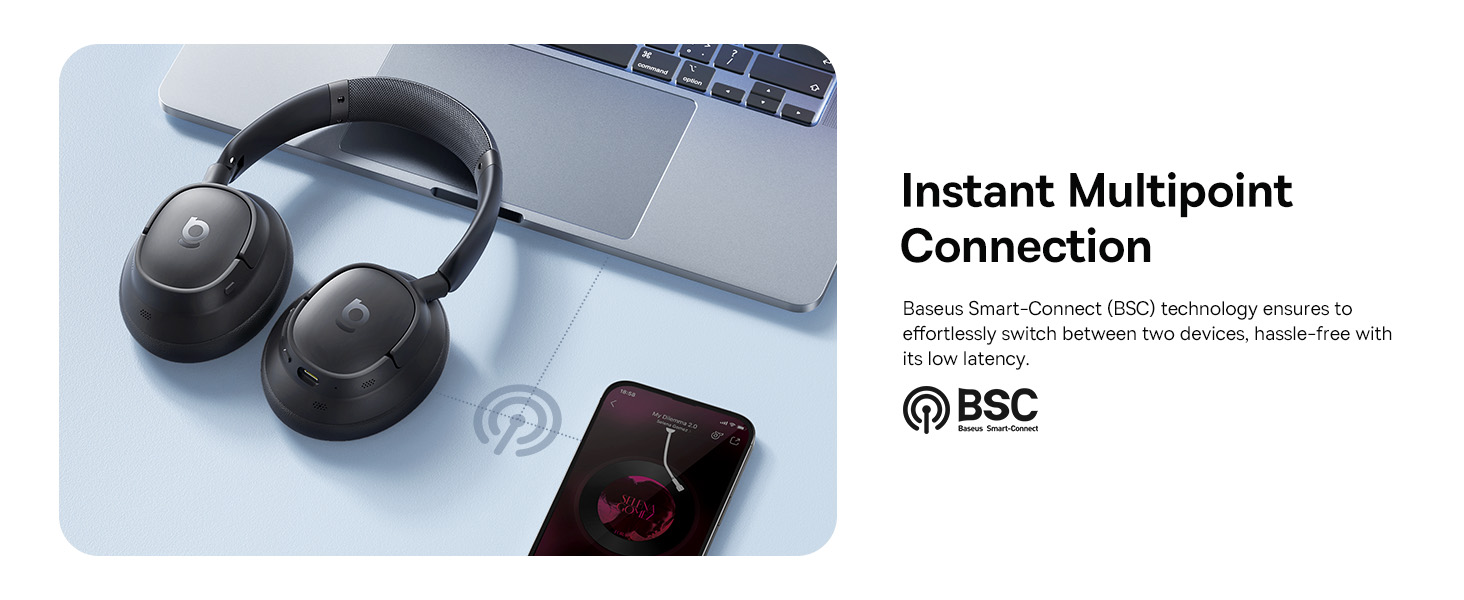
Image: Visual explanation of the instant multipoint connection feature.
ບໍາລຸງຮັກສາ
Proper maintenance ensures the longevity and optimal performance of your headphones:
- ທໍາຄວາມສະອາດ: ໃຊ້ຜ້າອ່ອນ, ແຫ້ງ, ແລະ ບໍ່ມີຂົນເພື່ອທຳຄວາມສະອາດຫູຟັງ ແລະ ຜ້າພັນຫົວ. ຢ່າໃຊ້ນ້ຳຢາທຳຄວາມສະອາດທີ່ມີສີຂັດ, ເຫຼົ້າ, ຫຼື ຕົວລະລາຍສານເຄມີ.
- ການເກັບຮັກສາ: When not in use, store the headphones in a cool, dry place, away from direct sunlight and extreme temperatures. It is recommended to use a protective case to prevent damage.
- ການດູແລຫມໍ້ໄຟ: ເພື່ອຮັກສາອາຍຸແບັດເຕີຣີ, ຫຼີກເວັ້ນການຖອດຫູຟັງອອກເຕັມທີ່ເລື້ອຍໆ. ໄລ່ໃຫ້ເຂົາເຈົ້າເປັນປົກກະຕິ, ເຖິງແມ່ນວ່າບໍ່ໄດ້ຢູ່ໃນການນໍາໃຊ້ຢ່າງຕໍ່ເນື່ອງ.
- ຫຼີກເວັ້ນຄວາມຊຸ່ມ: Do not expose the headphones to water or excessive moisture. If they get wet, dry them thoroughly before use or storage.
ການແກ້ໄຂບັນຫາ
If you encounter any issues with your Baseus Bass BH1 NC headphones, refer to the following common solutions:
| ບັນຫາ | ສາເຫດທີ່ເປັນໄປໄດ້ | ການແກ້ໄຂ |
|---|---|---|
| ຫູຟັງບໍ່ເປີດ. | ແບັດເຕີຣີຕໍ່າ. | ສາກຫູຟັງໃຫ້ເຕັມໂດຍໃຊ້ສາຍ USB-C ທີ່ໃຫ້ມາ. |
| ບໍ່ສາມາດຈັບຄູ່ກັບອຸປະກອນໄດ້. | ຫູຟັງບໍ່ໄດ້ຢູ່ໃນໂໝດຈັບຄູ່; Bluetooth ປິດຢູ່ໃນອຸປະກອນ; ອຸປະກອນຢູ່ໄກເກີນໄປ. | Ensure headphones are in pairing mode (flashing blue/red). Turn on Bluetooth on your device. Move headphones closer to the device. Try restarting both devices. |
| ບໍ່ມີສຽງ ຫຼືສຽງຕໍ່າ. | ລະດັບສຽງຕໍ່າເກີນໄປ; ເລືອກສຽງອອກບໍ່ຖືກຕ້ອງ; ບໍ່ໄດ້ເຊື່ອມຕໍ່ຫູຟັງ. | Increase volume on both headphones and connected device. Ensure headphones are selected as the audio output. Reconnect Bluetooth. |
| ANC ບໍ່ເຮັດວຽກຢ່າງມີປະສິດທິພາບ. | ANC mode off; improper fit; very high-frequency noise. | Ensure ANC is activated. Adjust headphones for a snug fit. ANC is most effective on low-frequency sounds. |
| ຄຸນນະພາບການໂທບໍ່ດີ. | Microphone obstructed; weak signal; environmental noise. | Ensure microphones are clear. Move closer to your device. Use the AI Clear Calls feature in noisy environments. |
ຂໍ້ມູນຈໍາເພາະ
Detailed technical specifications for the Baseus Bass BH1 NC headphones:
| ຄຸນສົມບັດ | ລາຍລະອຽດ |
|---|---|
| ຊື່ຕົວແບບ | Baseus Bass BH1 NC |
| ເຕັກໂນໂລຊີການເຊື່ອມຕໍ່ | Bluetooth 6.0, Wireless |
| ເຕັກໂນໂລຊີການສື່ສານໄຮ້ສາຍ | Bluetooth 6.0 |
| ວັດສະດຸ | ພາດສະຕິກ |
| ການນໍາໃຊ້ສະເພາະສໍາລັບຜະລິດຕະພັນ | Entertainment, Fitness, Travel |
| ການນໍາໃຊ້ທີ່ແນະນໍາສໍາລັບຜະລິດຕະພັນ | Calling, Cycling, Exercising, Music, Running, Travel, Work Out |
| ອຸປະກອນທີ່ເຂົ້າກັນໄດ້ | Cellphones, Devices with Bluetooth Audio Capability (iOS, Android, Windows, Mac OS, Switch), Laptops, Tablets |
| ປະເພດການຄວບຄຸມ | ການຄວບຄຸມປຸ່ມ |
| ວິທີການຄວບຄຸມ | ປຸ່ມກົດ |
| ຈໍານວນລາຍການ | 1 |
| ປະເພດໄດເວີສຽງ | ໄດນາມິກໄດເວີ |
| ລຸ້ນ Bluetooth | 6.0 |
| ຂະໜາດໄດເວີສຽງ | 40 ມິນລິແມັດ |
| UPC | 810196181526 |
| ຜູ້ຜະລິດ | Baseus |
| ຂະໜາດແພັກເກັດ | 9.25 x 8.94 x 2.48 ນິ້ວ |
| ນ້ໍາຫນັກລາຍການ | 14.9 ອອນ |
| ASIN | B0FHB7NBL5 |
| ໝາຍເລກຕົວແບບ | Baseus Bass BH1 NC |
| ໝໍ້ໄຟ | Nonstandard Battery batteries required. (included) |
| ວັນທີທໍາອິດທີ່ມີ | ວັນທີ 20 ກໍລະກົດ 2025 |
| ຍີ່ຫໍ້ | Baseus |
| ສີ | Space Black |
| ການຈັດວາງຫູ | ເກີນຫູ |
| ປັດໄຈແບບຟອມ | ເກີນຫູ |
| ການຄວບຄຸມສິ່ງລົບກວນ | ການຍົກເລີກສິ່ງລົບກວນແບບປັບຕົວ |

Image: Product dimensions for the Baseus Bass BH1 NC headphones.
ການຮັບປະກັນແລະການສະຫນັບສະຫນູນ
Baseus products are designed with quality and reliability in mind. For warranty information and customer support, please refer to the official Baseus webເວັບໄຊ ຫຼືຕິດຕໍ່ບໍລິການລູກຄ້າຂອງເຂົາເຈົ້າໂດຍກົງ. ຮັກສາໃບຮັບເງິນການຊື້ຂອງທ່ານໄວ້ເປັນຫຼັກຖານການຊື້ສໍາລັບການຮຽກຮ້ອງການຮັບປະກັນໃດໆ.
ນອກນັ້ນທ່ານຍັງສາມາດໄປຢ້ຽມຢາມໄດ້ ຮ້ານ Baseus ໃນ Amazon ສໍາລັບຂໍ້ມູນເພີ່ມເຕີມແລະຊັບພະຍາກອນສະຫນັບສະຫນູນ.


