1. ບົດແນະນຳ
Thank you for choosing the HTC GT-288 Electric Shaver. This manual provides essential information for the safe and effective operation, maintenance, and care of your new shaver. Please read these instructions thoroughly before first use and retain them for future reference.
2. ຂໍ້ມູນຄວາມປອດໄພ
ເພື່ອຫຼຸດຜ່ອນຄວາມສ່ຽງຂອງການຊັອດໄຟຟ້າ, ການບາດເຈັບ, ຫຼື ຄວາມເສຍຫາຍ, ໃຫ້ປະຕິບັດຕາມຂໍ້ຄວນລະວັງດ້ານຄວາມປອດໄພຂັ້ນພື້ນຖານເຫຼົ່ານີ້ສະເໝີ:
- Do not immerse the charging cable or power adapter in water or other liquids.
- ຮັກສາເຄື່ອງໃຊ້ໃຫ້ຫ່າງຈາກເດັກນ້ອຍ.
- Ensure the shaver is fully dry before connecting it to the charging cable.
- Do not use the shaver if the blade or foil is damaged, as this may cause injury.
- ພຽງແຕ່ໃຊ້ສາຍສາກໄຟ USB ທີ່ສະ ໜອງ ໃຫ້.
- This appliance is designed for personal use only.
3. ເນື້ອໃນຊຸດ
ກະລຸນາກວດເບິ່ງຊຸດສຳລັບລາຍການຕໍ່ໄປນີ້:
- 1 x HTC GT-288 Electric Shaver
- 1 x ສາຍສາກ USB
- 3 x Precision Combs (1mm, 3mm, 5mm)
- 1 x ແປງເຮັດຄວາມສະອາດ
- 1 x ນ້ຳມັນຫລໍ່ລື່ນ
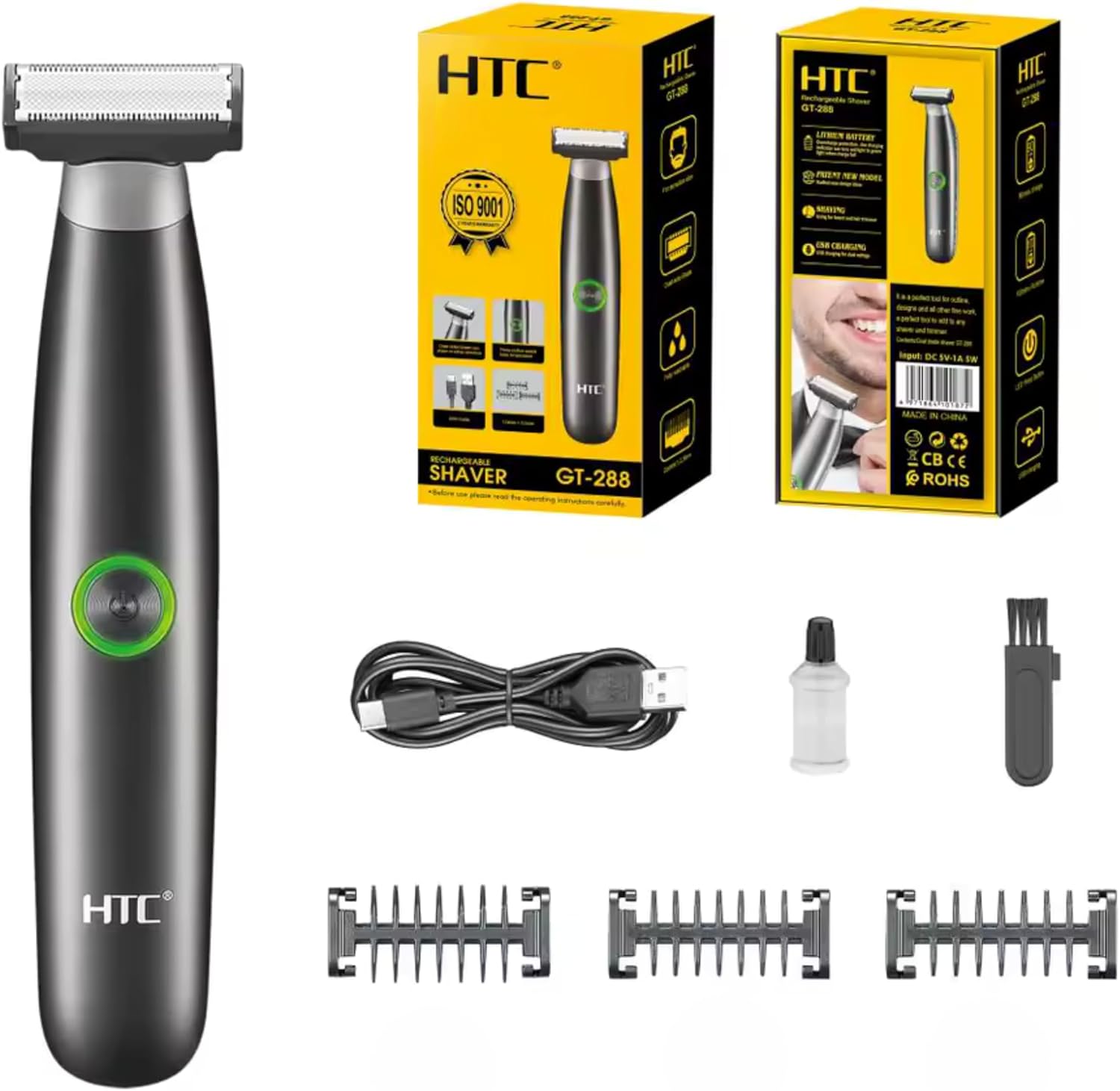
Image 3.1: Contents of the HTC GT-288 Electric Shaver package, including the shaver, USB cable, three precision combs, cleaning brush, and lubricating oil.
4. ຜະລິດຕະພັນເກີນview
The HTC GT-288 Electric Shaver features a sleek design with a dual-sided blade for efficient trimming and shaving. It includes an easy-to-operate press-button switch and is fully washable for convenient cleaning.
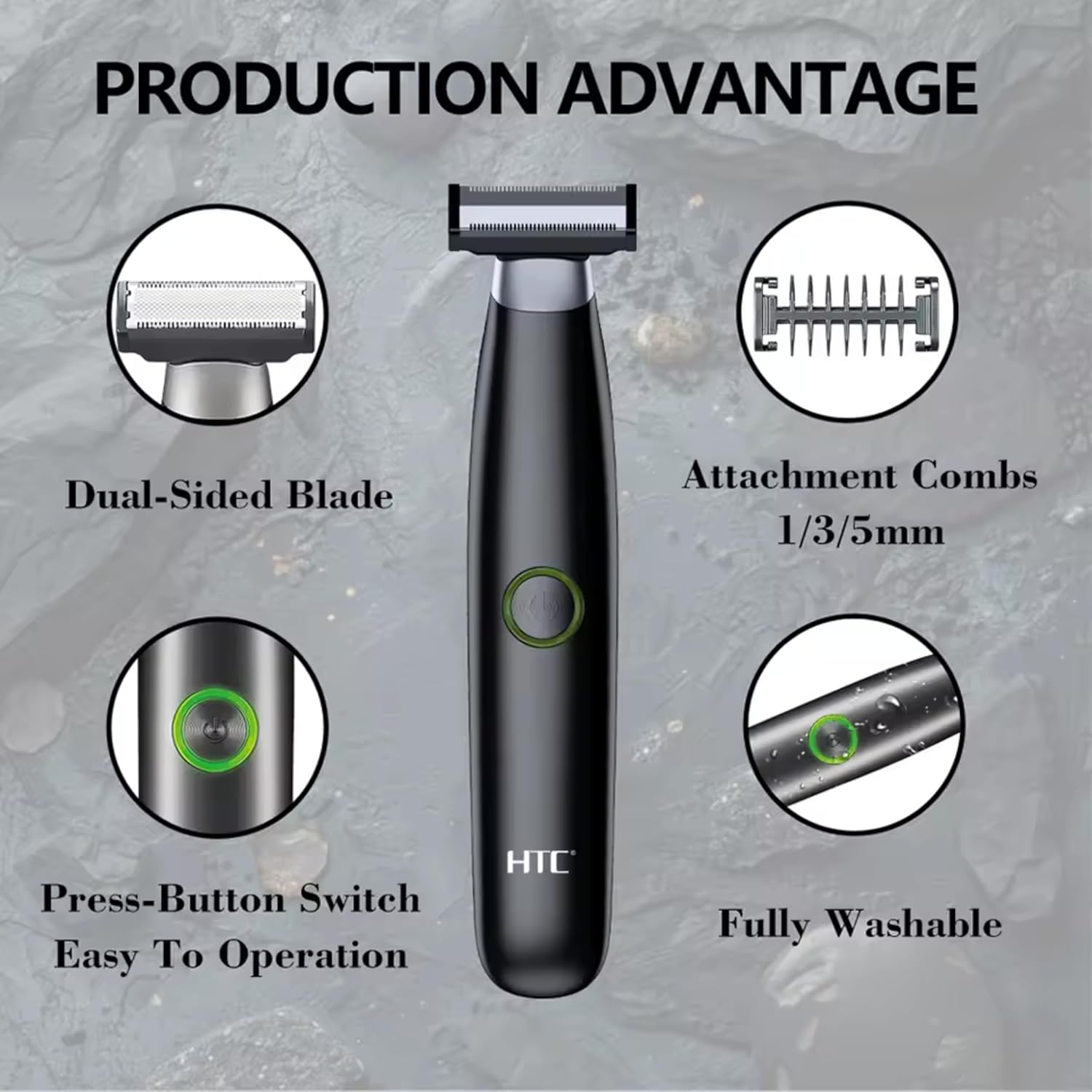
ຮູບພາບ 4.1: ຫຼາຍກວ່າview of the HTC GT-288 Electric Shaver's key features, highlighting the dual-sided blade, attachment combs (1/3/5mm), press-button switch, and fully washable design.

Image 4.2: Detail of the LED press button, which serves as the on/off switch for easy operation.
5. ຕັ້ງຄ່າ
- ແກະກ່ອງ: ເອົາສ່ວນປະກອບທັງຫມົດອອກຈາກການຫຸ້ມຫໍ່ຢ່າງລະມັດລະວັງ.
- ຄ່າ ທຳ ນຽມ: Before first use, fully charge the shaver. Refer to Section 6 for charging instructions.
- Attach Comb (Optional): If desired, select one of the three precision combs (1mm, 3mm, or 5mm) and slide it onto the shaver head until it clicks into place. Ensure it is securely attached.
6. ການສາກໄຟ
The HTC GT-288 Electric Shaver is equipped with a rechargeable battery for cordless operation.
- ໃຫ້ແນ່ໃຈວ່າເຄື່ອງໂກນຫນວດປິດແລ້ວ.
- Connect the small end of the USB charging cable to the charging port on the shaver.
- Connect the larger end of the USB cable to a compatible USB power source (e.g., computer, USB wall adapter).
- The LED indicator on the shaver will illuminate to show that it is charging.
- Allow the shaver to charge completely before its first use. A full charge typically takes several hours.
- ເມື່ອສາກໄຟເຕັມແລ້ວ, ໃຫ້ຖອດສາຍ USB ອອກ.
7. ຄໍາແນະນໍາການດໍາເນີນງານ
The HTC GT-288 shaver can be used for both wet and dry shaving.
- ເປີດ: Press the LED button to turn on the shaver.
- ໂກນຫນວດແຫ້ງ: For dry shaving, ensure your skin is clean and dry. Gently press the shaver against your skin and move it in slow, even strokes against the direction of hair growth.
- Wet Shaving: For wet shaving, apply shaving foam or gel to your skin. The shaver is waterproof, allowing for use in the shower or with water. Move the shaver in gentle, even strokes.
- Using Precision Combs: Attach the desired 1mm, 3mm, or 5mm comb for trimming beards, sideburns, or other facial hair to a specific length. Move the shaver with the comb attached against the direction of hair growth for an even trim.
- ປິດພະລັງງານ: Press the LED button again to turn off the shaver after use.
8. ການບໍາລຸງຮັກສາແລະການທໍາຄວາມສະອາດ
ການເຮັດຄວາມສະອາດເປັນປະຈຳຮັບປະກັນປະສິດທິພາບທີ່ດີທີ່ສຸດ ແລະ ຍືດອາຍຸການໃຊ້ງານຂອງເຄື່ອງໂກນໜວດຂອງທ່ານ.
- ປິດ: ສະເຫມີປິດເຄື່ອງໂກນຫນວດກ່ອນທີ່ຈະເຮັດຄວາມສະອາດ.
- ລ້າງຫົວ: The shaver is fully washable (IPX6 rated). You can rinse the shaver head directly under running water to remove hair clippings.
- ໃຊ້ແປງເຮັດຄວາມສະອາດ: For more thorough cleaning, use the provided cleaning brush to remove stubborn hair particles from the blade and comb attachments.
- ແຜ່ນໃບຄ້າຍຄືນໍ້າມັນ: After cleaning and drying, apply a small drop of the provided lubricating oil to the blades. Turn on the shaver for a few seconds to distribute the oil evenly. This helps maintain blade performance.
- ແຫ້ງ: Allow the shaver to air dry completely before storing or recharging.

Image 8.1: The HTC GT-288 Electric Shaver being rinsed under a faucet, illustrating its IPX6 fully washable design for easy cleaning.
9. ການແກ້ໄຂບັນຫາ
| ບັນຫາ | ສາເຫດທີ່ເປັນໄປໄດ້ | ການແກ້ໄຂ |
|---|---|---|
| ເຄື່ອງໂກນຫນວດບໍ່ເປີດ. | ແບັດເຕີຣີໝົດ. | ສາກເຄື່ອງໂກນຫນວດເຕັມ. |
| Shaver does not cut effectively. | ແຜ່ນໃບແມ່ນອຸດຕັນດ້ວຍຜົມຫຼືຈືດໆ. | Clean the shaver head thoroughly. Apply lubricating oil. If problem persists, blades may need replacement. |
| Shaver ດຶງຜົມ. | Battery is low or blades are clogged. | Charge the shaver. Clean the shaver head. |
| ເຄື່ອງໂກນຫນວດຢຸດໃນລະຫວ່າງການໃຊ້ງານ. | ແບັດເຕີຣີໝົດ. | ເຕີມເງິນເຄື່ອງໂກນຫນວດ. |
10. ຂໍ້ມູນຈໍາເພາະ
- ຍີ່ຫໍ້: HTC
- ຊື່ຕົວແບບ: GT-288
- ແຫຼ່ງພະລັງງານ: ສາກ USB ໄດ້
- ຄຸນນະສົມບັດພິເສດ: USB Cable, Adjustable Combs, Rechargeable, Water Resistant, Wet & Dry Use
- ການນໍາໃຊ້ທີ່ແນະນໍາ: Facial Shaving, Beard Trimming, Daily Use, Travel
- ອົງປະກອບລວມ: Electric Shaver, USB Cable, 3 Precision Combs, Cleaning Brush, Lubricating Oil
- ນ້ຳໜັກສິນຄ້າ: 250 ກຣາມ
- ສີ: ດຳ
- ວັດສະດຸແຜ່ນ: ສະແຕນເລດ
- ປະເພດຫົວ: ຄວາມແມ່ນຍໍາ Trimmer
11. ການຮັບປະກັນແລະການສະຫນັບສະຫນູນ
This product is manufactured by HTC. For any questions, technical support, or warranty claims, please contact the seller or manufacturer directly through your purchase platform. Please retain your proof of purchase for warranty purposes.


