1. ຜະລິດຕະພັນເກີນview
The avedio links VHS to Digital Converter is a USB capture device designed to convert analog video signals from various sources into a digital USB format. This allows for the preservation and playback of older media on modern computers.
- ການແປງອະນາລັອກເປັນດິຈິຕອນ: Converts analog video (RCA/Composite) to digital USB signals, supporting resolutions up to 1080p at 30Hz.
- ຄວາມເຂົ້າກັນໄດ້ຢ່າງກວ້າງຂວາງ: Ideal for connecting old camcorders, set-top boxes, DVD players, VHS recorders, and DVRs.
- ປລັກ ແລະຫຼິ້ນ: Designed for ease of use with most current laptops, ensuring stable video recording and transmission.
- ສາຍເຄເບີ້ນຂະຫຍາຍ: Features a 1-meter USB cable for flexible connection options.
- ສະຫນັບສະຫນູນລະບົບ: Compatible with Windows and macOS operating systems.
- ການເຊື່ອມໂຍງຊອບແວ: Works seamlessly with popular recording software such as OBS and PotPlayer for video capture and screen recording.

Image 1.1: The avedio links VHS to Digital Converter, showing its RCA (yellow, white, red) and S-Video input connectors, and the USB output connector. This device facilitates the conversion of analog audio and video to a digital format.
2. ເນື້ອໃນຊຸດ
ກວດສອບວ່າລາຍການທັງຫມົດແມ່ນມີຢູ່ໃນຊຸດ:
- RCA and S-Video to USB Capture Adapter
- ແປງ USB-A ເປັນ USB-C
- CD ຂັບລົດ
- ຄູ່ມືແນະ ນຳ (ເອກະສານນີ້)
3. ຄໍາແນະນໍາການຕິດຕັ້ງ
Follow these steps to set up your avedio links VHS to Digital Converter:
- ຕິດຕັ້ງໄດເວີ: Insert the included Driver CD into your computer's CD/DVD drive and follow the on-screen instructions to install the necessary drivers. If your computer does not have a CD drive, drivers may be available for download from the avedio links support webເວັບໄຊ.
- ເຊື່ອມຕໍ່ແຫຼ່ງອະນາລັອກ: Connect your analog video source (e.g., VCR, camcorder, DVD player) to the converter using the appropriate RCA (yellow for video, white for left audio, red for right audio) or S-Video cables. Ensure all connections are secure.
- ເຊື່ອມຕໍ່ກັບຄອມພິວເຕີ: Plug the USB connector of the capture device into an available USB 2.0 port on your laptop or PC. If your computer only has USB-C ports, use the provided USB-A to USB-C converter.
- Install Recording Software: Install your preferred video recording software (e.g., OBS Studio, PotPlayer). These applications are widely available and offer robust features for video capture.
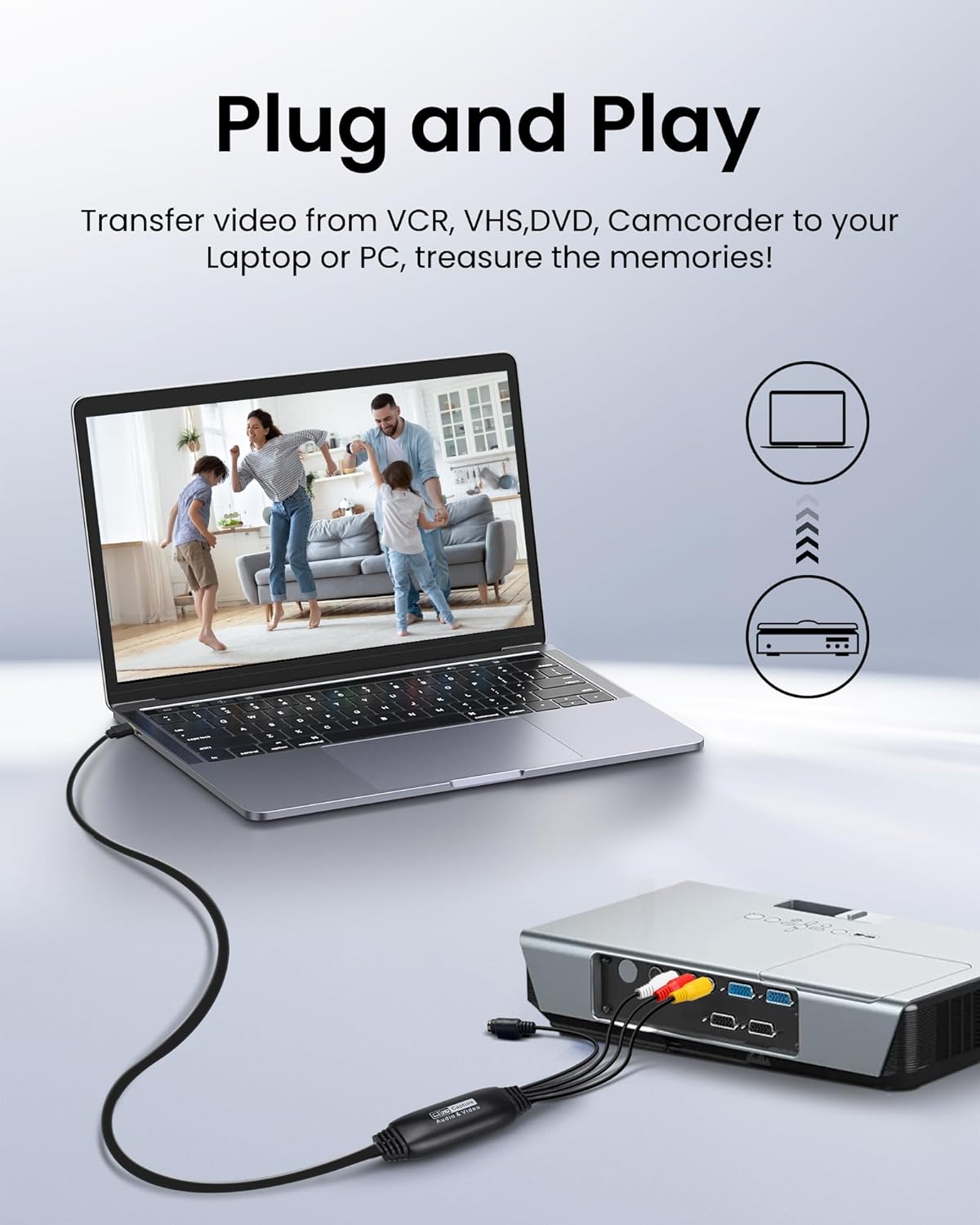
Image 3.1: Connection diagram illustrating how to connect an analog source (VCR) to the avedio links converter and then to a laptop for digital conversion.

Image 3.2: The converter is compatible with various operating systems including Mac OS, Windows, Android, and Linux, and supports software like OBS, Xsplit, VLC, and Skype for video capture.
4. ຄໍາແນະນໍາການດໍາເນີນງານ
Once the setup is complete, follow these steps to capture video:
- ເປີດໃຊ້ອຸປະກອນ: Ensure your analog video source (VCR, camcorder) and computer are powered on.
- ເປີດຕົວຊອບແວ: Open your chosen video recording software (e.g., OBS Studio).
- Select Video Input: In the software settings, locate the video input source selection. Choose the avedio links capture device (it may appear as 'USB Video Device' or similar).
- ເລືອກການປ້ອນຂໍ້ມູນສຽງ: Similarly, select the audio input source, which should also correspond to the avedio links capture device.
- ຕັ້ງຄ່າການຕັ້ງຄ່າ: Adjust video resolution, frame rate, and audio settings within the software as needed. For optimal quality, aim for 1080p at 30Hz if supported by your source and software.
- ເລີ່ມການຫຼິ້ນ: Begin playing the video on your analog source device.
- ເລີ່ມການບັນທຶກ: In your software, click the 'Record' button to begin capturing the video. Monitor the preview window to ensure the signal is being received correctly.
- ຢຸດການບັນທຶກ: Once the playback is complete, stop the recording in your software. Save the captured video file ໄປທີ່ບ່ອນທີ່ທ່ານຕ້ອງການໃນຄອມພິວເຕີຂອງທ່ານ.
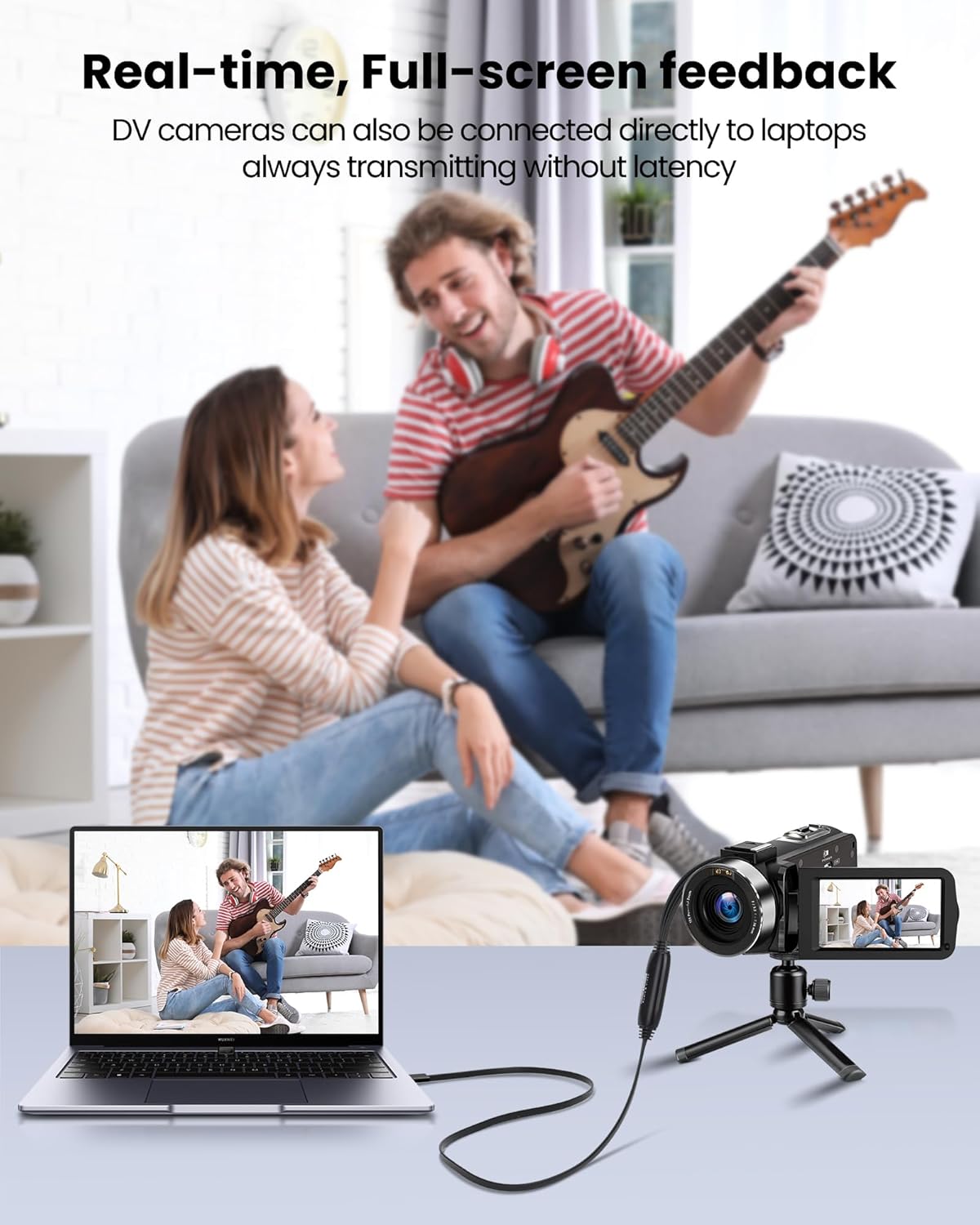
Image 4.1: Demonstrates real-time, full-screen feedback when a DV camera is connected directly to a laptop using the converter, ensuring no latency during transmission.

Image 4.2: The converter supports up to 1080P@30Hz output, as shown with a gaming console connected to a television.
5. ບໍາລຸງຮັກສາ
To ensure the longevity and optimal performance of your avedio links converter:
- ທໍາຄວາມສະອາດ: ໃຊ້ຜ້າອ່ອນໆ, ແຫ້ງເພື່ອເຮັດຄວາມສະອາດອຸປະກອນ. ຫຼີກເວັ້ນການເຮັດຄວາມສະອາດຂອງແຫຼວຫຼືວັດສະດຸຂັດ.
- ການເກັບຮັກສາ: ເກັບຮັກສາເຄື່ອງແປງໄຟໄວ້ໃນບ່ອນທີ່ເຢັນ, ແຫ້ງ, ຫ່າງຈາກແສງແດດໂດຍກົງແລະອຸນຫະພູມທີ່ຮຸນແຮງ.
- ການດູແລສາຍໄຟ: Avoid bending or kinking the cables excessively. Do not pull on the cables to disconnect the device.
- ອັບເດດຊອບແວ: Periodically check for updated drivers or software for your operating system and recording application to ensure compatibility and performance.
6. ການແກ້ໄຂບັນຫາ
If you encounter issues, refer to the following troubleshooting tips:
- ບໍ່ມີສັນຍານວິດີໂອ/ສຽງ:
- Ensure all cables (RCA/S-Video, USB) are securely connected.
- Verify that the analog source device (VCR, camcorder) is powered on and playing content.
- Check if the correct video and audio input sources are selected in your recording software.
- Confirm that the drivers for the capture device are correctly installed. Reinstall if necessary.
- ຄຸນນະພາບວິດີໂອ/ສຽງບໍ່ດີ:
- Ensure the analog source is providing a clean signal. Test with a different tape or DVD if possible.
- Check cable quality. Damaged or low-quality cables can degrade the signal.
- Adjust resolution and bitrate settings in your recording software. Higher settings generally result in better quality but larger file ຂະໜາດ.
- ຊອບແວບໍ່ຮັບຮູ້ອຸປະກອນ:
- Ensure drivers are installed correctly. Try uninstalling and reinstalling them.
- restart ຄອມພິວເຕີຂອງທ່ານຫຼັງຈາກການຕິດຕັ້ງໄດເວີ.
- ລອງໃຊ້ພອດ USB ອື່ນໃນຄອມພິວເຕີຂອງທ່ານ.
- Update your recording software to the latest version.
- ບັນຫາການຕິດຕັ້ງຊອບແວ:
- If you experience issues installing software from the CD, try downloading the latest version directly from the software developer's website (e.g., OBS Studio).
- Ensure your operating system meets the minimum requirements for the software.
7. ຂໍ້ມູນຈໍາເພາະ
| ຍີ່ຫໍ້ | ການເຊື່ອມຕໍ່ avidio |
| ໝາຍເລກຕົວແບບ | 9799240a-5448-44ed-a7ce-1925c09da1aa |
| ຂະໜາດສິນຄ້າ | 16.3 x 13.1 x 1.5 cm |
| ນ້ຳໜັກ | 110 ກຣາມ |
| ສີ | ດຳ |
| ອິນເຕີເຟດຂາເຂົ້າ | RCA (Composite), S-Video |
| Output Interface | USB 2.0 (with USB-A to USB-C converter) |
| ຄວາມລະອຽດສູງສຸດ | 1080p @ 30Hz |
| ອຸປະກອນທີ່ເຂົ້າກັນໄດ້ | ແລັບທັອບ, PC |
| ລະບົບປະຕິບັດການ | Windows, macOS (also compatible with Android, Linux) |

Image 7.1: The avedio links converter featuring its 1-meter extended USB cable, providing increased flexibility for connections.
8. ການຮັບປະກັນແລະການສະຫນັບສະຫນູນ
For technical support, driver updates, or warranty inquiries, please visit the official avedio links webເວັບໄຊ ຫຼືຕິດຕໍ່ບໍລິການລູກຄ້າຂອງເຂົາເຈົ້າ. ຮັກສາໃບຮັບເງິນການຊື້ຂອງທ່ານສໍາລັບການຮ້ອງຂໍການຮັບປະກັນ.